sketchucation logo sketchucation
    • Login
    1. Home
    2. AcesHigh
    3. Posts
    Oops, your profile's looking a bit empty! To help us tailor your experience, please fill in key details like your SketchUp version, skill level, operating system, and more. Update and save your info on your profile page today!
    🔌 Smart Spline | Fluid way to handle splines for furniture design and complex structures. Download
    A
    Offline
    • Profile
    • Following 0
    • Followers 0
    • Topics 62
    • Posts 556
    • Groups 1

    Posts

    Recent Best Controversial
    • RE: [REQ] GoogleEarth Meshes boolean subtract

      hi Chris. I just imported two small GoogleEarth meshes, using Sketchup 8.

      600 triangles each (i suppose... each one had 300 faces).

      still no luck. There was overlapping and nope, the triangles from each mesh did not mach perfectly the triangles from the other mesh.

      posted in Plugins
      A
      AcesHigh
    • RE: [Plugin] CleanUp

      @thomthom said:

      @aceshigh said:

      @thomthom said:

      Looking at the one you sent, I selected everything and intersected it with itself a few times. CleanUp doesn't clean up faces that partially overlaps. Only faces that fully cover the exact same space as another. After intersecting and then cleaning there was no overlapping.

      I will try that, thanks... however... how can I intersect if they are not solids?

      ps: I am trying to solve, with CleanUp, about the same problem that made me ask for the "GoogleEarth Meshes boolean subtract" plugin at the topic http://forums.sketchucation.com/viewtopic.php?f=323&t=40555

      Not intersecting with Solid Tools, but the regular intersect that's been in SU since, ever..?

      since ever, but I had never seen or used it before 😆

      anyway, however, intersected it with itself several times, and when I used cleanup³, several triangles were lost, and got some error messages 😢

      posted in Plugins
      A
      AcesHigh
    • RE: [Plugin] CleanUp

      @thomthom said:

      Looking at the one you sent, I selected everything and intersected it with itself a few times. CleanUp doesn't clean up faces that partially overlaps. Only faces that fully cover the exact same space as another. After intersecting and then cleaning there was no overlapping.

      I will try that, thanks... however... how can I intersect if they are not solids?

      ps: I am trying to solve, with CleanUp, about the same problem that made me ask for the "GoogleEarth Meshes boolean subtract" plugin at the topic http://forums.sketchucation.com/viewtopic.php?f=323&t=40555

      posted in Plugins
      A
      AcesHigh
    • RE: [Plugin] CleanUp

      here... I copied the two meshes and joined them in a group, exploded them, and used Cleanup. No lost triangles this time, but there are plenty of overlapping triangles. (sometimes they dont appear when viewing in the textured mode, but when you used SHADED mode you will see the overlapping triangles...)

      of course, the problem gets worse when you have to import even more mesh pieces, as sometimes you have over 3 meshes overlapping.


      experimento3.skp

      posted in Plugins
      A
      AcesHigh
    • RE: [Plugin] CleanUp

      @thomthom said:

      Also, what are your settings?

      what settings ThomThom? The ones from CleanUp³?

      everything selected except Geometry to Layer 0, Merge Identical Materials (its two different materials, a bitmap for each imported mesh), so I saw no reason to use it) and Erase Stray Edges.

      sorry, I didnt keep the original imported meshes. But I will try again with new imported meshes.

      posted in Plugins
      A
      AcesHigh
    • RE: [Plugin] CleanUp

      @thomthom said:

      @aceshigh said:

      @thomthom said:

      @aceshigh said:

      why arent these coplanar faces (from two different GoogleEarth imported meshes) merged?

      Can you post the model?
      Also, what are your settings? Remember that CleanUp has options to take into account face normals, material and UV mapping when merging.

      Also, that image seem to illustrate faces occupying the same plane...?

      no need to upload the model. It happens with any model, when importing several GoogleEarth meshes which overlap.

      Well, I don't see the behaviour, so if I am to check this out I need something to work with.

      sorry ThomThom, it had happened in every experiment I did before, so I wrongly assumed it would happen in every one. But I did one try with two small pieces and nothing happened (although there were some lost textures in the process)

      So I will upload a SKP file. Thanks for the patience and hard work.

      @unknownuser said:

      And these meshes, do you merge them into one group?

      yup. Merge them into one group, then explode the meshes inside the group. Then CleanUp them. In the file I am sending you, not only some faces were lost when using CleanUp, as some coplanar faces were not merged, so you can see some texture flickering when rotating around.


      experimento2.skp

      posted in Plugins
      A
      AcesHigh
    • RE: [Plugin] Super Drape

      @thomthom said:

      @aceshigh said:

      1 - instant roads is paid.

      And you want TIG to make a version for free..?

      I am not asking for a free Instant Roads. Its not even remotely similar, imho. The fact Instant Roads is paid was only 1 reason. The real problem is that its paid and it doesnt even really matches what I need (which is to use a DWG road which cant be copied by Instant Roads).

      As far as I understand, Instant Roads kinda works like you having a window and setting the width of the lanes, sidewalks, central garden (when its avenues), etc. Very flexible and very easy for some things. But if you need to make a road a bit different from what the program allows, its already not an useful plugin. And from everything I read, in my case (and probably many others) Instant Roads would not be useful as some better drape plugins.

      Besides, it can only be used for... ROADS!

      a drape pluging that had these other functions would be used for many other functions, by EVERYONE. Not only for roads, but for anything needing work with meshes...

      also, I dont want him to do it. He has no obligation to help me or anyone else (or you for that matter, since you also make some incredibly amazing plugins). I would "like" if he did it. But I am already super happy with what he already did with Super Drape. Its already some amazing improvement over normal drape.

      ps: I wouldnt even be benefited from this drape plugin, as for using it to make roads. Yes, I got a work right now where I must make a road, but the deadline certainly expires long before TIG would ever be able to get such advanced drape functionalities ready. And this is the first road work I ever got and probably the last.

      thus, an Ultra Drape would probably benefit more other people than myself, unless I get another road work (hardly)... OR, I use it for other functionalities (which I am sure will exist when dealing with meshes, but I cant think right now).

      Sorry for the long text TomTom, but I just dont want to be known as a cheapass bastard for not wanting to buy Instant Roads 😕

      😄

      posted in Plugins
      A
      AcesHigh
    • RE: [REQ] GoogleEarth Meshes boolean subtract

      @dave r said:

      @aceshigh said:

      they are overlapping a bit on the last row of triangles. The textures will flicker since they are coplanar faces.

      There weren't any overlapping faces in the example I posted and no flickering as I orbited

      http://img542.imageshack.us/img542/4412/89340841.jpg

      to me, it seems clear the red marked area is overlapping each other... there is a mix of dark and light green triangles there, thats usually what happens when there is overlapping faces, and when you orbit, there is flickering between the triangles, since the program doesnt know if it displays the triangles of one or the other mesh.

      if it didnt happen to you, you were lucky. I made several tries with both Sketchup 7 and 8 and it always happens.

      either way, you have only two meshes, so only a small part of each mesh overlaps the other. Its easy to overlap so little when you have only two small meshes. When you try to mount a giant gigsaw puzzle by having to select dozens of different meshes, you will end up with huge parts overlapping each other, and you will see the flickering when getting near and moving the camera (or even when importing to other program and rendering)

      posted in Plugins
      A
      AcesHigh
    • RE: [REQ] GoogleEarth Meshes boolean subtract

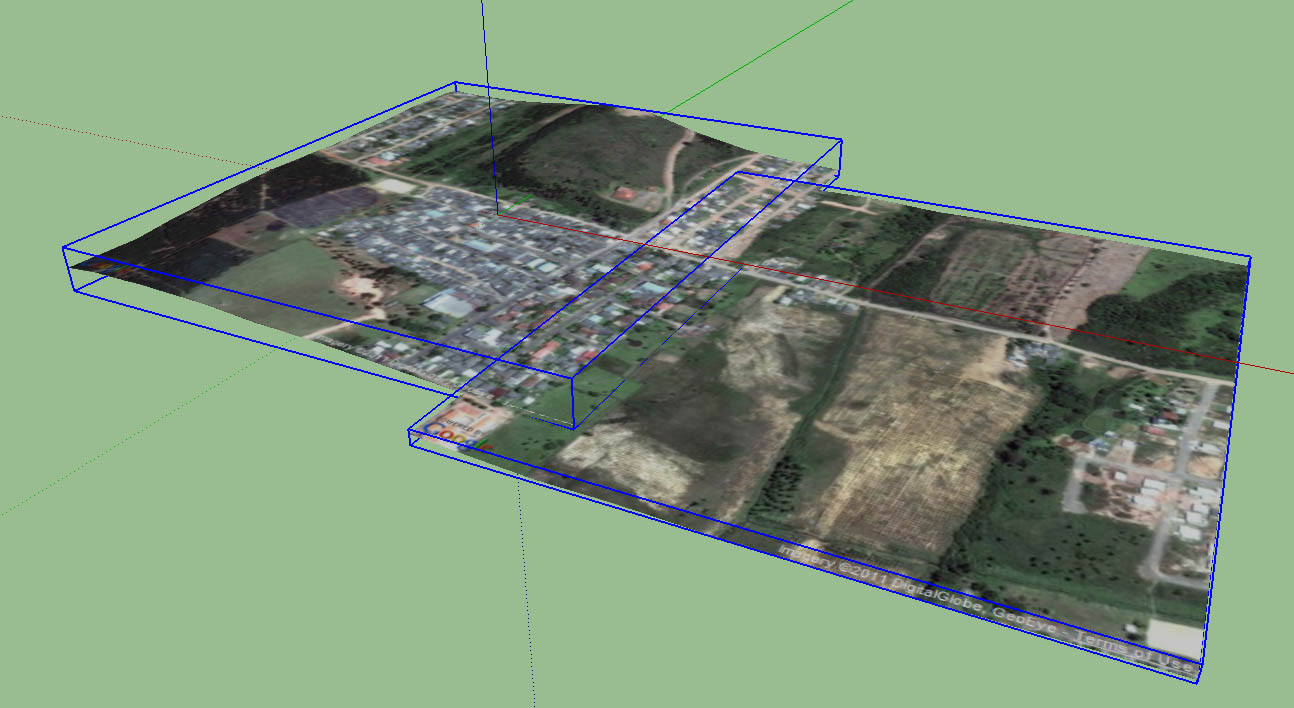
      two different meshes with overlapping parts. Notice the bounding boxes. Imagine the bounding boxes as the areas where one mesh should be cut from the other.

      http://img830.imageshack.us/img830/4519/13678112.jpg

      MAYBE the bounding boxes for the operation should be a bit higher and lower than the real ones, I dont know... if the lowest or highest areas of the mesh are in the border, the cut between two meshes would be more "garanteed" if the bounding box was a bit larger in the vertical?

      http://img716.imageshack.us/img716/3616/56366146.jpg

      subtract one mesh from the other. In the example, I simply deleted the triangles, but this doesnt work in real life, because the triangles in one mesh dont quite match the triangles from the other mesh, and a gap between the two meshes may appear (or they still may overlap).

      the perfect solution is to ZORRO out one mesh from the other and then delete the overlapping triangles.

      I imagine one bounding box exactly ZORROING through the other mesh, and then all the parts of the second mesh, which are inside the first mesh bounding box, being deleted.

      http://img62.imageshack.us/img62/6118/77524624.jpg


      01.jpg

      posted in Plugins
      A
      AcesHigh
    • RE: [REQ] GoogleEarth Meshes boolean subtract

      @chris fullmer said:

      What if the plugin sort of turned the terrains into volumes by drawing vertical faces downards on the sides, and then a face on the bottom to close the whole thing off into a sketrchup solid. Then use the solid tools to boolean add them together.

      That could work. It would be a plugin for pro users only though because of the solids tools usage. And I'm not sure how smart it would be about the GE image emerging. But it could work......maybe.

      maybe it could work. It doesnt even need to be a real boolean. Wait a bit, I will try to draw what I imagined.

      posted in Plugins
      A
      AcesHigh
    • RE: [REQ] GoogleEarth Meshes boolean subtract

      @tig said:

      Can't you simply group the two mesh groups together and explode them together inside the new group - then use one of the many erase-coplanar-edges tools available or manually erase unwanted edge divisions...

      already tried it, both with 2D Boolean (which joins the two groups into one with everything exploded inside) and also by joining the two groups and exploding the stuff inside.

      then using CleanUo³. For some reason, the coplanar faces of meshes do not disappear.

      posted in Plugins
      A
      AcesHigh
    • RE: [REQ] GoogleEarth Meshes boolean subtract

      @dave r said:

      Are you still using SU7/7.1?

      no, I am using SU8

      @unknownuser said:

      There's better elevation info from Google Maps which is accessed through SU8. Maybe that would eliminate your problems.

      quite the contrary. The problem is even bigger with SU8.

      with SU7, you could get a piece from GoogleEarth, than use the arrow keys to go sideways, and you could get two pieces that would overlap in just one side.

      with SU8, you dont use GoogleEarth. Everytime you go grab a new terrain mesh, the screen resets to the original land piece position, and you cant scroll with the arrow keys... you must scroll with the mouse, sometimes the next piece will be a little up, or a little down, as well as overlapping on the sides.

      @unknownuser said:

      [attachment=1:m8rijg4r]<!-- ia1 -->G Maps1.png<!-- ia1 -->[/attachment:m8rijg4r]
      This is an import from Google Maps of two neighboring sections. I cut the geometry from the smaller section and pasted it into the larger one to check for overlapping faces. There are none.

      they are overlapping a bit on the last row of triangles. The textures will flicker since they are coplanar faces.

      @unknownuser said:

      Why don't you add your SU version and OS to your profile?

      Windows 7, SU8.

      @jolran said:

      2d boolean only works on "flat" geometry, I'm afraid.

      Hint, the name: 2D boolean.

      yes, I know. I used the 2d Boolean plugin. But it doesnt subtract one from the other. It joins the two meshes. The coplanar faces remain. As I showed in screenshot above.

      @unknownuser said:

      I suspect a terrainmesh is a "3d geometry". Even though it's just a surface you would have to base calculations of 3 dimensions cause of elevations and such.

      oh, I see where you are getting

      @unknownuser said:

      Maybe you could build a box "underneath" the surface and do standard boolean on that?

      not practical when you have to deal with dozens or hundreds of different meshes.

      posted in Plugins
      A
      AcesHigh
    • RE: [Plugin] CleanUp

      @thomthom said:

      @aceshigh said:

      why arent these coplanar faces (from two different GoogleEarth imported meshes) merged?

      Can you post the model?
      Also, what are your settings? Remember that CleanUp has options to take into account face normals, material and UV mapping when merging.

      Also, that image seem to illustrate faces occupying the same plane...?

      no need to upload the model. It happens with any model, when importing several GoogleEarth meshes which overlap.

      posted in Plugins
      A
      AcesHigh
    • RE: [REQ] GoogleEarth Meshes boolean subtract

      thanks, but terrain detail and image detail are important. And when zooming out to get larger areas, you lose both. Didier´s mesh recreation tool loses the image and you have to project it again... very hard when dealing with many different meshes.

      my plugin request is not even that difficult I suppose. It doesnt join any mesh nor anything. Just cut one mesh from the other, like a Zorro and delete, automatic, when looking parallel camera from the top!

      thanks

      posted in Plugins
      A
      AcesHigh
    • RE: [Plugin] Super Drape

      @unknownuser said:

      AcesHigh,
      Joint push pull can be used to lower the mesh a given distance to account for curbs.

      yes, and I have used it. However, its much harder to select a heavily triangulated area of the mesh to "joint push pull", than it would be to select the same area in a flat drawing, push pull it lower, and drape it, already lowered, into the mesh below.

      @unknownuser said:

      How do you already have the road steepness?

      lets say you already drew it. With polylines.

      @unknownuser said:

      I guess I don't understand how you envision this working. How would the plugin know that you want a certain segment of the road to follow the existing grade, and a different segment to be cut into a hill at a flatter grade?

      no segment will follow the existing grade. Imagine a STAMP but following the different heights of the profile, instead of stamping flat.

      posted in Plugins
      A
      AcesHigh
    • RE: [Plugin] Super Drape

      1 - instant roads is paid.

      2 - these extra functionalities for drape can be used for other things besides roads

      3 - in my specific case, Instant Roads is of no use. I must drape a DWG road project over a mesh. Instant Roads is too limited.

      posted in Plugins
      A
      AcesHigh
    • [REQ] GoogleEarth Meshes boolean subtract

      Hi all... I am working right now on a model where I need to import a huge number of GoogleEarth meshes.

      As we all know, you cant perfecly import from GoogleEarth, when you import several meshes, they will usually overlap over each other in several places.

      This overlapping causes textures problems.

      But you cant boolean subtract one from the other.

      I tried the plugins 2D Boolean (which joins the meshes) and Cleanup³. None solved the overlapping problem, as can be seen below.

      http://img266.imageshack.us/img266/5064/coplanarfaces2.jpg

      What am I doing right now? I am using ZORRO to subtract the overlapping parts. But its impossibly huge work, when you have to do it in a model with hundreds of GoogleEarth imported parts. Zorro around the imported area of one mesh, carefully select the triangles you want to delete, manually erase triangles left. Repeat 100 times.

      What would make it EASIER the work for people working with lots of GoogleEarth imported meshes?

      A kind of boolean subtract, even if not a real boolean subtraction, specially because yes, there is the possibility some faces are not really coplanar and not all vertices of different meshes meet.

      What can be done then? Imagine two meshes. They are 2d. The plugin should draw imaginary boxes around one mesh, and subtract the shape of this box from the other mesh.

      Done, no more overlapping mesh geometry interfering with textures and everything else.

      Can this be done? Thanks.

      posted in Plugins
      A
      AcesHigh
    • RE: [Plugin] CleanUp

      why arent these coplanar faces (from two different GoogleEarth imported meshes) merged?

      http://img6.imageshack.us/img6/8480/coplanarfaces.jpg

      in this thread, I first tried to use the 2D Boolean plugin. To no use, as we can see here. There are still plenty of coplanar faces where the GoogleEarth imported meshes overlap.

      http://img266.imageshack.us/img266/5064/coplanarfaces2.jpg

      posted in Plugins
      A
      AcesHigh
    • RE: [Plugin] Super Drape

      TIG, interested in adding functionalities for making a Super Ultra Drape??? 💚 💚

      basically:

      1 - when drapeing, you simply projects the line of a surface over a 3d mesh. The ending result COMPLETELY follows the curvature of the mesh, just adding those lines over the mesh.

      2 - when stamping, you add a completely flat shape to a mesh. The mesh adapts to the stamp and becomes flat.

      What if you want a compromise? Like for example, to project a road over a mesh? Lets say you have a road, and the road is 20cm below the curbs/sidewalk level.

      Why not project that 3d road over the mesh, and the mesh ALREADY has the road areas becoming 20cm lower than the curb/sidewalks areas?

      What if you want the road to climb a small hill (that exists on the mesh) but you dont want the road to be as steep as the mesh? You already have the road steepness. Normal drape would be useless. It would just project the road lines over the existing (very steep) mesh. Drape would make the road flat. Ideal solution would be to project the road onto the mesh, but KEEP the road Y axis curvature, making the mesh adapt (like when stamping) to the road.

      So, TIG, do you think something like that would be possible? Thanks very much!

      posted in Plugins
      A
      AcesHigh
    • RE: [Plugin] 2dBoolean ver1.3.1 beta UPDATE 20 dec 2013

      can anyone check if this pluging works with meshes?

      when importing several pieces from GoogleMaps, the pieces usually end overlapping each other, causing texture errors.

      You cant use 3D boolean because obviously, meshes, are not solids.

      So I would usually "zorro" the different meshes, and cut the parts that overlap. Obviously, a HUGE work when you are dealing with dozens of different GoogleEarth imported meshes. If this plugin works with those, it will be great!

      posted in Plugins
      A
      AcesHigh
    • 1 / 1