sketchucation logo sketchucation
    • 登入
    Oops, your profile's looking a bit empty! To help us tailor your experience, please fill in key details like your SketchUp version, skill level, operating system, and more. Update and save your info on your profile page today!
    🔌 Smart Spline | Fluid way to handle splines for furniture design and complex structures. Download

    Follow Me tool not working with curve

    已排程 已置頂 已鎖定 已移動 Newbie Forum
    sketchup
    21 貼文 11 Posters 12.0k 瀏覽 11 Watching
    正在載入更多貼文
    • 從舊到新
    • 從新到舊
    • 最多點贊
    回覆
    • 在新貼文中回覆
    登入後回覆
    此主題已被刪除。只有擁有主題管理權限的使用者可以查看。
    • G 離線
      GreenToaster
      最後由 編輯

      Here's another example of what you can do with the Follow Me tool . . . it's not just for planar (flat) applications, as illustrated in this image . . .
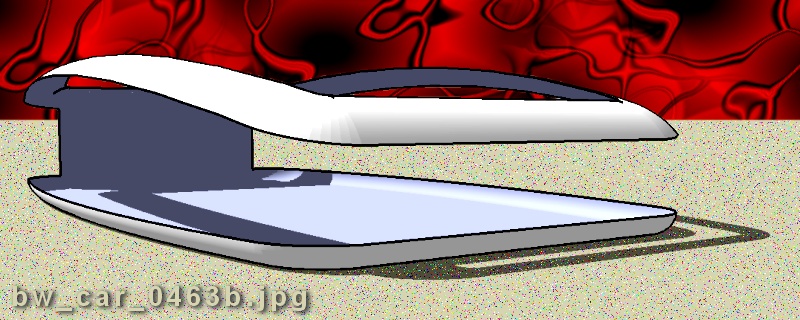

      bw_car_0463b.jpg

      If you really want something you won't ever stop pursuing it.

      1 條回覆 最後回覆 回覆 引用 0
      • GaieusG 離線
        Gaieus
        最後由 編輯

        Wodan I know it does this "trick" when coming around a right angle corner but here the path was a rounded one.

        I'd've bet that there should've been something like this result:


        http://www.sketchucation.com/forums/scf/sas/Newbie/FollowMe.jpg

        [Click on the image to download the skp file]

        @unknownuser said:

        Gaieus, maybe you should switch avatars with Julius!? 😎

        Well, to tell the truth it is Gaius Caesar Augustus Germanicus (Caligula) on the coin. I don't think Julius wanted my avatar... 😒


        Edit: I see now the difference. Dave placed the face to be extruded inside the box (thus creating the glitch for the radius of the face was smaller than the radius of the rounded edge). In my example I placed it outside so the face could smoothly follow the path.

        Gai...

        1 條回覆 最後回覆 回覆 引用 0
        • GaieusG 離線
          Gaieus
          最後由 編輯

          @greentoaster said:

          Here's another example of what you can do with the Follow Me tool . . . it's not just for planar (flat) applications, as illustrated in this image . . .

          Surely Brad it can be used on non-planar paths, too - it will just twist and distort so if you wanted an even extrusion, it would be a very hard work to be precise.

          Gai...

          1 條回覆 最後回覆 回覆 引用 0
          • J 離線
            Julius
            最後由 編輯

            no, thanks, i prefer homer... 😉

            1 條回覆 最後回覆 回覆 引用 0
            • AnssiA 離線
              Anssi
              最後由 編輯

              Julius,

              Here's Homer for you 😄
              Homeros0701.jpg

              Cheers

              Anssi

              securi adversus homines, securi adversus deos rem difficillimam adsecuti sunt, ut illis ne voto quidem opus esset

              1 條回覆 最後回覆 回覆 引用 0
              • J 離線
                Julius
                最後由 編輯

                😆 well, actually i didn't mean that one 😆

                1 條回覆 最後回覆 回覆 引用 0
                • boofredlayB 離線
                  boofredlay
                  最後由 編輯

                  How is this one?

                  http://www.sideshowtoy.com/mas_assets/large/8501.jpg

                  http://www.coroflot.com/boofredlay

                  1 條回覆 最後回覆 回覆 引用 0
                  • J 離線
                    Julius
                    最後由 編輯

                    that's better 😆 [/off-topic]

                    1 條回覆 最後回覆 回覆 引用 0
                    • T 離線
                      topbobster
                      最後由 編輯

                      @alan wood said:

                      Hi
                      I notice that you work with small measurements the same as myself. My solution to this problem was to
                      1 make the model in your case the rectanglular shape including the curve required.
                      2 group the model, scale up by a scale of 10 or 100.
                      3 ungroup the model, then carry out the follow me operation at this incrreased size.

                      This should then work. You will also have to use the same scaling up method for other shapes when working with small measurments.
                      cheers
                      Alan

                      Thanks, Alan, you're a star. Sometimes the simplest things make the difference....
                      Rob

                      1 條回覆 最後回覆 回覆 引用 0
                      • Dave RD 離線
                        Dave R
                        最後由 編輯

                        @Rob, making a group before scaling up only to explode it once you have is a waste of time. You can select the geometry and scale it up if you want. Scale down afterward. Here's another method that I think is easier. Start by making the profile and path for the Follow Me operation at the regular size. Make a component of the lot. Copy the component (Move/Copy) and scale the copy up by a factor of 10 or 100 or something. Open the large copy for editing, run Follow Me and do whatever else you need to do. Then close the large component to exit edit mode and delete it. Return to the original component and the work is done.


                        Etaoin Shrdlu

                        %

                        (THERE'S NO PLACE LIKE)

                        G28 X0.0 Y0.0 Z0.0

                        M30

                        %

                        1 條回覆 最後回覆 回覆 引用 0
                        • 1
                        • 2
                        • 1 / 2
                        • 第一個貼文
                          最後的貼文
                        Buy SketchPlus
                        Buy SUbD
                        Buy WrapR
                        Buy eBook
                        Buy Modelur
                        Buy Vertex Tools
                        Buy SketchCuisine
                        Buy FormFonts

                        Advertisement