sketchucation logo sketchucation
    • 登入
    Oops, your profile's looking a bit empty! To help us tailor your experience, please fill in key details like your SketchUp version, skill level, operating system, and more. Update and save your info on your profile page today!
    🔌 Easy Offset | Offset selected faces in SketchUp in positive and negative offsets. Download

    [Plugin] Cutting Windows script

    已排程 已置頂 已鎖定 已移動 Plugins
    27 貼文 13 Posters 39.4k 瀏覽 13 Watching
    正在載入更多貼文
    • 從舊到新
    • 從新到舊
    • 最多點贊
    回覆
    • 在新貼文中回覆
    登入後回覆
    此主題已被刪除。只有擁有主題管理權限的使用者可以查看。
    • B 離線
      Ben Ritter
      最後由 編輯

      Thank you for your generosity.

      1 條回覆 最後回覆 回覆 引用 0
      • A 離線
        amadex
        最後由 編輯

        @kmead said:

        Didier:
        Many thanks for what I hope becomes another great tool. I ran into the attached problem at startup of SU after installing your new ruby.

        I am on a Mac, OSX 10.4.11 with a PPC chip. I will check on my Intel Mac tomorrow after I get back to work.

        All the best.

        Karl

        Hi Didier, it happens the same with me... How can I solve this?

        tkx

        1 條回覆 最後回覆 回覆 引用 0
        • Didier BurD 離線
          Didier Bur
          最後由 編輯

          @ Amadex: look at the top of this topic, I've released a Mac version.
          Tell me if it's OK.

          DB

          1 條回覆 最後回覆 回覆 引用 0
          • G 離線
            gerdwillemen
            最後由 編輯

            Didier

            I also tried your "mac version. I also get an "error" report.
            Could you help ?

            See error report in attachment

            Thanks

            Gerd
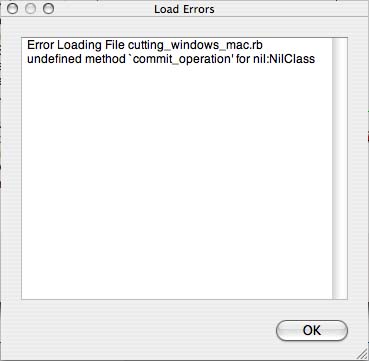

            error cutting report.jpg

            1 條回覆 最後回覆 回覆 引用 0
            • mariochaM 離線
              mariocha
              最後由 編輯

              Just to let you know that the Mac version works fine here.

              The whole thing is a 3 step process;

              1. define as cutting window
              2. put it on a wall
              3. right-click window and select "Cut wall from window" then parameters.
                Also works on several windows at a time.
                Many well deserved thanks to the author !

              %(#008000)[Mario C.
              Every rule has exceptions, but some.]

              1 條回覆 最後回覆 回覆 引用 0
              • P 離線
                paddyclown
                最後由 編輯

                Hi

                I tried to add this plugin to SUv8 Pro & got this message:
                Error Loading File cutting_windows.rb
                (eval):719: compile error
                (eval):610: syntax error, unexpected ',', expecting kEND
                faces_and_heights[0].pushpull (faces_and_heights[1]), false
                ^Error Loading File yaml.rb
                no such file to load -- date

                Does anyone have an idea what is going on ?
                Thanks in advance folks,

                1 條回覆 最後回覆 回覆 引用 0
                • TIGT 離線
                  TIG Moderator
                  最後由 編輯

                  Perhaps it's time to look up my 'HolePunchTool' [ http://forums.sketchucation.com/viewtopic.php?p=271170#p271170 ] which does a similar job BUT has far more bells and whistles - and works relatively seamlessly and has had few error reports...

                  TIG

                  1 條回覆 最後回覆 回覆 引用 0
                  • P 離線
                    paddyclown
                    最後由 編輯

                    TIG, yes, thanks, actually I have been trying to use your tool, but sadly it doesn't work for some unknown reason... I followed the instructions which seem pretty clear & can't get it to work 😞

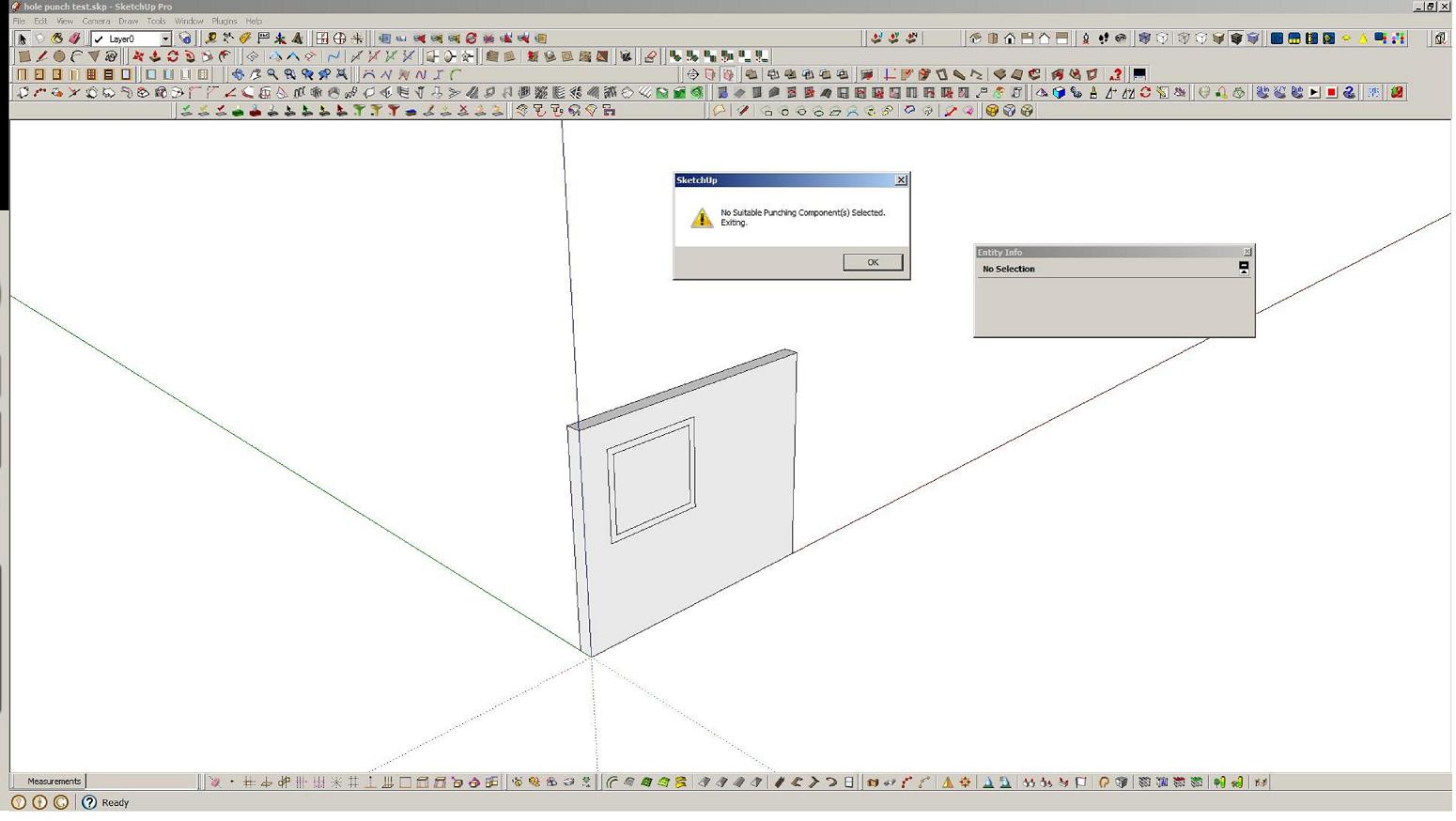
                    I have made a component that glues to "any" & has cut opening checked but when i try & use it (ie it is in place on a face of a 'wall' & i r-click & choose punch ) I get this message 'no suitable punching component selected, exiting'... maybe i have just not understood the procedure


                    file test

                    1 條回覆 最後回覆 回覆 引用 0
                    • P 離線
                      paddyclown
                      最後由 編輯

                      ... sorry i pressed the submit button too fast...
                      Thanks for any guidance..

                      best


                      screenshot

                      1 條回覆 最後回覆 回覆 引用 0
                      • TIGT 離線
                        TIG Moderator
                        最後由 編輯

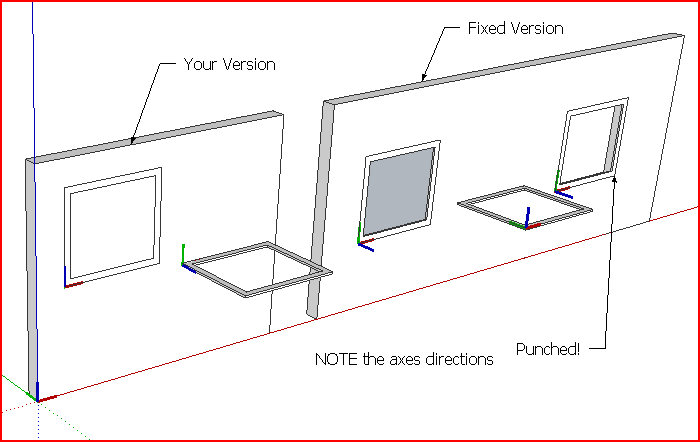
                        Your cutting component is not made properly its axes are the wrong way round.
                        It's clear from the Component's thumbnail in the Component Browser which is looking at the 'top' of it and not the 'front', as it should for any 'cutting' door/window/etc
                        When you make any 'cutting component' it must either be made 'flat' on the ground or already on a face.
                        If it's made on a face Sketchup assumes you want it to be 'cutting' and it sorts out the axes for you. Otherwise make it so that its z/blue axis will be facing square out of any face you might subsequently place it on.
                        A cutting component's axes look different from a standard component as there's a blue 'X' added to it
                        Then when you place your properly made cutting component on a face it should cut a hole in that face - so any transparent or open areas will be 'see-through' - if the wall has two faces you'll see the back-face of the other side.
                        If you then use my HolePunchTool on the component it punches through the inner face too, adding linked reveals etc...
                        Here's your component fixed and a version punched...
                        Compare it with the original...Capture.PNGhole punch test [fixed].skp
                        TIG

                        1 條回覆 最後回覆 回覆 引用 0
                        • P 離線
                          paddyclown
                          最後由 編輯

                          😳 ok, sorry, just tried for myself & got it finally sorted...
                          thanks for your help TIG

                          1 條回覆 最後回覆 回覆 引用 0
                          • sandropasquaS 離線
                            sandropasqua
                            最後由 編輯

                            Hi Didier,

                            I'm sorry but i cannot see the command line in the right clic menu...

                            I've tried with two component

                            Do you have any suggestion?

                            ThanksWindows cut test.skp

                            1 條回覆 最後回覆 回覆 引用 0
                            • J 離線
                              jabrown
                              最後由 編輯

                              the windows isn't cutting holes in the walls after installed.

                              1 條回覆 最後回覆 回覆 引用 0
                              • 1
                              • 2
                              • 2 / 2
                              • 第一個貼文
                                最後的貼文
                              Buy SketchPlus
                              Buy SUbD
                              Buy WrapR
                              Buy eBook
                              Buy Modelur
                              Buy Vertex Tools
                              Buy SketchCuisine
                              Buy FormFonts

                              Advertisement