sketchucation logo sketchucation
    • Se connecter
    Oops, your profile's looking a bit empty! To help us tailor your experience, please fill in key details like your SketchUp version, skill level, operating system, and more. Update and save your info on your profile page today!
    🚨 Skimp | 25% Off until March 30 Buy Now

    [Plugin] Roof.rb

    Planifier Épinglé Verrouillé Déplacé Extensions & Applications Discussions
    extensions
    174 Messages 75 Publieurs 173.4k Vues 75 Abonné
    Charger plus de messages
    • Du plus ancien au plus récent
    • Du plus récent au plus ancien
    • Les plus votés
    Répondre
    • Répondre à l'aide d'un nouveau sujet
    Se connecter pour répondre
    Ce sujet a été supprimé. Seuls les utilisateurs avec les droits d'administration peuvent le voir.
    • TIGT Hors-ligne
      TIG Moderator
      dernière édition par

      English only - désolé

      TIG

      1 réponse Dernière réponse Répondre Citer 0
      • L Hors-ligne
        LemonCCC
        dernière édition par

        @tig said:

        Is this with the Hipped roof tool ?

        Are there any error messages in the Ruby Console or in dialogs ?
        Is there a Bugsplat ?

        It is possible to invent a plan face for a hipped roof form that cannot exist in 3d, but usually it tells you it's failed rather than crashing...

        Sorry for the late reply. I was on vacation.

        Coming back to the issue, I have found the problem: The face was created with multiple broken lines, therefore generating a hipped roof caused the crash. Fix was to just redraw the whole face without broken lines.

        I do not know how to find error messages in the ruby console or dialogs
        It does show a Bugsplat report

        Another issue has popped up: I am unable to generate a hipped roof. I have tried troubleshooting myself, but I even failed generating a hipped roof on a basic square face.

        Hipped Roof with the following parameters:
        Slope: 22.5 degrees
        Fascia: 100mm
        Soffit: 300mm

        Note: I can not even generate a hipped roof on a basic square with default parameters.

        I have uploaded the skp file. SU Pro 2020. Please review if free. Thanks!


        Roof Error model_20220915.skp

        1 réponse Dernière réponse Répondre Citer 0
        • TIGT Hors-ligne
          TIG Moderator
          dernière édition par

          The SKP you provided has 2 roof faces at z>0 [faces at z0 don't work].
          These 2 are identical in edge sizes and orientations/direction.
          The one on the right takes a hipped roof OK, but the one on the left fails with an error message.
          This is weird.
          However, if you follow the advice in the error message on that problem face. and erase one edge and remake t the new face will also take a hipped roof OK.
          Something in your model's database is skewed.
          But it is fixable...

          TIG

          1 réponse Dernière réponse Répondre Citer 1
          • L Hors-ligne
            LemonCCC
            dernière édition par

            @tig said:

            The SKP you provided has 2 roof faces at z>0 [faces at z0 don't work].
            These 2 are identical in edge sizes and orientations/direction.
            The one on the right takes a hipped roof OK, but the one on the left fails with an error message.
            This is weird.
            However, if you follow the advice in the error message on that problem face. and erase one edge and remake t the new face will also take a hipped roof OK.
            Something in your model's database is skewed.
            But it is fixable...

            Thank you. I have tried using new files/ swap Computers/ skp 2022, still no fix for me. Maybe it's just a weird roof shape.

            I have resorted to draw the roof manually. I have tested this roof shape with an AutoCAD Plugin. The generated roof design seems to be at fault, missing one ridge, attached screenshot. I have tried manually connecting the ridge, shown in green lines screenshot, and I'd assume it might have a less than 1 degree slope. I can't measure out the exact angle, as AutoCAD shows '180 degree' flat once connected. It's a weird roof layout anyways.

            Perhaps a tolerance/rounding on the plugin may help? Just suggesting, I do not have a clue with code writing etc.

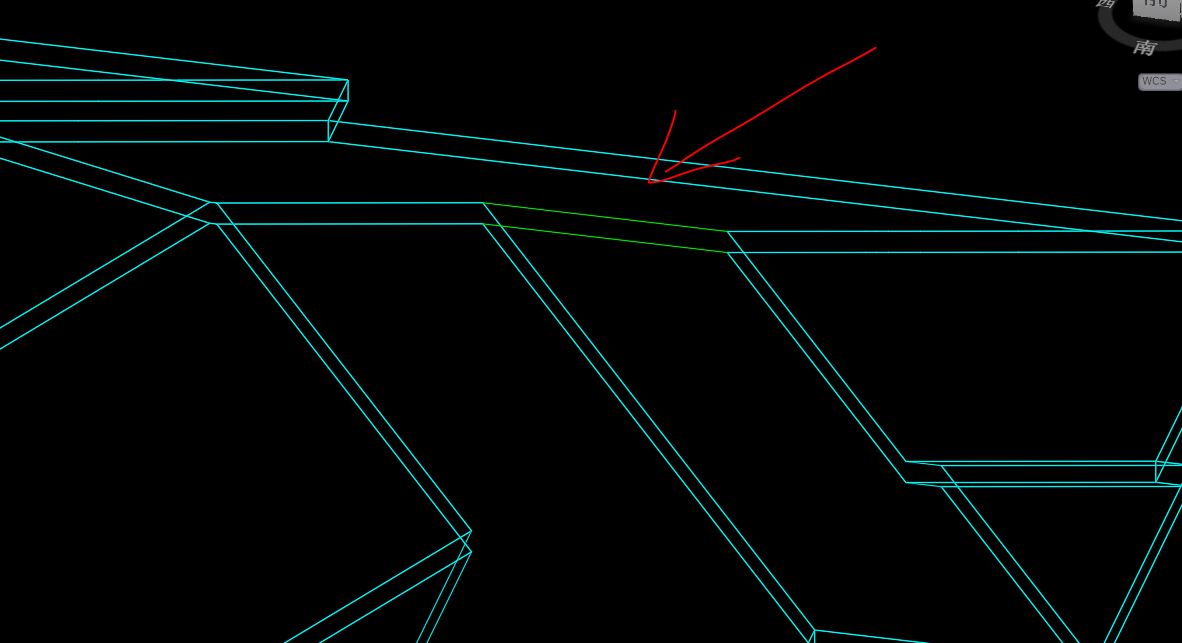
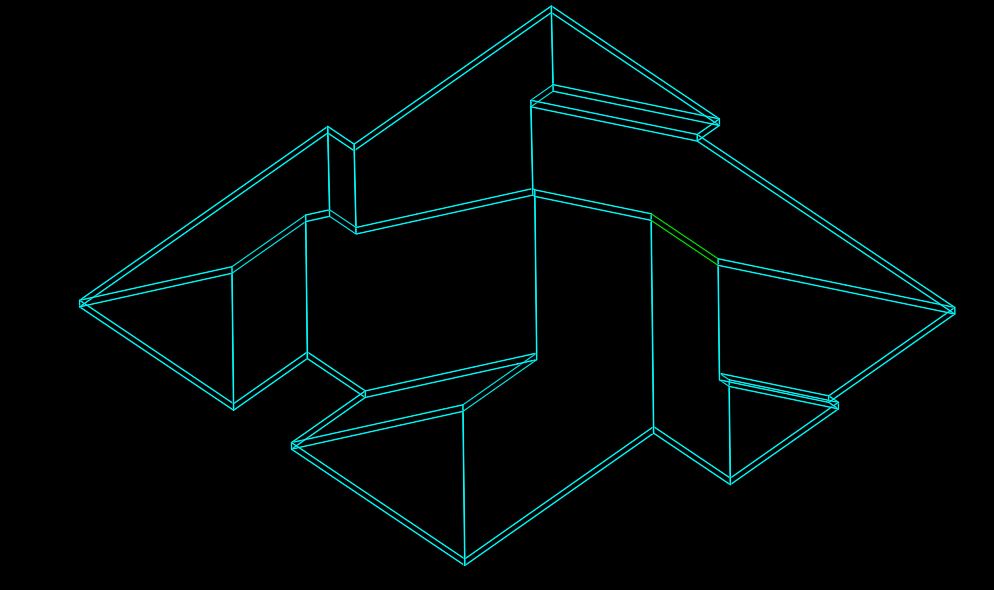
            Snip 1.JPG


            Snip 2.JPG


            snip 3.JPG

            1 réponse Dernière réponse Répondre Citer 0
            • Rich O BrienR En ligne
              Rich O Brien Moderator
              dernière édition par

              You can get a result if you break the face up...

              https://i.imgur.com/GR5Bd65.png

              ..so its a case of finding the correct pattern to get the result you need

              Download the free D'oh Book for SketchUp 📖

              1 réponse Dernière réponse Répondre Citer 0
              • B Hors-ligne
                bluexeiden
                dernière édition par

                Idk why i keep on getting bugsplat error. Pls help

                1 réponse Dernière réponse Répondre Citer 0
                • TIGT Hors-ligne
                  TIG Moderator
                  dernière édition par TIG

                  Without a lot more detail, or even a SKP, we are guessing - e.g. perhaps you are holding your tongue wrongly 😕

                  TIG

                  1 réponse Dernière réponse Répondre Citer -1
                  • N Hors-ligne
                    Nerabz
                    dernière édition par Nerabz

                    Is there a way to establish the roof object with a different user input such as "Heel Height. In my line of construction sometimes all that is provided is heel height and the fascia height is dictated by heel height.

                    1 réponse Dernière réponse Répondre Citer 1
                    • TIGT Hors-ligne
                      TIG Moderator
                      dernière édition par

                      I think not.
                      Try out some permutations and see what's best for you...

                      TIG

                      1 réponse Dernière réponse Répondre Citer 0
                      • N Hors-ligne
                        Nerabz
                        dernière édition par

                        I was able to make it work at the fascia+soffit type = vertical + Horizontal at the hip roof. Trying to manipulate the three other types now.
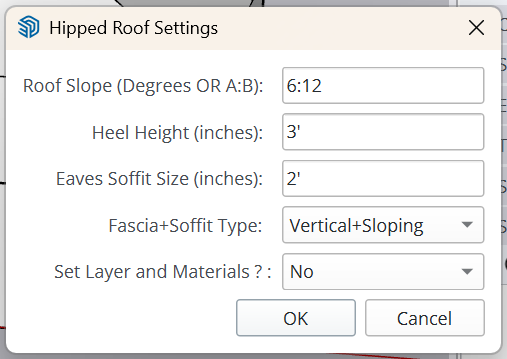
                        image.png

                        1 réponse Dernière réponse Répondre Citer 1
                        • J Hors-ligne
                          Jorgej @TIG
                          dernière édition par

                          @TIG Thank you TIG for your work

                          1 réponse Dernière réponse Répondre Citer 0
                          • 1
                          • 2
                          • 5
                          • 6
                          • 7
                          • 8
                          • 9
                          • 7 / 9
                          • Premier message
                            Dernier message
                          Buy SketchPlus
                          Buy SUbD
                          Buy WrapR
                          Buy eBook
                          Buy Modelur
                          Buy Vertex Tools
                          Buy SketchCuisine
                          Buy FormFonts

                          Advertisement

