sketchucation logo sketchucation
    • 登入
    Oops, your profile's looking a bit empty! To help us tailor your experience, please fill in key details like your SketchUp version, skill level, operating system, and more. Update and save your info on your profile page today!
    🔌 Smart Spline | Fluid way to handle splines for furniture design and complex structures. Download

    [Plugin] Skin.rb

    已排程 已置頂 已鎖定 已移動 Plugins
    237 貼文 66 Posters 167.2k 瀏覽 66 Watching
    正在載入更多貼文
    • 從舊到新
    • 從新到舊
    • 最多點贊
    回覆
    • 在新貼文中回覆
    登入後回覆
    此主題已被刪除。只有擁有主題管理權限的使用者可以查看。
    • M 離線
      maxosmedia
      最後由 編輯

      ===========
      Error Loading File skin.rb
      undefined method `[]' for nil:NilClass

      MacOSX 10.4 SU6.4.245

      1 條回覆 最後回覆 回覆 引用 0
      • kmeadK 離線
        kmead
        最後由 編輯

        @maxosmedia said:

        ===========
        Error Loading File skin.rb
        undefined method `[]' for nil:NilClass

        I am seeing the same error with the 2.4 version of the plugin under MacOSX 10.5.5

        I created Dilbertville, sorry about that...

        1 條回覆 最後回覆 回覆 引用 0
        • A 離線
          architectboy
          最後由 編輯

          Hmmm, it doesn't do that on my computer. Let's see if this fixes it.


          Version 2.5

          1 條回覆 最後回覆 回覆 引用 0
          • plot-parisP 離線
            plot-paris
            最後由 編輯

            weird. the plugin works for me, when I use the toolbar (buttons). but it doesn't react at all, if I try to launch the skin command from the tools-menu... its a pity, because I just assigned a shortcut for the old version. and now I can't use a keyboard shortcut anymore 😞

            1 條回覆 最後回覆 回覆 引用 0
            • F 離線
              fakircho
              最後由 編輯

              Hi it is working for me fine. I am finding it a bit inconsistent when i give more than two
              profiles to "Skin". It usually gets it right at the end after asking "is the connection done right"? 😄
              but if i undo i notice that it does it in stages, two profiles at a time.
              That is ok but is it possible to have it do the whole "skin" as one operation if you have selected more than two profiles, instead of being asked to confirm each step? Please see attached. That would be great
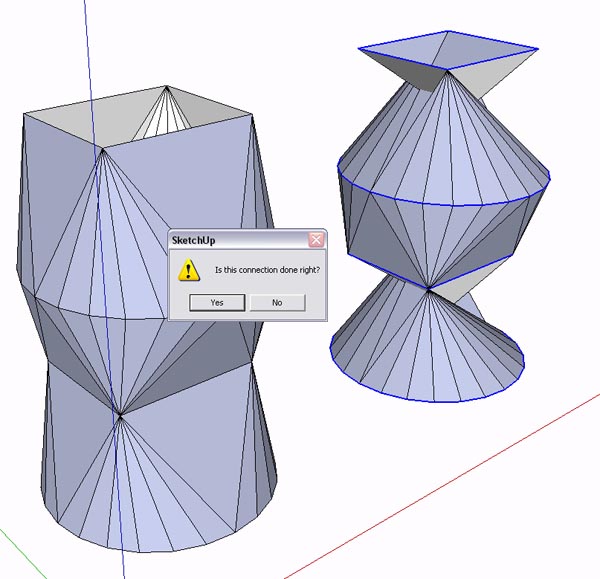

              Skin.jpg

              1 條回覆 最後回覆 回覆 引用 0
              • O 離線
                otb designworks
                最後由 編輯

                @kmead said:

                @maxosmedia said:

                ===========
                Error Loading File skin.rb
                undefined method `[]' for nil:NilClass

                I am seeing the same error with the 2.4 version of the plugin under MacOSX 10.5.5

                I, too, am getting this error on start up. Mac 10.5.5, also.

                Cheers, Chuck

                OTB Designworks is on Youtube

                6 core nMP, 32 gig RAM, (2) D700 GPU's, dual monitors

                1 條回覆 最後回覆 回覆 引用 0
                • B 離線
                  BTM
                  最後由 編輯

                  Using the Skin rb., running SU7 on Mac OSX 10.5.5, The plugin works almost not at all. The only action working is the one that cleans up the unnecessary edges. It will only work from the toolbar too. Also, I don't know if it's supposed to be like this, but there are no icons in the skin toolbar.

                  1 條回覆 最後回覆 回覆 引用 0
                  • olisheaO 離線
                    olishea
                    最後由 編輯

                    this is exactly the ruby ive been looking for. thank you so much. I've been wanting to 'skin' between faces for a long time.

                    oli

                    1 條回覆 最後回覆 回覆 引用 0
                    • A 離線
                      AcesHigh
                      最後由 編輯

                      I think the problem with this plugin, in the way that it DOES NOT achieves the same result as true loft commands in other software, is that the Skin plugin SEEMS to try to achieve the transformation directly... from one shape to the other... maybe there is ONE partial step in the middle.

                      Analize visually the image below... watch as it seems there is a VERY GRADUAL MORPHING between one shape and the other. Its like if the LOFT command created some 10 intermediate profiles between each ORIGINAL profile. Then, after creating lots of intermediate profiles, it does "sking" the model.

                      When seeing the pictures of the SKIN plugin in this thread, I guess (but I cant be sure) that one ONE intermediate is create, half the way between the two original profiles.

                      I wonder if the author agrees with me, and if he thinks its POSSIBLE to better simulate a LOFT command, by making Sketchup draw a number of intermediate profiles, who morph in shape between the two original profiles (the number of intermediate profiles maybe could be selected in a dialog box?)

                      Easier said than done 😄
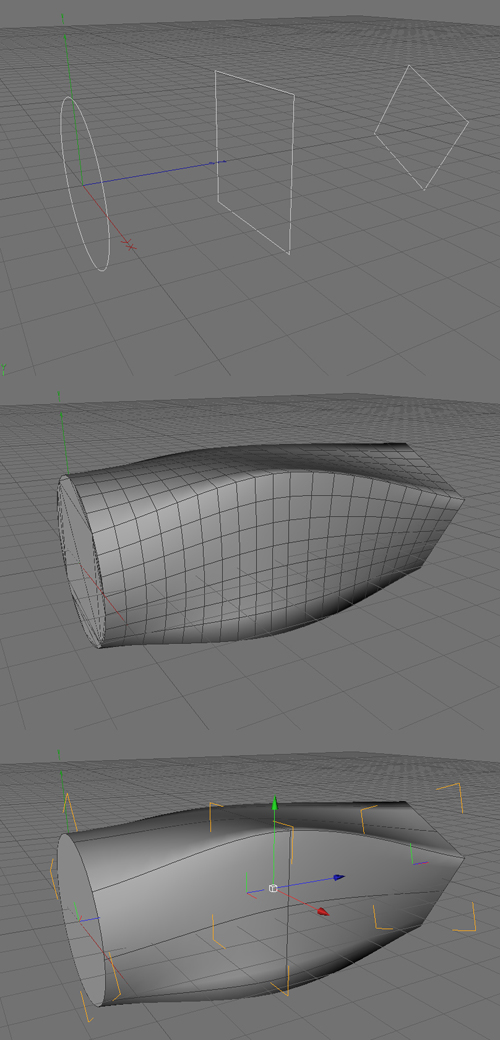

                      Loft_Script.jpg

                      1 條回覆 最後回覆 回覆 引用 0
                      • A 離線
                        AcesHigh
                        最後由 編輯

                        hmmm... btw, the plugin is not working at all here at my PC... ive just downloaded 2.5... last time I used the plugin was a long time ago (many versions ago)...

                        1 條回覆 最後回覆 回覆 引用 0
                        • F 離線
                          fakircho
                          最後由 編輯

                          Thank you AcesHigh, i have been moaning about this for years 😉

                          We need a proper Loft tool full stop. I did start a thread a while ago but nothing so far.
                          http://www.sketchucation.com/forums/scf/viewtopic.php?f=180&t=13272&p=98352&hilit=loft&sid=bcc844a9806886b037dad1618e96f9ad#p98352

                          I see you use C4D 😄

                          1 條回覆 最後回覆 回覆 引用 0
                          • A 離線
                            AcesHigh
                            最後由 編輯

                            actually, I dont. I found that image on google 😄

                            1 條回覆 最後回覆 回覆 引用 0
                            • F 離線
                              fakircho
                              最後由 編輯

                              Now that i look at it again i think i did that image in c4d ages ago to show what i want in Sketchup 😉

                              If i am not mistaken i posted it on the old forum ❓

                              1 條回覆 最後回覆 回覆 引用 0
                              • A 離線
                                AcesHigh
                                最後由 編輯

                                lol... yes, I found it on a Sketchup forum where a guy was asking for a LOFT plugin... 😆 😆 😆

                                how funny that it was YOU, and then years later, you are still asking for the loft plugin, and I post YOUR image and you thought it was mine 😆 😆 😆 😆

                                1 條回覆 最後回覆 回覆 引用 0
                                • F 離線
                                  fakircho
                                  最後由 編輯

                                  Nice one man 😄 that is funny 😆 😆 😆

                                  1 條回覆 最後回覆 回覆 引用 0
                                  • L 離線
                                    lightburn
                                    最後由 編輯

                                    umm, Where do I sign to join in your "petition" for a loft tool? 🎉 That would be a great addition to all the fine tools we have now. 😄

                                    1 條回覆 最後回覆 回覆 引用 0
                                    • A 離線
                                      AcesHigh
                                      最後由 編輯

                                      problem is that the Skin tool is not working in my Sketchup. I opened the Ruby console and NOTHING appears when I try to use the Skin command!

                                      1 條回覆 最後回覆 回覆 引用 0
                                      • MarianM 離線
                                        Marian
                                        最後由 編輯

                                        Try an older version of it, many of the newer ones don'y work for me either.

                                        http://marian87.deviantart.com/

                                        1 條回覆 最後回覆 回覆 引用 0
                                        • S 離線
                                          sojourner
                                          最後由 編輯

                                          I have tried several versions of this and get no results. 23, 24, and 25 seem to do nothing, ruby console is blank. versions earlier give:

                                          Error: #<NoMethodError: undefined method collect' for nil:NilClass> C:/Program Files/Google/Google SketchUp 7/Plugins/skin22.rb:166:in skin'

                                          I take it this is a SU 7 problem?

                                          1 條回覆 最後回覆 回覆 引用 0
                                          • MarianM 離線
                                            Marian
                                            最後由 編輯

                                            It works for me in su7 but dunno what version it is. if you used one of the earlier versions and didn't work probably some other plugin is interfer.


                                            http://marian87.deviantart.com/

                                            1 條回覆 最後回覆 回覆 引用 0
                                            • 1
                                            • 2
                                            • 7
                                            • 8
                                            • 9
                                            • 10
                                            • 11
                                            • 12
                                            • 9 / 12
                                            • 第一個貼文
                                              最後的貼文
                                            Buy SketchPlus
                                            Buy SUbD
                                            Buy WrapR
                                            Buy eBook
                                            Buy Modelur
                                            Buy Vertex Tools
                                            Buy SketchCuisine
                                            Buy FormFonts

                                            Advertisement

