sketchucation logo sketchucation
    • 登入
    Oops, your profile's looking a bit empty! To help us tailor your experience, please fill in key details like your SketchUp version, skill level, operating system, and more. Update and save your info on your profile page today!
    🔌 Smart Spline | Fluid way to handle splines for furniture design and complex structures. Download

    [Plugin] Skin.rb

    已排程 已置頂 已鎖定 已移動 Plugins
    237 貼文 66 Posters 167.2k 瀏覽 66 Watching
    正在載入更多貼文
    • 從舊到新
    • 從新到舊
    • 最多點贊
    回覆
    • 在新貼文中回覆
    登入後回覆
    此主題已被刪除。只有擁有主題管理權限的使用者可以查看。
    • V 離線
      Voder Vocoder
      最後由 編輯

      Darrel,

      I'm delighted to see you back, and I'm excited that there's a new version. Would you mind explaining a bit about the new options?

      Thanks for this.

      ~Voder

      1 條回覆 最後回覆 回覆 引用 0
      • R 離線
        remus
        最後由 編輯

        Oooh, what a nice surprise.

        http://remusrendering.wordpress.com/

        1 條回覆 最後回覆 回覆 引用 0
        • ToboboT 離線
          Tobobo
          最後由 編輯

          Thanks Mate

          Toby

          Philippians 4:13

          I can do everything through him who gives me strength.

          1 條回覆 最後回覆 回覆 引用 0
          • W 離線
            watkins
            最後由 編輯

            Dear Darrel,

            I note that the new script adds something extra. Do you have a User Guide document to explain how best to use this script?

            Kind regards,
            Bob

            1 條回覆 最後回覆 回覆 引用 0
            • M 離線
              maxosmedia
              最後由 編輯

              SU crash!!! 😞 Without tears and comments
              (SU 6.4.245, MacOS 10.4.11)
              Previous versions Skin.rb work perfect

              1 條回覆 最後回覆 回覆 引用 0
              • A 離線
                architectboy
                最後由 編輯

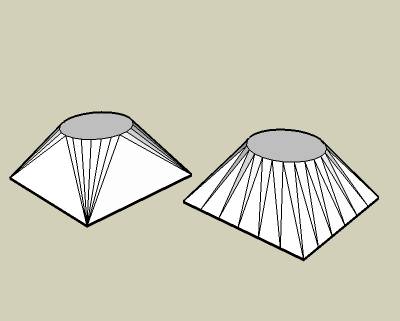
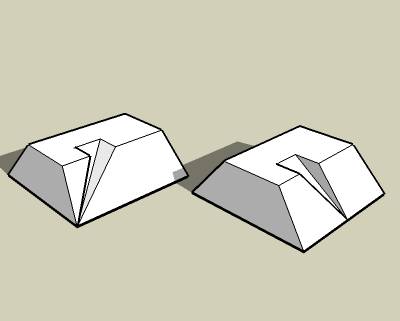
                Skin.rb was originally designed to only "skin", or connect, the sides, but it became evident that it sometimes should "prep", or prepare the sides for skinning by splitting the edges. I came up with two methods for skinning the sides and two methods for preparing the sides. I used to have a button for each method, but now I have one skin button and the settings dialog sets what methods skin.rb uses. I hope that you can figure it out. If someone can explain it better than me, please do.

                1 條回覆 最後回覆 回覆 引用 0
                • V 離線
                  Voder Vocoder
                  最後由 編輯

                  @unknownuser said:

                  ...it became evident that it sometimes should "prep", or prepare the sides for skinning by splitting the edges.

                  Darrel,

                  It's not obvious to me what the benefit of prepping is. The granularity of the resulting shape is still determined by the original edges, is it not?

                  Thanks,

                  ~Voder

                  1 條回覆 最後回覆 回覆 引用 0
                  • A 離線
                    architectboy
                    最後由 編輯

                    Voder, prepping the edges creates the effect that the edges are connected, not just the vertices.Example1.jpgExample2.jpg

                    1 條回覆 最後回覆 回覆 引用 0
                    • pilouP 離線
                      pilou
                      最後由 編輯

                      these icons have disapeared?


                      why.jpg

                      Frenchy Pilou
                      Is beautiful that please without concept!
                      My Little site :)

                      1 條回覆 最後回覆 回覆 引用 0
                      • ToboboT 離線
                        Tobobo
                        最後由 編輯

                        Darrel,

                        Thanks for the script but it crashed sketch up and i'm not sure what all the settings mean?

                        Toby

                        Philippians 4:13

                        I can do everything through him who gives me strength.

                        1 條回覆 最後回覆 回覆 引用 0
                        • GaieusG 離線
                          Gaieus
                          最後由 編輯

                          Cool Darrel, works just fine with my machine. Thanks for coming back. A lot of us were indeed quite curious where you could be. 😉

                          Nice options, too! 👍

                          Gai...

                          1 條回覆 最後回覆 回覆 引用 0
                          • kmeadK 離線
                            kmead
                            最後由 編輯

                            Good day.

                            I am a MacOS user and unfortunately, version 23 does not appear to work any longer. V22 does, so I don't know what the issue is. It doesn't crash SU but doesn't do anything beyond have the buttons toggle and change color. Nothing untoward happens just no change in state of the model.

                            Mac OSX v10.5.5 MacBook Pro 2.33, 3gb Ram, 256 ATI X1600

                            The earlier versions have worked fine until this point.

                            Many thanks.

                            Karl

                            I created Dilbertville, sorry about that...

                            1 條回覆 最後回覆 回覆 引用 0
                            • A 離線
                              architectboy
                              最後由 編輯

                              Pilou, thank you for the test case. I used it in debugging this version. Hopefully this fixes the problems you guys have been having. The test case still takes my computer several minutes to sort through those 61000 entities and to delete 9000 edges, I don't get how your computer could do it in three seconds 😕 .


                              Version 2.4

                              1 條回覆 最後回覆 回覆 引用 0
                              • pilouP 離線
                                pilou
                                最後由 編輯

                                3 seconds again for the function "Clean selection" with your new version 2.4 😎
                                My comput has 5 years old so with up to date machine that will be instantaneous!
                                Of course I select all the model before launch the Clean Selection!
                                Only edges on "flat" faces are erased!
                                That is I suppose the normal use of the function "Clean Selection"?
                                Maybe I have not calculate tools like your "sort" on my comput processor?
                                That maybe explain the 3 seconds result?
                                (for other manipulations like move copy etc...my comput with this model is go down on its knees! 😉
                                Model by Steph3D
                                PS Existing before 2 icones (rectangle with little red points) for divide in same numbers edges of facets : are they disapeared?
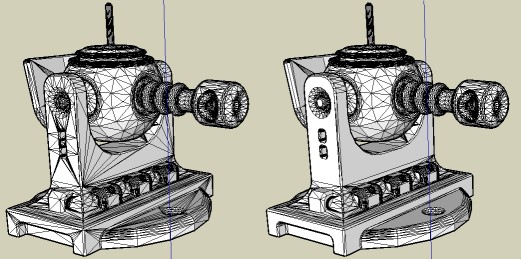

                                test.jpg

                                Frenchy Pilou
                                Is beautiful that please without concept!
                                My Little site :)

                                1 條回覆 最後回覆 回覆 引用 0
                                • pilouP 離線
                                  pilou
                                  最後由 編輯

                                  Seems your 23 works less than the 22! ❓
                                  With the 22 "Clean Selection" (on my very old computer) works fine in 3 seconds ☀
                                  With the 23 no result after one minute! 😮

                                  (select the all with triple click !
                                  Model by Steph3D


                                  test.zip

                                  Frenchy Pilou
                                  Is beautiful that please without concept!
                                  My Little site :)

                                  1 條回覆 最後回覆 回覆 引用 0
                                  • M 離線
                                    maxosmedia
                                    最後由 編輯

                                    ===========
                                    Error Loading File skin.rb
                                    undefined method `[]' for nil:NilClass

                                    MacOSX 10.4 SU6.4.245

                                    1 條回覆 最後回覆 回覆 引用 0
                                    • kmeadK 離線
                                      kmead
                                      最後由 編輯

                                      @maxosmedia said:

                                      ===========
                                      Error Loading File skin.rb
                                      undefined method `[]' for nil:NilClass

                                      I am seeing the same error with the 2.4 version of the plugin under MacOSX 10.5.5

                                      I created Dilbertville, sorry about that...

                                      1 條回覆 最後回覆 回覆 引用 0
                                      • A 離線
                                        architectboy
                                        最後由 編輯

                                        Hmmm, it doesn't do that on my computer. Let's see if this fixes it.


                                        Version 2.5

                                        1 條回覆 最後回覆 回覆 引用 0
                                        • plot-parisP 離線
                                          plot-paris
                                          最後由 編輯

                                          weird. the plugin works for me, when I use the toolbar (buttons). but it doesn't react at all, if I try to launch the skin command from the tools-menu... its a pity, because I just assigned a shortcut for the old version. and now I can't use a keyboard shortcut anymore 😞

                                          1 條回覆 最後回覆 回覆 引用 0
                                          • F 離線
                                            fakircho
                                            最後由 編輯

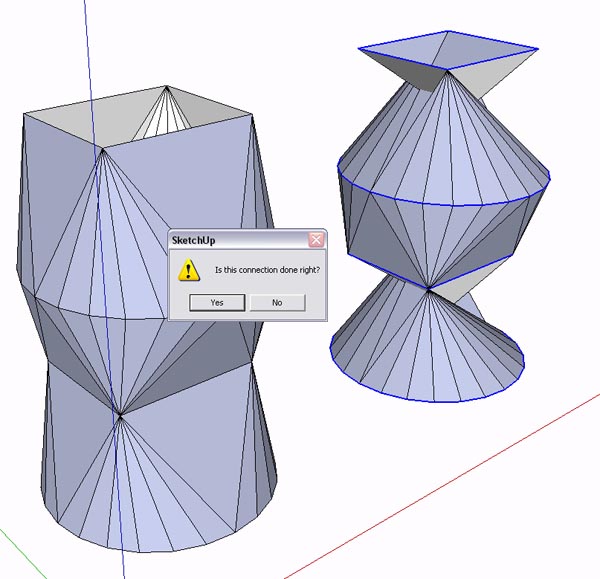
                                            Hi it is working for me fine. I am finding it a bit inconsistent when i give more than two
                                            profiles to "Skin". It usually gets it right at the end after asking "is the connection done right"? 😄
                                            but if i undo i notice that it does it in stages, two profiles at a time.
                                            That is ok but is it possible to have it do the whole "skin" as one operation if you have selected more than two profiles, instead of being asked to confirm each step? Please see attached. That would be great

                                            Skin.jpg

                                            1 條回覆 最後回覆 回覆 引用 0
                                            • 1
                                            • 2
                                            • 3
                                            • 4
                                            • 5
                                            • 11
                                            • 12
                                            • 3 / 12
                                            • 第一個貼文
                                              最後的貼文
                                            Buy SketchPlus
                                            Buy SUbD
                                            Buy WrapR
                                            Buy eBook
                                            Buy Modelur
                                            Buy Vertex Tools
                                            Buy SketchCuisine
                                            Buy FormFonts

                                            Advertisement