sketchucation logo sketchucation
    • 登入
    Oops, your profile's looking a bit empty! To help us tailor your experience, please fill in key details like your SketchUp version, skill level, operating system, and more. Update and save your info on your profile page today!
    🔌 Smart Spline | Fluid way to handle splines for furniture design and complex structures. Download

    [Plugin] Exporting a texture from a material

    已排程 已置頂 已鎖定 已移動 Plugins
    29 貼文 15 Posters 39.7k 瀏覽 15 Watching
    正在載入更多貼文
    • 從舊到新
    • 從新到舊
    • 最多點贊
    回覆
    • 在新貼文中回覆
    登入後回覆
    此主題已被刪除。只有擁有主題管理權限的使用者可以查看。
    • Al HartA 離線
      Al Hart
      最後由 Al Hart 編輯

      It's interesting how you can forget things.

      I needed a ruby script to extract a texture file from a SketchUp texture. So I started searching around and found this thread.

      301 Moved Permanently

      favicon

      (www.sketchucation.com)

      But SURPRISE! 😄 It turns to to be a script that I wrote and sent to Didier for distribution. (rps_texturewrite.rb)

      I was looking for a script to extract a single texture, so I modified rps_texturewrite.rb to extract the texture from a selected face (or other entity),
      and ask you where you want to save it.

      When you load it (or put it in the plugins folder), it adds two commands to the plugins menu:

      Export Textures- this saves all the raster images for textures in your model to a folder called 'texture_test' in your temporary folder.

      Export Selected Texture - This exports the first texture it finds in the current selection and asks you where to put it.

      (I put this here instead of the ruby forum because people may want to extract textures from materials without getting involved in ruby scripts)

      [EDIT Aug 30, 2012 - replaced rps_texturewrite.rb with a version which works better]


      rps_texturewrite.rb

      Al Hart

      http:wiki.renderplus.comimageseefRender_plus_colored30x30%29.PNG
      IRender nXt from Render Plus

      1 條回覆 最後回覆 回覆 引用 0
      • K 離線
        kwistenbiebel
        最後由 編輯

        Hi Al,

        I try to use the 'export textures' but I don't know where to find the temporary folder...
        Is it situated under C\Windows somewhere?

        1 條回覆 最後回覆 回覆 引用 0
        • K 離線
          kwistenbiebel
          最後由 編輯

          Nevermind..... 😉
          I used a workaround by exporting my scene to Kerkythea (Indigo works as well).
          The export automatically saves a folder with all textures in the same folder as the export output file.

          Also for users of Podium: a texture folder is in the >plugins>podium map containing all textures.

          1 條回覆 最後回覆 回覆 引用 0
          • R 離線
            remus
            最後由 編輯

            when you say 'here:' do you mean in your archive, or did you forget the link?

            http://remusrendering.wordpress.com/

            1 條回覆 最後回覆 回覆 引用 0
            • Didier BurD 離線
              Didier Bur
              最後由 編輯

              Hi,
              A little bit off topic, but I've just coded a very fast texture writer. Instead of interating through all the entities of the model, dig in groups/components, etc, etc, it iterates through materials and assign each material which has a texture to a virtual face. 10 times faster, especially on huge models as you may think.
              It's here:
              http://www.sketchucation.com/forums/scf/viewtopic.php?f=153&t=6386

              DB

              1 條回覆 最後回覆 回覆 引用 0
              • Alan FraserA 離線
                Alan Fraser
                最後由 編輯

                Unless I'm missing something here, why can't you simply r-click the material swatch in the In Model library, choose Export Texture Image and save it to your Desktop?

                3D Figures
                Were you required to walk 500 miles? Were you advised to walk 500 more?
                You could be entitled to compensation. Call the Pro Claimers now!

                1 條回覆 最後回覆 回覆 引用 0
                • T 離線
                  troyhome
                  最後由 編輯

                  I'm on a Mac using SU6 and the only way i can export textures is using the Export Selected Texture; all other texture exporters do not work for me. And one-at-a-time texture export is not fun. On the PC i can right click the texture in the texture window and save as, but no such luck on the mac. Any suggestions besides exporting as a 3d format and manually relinking?

                  IOviz.com
                  SU Pro 2024 PC

                  1 條回覆 最後回覆 回覆 引用 0
                  • Al HartA 離線
                    Al Hart
                    最後由 編輯

                    Did you try the texture_writer ruby script in this thread?

                    I would expect it to work on the mac.

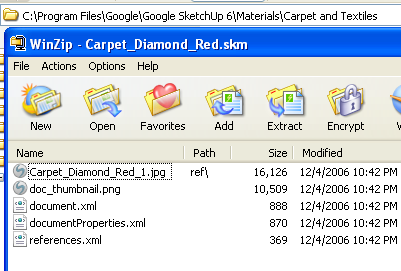
                    • Also, have you tried reading the texture from the .skm file. You can open the file with WinZip and see the texture stored in the file.

                    Al Hart

                    http:wiki.renderplus.comimageseefRender_plus_colored30x30%29.PNG
                    IRender nXt from Render Plus

                    1 條回覆 最後回覆 回覆 引用 0
                    • T 離線
                      troyhome
                      最後由 編輯

                      I tried the file in this thread- maybe it's not playing nice with some of the other ruby's i've got.
                      I'll try looking at the .skm which i assume is somewhere on my computer 😄
                      Thanks!

                      IOviz.com
                      SU Pro 2024 PC

                      1 條回覆 最後回覆 回覆 引用 0
                      • Al HartA 離線
                        Al Hart
                        最後由 編輯

                        Here is a carpet.skm file - located in the SketchUp Materials folder.
                        carpet-skm.png

                        Al Hart

                        http:wiki.renderplus.comimageseefRender_plus_colored30x30%29.PNG
                        IRender nXt from Render Plus

                        1 條回覆 最後回覆 回覆 引用 0
                        • T 離線
                          troyhome
                          最後由 編輯

                          Thank you, Al- this will help tremendously!
                          One thing i should note about the script is that when i do run it to export all materials, it appears as though something happens- as though there might be a window hiding that shows a save location or somethings- but then there is nothing. All i mean is- i wonder if the materials are saving to some hidden location?
                          Oh well- i like the .skm approach- thanks again!

                          IOviz.com
                          SU Pro 2024 PC

                          1 條回覆 最後回覆 回覆 引用 0
                          • Chris FullmerC 離線
                            Chris Fullmer
                            最後由 編輯

                            Whats the matter with exportingas a 3ds file to get all the images out? I saw you said you didn't want to do that, but I didn't catch why? What do you mean by manually relinking?

                            Chris

                            Lately you've been tan, suspicious for the winter.
                            All my Plugins I've written

                            1 條回覆 最後回覆 回覆 引用 0
                            • T 離線
                              troyhome
                              最後由 編輯

                              Hi Chris,
                              I just mean having to export the file on which i'm working just so i get the maps... manually relinking? I don't know what i was thinking about when i typed that... I've been linking maps to Maxwell materials for the last couple days- i imagine that made it into my post somehow- how embarrassing.

                              IOviz.com
                              SU Pro 2024 PC

                              1 條回覆 最後回覆 回覆 引用 0
                              • A 離線
                                Artz_ab
                                最後由 編輯

                                thank you, i will try it

                                1 條回覆 最後回覆 回覆 引用 0
                                • IneshtineI 離線
                                  Ineshtine
                                  最後由 編輯

                                  I'm a year an a half off on this topic, but if anyone cares, I have written a plugin to export all of the textures from your models. It's very fast and not coded in Ruby. It's freeware and you can get it from http://Raylectron.com

                                  Please let me know how it works for you?

                                  What? you haven't tried Raylectron yet?

                                  1 條回覆 最後回覆 回覆 引用 0
                                  • eidam655E 離線
                                    eidam655
                                    最後由 編輯

                                    hi, the raylecton exporter looks good, however, i would like to retain the plugin's functionality inside sketchup.

                                    so far the mass-export does not work because of this:

                                    Error; #<ArgumentError; wrong number of arguments (2 for 3)>
                                    C;/PROGRA~1/Google/Google SketchUp 8/Plugins/rps_texturewrite.rb;25;in `export_texture'
                                    C;/PROGRA~1/Google/Google SketchUp 8/Plugins/rps_texturewrite.rb;25;in `exportTextures'
                                    C;/PROGRA~1/Google/Google SketchUp 8/Plugins/rps_texturewrite.rb;24;in `each'
                                    C;/PROGRA~1/Google/Google SketchUp 8/Plugins/rps_texturewrite.rb;24;in `exportTextures'
                                    C;/PROGRA~1/Google/Google SketchUp 8/Plugins/rps_texturewrite.rb;216
                                    

                                    i would love to fix this, but i'm not familiar with Ruby, let alone Ruby inside Sketchup. if anyone could have a look at this issue, i'd be very very glad...

                                    I'm using SketchUp 2017, V-Ray 3.4

                                    1 條回覆 最後回覆 回覆 引用 0
                                    • TIGT 線上
                                      TIG Moderator
                                      最後由 編輯

                                      OR there's Didier's "Very Fast Texture Writer" http://forums.sketchucation.com/viewtopic.php?t=6386

                                      TIG

                                      1 條回覆 最後回覆 回覆 引用 0
                                      • IneshtineI 離線
                                        Ineshtine
                                        最後由 編輯

                                        rps_texturewrite.rb is not part of Raylectron, it's from Renderplus, so you may want to contact them.

                                        The Raylectron texture exporter is very fast, and, you can select the format you want to save the images as, and where to save them, and, it's easier to use, with a nice GUI.

                                        What? you haven't tried Raylectron yet?

                                        1 條回覆 最後回覆 回覆 引用 0
                                        • Al HartA 離線
                                          Al Hart
                                          最後由 編輯

                                          I got the same errors when trying to use rps_texturewrite.rb.

                                          I fixed it and uploaded a new version into the first post in this thread.

                                          Al Hart

                                          http:wiki.renderplus.comimageseefRender_plus_colored30x30%29.PNG
                                          IRender nXt from Render Plus

                                          1 條回覆 最後回覆 回覆 引用 0
                                          • Al HartA 離線
                                            Al Hart
                                            最後由 編輯

                                            @troyhome said:

                                            Thank you, Al- this will help tremendously!
                                            One thing i should note about the script is that when i do run it to export all materials, it appears as though something happens- as though there might be a window hiding that shows a save location or somethings- but then there is nothing. All i mean is- i wonder if the materials are saving to some hidden location?
                                            Oh well- i like the .skm approach- thanks again!

                                            In the newest version, I added a display of the file names of all textures saved, which will appear in the Ruby Console. That should help:

                                            e.g.

                                            Writing: c:\tmp/texture_test/F0.jpg

                                            Al Hart

                                            http:wiki.renderplus.comimageseefRender_plus_colored30x30%29.PNG
                                            IRender nXt from Render Plus

                                            1 條回覆 最後回覆 回覆 引用 0
                                            • 1
                                            • 2
                                            • 1 / 2
                                            • 第一個貼文
                                              最後的貼文
                                            Buy SketchPlus
                                            Buy SUbD
                                            Buy WrapR
                                            Buy eBook
                                            Buy Modelur
                                            Buy Vertex Tools
                                            Buy SketchCuisine
                                            Buy FormFonts

                                            Advertisement