A Welcome Message to New SketchUcation Members
-
Welcome, Pedro!
Kerkythea is indeed a fine renderer - quite a lot of member use it here, too. See you in the Gallery soon!

-
Hi everyone! Many thanks for this great forum! Great place to share/learn information. I've been using SketchUp for about 4 years now, and it really is a superb tool.
I'm a practising architect (and a blogger) and I just wanted to introduce myself. I hope to be using this forum lots in the future, both to learn and to inform!
-
I thought I would put this here since I am and always will be a newbie + this is a setting problem that was discussed in this list earlier. Hope it helps.
I was having problems with Orbit and my scroll wheel button on my Logitech MX 1100. I did a palm/face when I finally figured it out. If you're having troubles go into your System Preferences window at the bottom should be a row called Others. Open up the setting window for this mouse, select 'click' for scroll wheel button and them configure the click to 'Middle Click'. Simple as that.
-
Hello,thank you for the welcome Ive been learning sketchup for a couple of weeks now and find it great for drawing up engineering components as I dont think I could manage something like cad,by the way can you export from sketchup to a cad program,thanks again Pedro
-
Hi Pedro and welcome. There are a couple of engineers here so you will have a good companion.
-
I have used Sketchup now for a few months, it really helps fill a gap in house design, especially about irregular feature proximity issues, like second story windows on inset walls conflicting with sloping roofs on porches below; and irregular stairways with features underneath . . . some clients need that extra edge of visualization. I gave away a thousand dollar drafting app several years ago just to get it out of my life, it was so riddled with bugs. Was working without 3D since then; along came Sketchup Yay!
Sketchup worked way better for me since I learned to use components on layers. Due to Sketchup's "sticky geometry" when I moved anything it would shift the whole model slightly out of "true" without me noticing. Gradually older models would become unstable and erratic, eventually crashing becoming useless. Thanks Eli in Alaska for straightening me out on that. Looking forward to putting some bridges on the G MAP.
-
Ok, first post so here it goes.
I have been using sketchup for a while now, (since sketchup 5)and I have made a lot of models and posted them on 3d warehouse. I'm joining this forum now because I would like to move to the next level of of modeling and also take advantage of some of the plugins exclusive to this site.
First question... I downloaded this plugin called [bs]Make Faces v1.2[/b] I have an idea of what it does but I'm having trouble implementing it on other then 2d lines. Is it possible to use this plugin on 3D lines ? If not is there a plugin that does what Make Faces does only in 3D.
-
@riveteer said:
Ok, first post so here it goes.
I have been using Sketchup for a while now, (since Sketchup 5)and I have made a lot of models and posted them on 3d-warehouse. I'm joining this forum now because I would like to move to the next level of of modeling and also take advantage of some of the plugins exclusive to this site.
First question... I downloaded this plugin called Make Faces v1.2 I have an idea of what it does but I'm having trouble implementing it on other then 2d lines. Is it possible to use this plugin on 3D lines ? If not is there a plugin that does what Make Faces does only in 3D.'Make Faces' only works if the selected edge had connected edges that are coplanar and could therefore make a face.
If you have '3D' lines you need additional edges between vertices to make triangular shapes which could take a face - in fact the act of drawing them in will usually result in Sketchup adding the face for you if it can.
To add faces in a 'mesh' linking 3D lines you could find and try Fredo's 'CurviLoft' script that's in beta, or my set of scripts zipped as the 'Extrusion Tools' - there are several tools but 'ExtrudeEdgesByRails.rb' would probably do what you want - just make 2, 3 or 4 curves from the edges [use 'weld.rb' for this] and use them as profiles/rails and they will get a mesh applied...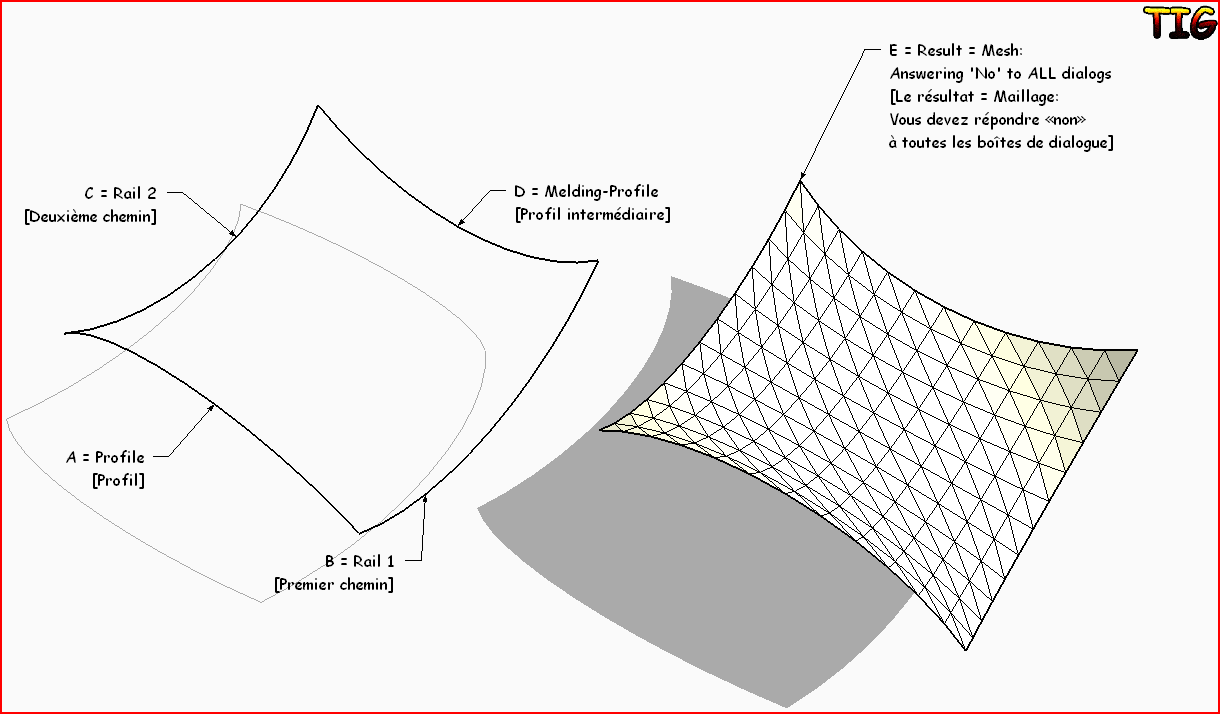
-
I get what make faces does now thanks Tig. I have also been manually drawing those triangles to make curved faces for a while now. I recently watched a speed modeling video on youtube and I swear, I saw the guy select some lines (that connected) and just push a button, and it made a meshed face.
-
I've decided to finally stop lurking and join in. I've met a few members around the web at different places, like SFM & Deviant Art, so hello to them and everyone else as well.
I've been using Sketchup for almost a year now....wow, has it really been that long. I guess it has. Man, time flies when you're modeling.
Anyway, I wanted to learn 3d (cheaply) for a an original universe sci-fi project I'm working on and I've been really impressed by some of the results I've seen with Sketchup so I decided to jump in with both feet. I was really surprised by how easy it was to pick up, however with that being said, I realize I still have much to learn. I really enjoy it though so it's all good.
I'll be posting some work in the gallery shortly. See you around the forum.
-
Lookin' forward to seeing some of your stuff Jimi!
-
I‘m a newbie and I 'm not a native english speaker.Just love designd and sketchup,i'm here.Thank you.
-
Hi Tony and welcome. I am not a native English speaker myself and - well, I also (and still) rememberbeing a newbie.

-
He may not be a native English speaker, but Csaba can snore in many languages very fluently.
-
Indeed. And you have not even heard me after I eat beans!

-
Stereo? with aroma?
-
Hi to you all, intereior designer by trade. Im relatively new to sketchup. I am used to using Solidworks. In that, you can create a plane to sketch on using a plane tool. Is there anything in sketchup that would do that ie a plugin. I find it awkward sketching to draw. This would help immensely. Thanks for listening and big thumbs up if you reply with a viable solution.
Col
-
Hi Colin and welcome!
In SU, you do not (necessarily) need a plane to sketch on. If you are drawing looking down (top view), SU will automatically draw your 2d sketches on the red/green plane.
However you can always draw a big enough rectangle and sketch on that if it feels more comfortable that way.
-
just checking -
ive been using su for a total of about 45 minutes now
 (but i managed to get some images out for a presentation)
actually i learned 3d on alias wavefront back when dinosaurs roamed the earth but it was so cumbersome and pricey that i bailed before i ever became proficient at it. my background is in custom metal work and ive run into a plethora of issues right off the bat but its very promising overall, just need to take the time to learn (or unlearn) and get a rhythm going to the work flow.
i currently have 2d dxf to G code to a cnc cutter then on the brake presses and such to bend it all up -
what im missing is the ability to sketch up concepts, narrow them down, and then plug them into my current process. i noticed a "folding" plug in - not sure if it applies, material thickness is a big factor in steel.
anyways, thanks in advance

-
Hi inkster and welcome. If you work with metal, maybe you will find some of these plugins useful:
http://www.drawmetal.com/




Hello! It looks like you're interested in this conversation, but you don't have an account yet.
Getting fed up of having to scroll through the same posts each visit? When you register for an account, you'll always come back to exactly where you were before, and choose to be notified of new replies (either via email, or push notification). You'll also be able to save bookmarks and upvote posts to show your appreciation to other community members.
With your input, this post could be even better 💗
Register Login


Advertisement