nEVEn — System Intelligence Protocol for SketchUp | Coming Soon
-
Hi everyone,
I've been developing a new SketchUp plugin called nEVEn —
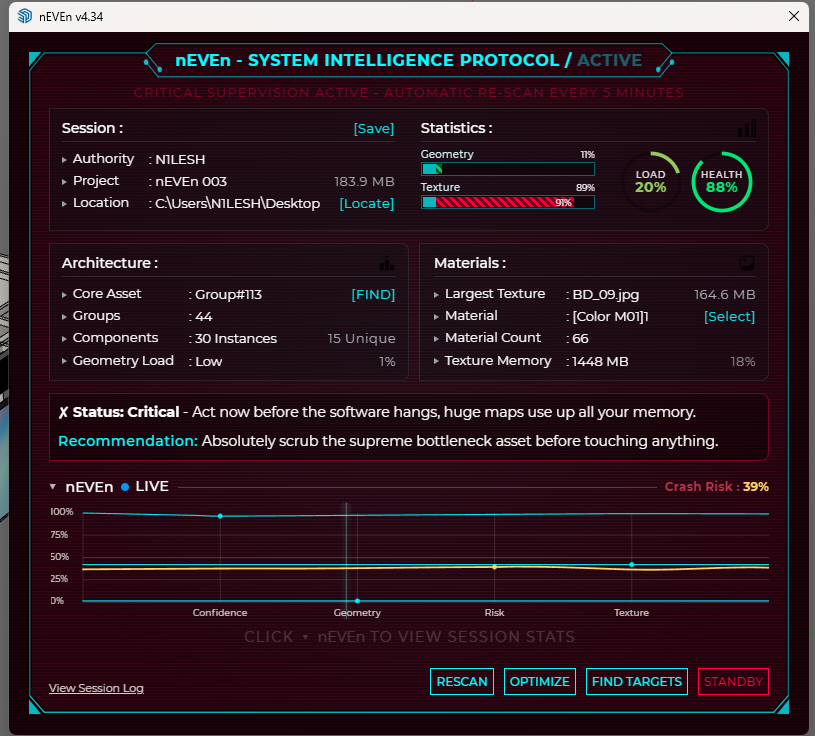
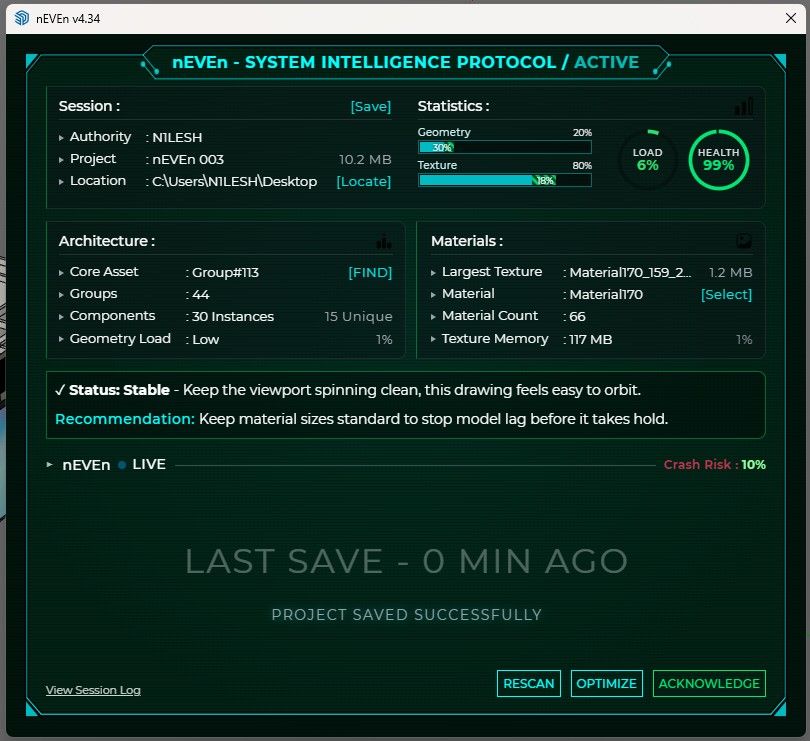
System Intelligence Protocol.It monitors your model health while you work — geometry load,
texture memory, crash risk, and gives you actionable
recommendations per session.Designed for architects and interior designers working
with large, complex SketchUp models.Features :
— automatic model health monitoring
— crash risk detection
— texture optimization
— session logging
— find targets
— purge and save workflow
— geometry cleanup
— & more...This video shows a live texture optimization session
on a real project — 183mb reduced to 10mb.YouTube : https://youtu.be/RjmF1os6b80
Running on SketchUp 2025. Coming soon on
Extension Warehouse.Feedback welcome.
Contact : Arnilesh@outlook.com— N1LESH
-
I see a lot of percentages going on in your tool.
I would genuinely be curious to know: percentage based on what?How do you define "100% geometry load"?
What is "Crash Risk percentage"? Is there some deterministic way to calculate crash risk percentage?What about "Texture memory percentage"? 117 MB is 1%, ok, then 100% is supposed to be 11,7 GB.
What does this actually mean? It's calculated based on actual free system RAM? VRAM?What is the "Health" percentage? What parameters is it based on?
Is there a documentation available for this tool that explains what all this parameters are supposed to represent?
-
Hi panixia — good questions.
These % are not fixed numbers. nEVEn reads your system RAM and sets limits based on that, so everything is relative to your machine.
Geometry Load → model complexity (entities, nesting, instances)
Texture % → how much of safe texture budget is used
Crash Risk → combined signal from geometry + textures
Health → overall stability scoreSo 100% means you’re hitting your system’s safe limit, not a universal value.
Also, each metric has a tooltip in the UI explaining what it represents.
Will share proper documentation at launch.
— N1LESH
-

-
@Rich-O-Brien Hi Rich — noted. I’m putting proper documentation together, will share it at launch.
For now, each parameter already has a tooltip inside the UI explaining what it represents.
— N1LESH
-
Hi, just a quick update on nEVEn.
The walkthrough series is now mostly live if anyone wants to see nEVEn workflow in action.One final video is coming next week to wrap up the series. Thanks for all the feedback so far.
-
This post is deleted! -
Priceless, just Priceless

-
N N1LESH marked this topic as a question
-
N N1LESH marked this topic as a regular topic



Hello! It looks like you're interested in this conversation, but you don't have an account yet.
Getting fed up of having to scroll through the same posts each visit? When you register for an account, you'll always come back to exactly where you were before, and choose to be notified of new replies (either via email, or push notification). You'll also be able to save bookmarks and upvote posts to show your appreciation to other community members.
With your input, this post could be even better 💗
Register Login


Advertisement