sketchucation logo sketchucation
    • Login
    Oops, your profile's looking a bit empty! To help us tailor your experience, please fill in key details like your SketchUp version, skill level, operating system, and more. Update and save your info on your profile page today!
    ⚠️ Important | Libfredo 15.6b introduces important bugfixes for Fredo's Extensions Update

    Fredo Lord of Toolbars Search issue

    Scheduled Pinned Locked Moved Plugins
    19 Posts 4 Posters 532 Views 4 Watching
    Loading More Posts
    • Oldest to Newest
    • Newest to Oldest
    • Most Votes
    Reply
    • Reply as topic
    Log in to reply
    This topic has been deleted. Only users with topic management privileges can see it.
    • fredo6F Offline
      fredo6 @Salient
      last edited by

      @Salient
      Can you leave the Ruby console open to check for errors.

      K S 2 Replies Last reply Reply Quote 1
      • K Offline
        kylekin Newcomers @fredo6
        last edited by

        @fredo6 Having the same issues. Search doesn't work. And tools are not registering. When I have the ruby console open -- nothing happens when I click on a tool within LOTT

        S 1 Reply Last reply Reply Quote 0
        • S Offline
          Salient @fredo6
          last edited by

          @fredo6

          Thanks for responding. I opened the ruby console by selecting Extensions>Developer>Ruby Console. The console appears however nothing shows in the console when I click the search button on the toolbar. Did I do what you asked me to do correctly?

          1 Reply Last reply Reply Quote 1
          • S Offline
            Salient @kylekin
            last edited by

            @kylekin

            it doesn't appear as though it can be fixed.

            1 Reply Last reply Reply Quote 0
            • fredo6F Offline
              fredo6
              last edited by fredo6

              I would need a little bit more information.

              • Mac or Windows?
              • What is the 'hourglass'. The Search icon has a magnifier?
              • did you upgrade t the latest version of LibFredo6 (14.2a)?
              K S 2 Replies Last reply Reply Quote 0
              • K Offline
                kylekin Newcomers @fredo6
                last edited by

                @fredo6 I upgraded to latest version of libfredo. On a Mac. None of the tool buttons are working from the main menu, search doesn't work, no longer able to add to my favorites with more tools.

                1 Reply Last reply Reply Quote 0
                • fredo6F Offline
                  fredo6
                  last edited by

                  Difficult to tell what is the problem.

                  Do you get the Master Toolbar Manager dialog (first icon)?
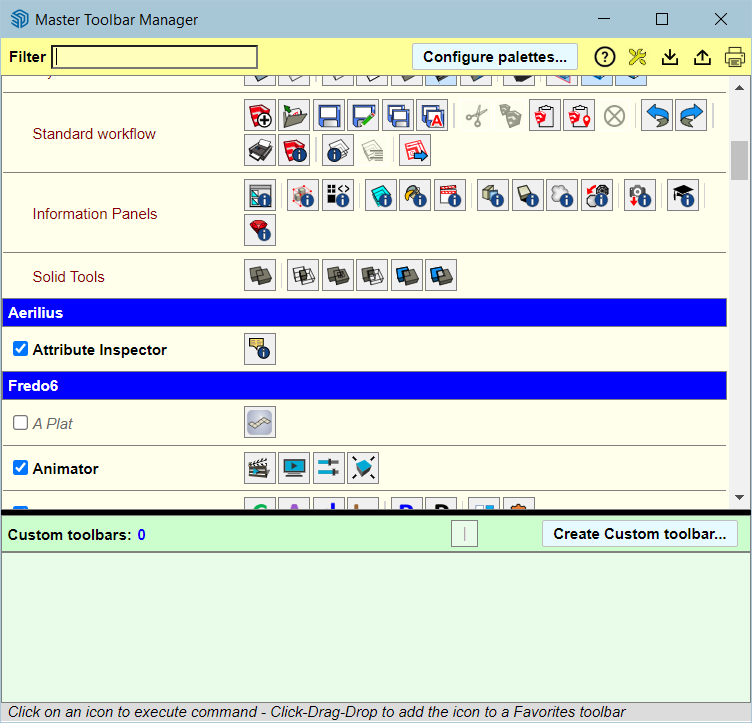
                  dbc44de3-e1ff-4462-bdea-40d2ec8f8c0d-image.png

                  1 Reply Last reply Reply Quote 0
                  • S Offline
                    Salient @fredo6
                    last edited by massimo

                    @fredo6

                    Windows
                    and yes, I apologize, I meant the magnifier
                    I did have 14.2a but I just upgraded to your newest.

                    fredo6F 1 Reply Last reply Reply Quote 0
                    • fredo6F Offline
                      fredo6 @Salient
                      last edited by fredo6

                      @Salient
                      Do you have several monitors?

                      If so, it might be that the dialog is out of screen.

                      The best is to open the Ruby Console and copy/ paste the following command and type Enter.

                      Traductor::ChromiumWdlg.dialog_info_reset "LOTT_MiniFindDialog"

                      Then, launch the Serach again. The dialog should be on the main Sketchup screen.

                      S 3 Replies Last reply Reply Quote 0
                      • S Offline
                        Salient @fredo6
                        last edited by

                        @fredo6

                        Yes, I have 4.

                        I disconnected three of them to see if the menu was hiding, but if it is, I still cannot see anything when I click the magnifier.

                        I can see this, but nothing at all when I click the magnifier.

                        Screenshot 2024-04-02 155429.png

                        1 Reply Last reply Reply Quote 0
                        • S Offline
                          Salient @fredo6
                          last edited by

                          @fredo6 said in Fredo Lord of Toolbars Search issue:

                          Traductor::ChromiumWdlg.dialog_info_reset "LOTT_MiniFindDialog"

                          Okay, I will try that and report back.

                          1 Reply Last reply Reply Quote 0
                          • S Offline
                            Salient @fredo6
                            last edited by

                            @fredo6

                            No luck. That didn't work either.

                            I am happy to try anything you suggest.

                            fredo6F 1 Reply Last reply Reply Quote 0
                            • fredo6F Offline
                              fredo6 @Salient
                              last edited by

                              @Salient

                              Can you indicate

                              • which version of Sketchup?
                              • whether you see the other dialogs?
                              S 1 Reply Last reply Reply Quote 0
                              • S Offline
                                Salient @fredo6
                                last edited by

                                @fredo6

                                22.0.354

                                I see all of the other dialogs.

                                The magnifier was working for me perfectly. I do not know what I did to cause it to stop.

                                I have licenses for several of your other plugins and they seem to work perfectly.

                                K 1 Reply Last reply Reply Quote 0
                                • K Offline
                                  kylekin Newcomers @Salient
                                  last edited by

                                  @Salient All appears fixed with the new Sketchup update.

                                  1 Reply Last reply Reply Quote 0
                                  • 1 / 1
                                  • First post
                                    Last post
                                  Buy SketchPlus
                                  Buy SUbD
                                  Buy WrapR
                                  Buy eBook
                                  Buy Modelur
                                  Buy Vertex Tools
                                  Buy SketchCuisine
                                  Buy FormFonts

                                  Advertisement