sketchucation logo sketchucation
    • Login
    Oops, your profile's looking a bit empty! To help us tailor your experience, please fill in key details like your SketchUp version, skill level, operating system, and more. Update and save your info on your profile page today!
    Mac User? | Join the Rayscaper Beta for Mac Learn More

    Rayscaper New Releases

    Scheduled Pinned Locked Moved Extensions & Applications Discussions
    rayscaperrender
    738 Posts 14 Posters 311.5k Views 15 Watching
    Loading More Posts
    • Oldest to Newest
    • Newest to Oldest
    • Most Votes
    Reply
    • Reply as topic
    Log in to reply
    This topic has been deleted. Only users with topic management privileges can see it.
    • A
      Alattab @pixelcruncher
      last edited by

      @pixelcruncher SUPER

      1 Reply Last reply
      Reply Quote 1
      • pixelcruncherP
        pixelcruncher Extension Creator @Alattab
        last edited by

        @Alattab Thanks for the example. I'm still not sure what you're missing, because Rayscaper already does some of these things in the settings of an image texture:

        • Place as a box: set Mapping to Tri-Planar under Texture Projection. It projects the image from three sides and ignores the UVs from SketchUp, so it works well on imported models without good UVs.
        • Turn the texture, scale, move: the Transformation settings (Scale, Translation, Rotation) of every image texture.
        • All images of a material at once: the Texture Mapping… button at the top of the material editor moves the color, roughness and normal maps together.

        They're all explained here: https://rayscaper.com/manual/textures/#texture-projection-uv-or-tri-planar

        Would you like more mapping types there, for example cylinder or sphere mapping, or one picture fitted to each face? Or do you mean a menu in SketchUp itself that changes the SketchUp UVs, like the extension in your screenshot? Those are two different features, so it helps me to know which one you'd use..

        I'm the developer of Rayscaper: https://rayscaper.com/ - Fast and easy rendering for SketchUp.

        A majidM 2 Replies Last reply
        Reply Quote 1
        • A
          Alattab @pixelcruncher
          last edited by Alattab

          @pixelcruncher Yes, as you mentioned, we need to be able to edit the texture within the SketchUp viewport ; I would also like to see various options added for how the texture is projected .

          1 Reply Last reply
          Reply Quote 0
          • KrassK
            Krass
            last edited by

            are you talking about texture mapping?

            Krass

            1 Reply Last reply 👍
            Reply Quote 0
            • KrassK
              Krass
              last edited by

              all this features are available with free plugin SketchUv. And best : Thrupaint by Fredo6

              Krass

              1 Reply Last reply 👍
              Reply Quote 0
              • A
                Alattab
                last edited by

                I think it's a good idea to have the Tracking SketchUp Sun box be able to check out the Rayscaper view window without resorting to it.

                1 Reply Last reply
                Reply Quote 0
                • A
                  Alattab
                  last edited by

                  it is good to add color picker to pick color from render screen

                  1 Reply Last reply
                  Reply Quote 0
                  • S
                    sashapepperspray
                    last edited by

                    any idea when you are going to add section plane support? it is the only feature I need that you don't have yet. (The only thing I miss from twilight render).

                    1 Reply Last reply
                    Reply Quote 0
                    • majidM
                      majid @pixelcruncher
                      last edited by majid

                      @pixelcruncher To my experience, cube mapping aka box mapping, may solve the majority of architectural texturing. What may make it easier and more intuitive, and may speed up the texture mapping, could be a "virtual" box that sets the origin of the texture and its dimensions are the same as the texture tile. Rotating, scaling, and moving it may change the material's origin, rotation and scale.
                      This virtual cube (maybe just a grayish wireframe box) could work similarly with procedural textures as well. This way the Tri-Planar would be an internal job.

                      My inspiring A, B, Sketches book: https://sketchucation.com/shop/books/intermediate/2612-alphabet-inspired-sketches--inspiring-drills-for-architects--3d-artists-and-designers-

                      KrassK 1 Reply Last reply
                      Reply Quote 0
                      • KrassK
                        Krass @majid
                        last edited by

                        @majid
                        But that is exactly what has been available in Rayscaper for several versions now—triplanar mapping. Or am I mistaken, and you’re referring to something else?
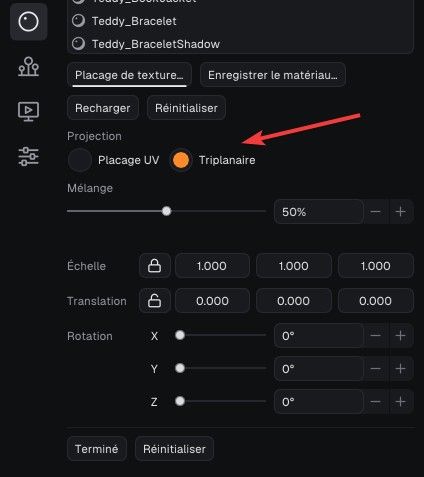
                        image.jpeg

                        Krass

                        1 Reply Last reply
                        Reply Quote 1
                        • majidM
                          majid
                          last edited by

                          Yes it is there yet could be more intuitive (IMO) maybe like what happens in 3Ds Max mapping modifier (UVW map Modifier)

                          My inspiring A, B, Sketches book: https://sketchucation.com/shop/books/intermediate/2612-alphabet-inspired-sketches--inspiring-drills-for-architects--3d-artists-and-designers-

                          1 Reply Last reply
                          Reply Quote 0
                          • KrassK
                            Krass
                            last edited by

                            It was nice having Animator with Rayscaper, but the plugin behaves so strangely that I’m getting fed up. I’ve wasted so much time and haven’t managed to achieve anything. Nothing but unpleasant surprises—it’s completely illogical.
                            Perhaps if I get some help on the thread dedicated to it...
                            And yet, I had intended to use it quite seriously.

                            Krass

                            Rich O BrienR 1 Reply Last reply
                            Reply Quote 0
                            • Rich O BrienR
                              Rich O Brien Moderator @Krass
                              last edited by

                              @Krass said:

                              behaves so strangely

                              Can you share a file that reproduces the error? That would be helpful for Fredo

                              When dealing with many objects and nested objects in a scene it is easy to 'wrong-pick'

                              I watched your video but it's not clear to me what it was you were highlighting.

                              Download the free D'oh Book for SketchUp 📖

                              1 Reply Last reply
                              Reply Quote 0

                              Hello! It looks like you're interested in this conversation, but you don't have an account yet.

                              Getting fed up of having to scroll through the same posts each visit? When you register for an account, you'll always come back to exactly where you were before, and choose to be notified of new replies (either via email, or push notification). You'll also be able to save bookmarks and upvote posts to show your appreciation to other community members.

                              With your input, this post could be even better 💗

                              Register Login
                              • 1
                              • 2
                              • 29
                              • 30
                              • 31
                              • 32
                              • 33
                              • 36
                              • 37
                              • 31 / 37
                              • First post
                                Last post
                              Buy SketchPlus
                              Buy SUbD
                              Buy WrapR
                              Buy eBook
                              Buy Modelur
                              Buy Vertex Tools
                              Buy SketchCuisine
                              Buy FormFonts

                              Advertisement