Rayscaper New Releases
-
This version was released on Oct 28, 2026.I downloaded the version you indicated in the link. What made me ask was this phrase: "We plan to sort it out tomorrow."
-
I downloaded the version you indicated in the link. What made me ask was this phrase: "We plan to sort it out tomorrow."
This version was released on October 28, 2026
-
@pixelcruncher
I bring greetings from China, and many designers and rendering creators around me have praised Rayscaper's official quick and serious response. The launch of the Chinese version has increased everyone's interest in using Ray. We have conducted a preliminary screening of the content of existing Chinese translations in the WeChat community. There is basically no incomprehensible content. I would like to express my respect for your work -
@lightscape Thanks for the kind words! And of course, we hope this might be the trigger for many creators in China to become Rayscaper customers!
Cheers,
ThomasI'm the developer of Rayscaper: https://rayscaper.com/ - Fast and easy rendering for SketchUp.
-
Hello,
an other animation with Fredo6 Animator!
Krass
-
@Krass Nice, that's awesome! Very well done.
-
Simply this, WOW.
-
@Krass Impressive
-
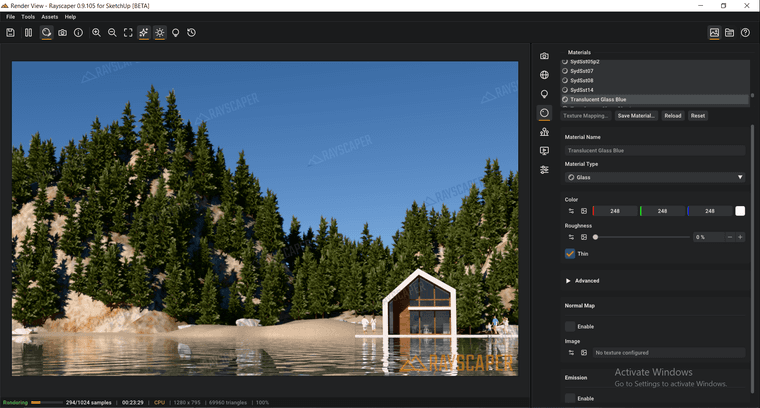
It would be best to create a drop-down menu for glass presets.
-
-
@Alattab Wow, very impressive result. Well done!
-
@Alattab I will add it to the feature list.
-
Nasty Jingle
-
Hey folks,
A new Mac beta is up: Rayscaper 0.9.106. Same link as before: Rayscaper for Mac
What's new since 0.9.105:
- No more crash next to other extensions: starting a render could crash SketchUp when an extension such as Unreal Datasmith was installed. Such an extension loads its own copies of libraries that Rayscaper uses too, and macOS handed those to Rayscaper. Rayscaper now ships its libraries under names of its own, so they can't get mixed up. Thanks to the tester who sent their logs!
- A calmer, more polished interface: clearer text hierarchy, quieter controls with their values lined up, dropdowns with readable lists, and a status bar that shows what Rayscaper is doing and, when a render fails, why.
- Faster value editing: drag a label to change its value, double-click a slider to type one, and type values with units (35 %, 2 ft, 90°). Right-click a setting in Post Processing or Render to reset it to its default.
- Feedback when you save: saving a render, preset or material shows a notification with Show in Folder, and errors tell you what to do next.
- Scene tabs set the sun: selecting a SketchUp scene tab now also sets the sky to that scene's time and date. Before, it kept the sun of the previous scene.
If you installed an earlier beta: install this one over it with the Extension Manager, then restart SketchUp.
Thanks to everyone testing, keep the feedback coming!
Cheers, Thomas
-
What about the Windows operating system community?



Hello! It looks like you're interested in this conversation, but you don't have an account yet.
Getting fed up of having to scroll through the same posts each visit? When you register for an account, you'll always come back to exactly where you were before, and choose to be notified of new replies (either via email, or push notification). You'll also be able to save bookmarks and upvote posts to show your appreciation to other community members.
With your input, this post could be even better 💗
Register Login


Advertisement