Rayscaper New Releases
-
@Krass Wow! Very impressive.
-
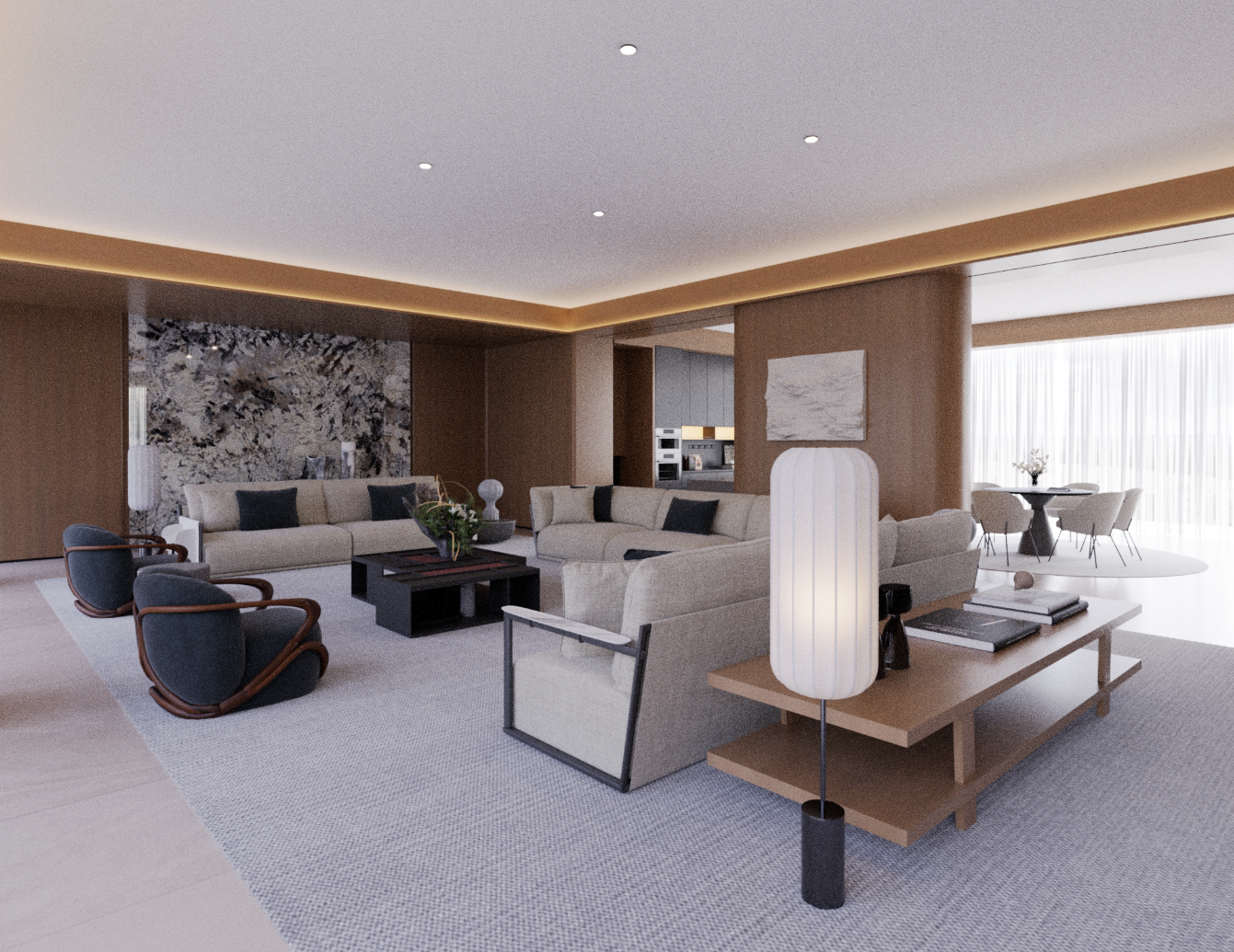
The latest version of the scene rendering function is very good! I hope to further expand it by setting different rendering resolutions and environment settings for each scene, so that the differences in each scene can be rendered in batches at once
a copy of my test! -
@lightscape Nice interior! Are you working as an interior designer? It looks grainy still, are you enabling the AI denoiser?
Presets have been coming up for a while. I'm working on them, but I don't think I can slip them in the next release.
-
Hey, Rayscaper users!
Rayscaper 0.9.103 Beta is available.
Heads-up: I couldn't upload 0.9.103 to the SketchUcation store yet, so the store still has 0.9.102. Please download it directly: Rayscaper_Win_0.9.103_Beta.rbz.
I recommend upgrading to the latest version.
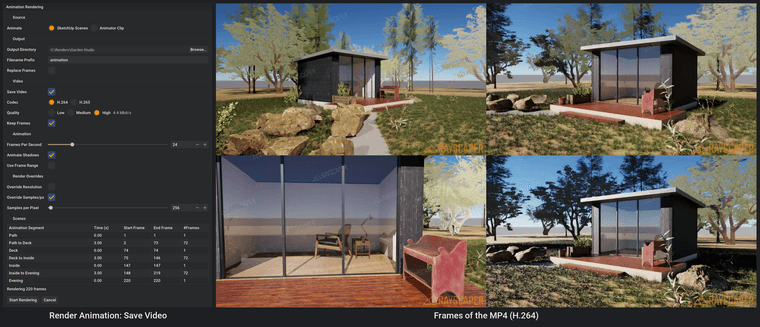
Save Your Animation as a Video
File > Render Animation... now turns the frames into an MP4 once the last one is saved, in H.264 or H.265 with a choice of quality. No more stitching PNGs together in another program, and you can let it delete the frames afterwards. See the Animation guide.
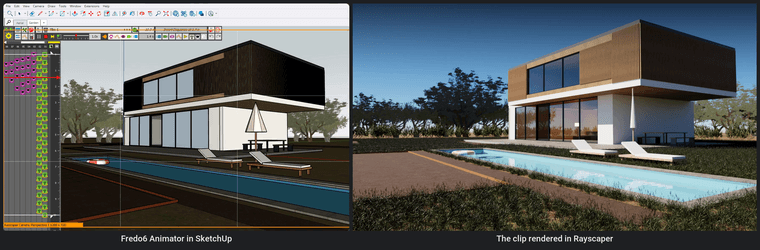
Render Fredo6 Animator Clips
Animate your model with Fredo6 Animator and pick the clip in File > Render Animation...: Rayscaper renders every frame of it, with the camera, the moving objects and the timing all coming from Animator. More on that in Render Fredo6 Animator clips with Rayscaper. See the Fredo6 Animator guide.
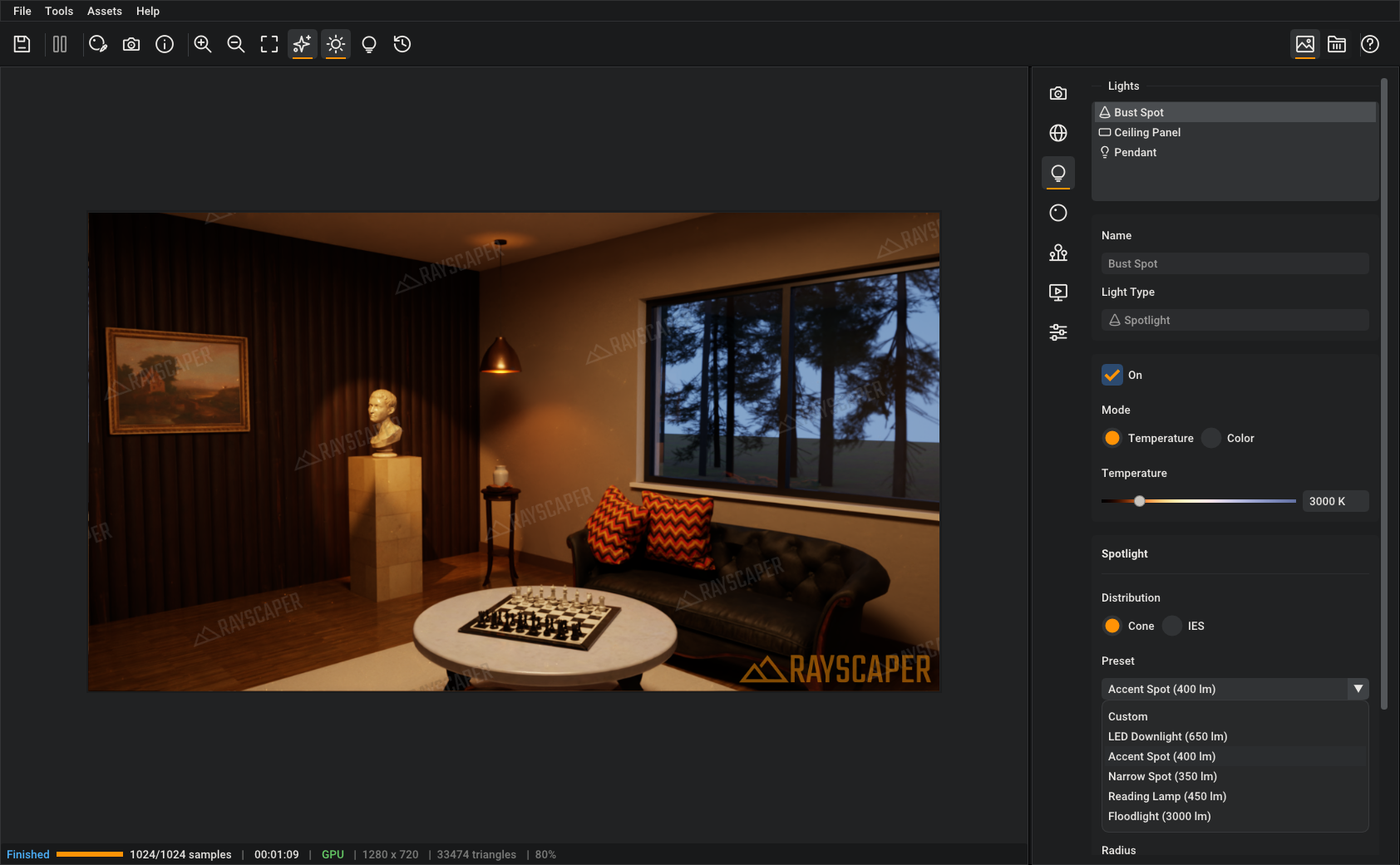
Lights With Real Brightness
Pick a 60 W bulb, an LED downlight, a window or the sun from the presets and the light comes out as bright as the real thing, in lumen, cd/m² or lux. New lights start as a real light too, so a room lit at night looks right without guessing Watts. See Light Presets.
See and Aim Your Lights in SketchUp
Select a light and SketchUp shows the cone of a spotlight, the radius of a point light or the spread of an area light, so you see what it lights before you render.
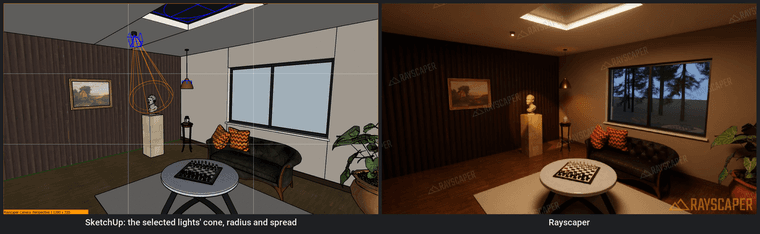
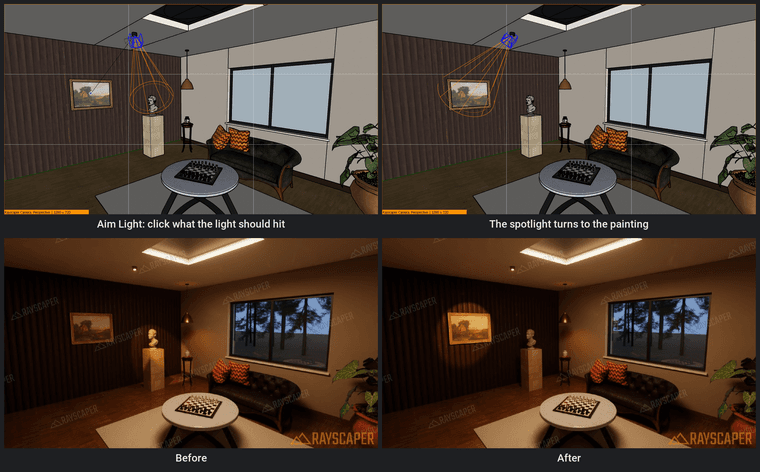
The new Aim Light tool turns a light towards the point you click, and a right click on a light gives a Rayscaper submenu to edit, turn off, aim or change its type. See Aiming a Light.
Material ID, Object ID and Render Passes
Two new render methods paint every material or every object in a flat color, ready for selections in Photoshop. See Material ID.
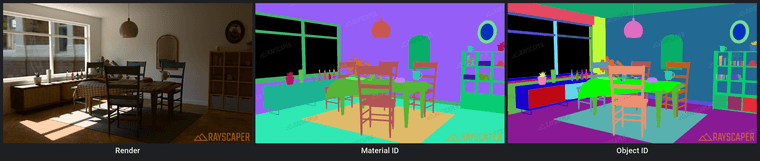
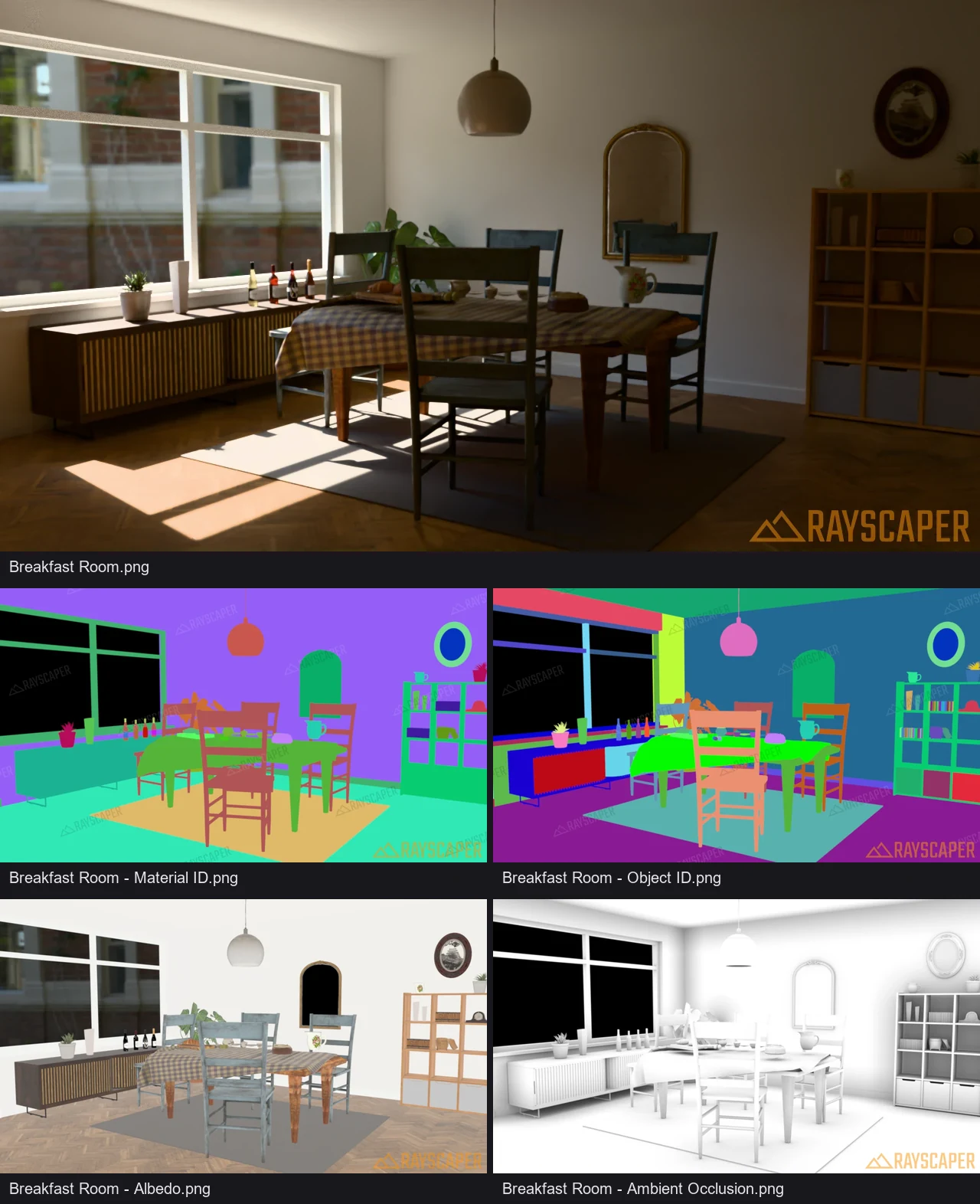
File > Render Scenes... saves them as passes next to each render, together with Albedo and Ambient Occlusion. See Passes.
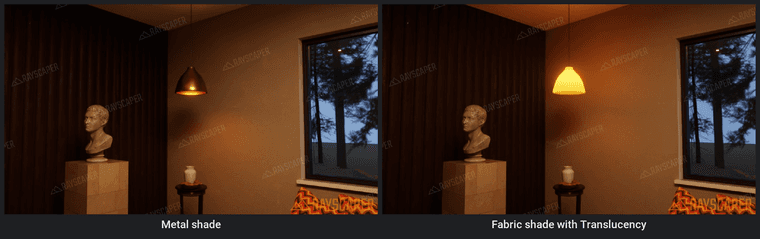
Translucency
Curtains, lampshades and leaves now glow when the light comes from behind them. Set Translucency in the Standard material, or pick the Fabric or Sheer Fabric finish. See Translucency.
What Changed?
- Save animations as an MP4 video: Render Animation encodes the frames into a video once the last one is saved, in H.264 or H.265 with a choice of quality, and can delete the frames afterwards.
- Render Fredo6 Animator clips from File > Render Animation...
- Add light presets with real brightness: bulbs, downlights, an LED panel, a window, the sun and more. Set a light's intensity in lumen, cd/m² or lux, and new lights start as a real light: a 60 W bulb, an LED downlight, an LED panel or the sun.
- Draw the cone of a spotlight, the radius of a point light and the spread of an area light in SketchUp while a light is selected.
- Add an Aim Light tool that turns a light in the model towards the point you click.
- Add a Rayscaper submenu to the context menu of selected lights: Edit in Rayscaper, Turn Off/On, Aim and Change Type.
- Add Material ID and Object ID render methods, and render passes (Material ID, Albedo, AO, ...) to Render Scenes.
- Add Translucency to the Standard material, for curtains, lampshades and leaves lit from behind.
- Change the size of an area light in Rayscaper's light editor.
- Keep the settings of a light when it is copied in SketchUp, and show how many copies of a component share a light's settings.
- Keep the aspect ratio when typing the width or height of the resolution, with a link button to turn it off.
- Let thin glass reflect according to its IOR, so windows and picture frame glass modelled as a single face reflect.
- Remodel the light components with an arrow that shows where a light shines, and recognize lights that SketchUp renamed when models are merged.
- Show a notification instead of quitting when the GPU runs out of memory for a large render, and render at most 134 megapixels (a 16384 x 8192 panorama).
- Fix a SketchUp crash when moving a group whose new components reached Rayscaper out of order, and groups missing from the render after such an operation.
- Fix the crash when SketchUp 2027 quits.
- Keep hidden nested tag folders hidden when their parent folder is made visible, and follow tag folder moves in the render.
- Fix crashes when removing lights, groups and components while rendering.
Full release notes: rayscaper.com/manual/release-notes
Help Me Build the Community

If you like Rayscaper, please share your renders (final or work-in-progress, it doesn't matter)! This is motivating and helps me showcase its capabilities to new users.
Follow me on X.
Happy Rendering!
Thomas -
Génial ! (Pardon my french)
-
Everything you added this time is isefull
-
-
Be aware that automatically generating an MP4 file involves compression; for the final edit of a high-quality project, it is indeed better to work with individual PNG files and let the editing software handle the compression later. That said, having the option to generate an immediate preview is very useful—just be sure to check "Keep Frames" if you intend to use the output for your final edit.
-
Thomas,
In the latest version, I am unable to create any light points. -
@Krass Yikes, I'm having a look. Will likely update with a new hotfix release.
thanks for reporting!
Cheers,
Thomas -
Hey, Rayscaper users!
Rayscaper 0.9.104 Beta is available. This is a hotfix for 0.9.103.
Heads-up: I couldn't upload 0.9.104 to the SketchUcation store yet, so the store still has 0.9.102. Please download it directly: Rayscaper_Win_0.9.104_Beta.rbz.
If you use SketchUp 2024 with 0.9.103, please upgrade.
What Changed?
- Fix placing lights in SketchUp 2024: in 0.9.103, the light tools couldn't add a light to a model that had no Rayscaper lights yet.
Thanks to @krass for reporting it!
Full release notes: rayscaper.com/manual/release-notes
Help Me Build the Community
If you like Rayscaper, please share your renders (final or work-in-progress, it doesn't matter)! This is motivating and helps me showcase its capabilities to new users.
Follow me on X.
Happy Rendering!
Thomas



Hello! It looks like you're interested in this conversation, but you don't have an account yet.
Getting fed up of having to scroll through the same posts each visit? When you register for an account, you'll always come back to exactly where you were before, and choose to be notified of new replies (either via email, or push notification). You'll also be able to save bookmarks and upvote posts to show your appreciation to other community members.
With your input, this post could be even better 💗
Register Login


Advertisement