sketchucation logo sketchucation
    • Login
    Oops, your profile's looking a bit empty! To help us tailor your experience, please fill in key details like your SketchUp version, skill level, operating system, and more. Update and save your info on your profile page today!
    Mac User? | Join the Rayscaper Beta for Mac Learn More

    Scissor table mechanism

    Scheduled Pinned Locked Moved Animator Beta
    13 Posts 4 Posters 1.2k Views 4 Watching
    Loading More Posts
    • Oldest to Newest
    • Newest to Oldest
    • Most Votes
    Reply
    • Reply as topic
    Log in to reply
    This topic has been deleted. Only users with topic management privileges can see it.
    • Rich O BrienR
      Rich O Brien Moderator
      last edited by

      The hinge needs a fixed point to act as parent(kinectic master). Then the child(kinectic slave) spins about the parent.
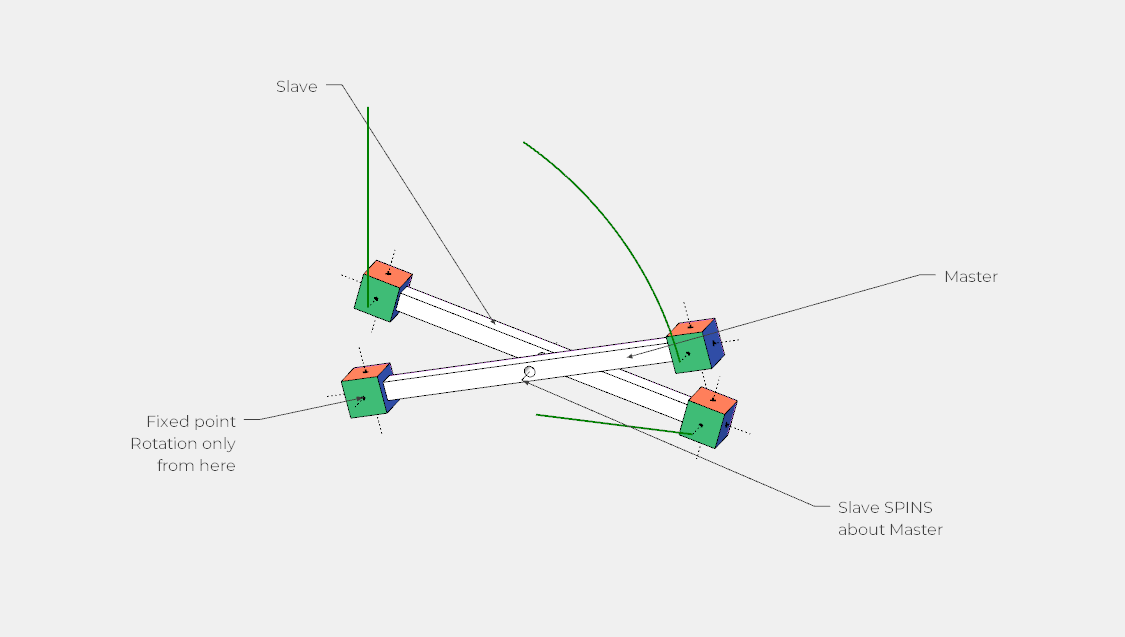
      https://i.imgur.com/OHWf7uw.png

      scissor-hinge[2020].skp

      Download the free D'oh Book for SketchUp đź“–

      1 Reply Last reply
      Reply Quote 0
      • S
        Sopper
        last edited by

        @gus r said:

        I looked at your skp this morning and it should work. It's the same mechanism I used for a wall mounted shaving mirror.

        [attachment=0:2po8974h]<!-- ia0 -->Shaving-Mirror-2023.jpg<!-- ia0 -->[/attachment:2po8974h]

        Is your skp file an animation? If so, give me the file for download please

        1 Reply Last reply
        Reply Quote 0
        • Gus RG
          Gus R
          last edited by

          Sopper,

          Thought yours might be an animation. Maybe Rich's is one and you can use the same pivots and sliding points.

          www.instagram.com/gusrobatto/

          www.facebook.com/gusrobatto

          www.flickr.com/photos/gusrobatto

          1 Reply Last reply
          Reply Quote 0
          • S
            Sopper
            last edited by

            @gus r said:

            Sopper,

            Thought yours might be an animation. Maybe Rich's is one and you can use the same pivots and sliding points.

            Gus,
            Mine IS an animation. Download and open the file. Than open Fredo6 Animation and start the animation. In practice, the displacement of the shear parts will be constant (linear speed), but the rotational speed of the shear parts will be variable (to keep the outer pivot points on top of each other). I can't find a way to make that speed variable.

            1 Reply Last reply
            Reply Quote 0
            • S
              Sopper
              last edited by

              @rich o brien said:

              The hinge needs a fixed point to act as parent(kinectic master). Then the child(kinectic slave) spins about the parent.

              https://i.imgur.com/OHWf7uw.png

              [attachment=0:3s2xt944]<!-- ia0 -->scissor-hinge[2020].skp<!-- ia0 -->[/attachment:3s2xt944]

              Rich,
              You drew a single shear element, but can you make me a composition of several scissor elements like in that mirror of Gus? I'd rather you download my file and adjust it so that the hinges actually work as hinges.

              1 Reply Last reply
              Reply Quote 0
              • Rich O BrienR
                Rich O Brien Moderator
                last edited by

                @sopper said:

                I'd rather you download my file and adjust it so that the hinges actually work as hinges.

                I did download the file and provided you a template to rebuild your animation. It is better to try and fail than to not even try.

                Worth mentioning Animator is still in Beta so irregularities are normal.

                Download the free D'oh Book for SketchUp đź“–

                1 Reply Last reply
                Reply Quote 0
                • ntxdaveN
                  ntxdave
                  last edited by

                  @rich o brien said:

                  Worth mentioning Animator is still in Beta so irregularities are normal.

                  I thought it had been around for several years. Are you talking about a new version?

                  Press F1...thank me later

                  1 Reply Last reply
                  Reply Quote 0
                  • Rich O BrienR
                    Rich O Brien Moderator
                    last edited by

                    @ntxdave said:

                    I thought it had been around for several years. Are you talking about a new version?

                    https://i.imgur.com/Kx8yoY0.png

                    It's been Beta since release. Hence the irregularities people encounter.

                    Download the free D'oh Book for SketchUp đź“–

                    1 Reply Last reply
                    Reply Quote 0
                    • ntxdaveN
                      ntxdave
                      last edited by

                      OK, I had not had any problems and had forgotten it shows as beta.

                      Press F1...thank me later

                      1 Reply Last reply
                      Reply Quote 0
                      • S
                        Sopper
                        last edited by

                        @rich o brien said:

                        @sopper said:

                        I'd rather you download my file and adjust it so that the hinges actually work as hinges.

                        I did download the file and provided you a template to rebuild your animation. It is better to try and fail than to not even try.

                        Worth mentioning Animator is still in Beta so irregularities are normal.

                        I made the scissor according to your template.
                        But how to arrange the second scissor to follow the first one out

                        schaar_animatie_V03.skp
                        schaar_animatie_V03.skp
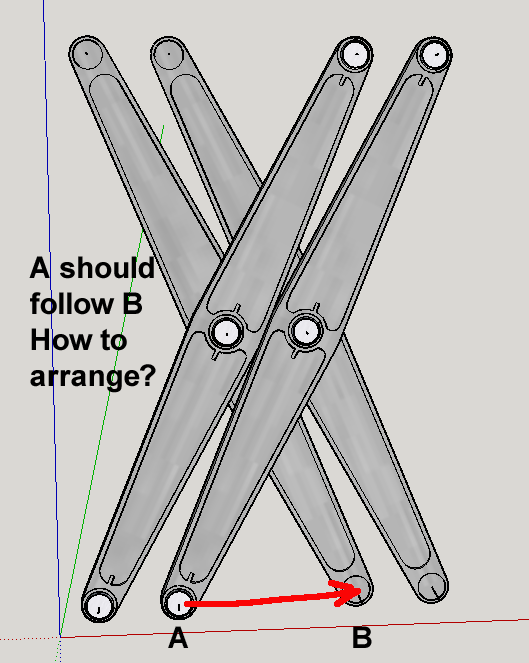

                        Scherm­afbeelding 2023-07-25 om 11.30.07.png

                        1 Reply Last reply
                        Reply Quote 0
                        • S
                          Sopper
                          last edited by

                          I'm done with Animation… I've tried almost everything to get this scissor mechanism done, but Animation seems te be in lack of many good functions or functions that simply don't work. I was realy hopefull when I started Animation, but it doen't offer what it promeses. I hope that Fredo6 will give attention to Animation in order to make it functional without bugs and lets hope with a users manual. For now… I will give it a try in either Blender or Cinema 4D.


                          1 Reply Last reply
                          Reply Quote 0

                          Hello! It looks like you're interested in this conversation, but you don't have an account yet.

                          Getting fed up of having to scroll through the same posts each visit? When you register for an account, you'll always come back to exactly where you were before, and choose to be notified of new replies (either via email, or push notification). You'll also be able to save bookmarks and upvote posts to show your appreciation to other community members.

                          With your input, this post could be even better đź’—

                          Register Login
                          • 1 / 1
                          • First post
                            Last post
                          Buy SketchPlus
                          Buy SUbD
                          Buy WrapR
                          Buy eBook
                          Buy Modelur
                          Buy Vertex Tools
                          Buy SketchCuisine
                          Buy FormFonts

                          Advertisement