FlexTools Crashing Sketchup
-
Hello FlexTool,
I just recently purchased a subscription of Flextools after using the trial and was able to update the license key and subscription and use the plugin. Once I closed out of SketchUp and restarted it, SU will crash with no error. I tried manually deleting all the plugin files in the Plugins folder and deleted the "F3d_FlexTools" folder located in AppData/Local and SU will load up fine. Once I reinstall Flextools plugin, it works but then crashes SU whenever it is restarted.
Is there any solution to fix this?
-
Hi,
-
The crashes started happening after transitioning from the trial?
-
Do the crashes happen if only FlexTools is installed and enabled? and no other extensions?
-
It looks like you've tried this already, but just in case:
a. Disable all extensions
b. Restart Sketchup
c. Enable FlexTools and the Dynamic Components extension.
d. Restart Sketchup
e. check if it still crashes after another restart... -
Please go to: C:\Users%USERNAME%\AppData\Local\F3d_FlexTools\logs and send all the log files that you find there to us at: https://flextools.cc/contact/
Yoni
-
-
@halroach said:
Hi,
-
The crashes started happening after transitioning from the trial?
-
Do the crashes happen if only FlexTools is installed and enabled? and no other extensions?
-
It looks like you've tried this already, but just in case:
a. Disable all extensions
b. Restart Sketchup
c. Enable FlexTools and the Dynamic Components extension.
d. Restart Sketchup
e. check if it still crashes after another restart... -
Please go to: C:\Users%USERNAME%\AppData\Local\F3d_FlexTools\logs and send all the log files that you find there to us at: https://flextools.cc/contact/
Yoni
Thank you for he assistance Yoni. I have no idea what I did but I left my computer alone over the weekend and now the plugin loads up fine without trying any fixes. I did however do a clean install of all plugins afterwards and have not come across the problem again.
Thank you .
-
-
Looking further into this. I believe Flextools is not compatible with Enscape3d plugin. FlexTools runs great with Enscape disabled and crashes when Enscape is enabled.
I have ran the following tests:
- Disabled all plugins (Working)
- Enabled all plugins (Fail)
- Disable Enscape3d (Working)
- Enable Enscape3d (Fail)
-
It looks your FlexTools make Thea for SketchUp 3.0 crash when exporting models.
When your plugin is disabled, Thea works as expected.I have had a whole day debugging session with a kind user, who shared his machine with me today. Our export function was stopping due to some error in SketchUp (Temp folder error most likely raised by BugSplat).
I am not sure what actually happens, because I do not have your plugin on my machine, but I would really appreciate you either sharing FlexTools, so I could replicate the issue in my own debugging environment or please download Thea for SketchUp 3.0 and try to see for yourself rendering a larger model.
https://www.thearender.com/downloads/This issue has to be addressed.
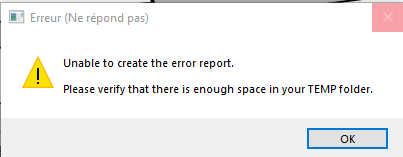
-
Hi Tomasz,
I just received an email about this. We were unaware of any issues with Thea render until now, but everything is possible.
Please contact me at https://flextools.cc/contact and we'll continue there.
-
@halroach said:
Hi Tomasz,
I just received an email about this. We were unaware of any issues with Thea render until now, but everything is possible.
Please contact me at https://flextools.cc/contact and we'll continue there.
Hi, will you give some news about this bug if solved, an update?
-
We are now testing a possible bug fix for this issue. We'll update if it's successful.
@tf3 said:
@halroach said:
Hi Tomasz,
I just received an email about this. We were unaware of any issues with Thea render until now, but everything is possible.
Please contact me at https://flextools.cc/contact and we'll continue there.
Hi, will you give some news about this bug if solved, an update?
-
Our fix seems to have solved the issue. We will be releasing the fix in the next update. If it's urgent, send us a message at: https://flextools.cc/contact/ and we'll send you the fix.

Hello! It looks like you're interested in this conversation, but you don't have an account yet.
Getting fed up of having to scroll through the same posts each visit? When you register for an account, you'll always come back to exactly where you were before, and choose to be notified of new replies (either via email, or push notification). You'll also be able to save bookmarks and upvote posts to show your appreciation to other community members.
With your input, this post could be even better 💗
Register Login


Advertisement