sketchucation logo sketchucation
    • Login
    Oops, your profile's looking a bit empty! To help us tailor your experience, please fill in key details like your SketchUp version, skill level, operating system, and more. Update and save your info on your profile page today!
    Mac User? | Join the Rayscaper Beta for Mac Learn More

    [Plugin] LordOfTheToolbars - v4.0a - 22 Sep 26


    Scheduled Pinned Locked Moved Plugins
    529 Posts 101 Posters 588.5k Views 99 Watching
    Loading More Posts
    • Oldest to Newest
    • Newest to Oldest
    • Most Votes
    Reply
    • Reply as topic
    Log in to reply
    This topic has been deleted. Only users with topic management privileges can see it.
    • fredo6F
      fredo6
      last edited by

      Can you try LordOfTheToolbars v3.0b, just published.

      I don't have D5 installed and I don't really understand why it creates problems with LOTT.

      1 Reply Last reply
      Reply Quote 0
      • N
        nicolasberthier
        last edited by

        Thank you but this fix still doesn't work. You can have D5 for free at https://www.d5render.com/download

        To understand and reproduce the issue:

        1. Install the free D5 LiveSync plugin for SketchUp.
        2. It generates a folder named d5_converter inside the SketchUp Plugins directory.
        3. Start SketchUp.
        4. LOTT scans the Plugins directory, encounters the d5_converter folder, and attempts to open it as a file.
        5. This triggers the fatal Errno::EISDIR exception in lordofthetoolbarsmanager.rbe (ghost_command_register).

        The script requires a bypass condition (e.g., next if File.directory?(path)) when reading the plugin directory contents.

        • D5 Render : https://www.d5render.com/download
        • D5 LiveSync for SketchUp : https://www.d5render.com/livesync/sketchup
        1 Reply Last reply
        Reply Quote 0
        • fredo6F
          fredo6
          last edited by

          Can you try with LOTT v3.0c.

          N 1 Reply Last reply
          Reply Quote 0
          • N
            nicolasberthier @fredo6
            last edited by

            @fredo6 Thank you, the fix works perfectly.

            Regarding future development, LOTT requires two long-overdue updates to maintain full compatibility with the current workflow:

            1. Integration of new native tools: Several recent SketchUp tools are currently missing from the LOTT catalog and must be added.
            2. Iconography update: The UI icons need to be refreshed to align with the current SketchUp environment.

            Again, thank you!

            1 Reply Last reply
            Reply Quote 0
            • J
              jfish101
              last edited by

              Hello @fredo6
              I am using SU 2026 26.2.243 64-bit on Windows 10 Pro with LOTT 3.0c
              I am trying to create a Personal Command for a Menu item, but when I start this process, no choices display in the Menu section of the window. Even when I try to search for a menu item, no choices display. The Menu portion of the window is blank.
              Is this a known bug?

              1 Reply Last reply
              Reply Quote 0
              • fredo6F
                fredo6
                last edited by

                Menus Commands are no longer available on Windows since SU2023. This is due to a change of UI framewrok (Qt) in Sketchup.

                Dave RD 1 Reply Last reply
                Reply Quote 0
                • Dave RD
                  Dave R @fredo6
                  last edited by

                  @fredo6 you have had to repeat this numerous times in this thread but since new responders don't seem to read it, perhaps they would see it if you put it in the first few lines of the original post? 😉

                  Etaoin Shrdlu

                  %

                  (THERE'S NO PLACE LIKE)

                  G28 X0.0 Y0.0 Z0.0

                  M30

                  %

                  1 Reply Last reply
                  Reply Quote 0
                  • D
                    Dalle Newcomers
                    last edited by Dalle

                    FOLLOWING PROBLEM IS NOW SOLVED

                    ▼ ▼ ▼

                    Hello @fredo6,
                    I'm using your plugin for several months and It is useful tool. Thank you.

                    Unfortunately, there seems to be a problem as of today. It doesn't load as it used to.

                    There is no Vignette Stripe and instead I have this:
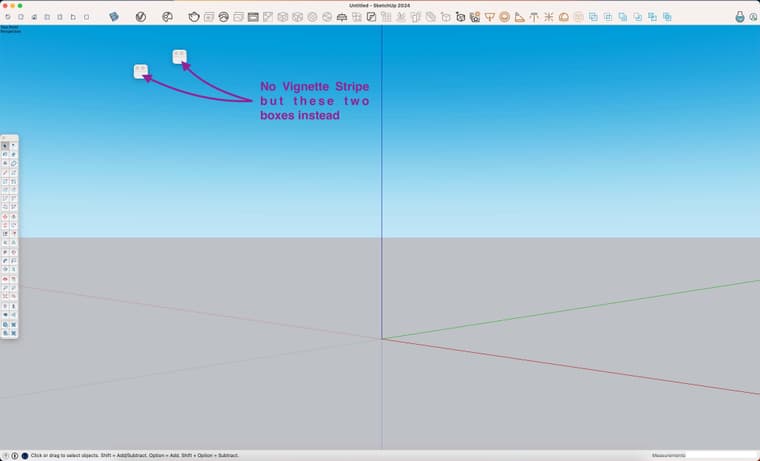
                    S02.jpg

                    According to the Extension Manager, it seems good:
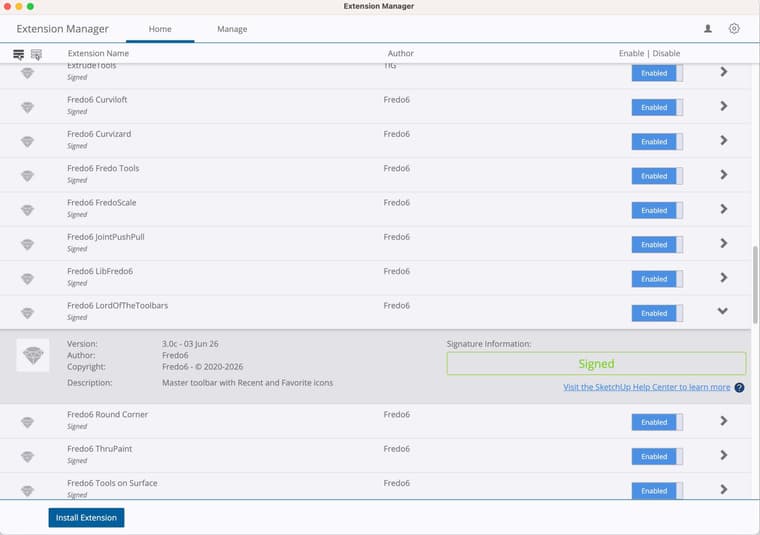
                    S3.jpg

                    But there's a new !LordOfTheToolbars_seed that seems to have appeared and appears to have a problem:
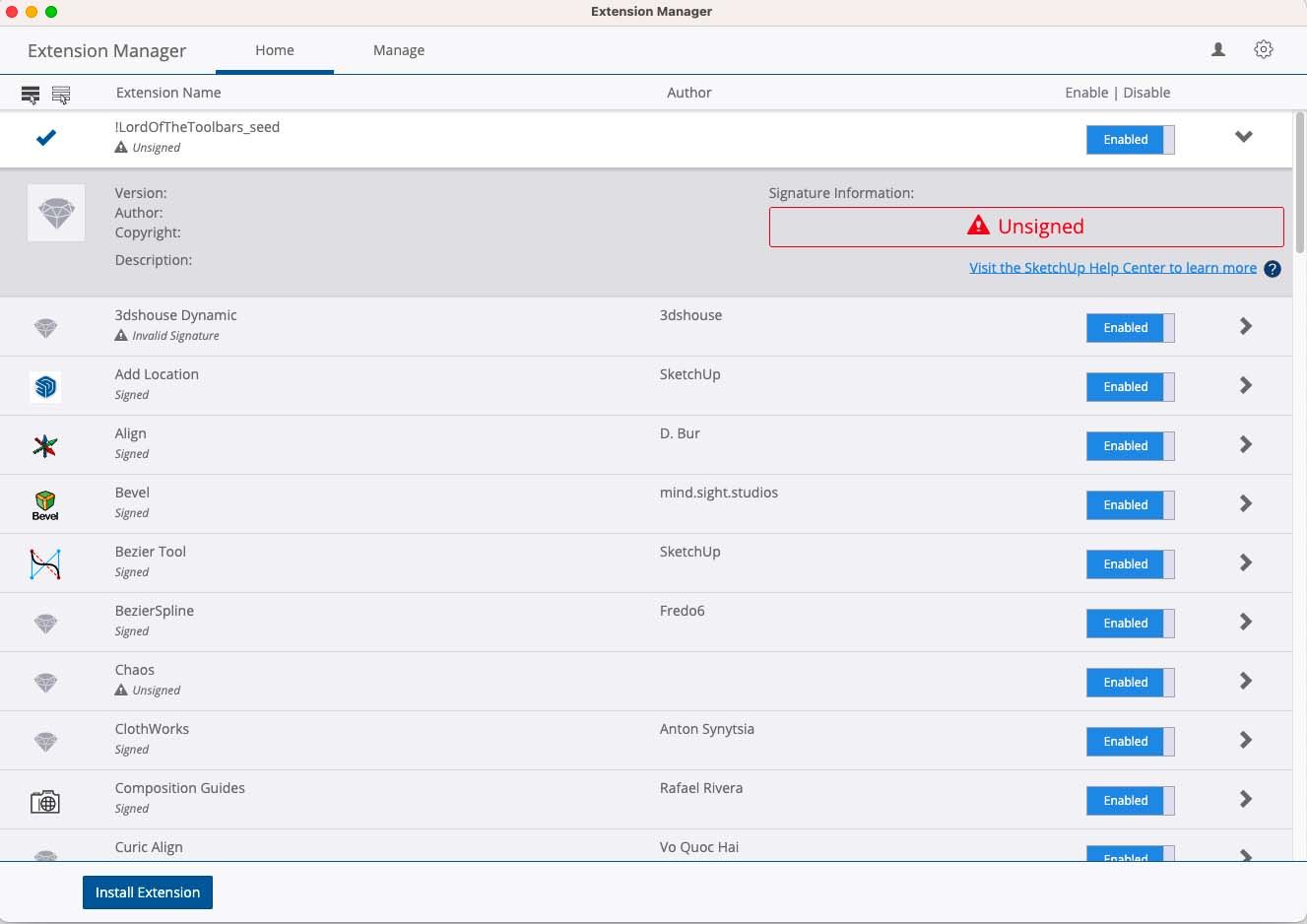
                    S01.jpg

                    I use Sketchup 2024, with LordOfTheToolbars_v2.9c and LibFredo6_v15.2a.
                    Since, I tried to fix the problem, uninstalling the plugins and replacing them by the last versions, LordOfTheToolbars_v3.0c and LibFredo6_v16.0b.
                    And my Loading Policy is set on Unrestricted since forever.
                    The problem remains.

                    May I ask for your help, please?

                    EDIT: I installed SketchUp 2026 with all plugins and the problem remains 😞

                    EDIT #2: I updated LibFredo6 with version: 16.1a. Problem is now solved. Thank you 🙂

                    1 Reply Last reply
                    Reply Quote 0
                    • fredo6F
                      fredo6
                      last edited by

                      NEW RELEASE: LordOfTheToolbars v4.0a - 22 Sep 26

                      Requirements

                      • LibFredo6: v16.2a or above
                      • Sketchup version: SU2017 and above

                      LordOfTheToolbars 4.0a is a maintenance release including:

                      • Compatibility SU2027
                      • Bug fixing

                      Home Page of LordOfTheToolbars for information and Download.

                      Main post of this LordOfTheToolbars thread.

                      1 Reply Last reply
                      Reply Quote 0
                      • H
                        Horizon41
                        last edited by

                        Hi, I am having an issue with the toolbars not adjusting to the content. When I adjust it, it goes back to missing the last tab. The version before adjusted automatically if you were partially over the last tab. I cannot find any related settings. I did try removing the sticky to sketchup window options. Thanks

                        1 Reply Last reply
                        Reply Quote 0
                        • H
                          Horizon41
                          last edited by

                          Hi, thought I had solved the auto adjusting of palettes, but I have re-checked auto adjust on all toolbars and they are not adjusting to show last tab. I am also not able to move palettes even though I have user defined checked in prefs

                          1 Reply Last reply
                          Reply Quote 0
                          • fredo6F
                            fredo6
                            last edited by

                            Could you check the effective version of LibFredo6, as there has been some issues on the Sketchucation server side.
                            Use menu Window > LibFredo6 Settings... > About LibFredo6... You should see v6.2a or 6.2b.

                            H 1 Reply Last reply
                            Reply Quote 0
                            • H
                              Horizon41
                              last edited by

                              Hi, the Library is 6.2b. I am not sure about how to use the Ruby Console to check for errors. I tried leaving it on and restarting sketchup. I am using sketchup pro 21. Everything was ok with the previous version of the Toolbar. Thanks

                              1 Reply Last reply
                              Reply Quote 0
                              • H
                                Horizon41 @fredo6
                                last edited by

                                @fredo6 Hi, I checked the Fredo library and it is correct. I am not sure about how the Ruby + Console works. I tried leaving it open and there are warnings, but I cannot see any mention of LOTT. See below, for 1st console page which contains links that go to a lot of code in the console

                                "Add help menu!"
                                "create new"
                                "created"
                                #Sketchup::Menu:0x000001f0e18eddd8
                                (eval):23: warning: calling URI.open via Kernel#open is deprecated, call URI.open directly or use URI#open
                                internal:warning:43:in warn' <internal:warning>:43:in warn'
                                …/rubygems/core_ext/kernel_warn.rb:52:in call' …/rubygems/core_ext/kernel_warn.rb:52:in block in module:Kernel'
                                …/open-uri.rb:18:in open' (eval):23:in pull'
                                (eval):203:in `block in module:Notification'

                                1 Reply Last reply
                                Reply Quote 0
                                • TIGT
                                  TIG Moderator
                                  last edited by

                                  @horizon41
                                  The current version is 16.2b - perhaps you made a typo ? You need to restart SketchUp after installing any extension so it is properly synced.
                                  Please post the whole error message - part is not sufficient - in the Ruby Console -Ctrl+A to Select All then Ctrl+V to Paste that into your message here...

                                  TIG

                                  1 Reply Last reply
                                  Reply Quote 0
                                  • H
                                    Horizon41
                                    last edited by

                                    Thanks I have restarted each time, after several reinstalls. There is definitely an issue. I was trying to do a clean install. Maybe I need to track down some sort of cache or config file that might be corrupt, it appears to revert to the last backup. Here is the full console message.
                                    Editor Clear
                                    Console
                                    Help Select Menu
                                    "Add help menu!"
                                    "create new"
                                    "created"
                                    #Sketchup::Menu:0x0000020f29900cb0
                                    (eval):23: warning: calling URI.open via Kernel#open is deprecated, call URI.open directly or use URI#open
                                    internal:warning:43:in warn' <internal:warning>:43:in warn'
                                    …/rubygems/core_ext/kernel_warn.rb:52:in call' …/rubygems/core_ext/kernel_warn.rb:52:in block in module:Kernel'
                                    …/open-uri.rb:18:in open' (eval):23:in pull'
                                    (eval):203:in `block in module:Notification'

                                    1 Reply Last reply
                                    Reply Quote 0
                                    • H
                                      Horizon41
                                      last edited by

                                      I can confirm Library is 16.2b

                                      1 Reply Last reply
                                      Reply Quote 0
                                      • TIGT
                                        TIG Moderator
                                        last edited by TIG

                                        The open v. URI.open deprecation issue has been around for quite along time.
                                        Any developer using it will have rewritten their code to sidestep that issue and use the current 'safe' methods...
                                        I can't believe that Fredo has left this 'hanging' - so have you perhaps got some now incorrect older legacy Fredo files loading, which could confuse the situation ?
                                        Fredo might have some ideas as to what files to look for ??
                                        @fredo6 do6 ?

                                        TIG

                                        1 Reply Last reply
                                        Reply Quote 0
                                        • fredo6F
                                          fredo6
                                          last edited by

                                          Did you upgrade Sketchucation tools to 5.0.8 ?

                                          1 Reply Last reply
                                          Reply Quote 0
                                          • TIGT
                                            TIG Moderator
                                            last edited by

                                            @fredo6
                                            Question: why is there an open v. UI.open error message at all ?
                                            I sure you will have trapped for that long ago after the versions' Ruby changes ?
                                            Could he have a rogue file hanging around in one of your subfolders which is somehow loading a spurious old deprecated method ?


                                            TIG

                                            1 Reply Last reply
                                            Reply Quote 0

                                            Hello! It looks like you're interested in this conversation, but you don't have an account yet.

                                            Getting fed up of having to scroll through the same posts each visit? When you register for an account, you'll always come back to exactly where you were before, and choose to be notified of new replies (either via email, or push notification). You'll also be able to save bookmarks and upvote posts to show your appreciation to other community members.

                                            With your input, this post could be even better 💗

                                            Register Login
                                            • 1
                                            • 2
                                            • 23
                                            • 24
                                            • 25
                                            • 26
                                            • 27
                                            • 27 / 27
                                            • First post
                                              Last post
                                            Buy SketchPlus
                                            Buy SUbD
                                            Buy WrapR
                                            Buy eBook
                                            Buy Modelur
                                            Buy Vertex Tools
                                            Buy SketchCuisine
                                            Buy FormFonts

                                            Advertisement