[Plugin] LordOfTheToolbars - v2.9c - 20 Dec 24




-
Just in case could you open the Default Parameters dialog and uncheck or check this option

-
Hello Fredo, thank you for another great extension!
Just a question, the quick command search does not work anymore, is anybody else having the issue? -
Could you explain what exactly does not work.. Thanks
-
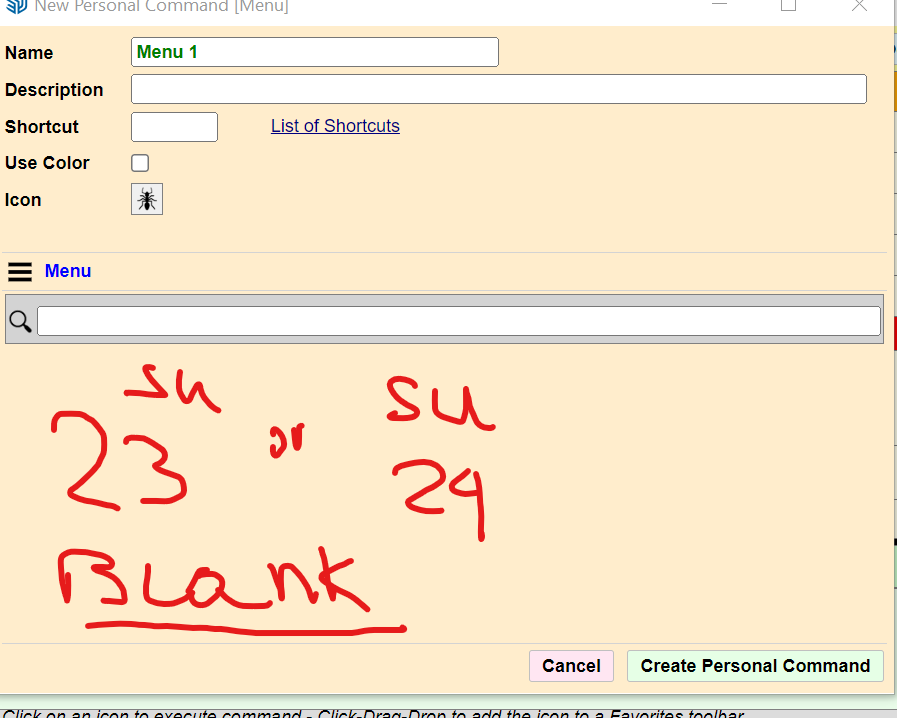
There is a bug in SU 23 and SU 24 extensions when creating New Personal Command (MENU) The list of available comments is missing...
-
Actually, access to menu commands has been removed from LOTT as of SU2023.
This is because of a change of UI framework of Sketchup.
-
Ah, ok. Thanks for the info. It was nice to have that before.
-
NEW RELEASE: LordOfTheToolbars v2.7c - 20 Apr 24
Requirements
- LibFredo6: v14.3b or above
- Sketchup version: SU2017 and above
LordOfTheToolbars 2.7c is a maintenance release for:
- SU2024
- Fix for context menu in the palettes
Home Page of LordOfTheToolbars for information and Download.
-
@ltchest Hi, I know it's been 3 years but could you expand on that "Exclude" vray option?. I'm having the same issue here.
-
@Ramzix nwm, got it

-
@fredo6 I'm sorry it take me so much to reply, life got busy.
Basically nothing happens when I try to open the quick command finder, it does not matter if by the vignette stripe, the tools menu or the icon. Nothing happens -
Can you confirm you installed the latest version of LibFredo6 and LOTT.
Also, can you open the Ruby Console before clicking on the Fnd icon, in case there are error displayed
-
@fredo6 "En fait, l'accès aux commandes de menu a été supprimé de LOTT à partir de SU2023.Cela est dû à un changement du cadre de l'interface utilisateur de Sketchup."
Bonjour Fredo, en claire cela veut dire quoi, que dans une prochaine version tu pourras résoudre le problème, ou on peut oublier. Merci d'avance pour la réponse et félicitation pour la somme de tous tes travaux.
-
En trois mots : on peut oublier, sauf si Sketchup évolue son API.
-
@fredo6
again, sorry for the late reply, I don't get email notifications for the forum.Yes. both LibFredo6 and LOTT are updated.
Here is the ruby console dialog:
Error: #<RangeError: invalid codepoint 0xD83D in UTF-8>
c:/users/giordano/appdata/roaming/sketchup/sketchup 2021/sketchup/plugins/fredo6_!libfredo6/body_lib6g6.rbe:6125:inall_menus' c:/users/giordano/appdata/roaming/sketchup/sketchup 2021/sketchup/plugins/fredo6_!libfredo6/body_lib6g6.rbe:6125:inmenu_mapping'
c:/users/giordano/appdata/roaming/sketchup/sketchup 2021/sketchup/plugins/fredo6_!libfredo6/body_lib6g6.rbe:6203:inmenu_structured_list' c:/users/giordano/appdata/roaming/sketchup/sketchup 2021/sketchup/plugins/!!fredo6_lordofthetoolbars/lordofthetoolbarsfinddialog.rbe:219:inprepare_data'
c:/users/giordano/appdata/roaming/sketchup/sketchup 2021/sketchup/plugins/!!fredo6_lordofthetoolbars/lordofthetoolbarsfinddialog.rbe:136:indialog_invoke' c:/users/giordano/appdata/roaming/sketchup/sketchup 2021/sketchup/plugins/!!fredo6_lordofthetoolbars/lordofthetoolbarsmanager.rbe:5379:inminifind_invoke'
c:/users/giordano/appdata/roaming/sketchup/sketchup 2021/sketchup/plugins/!!fredo6_lordofthetoolbars/lordofthetoolbarsvignettedialog.rbe:888:inminifind_invoke' c:/users/giordano/appdata/roaming/sketchup/sketchup 2021/sketchup/plugins/!!fredo6_lordofthetoolbars/lordofthetoolbarsvignettedialog.rbe:619:indialog_callback_exec'
c:/users/giordano/appdata/roaming/sketchup/sketchup 2021/sketchup/plugins/!!fredo6_lordofthetoolbars/lordofthetoolbarsvignettedialog.rbe:588:indialog_callback' c:/users/giordano/appdata/roaming/sketchup/sketchup 2021/sketchup/plugins/fredo6_!libfredo6/body_lib6chromiumwdlg.rbe:2456:incall'
c:/users/giordano/appdata/roaming/sketchup/sketchup 2021/sketchup/plugins/fredo6_!libfredo6/body_lib6chromiumwdlg.rbe:2456:inmaster_callback' c:/users/giordano/appdata/roaming/sketchup/sketchup 2021/sketchup/plugins/fredo6_!libfredo6/body_lib6chromiumwdlg.rbe:2221:inj_action'
c:/users/giordano/appdata/roaming/sketchup/sketchup 2021/sketchup/plugins/fredo6_!libfredo6/body_lib6chromiumwdlg.rbe:2180:inj_callback' c:/users/giordano/appdata/roaming/sketchup/sketchup 2021/sketchup/plugins/fredo6_!libfredo6/body_lib6chromiumwdlg.rbe:2166:inblock in j_dispatch'
c:/users/giordano/appdata/roaming/sketchup/sketchup 2021/sketchup/plugins/fredo6_!libfredo6/body_lib6chromiumwdlg.rbe:2158:ineach' c:/users/giordano/appdata/roaming/sketchup/sketchup 2021/sketchup/plugins/fredo6_!libfredo6/body_lib6chromiumwdlg.rbe:2158:inj_dispatch'
c:/users/giordano/appdata/roaming/sketchup/sketchup 2021/sketchup/plugins/fredo6_!libfredo6/body_lib6chromiumwdlg.rbe:1436:in `block in create_dialog' -
Hi!
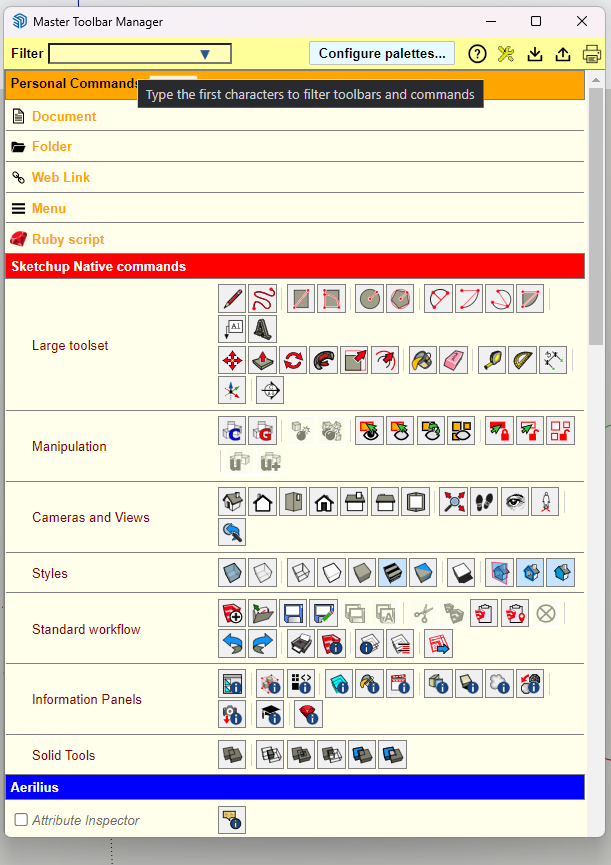
I am having issue with Master Toolbar manager. It does not display my custom toolbars anymore... When I opened it for the first time it appeared and then when i tried to resize the window it disappeared and I cannot get it back to show again.
-



I've created a custom toolbar with two personal commands as well as custom icons for them. When doing export/import from one PC to another, on the other PC custom commands loaded with missing icons. That would not be the problem but they're missing from the "Menu" list as well so Im unable to change the icons.
Tried simply adding the personal commands once again but it resulted in duplicated command.
Any tips on how to fix it?
The extension is amazing, will pay! :))
-
@fredo6
Hello Fredo6, Plugin LordOfTheToolbar 12.7C does not work on Sketchup 2024.0.553, right? -
LOTT is free for the time being. It has an expiration of 31-12-2024. Will this have a perpetual license going forward? It looks good but I want to make sure that this is going to be around.
-
@fredo6
I tried the sticky button like you suggested I still need to go into my display settings and may my monitor my " main Monitor" other wise the vignette will remain stuck on my laptops screen -
It was my very favourite feature and I used it all the time,
Today, after downloading the latest version, the extension is no longer available.
No matter how many times I download it, it does not appear in the tools.
I would like to revert to one of the previous versions, from where can I download it?
Thank you very much in advance.


Hello! It looks like you're interested in this conversation, but you don't have an account yet.
Getting fed up of having to scroll through the same posts each visit? When you register for an account, you'll always come back to exactly where you were before, and choose to be notified of new replies (either via email, or push notification). You'll also be able to save bookmarks and upvote posts to show your appreciation to other community members.
With your input, this post could be even better 💗
Register Login


Advertisement