sketchucation logo sketchucation
    • 登入
    Oops, your profile's looking a bit empty! To help us tailor your experience, please fill in key details like your SketchUp version, skill level, operating system, and more. Update and save your info on your profile page today!
    🔌 Smart Spline | Fluid way to handle splines for furniture design and complex structures. Download

    [Plugin] LordOfTheToolbars - v2.9c - 20 Dec 24


    已排程 已置頂 已鎖定 已移動 Plugins
    481 貼文 92 Posters 356.6k 瀏覽 91 Watching
    正在載入更多貼文
    • 從舊到新
    • 從新到舊
    • 最多點贊
    回覆
    • 在新貼文中回覆
    登入後回覆
    此主題已被刪除。只有擁有主題管理權限的使用者可以查看。
    • A 離線
      aa6
      最後由 編輯

      Having similar problem... the plug-in seems to work fine, but I can't get the vignette stripe to display. I can see it with "pop up the vignette stripe" but it comes up as a floating menu and then disappears when I click away.

      1 條回覆 最後回覆 回覆 引用 0
      • fredo6F 離線
        fredo6
        最後由 編輯

        @aa6 said:

        Having similar problem... the plug-in seems to work fine, but I can't get the vignette stripe to display. I can see it with "pop up the vignette stripe" but it comes up as a floating menu and then disappears when I click away.

        Could you open the Ruby Console at startup to see potential errors (just open the Ruby console, quit Sketchup and restart Sketchup).

        1 條回覆 最後回覆 回覆 引用 0
        • A 離線
          AISmebel
          最後由 編輯

          I really look forward to fixing this error.
          I have been working with this problem for several months, it greatly interferes when after each launch of SU. When you first need to run Lord (so that the icons appear), and then they need to be put in their places (because after launch they appear in the center of the monitor) 😞((

          1 條回覆 最後回覆 回覆 引用 0
          • A 離線
            aa6
            最後由 編輯

            Hi - Thanks for the quick response! I re-started with the ruby console open, but I don't see any errors - although I'm not exactly sure what I'm looking for.

            1 條回覆 最後回覆 回覆 引用 0
            • R 離線
              rv1974
              最後由 編輯

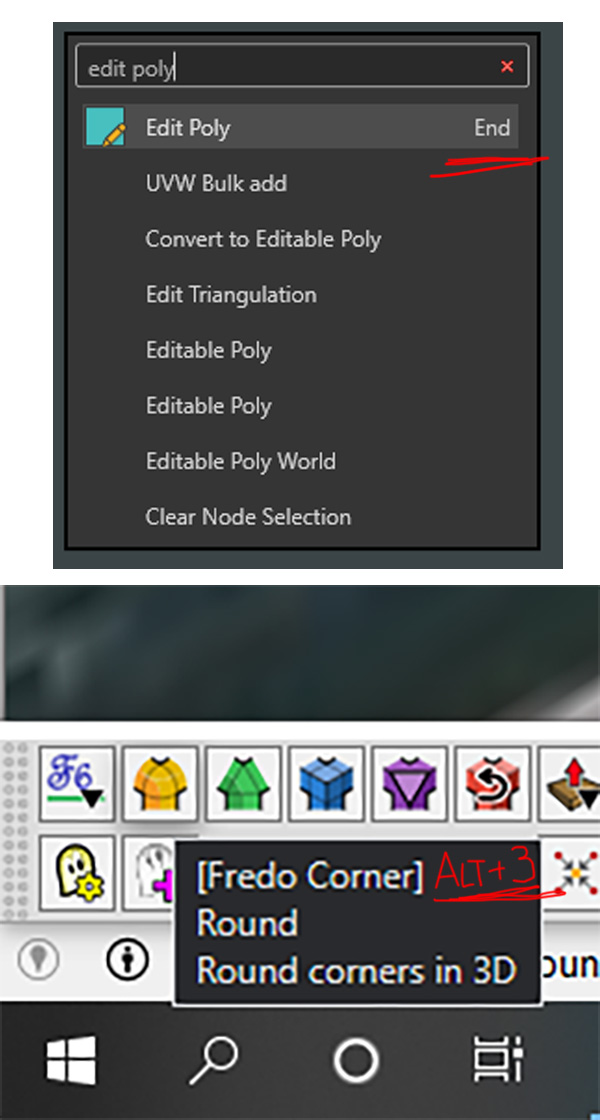
              Fredo, is there any technical obstacle to show user's shortcuts in the tool tips and command search?

              Untitled-1.jpg

              1 條回覆 最後回覆 回覆 引用 0
              • D 離線
                digitect
                最後由 編輯

                No vignette stripe for me either on SketchUp Pro 2020 on Windows 10, with LOTT v2.0a and LibFredo6 v12.8a.

                I can make it temporarily visible via menu Tools > Fredo6 Collection > LOTT > Pop Up but then it disappears the first click anywhere in the SketchUp window. Ruby Console shows no actions or errors.

                1 條回覆 最後回覆 回覆 引用 0
                • S 離線
                  Scozzarella
                  最後由 編輯

                  Sketchup 2022 MAC

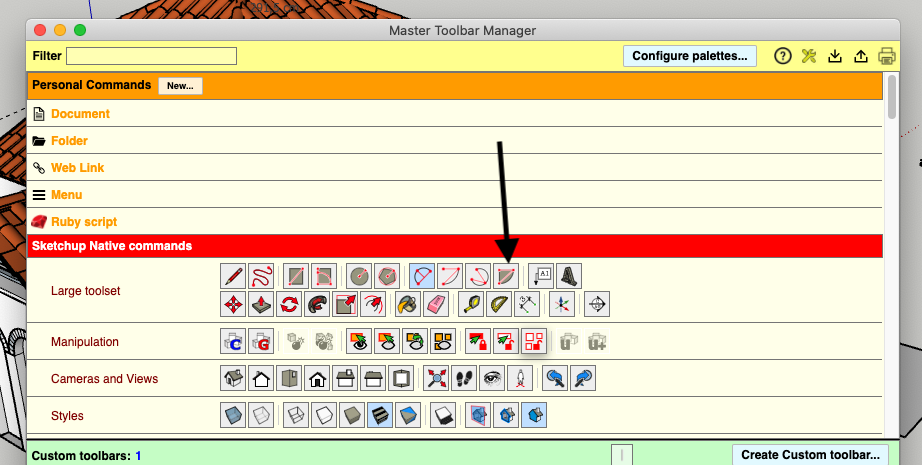
                  the Pie Tool doesn't work if I press the button on Palette of LordofTheToolbars.

                  Is it a bug?

                  1 條回覆 最後回覆 回覆 引用 0
                  • D 離線
                    digitect
                    最後由 編輯

                    @digitect said:

                    No vignette stripe for me...

                    UPDATE: I position my Windows taskbar at screen top, and found LOTT beneath it. So that default needs to be adjusted. Once I found, and adjusted, several LOTT positioning options from their defaults (sticky to Sketchup window, position in Popup mode, position when cycling), it behaved as expected.

                    1 條回覆 最後回覆 回覆 引用 0
                    • fredo6F 離線
                      fredo6
                      最後由 編輯

                      @scozzarella said:

                      Sketchup 2022 MAC

                      the Pie Tool doesn't work if I press the button on Palette of LordofTheToolbars.

                      Is it a bug?

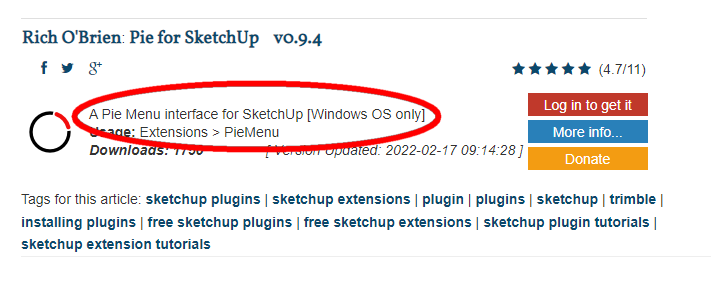
                      As far as I now the Pie tool (from Rich O Brien) is not supported on Mac.

                      1 條回覆 最後回覆 回覆 引用 0
                      • Dave RD 離線
                        Dave R
                        最後由 編輯

                        @scozzarella said:

                        Sketchup 2022 MAC...

                        Is it a bug?

                        No. As Fredo indicated, Pie is Windows only.

                        Screenshot - 5_11_2022 , 2_06_04 PM.png

                        Etaoin Shrdlu

                        %

                        (THERE'S NO PLACE LIKE)

                        G28 X0.0 Y0.0 Z0.0

                        M30

                        %

                        1 條回覆 最後回覆 回覆 引用 0
                        • S 離線
                          Scozzarella
                          最後由 編輯

                          /Users/angeloscozzarella/Desktop/Schermata 2022-05-12 alle 04.42.13.png

                          1 條回覆 最後回覆 回覆 引用 0
                          • S 離線
                            Scozzarella
                            最後由 編輯

                            Schermata 2022-05-12 alle 04.42.13.png

                            1 條回覆 最後回覆 回覆 引用 0
                            • fredo6F 離線
                              fredo6
                              最後由 編輯

                              @Scozzarella

                              What is the problem?

                              1 條回覆 最後回覆 回覆 引用 0
                              • S 離線
                                Scozzarella
                                最後由 編輯

                                @fredo6 said:

                                @Scozzarella

                                What is the problem?

                                If I click on the button with tool indicates by my arrow, (Arc Pie Tool) the tool doesn't activate.

                                1 條回覆 最後回覆 回覆 引用 0
                                • fredo6F 離線
                                  fredo6
                                  最後由 編輯

                                  @scozzarella said:

                                  If I click on the button with tool indicates by my arrow, (Arc Pie Tool) the tool doesn't activate.

                                  Strange. On Mac, it works for SU2021, but not for SU2022

                                  Thanks for signaling the problem.

                                  1 條回覆 最後回覆 回覆 引用 0
                                  • S 離線
                                    Scozzarella
                                    最後由 編輯

                                    you are welcome

                                    1 條回覆 最後回覆 回覆 引用 0
                                    • fredo6F 離線
                                      fredo6
                                      最後由 編輯

                                      NEW RELEASE: LordOfTheToolbars v2.1a - 14 May 22

                                      Requirements

                                      • LibFredo6: v12.9a or above
                                      • Sketchup version: SU2017 and above

                                      LordOfTheToolbars 2.1a includes

                                      • Bug fixing
                                      • Future compatibility

                                      Home Page of LordOfTheToolbars for information and Download.

                                      Main post of this LordOfTheToolbars thread.

                                      1 條回覆 最後回覆 回覆 引用 0
                                      • S 離線
                                        Scozzarella
                                        最後由 編輯

                                        thank you very much

                                        1 條回覆 最後回覆 回覆 引用 0
                                        • R 離線
                                          Rougeee
                                          最後由 編輯

                                          Hi,

                                          Why the "selection arrow" is not on the master toolbar list ?

                                          This would be very useful for me to customize a side toolbar on a single column rather than the two columns of the "large toolset" bar.

                                          I know that I can use the spacebar at any time, but it would be more practical for me to have the "selection arrow" icon accessible.

                                          Thanks.

                                          1 條回覆 最後回覆 回覆 引用 0
                                          • Dave RD 離線
                                            Dave R
                                            最後由 編輯

                                            @rougeee said:

                                            This would be very useful for me to customize a side toolbar on a single column rather than the two columns of the "large toolset" bar.

                                            You could natively (without LOTT) create a custom toolbar to replace the Large Toolset.

                                            Etaoin Shrdlu

                                            %

                                            (THERE'S NO PLACE LIKE)

                                            G28 X0.0 Y0.0 Z0.0

                                            M30

                                            %

                                            1 條回覆 最後回覆 回覆 引用 0
                                            • 1
                                            • 2
                                            • 18
                                            • 19
                                            • 20
                                            • 21
                                            • 22
                                            • 23
                                            • 24
                                            • 25
                                            • 20 / 25
                                            • 第一個貼文
                                              最後的貼文
                                            Buy SketchPlus
                                            Buy SUbD
                                            Buy WrapR
                                            Buy eBook
                                            Buy Modelur
                                            Buy Vertex Tools
                                            Buy SketchCuisine
                                            Buy FormFonts

                                            Advertisement