[Plugin] LordOfTheToolbars - v2.9c - 20 Dec 24




-
Please help
I have set up LOTT but the vignette strip is stuck on my laptop screen and will not drag to my 2nd larger screen where I use SU. I can solve this by making the 2nd screen the main screen in windows11 but then SU does not allow me to access the standard menus and SU freezes. I run lot s of pluggins and this is the first time I have had this issue. Having the vignette strip on the laptop screen also means The favourite pallets I have made open on that screen as well and the shortcuts don't work. This make LOTT un useable for me which would be a shame because it looks awesome.
I would be extremely grateful if you cold help trouble shoot this issue.
Kind regardsMike
-
Further to previous post. It is worth noting that the LOTT toolbar is open on the main screen. The favourite, master and shortcut menus open on laptop and can be dragged to main screen but everything else is stuck on the laptop screen. Its like the vignette strip does not recognise the second screen.
I am using LOTT V1.6a and LIBfredo6 v12.3a. SU2021 all up to date.
Thanks -
It's funny, because other users have complained that the Vignette Stripe does not follow Sketchup when the main SU window is moved to another monitor (hence the changes I made to keep the Vignette Stripe position relative to the Sketchup viewport).
I need to think a little bit to see how to accommodate all requirements.
-
Thanks for the prompt response.
Would it be possible for me to download an earlier version that would work?
CheersMike
-
Talking of moving to 2nd monitor.. I'm so pleased with rosette behavior - it preserves location perfectly and no more disappearings

Hope one day palettes will be able to keep their relative location while manipulating SU viewport in precise manner as well. -
@rv1974 said:
Talking of moving to 2nd monitor.. I'm so pleased with rosette behavior - it preserves location perfectly and no more disappearings
What is the rosette behavior again?
-
I mean vignette. I got addicted to Stromae's Sante lately Haha
-
@haymaker said:
Thanks for the prompt response.
Would it be possible for me to download an earlier version that would work?Instead, I would suggest that you install LOTT V1.6b, which includes an option for setting or unsetting the stickiness of the Vignette Stripe to the Sketchup window (ON by default, so you would need to disable it in the Default Parameters).

-
NEW RELEASE: LordOfTheToolbars v1.6b - 06 Jan 22
Requirements
- LibFredo6: v12.3a or above
- Sketchup version: SU2017 and above
LordOfTheToolbars 1.6b includes
- New parameter (in the Default Parameter dialog box) to enable / disable the stickiness of the Vignette Stripe to the Sketchup Window (default is enabled).

Home Page of LordOfTheToolbars for information and Download.
-
Hey.
Great customer service.
I have updated LOTT to 6b but the problem persists. The vignette strip and the favourite pallets that I have made are stuck on the main laptop screen. I also have the problem that whenever I enter text into a dialogue box then the shortcut keys are activated. For example when I make a component with the name 'nog' as soon as I type O the Edit pallet opens up.
I have disabled all my other extensions but it makes no difference. Could this be an installation error. If delete the LOTT extension and reinstall it will I lose all my pallets and shortcuts.
Thank you for your help so far. I am really looking forward to getting this sorted as your plugin will improve my workflow.
ThanksMike
-
@haymaker said:
I have updated LOTT to 6b but the problem persists. The vignette strip and the favourite pallets that I have made are stuck on the main laptop screen.
Did you disable the stickiness of the Vignette Stripe in the Default Parameters?
For palettes, they are sticky. So I will make an option to release stickiness for them.
@haymaker said:
I also have the problem that whenever I enter text into a dialogue box then the shortcut keys are activated. For example when I make a component with the name 'nog' as soon as I type O the Edit pallet opens up.
Good catch. I will fix that.
-
Hey
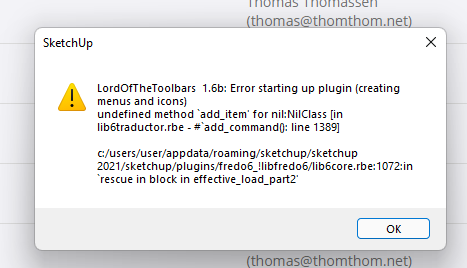
I deleted LOTT. I reinstalled it and have attached a screenshot of the error that showed up. I continued with the install and have the same issues. I am not sure if this error has anything to do with the problems I have or not.
ThanksMike
-
@fredo6 said:
Did you disable the stickiness of the Vignette Stripe in the Default Parameters?
Sure did, problem still persists, I can work around it by going into windows display settings and making my external screen the main screen however this seems to cause problems, mainly that if I try and open the Preferences or Model info then SU freezes?? So not really an option..
CheersMike
-
@haymaker said:
@fredo6 said:
Did you disable the stickiness of the Vignette Stripe in the Default Parameters?
Sure did, problem still persists, I can work around it by going into windows display settings and making my external screen the main screen however this seems to cause problems, mainly that if I try and open the Preferences or Model info then SU freezes?? So not really an option..
CheersMike
I sent you a PM for the multiple issues you have
-
NEW RELEASE: LordOfTheToolbars v1.6c - 08 Jan 22
Requirements
- LibFredo6: v12.3a or above
- Sketchup version: SU2017 and above
LordOfTheToolbars 1.6c includes
- Bug fixing for palette and personal commands shortcuts
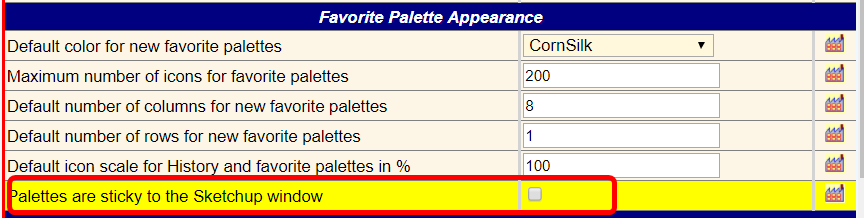
- New parameter (in the Default Parameter dialog box) to enable / disable the stickiness of the Palettes to the Sketchup Window (default is enabled).
Home Page of LordOfTheToolbars for information and Download.
-
Started to look at this very rich looking extension - via SketchupEssentials video.
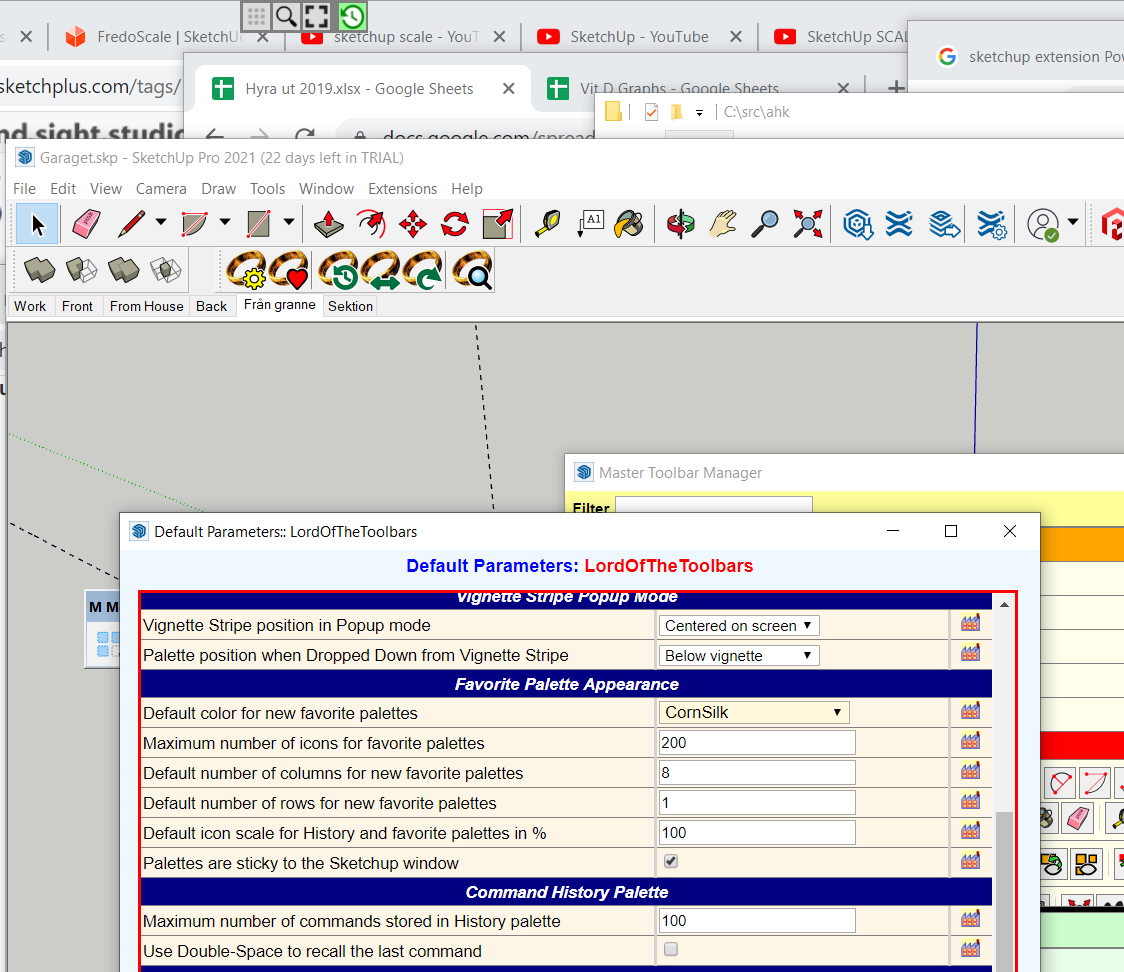
I have the issue of the main "palette" (Vignette stripe?) not showing up in the Sketchup main window bar - but rather at the top of the screen - See image.
I tried the setting: "Palettes are sticky to the Sketchup window" - still stays on top of screen.
Advice ?
-
For clarification
- Stickiness means that the palettes or Vignette Stripe follow move when the Sketchup window is moved. But you decide where to position them manually
- There are separate stickiness options for the Vignette Stripe and for palettes
-
I got the Vignette stripe to move with the SU window now, thanks.
However, I had do both activate the "Vignette Stripe is sticky" option and then manually move it somewhere over the Sketchup window.
If I did not move it manually somewhere over the Sketchup window, the Vignette option just stayed in one place, even when I moved the SU window.
For me, good enough
! -
NEW RELEASE: LordOfTheToolbars v1.7a - 09 Jan 22
Requirements
- LibFredo6: v12.4a or above
- Sketchup version: SU2017 and above
LordOfTheToolbars 1.7a includes
- Bug fixing for palette and personal commands shortcuts
- Bug fixing for list of shortcuts dialog
- Bug fixing for appearance of palettes when never displayed.
Home Page of LordOfTheToolbars for information and Download.
-
Hi Fredo, I'm having problem trying this plugin on a M1 chipset Apple MacBook Pro.
I'm on SketchUp Pro 2021 on 16" MacBook Pro with Apple M1 Max running macOS Monterey. And LordOfTheToolbars is not running properly. All other plugins by Fredo is fine, including FredoCorner and JointPushPull. Only when SIP is disabled, LordOfTheToolbars will run without issue.
Will try to make some screenshots later.



Advertisement