sketchucation logo sketchucation
    • 登入
    Oops, your profile's looking a bit empty! To help us tailor your experience, please fill in key details like your SketchUp version, skill level, operating system, and more. Update and save your info on your profile page today!
    🔌 Smart Spline | Fluid way to handle splines for furniture design and complex structures. Download

    Point To Center

    已排程 已置頂 已鎖定 已移動 SketchUp Discussions
    sketchup
    22 貼文 5 Posters 2.9k 瀏覽 5 Watching
    正在載入更多貼文
    • 從舊到新
    • 從新到舊
    • 最多點贊
    回覆
    • 在新貼文中回覆
    登入後回覆
    此主題已被刪除。只有擁有主題管理權限的使用者可以查看。
    • Joe WoodJ 離線
      Joe Wood
      最後由 編輯

      Hhmmm, I R click on an arc, but there's no point to center, where'd it go?

      using 2015, win 10 recently installed.

      Joe Wood
      woodsshop.com/

      1 條回覆 最後回覆 回覆 引用 0
      • Dave RD 離線
        Dave R
        最後由 編輯

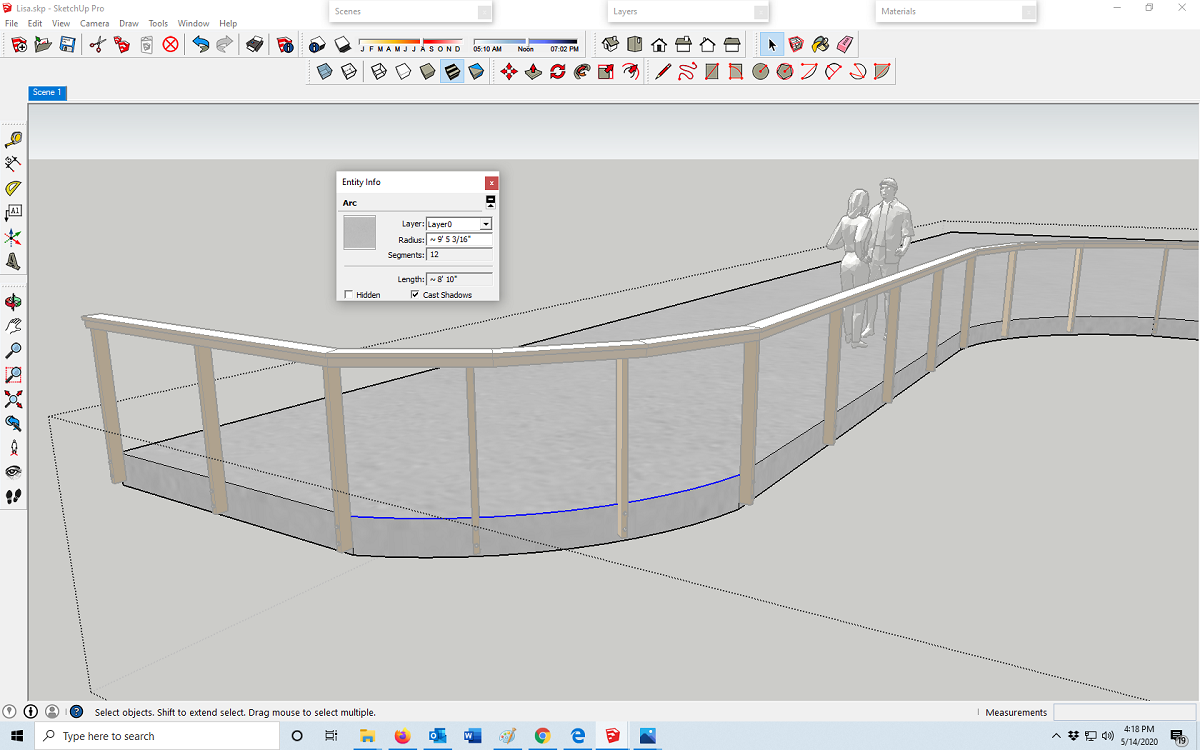
        When you select the arc does Entity Info report it as an arc or as a curve?

        2015 is a long time ago but if I remember correctly Point AT center was from a plugin. Since then, maybe in 2018, there's a native Find Center for arcs and circles.

        Etaoin Shrdlu

        %

        (THERE'S NO PLACE LIKE)

        G28 X0.0 Y0.0 Z0.0

        M30

        %

        1 條回覆 最後回覆 回覆 引用 0
        • Joe WoodJ 離線
          Joe Wood
          最後由 編輯

          Shows it as an arc , where do I get that plugin?

          1a.png

          Joe Wood
          woodsshop.com/

          1 條回覆 最後回覆 回覆 引用 0
          • Dave RD 離線
            Dave R
            最後由 編輯

            There's TIG's Center Point All from SCF, Thom Thom's Guide Tools from the Extension Warehouse, and others.

            Etaoin Shrdlu

            %

            (THERE'S NO PLACE LIKE)

            G28 X0.0 Y0.0 Z0.0

            M30

            %

            1 條回覆 最後回覆 回覆 引用 0
            • Joe WoodJ 離線
              Joe Wood
              最後由 編輯

              can you give me a link to that Dave? Is Tig's the simplest for point to center?

              Joe Wood
              woodsshop.com/

              1 條回覆 最後回覆 回覆 引用 0
              • Dave RD 離線
                Dave R
                最後由 編輯

                Joe, you should click on the PluginStore link once in awhile and have a look at what's available. You'll find TIG's Center Point All and many other extensions and plugins.

                @unknownuser said:

                Is Tig's the simplest for point to center?

                According to the description it can't get much simpler.

                @unknownuser said:

                Adds a centerpoint to anything that's selected - Group, ComponentInstance, Line, Circle, Face etc.

                Etaoin Shrdlu

                %

                (THERE'S NO PLACE LIKE)

                G28 X0.0 Y0.0 Z0.0

                M30

                %

                1 條回覆 最後回覆 回覆 引用 0
                • Joe WoodJ 離線
                  Joe Wood
                  最後由 編輯

                  You have to excuse me Dave I'm not a plugin type of guy, this will probably be the first one I've used 🙂

                  Joe Wood
                  woodsshop.com/

                  1 條回覆 最後回覆 回覆 引用 0
                  • Joe WoodJ 離線
                    Joe Wood
                    最後由 編輯

                    I downloaded that from TIG,

                    do I need to install it somewhere to make it available?

                    Joe Wood
                    woodsshop.com/

                    1 條回覆 最後回覆 回覆 引用 0
                    • cottyC 離線
                      cotty
                      最後由 編輯

                      I thinks TIGs pulgin don't find the center of an arc, maybe this plugin from Chris can help in this case:
                      https://sketchucation.com/pluginstore?pln=clf_arc_centerpoint_finder

                      my SketchUp gallery

                      1 條回覆 最後回覆 回覆 引用 0
                      • Dave RD 離線
                        Dave R
                        最後由 編輯

                        Cotty is right it puts center points at everything but arcs and circles. Still, installation is done by going to Preferences>Extensions and clicking on Install Extension. then you select the downloaded extension, click Open, and OK.

                        Since 2019 SketchUp can natively mark the centers of arcs and circles. No need for an extension at all.

                        Etaoin Shrdlu

                        %

                        (THERE'S NO PLACE LIKE)

                        G28 X0.0 Y0.0 Z0.0

                        M30

                        %

                        1 條回覆 最後回覆 回覆 引用 0
                        • TIGT 離線
                          TIG Moderator
                          最後由 編輯

                          Here's a quick arc/circle/polygon center point tool.
                          Put the RB into the Plugins folder and restart SketchUp.
                          It adds a new menu item if the selected object is one of those things, and then adds a guide-point at the center...
                          ArcContextmenu.rb
                          To open your Plugins folder you can copy/paste this snippet in the Ruby Console [PC]...
                          UI.openURL("file:///#{Sketchup.find_support_file('Plugins')}")
                          For a newer version & MAC you can use...
                          system("open #{Sketchup.find_support_file('Plugins').inspect}")

                          TIG

                          1 條回覆 最後回覆 回覆 引用 0
                          • Joe WoodJ 離線
                            Joe Wood
                            最後由 編輯

                            Right on Tig, would that be better then the one offered by Chris? I really only need to find center of arcs, can't even remember wanting to find center of a circle.

                            Joe Wood
                            woodsshop.com/

                            1 條回覆 最後回覆 回覆 引用 0
                            • TIGT 離線
                              TIG Moderator
                              最後由 編輯

                              Chris's tool doesn't actually find the center of an arc unless you have exploded it, then it works backwards to work out the center of a possible arc from two of the [now] separate edges, which could have been before !

                              So my version is probably the best for you.
                              If you only want to find Arc centers it's fine - with one [arc-curve] selected the context-menu says "Point at Center of Arc".
                              If it's a circle then it's actually an arc that loops back on itself in 360° - it then says "...of Circle".
                              Because a polygon is really a special kind of circle that doesn't produce smoothed extrusions in that case it says "...of Polygon".

                              But if you find yourself with some edges which were once an arc, then using Chris's tool will help...

                              TIG

                              1 條回覆 最後回覆 回覆 引用 0
                              • Joe WoodJ 離線
                                Joe Wood
                                最後由 編輯

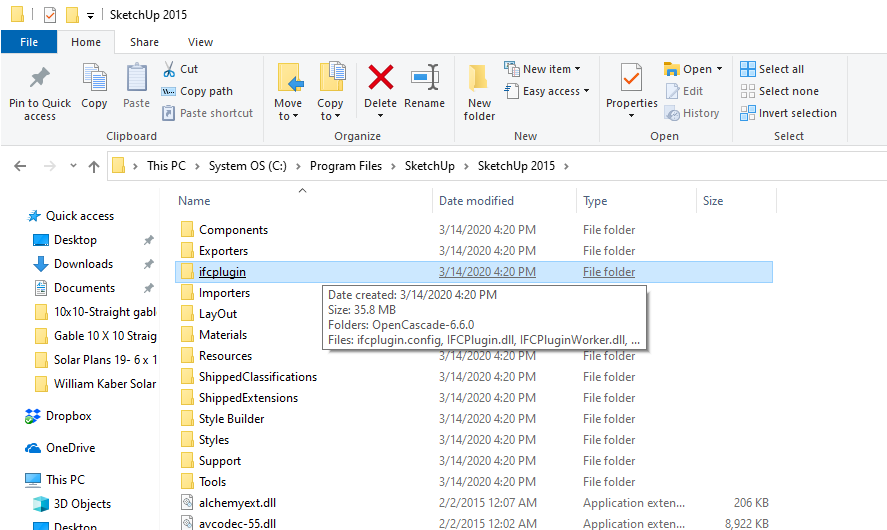
                                Hhmmm, trying to install that rb, went to SUp 2015 but don't see a Plugins folder, only a ifc plugins, and I don't see any other rb files in there?

                                also I went to Preferences>Extensions and clicked on Install Extension, browsed to th Downloads folder but only see the other rb I downloaded yesterday. I dragged it out of downloads to my desktop but can't see it there either?

                                1PlugIns.png

                                Joe Wood
                                woodsshop.com/

                                1 條回覆 最後回覆 回覆 引用 0
                                • Joe WoodJ 離線
                                  Joe Wood
                                  最後由 編輯

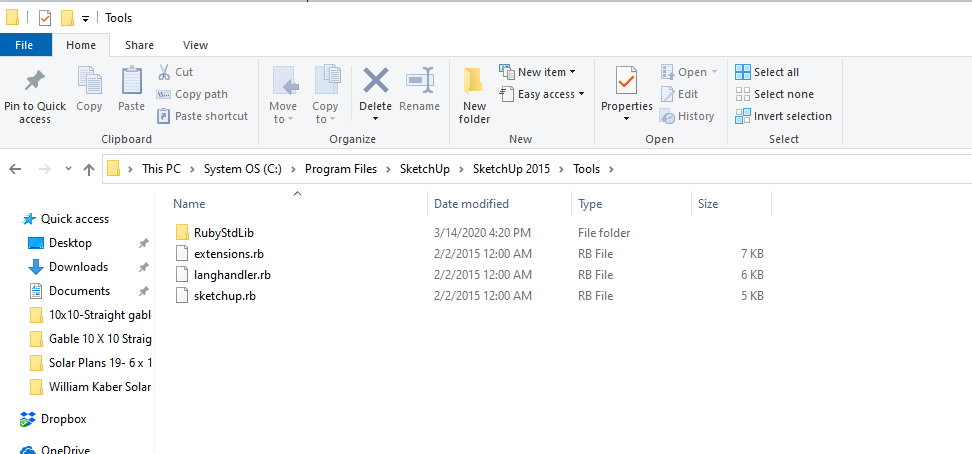
                                  I see other rb in the Tools folder?


                                  2.png

                                  Joe Wood
                                  woodsshop.com/

                                  1 條回覆 最後回覆 回覆 引用 0
                                  • TIGT 離線
                                    TIG Moderator
                                    最後由 編輯

                                    You can only install RBZ files using the Extension Manager dialog.
                                    These go into your user's Plugins folder...
                                    For such a simple RB you just put it directly into your Plugins folder.
                                    Your user's Plugins folder [in all newer SketchUp versions] is now 'hidden', and it's in your AppData tree.
                                    So that's why I gave you [what I thought were] clear instructions on how to open the Plugins folder using the Ruby Console...
                                    To reiterate... In SketchUp open the menu item Window > Ruby Console and paste the text in and press <enter>
                                    UI.openURL("file:///#{Sketchup.find_support_file('Plugins')}")
                                    Your Plugins folder will open and you then simply drop the RB into it...
                                    Restart SketchUp to auto-load the new RB file...

                                    TIG

                                    1 條回覆 最後回覆 回覆 引用 0
                                    • TIGT 離線
                                      TIG Moderator
                                      最後由 編輯

                                      Sorry if I was a bit terse - the unseasonal gales are blowing half my garden away !
                                      Here's an RBZ equivalent to the previous RB file - I simply zipped the .rb file and changed its .zip to .rbz
                                      Download this RBZ, then use the built-in Extension Manager's dialog's red-button to auto-install it...
                                      ArcContextmenu.rbz

                                      TIG

                                      1 條回覆 最後回覆 回覆 引用 0
                                      • Joe WoodJ 離線
                                        Joe Wood
                                        最後由 編輯

                                        No terseness detected Tig!

                                        we're almost there I think. I found the Preferences>Extensions, but don't see a red button??

                                        Joe Wood
                                        woodsshop.com/

                                        1 條回覆 最後回覆 回覆 引用 0
                                        • TIGT 離線
                                          TIG Moderator
                                          最後由 編輯

                                          Sorry, I'm keep forgetting your version of SketchUp predates Noah !

                                          In the older SketchUp versions you install extensions' RBZ files using Window > Preferences [it opens a dialog] > Extensions [open that tab] > Install Extension... [a button - default-gray color]
                                          Then you find the RBZ, OK... and it installs.

                                          In newer SketchUp versions it's pretty much the same tool, but now it is accessed from Window > Extension-Manager [opens a dialog] and that dialog has a button saying 'Install Extension...' [and in that case it is colored red !]

                                          TIG

                                          1 條回覆 最後回覆 回覆 引用 0
                                          • Joe WoodJ 離線
                                            Joe Wood
                                            最後由 編輯

                                            I have the ArcContextmenu.rb,

                                            do I need to rename it to rbz?

                                            Joe Wood
                                            woodsshop.com/

                                            1 條回覆 最後回覆 回覆 引用 0
                                            • 1
                                            • 2
                                            • 1 / 2
                                            • 第一個貼文
                                              最後的貼文
                                            Buy SketchPlus
                                            Buy SUbD
                                            Buy WrapR
                                            Buy eBook
                                            Buy Modelur
                                            Buy Vertex Tools
                                            Buy SketchCuisine
                                            Buy FormFonts

                                            Advertisement