FFmpeg: Instructions for download and Install
-
FFmpeg is an open source program of the foundation FFmepg.org providing a comprehensive set of methods to manipulate images and videos.
Animatoruses FFmpeg to stitch the set of images generated for each frame of an animation into a video with various format. If you do not install FFmpeg, Animator will only generate the animation as a sequence of images.
This post indicates where to download FFmpeg from and then how to install it so that it can be used by Animator.
Step 1 - Downloading FFmpeg
The first step is to download the FFmpeg executable. The links below point to a zip file containing the executable file of FFmpeg (stored on the Sketchucation web site).
Step 2 - Extracting FFmpeg executable
The second step is to extract the FFmpeg executable from the ZIP archive you just downloaded.
1) Open the Zip file (with 7-Zip program or equivalent).
Note for Mac users: You may need to authorize FFmpeg for your Mac. Go to the Security panel (menu Apple > System Preferences > Security and Privacy > General).
2) Copy the file ffmpeg.exe (or ffmpeg for Mac) to a safe place on your computer
Just make sure you remember where you put the file on your computer.
The best is to copy the FFmpeg executable to a location that is independent from the current Sketchup version.
Note: If you put the FFmpeg executable in the following directories, the location will be automatically recognized by Animator, and you can skip Step 3 below:
- On Windows: C:\FFmpeg\
- On Mac: ~/Applications
Step 3 - Locating FFmpeg within Animator
If you did not install and locate FFmpeg on your computer and you try to generate a video with Animator, you will get the following flavor of the dialog box for generating videos:
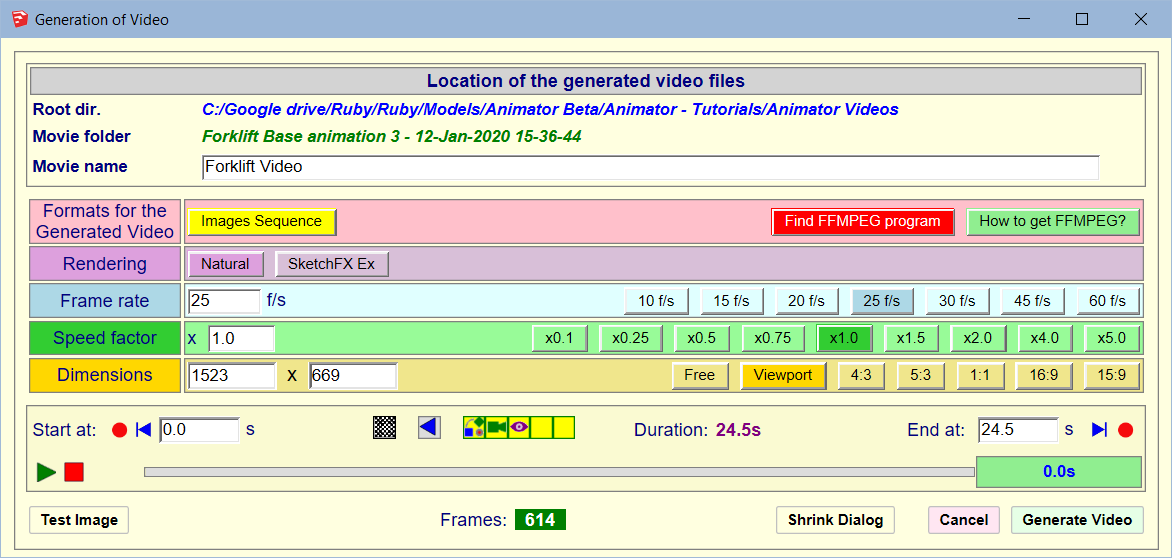

The button How to get FFmpeg? opens the present post on Sketchucation.
The button Find FFmpeg program? is used to locate the FFmpeg executable on your computer, after you performed Step 1 and Step 2.
Once Animator knows where the FFmpeg program is located, then you will go directly to the normal flavor of the dialog box, allowing you to generate videos files in various formats.
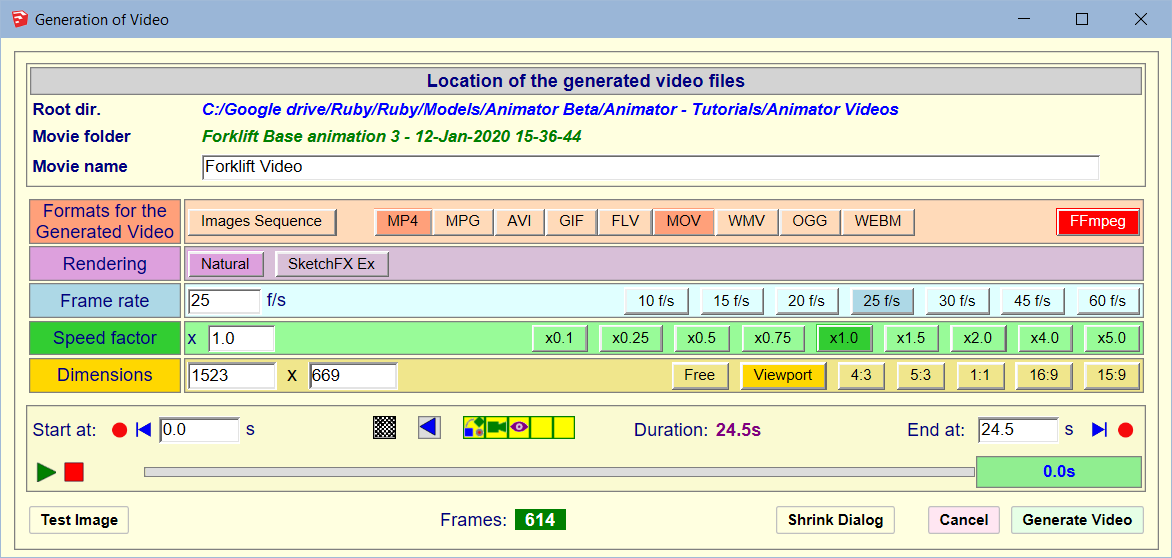
Note that you can still change the location of FFMpeg executable with the button FFmpeg on the right of the dialog box.
-
The download link is not working. I found a version that works here https://ffmpeg.org/download.html#build-mac
-
@jstahlman said:
The download link is not working. I found a version that works here https://ffmpeg.org/download.html#build-mac
Thanks for signaling. It seems that the hosting site Zeranoe has closed on 18 Sep 2020.
There seems to be alternative sites. I'll check and update the documentation.
Fredo
-
Thank you very much for the ANIMATOR and for the FFmpeg.
I am just trying to generate my first video, but after completing all the instruction bove I still only get a folder with images instead of a video in the selected format.
I downloaded the latest WINDOW compatible FFmpeg, unzipped, copied the ffmpeg.exe to the PLUGIN folder and located it within ANIMATOR. Then I restarted the computer. After all that I tried to generate the video I already set up before all this process. It showed the pictures and a text file in the folder, but when I pressed save and exit the images did disappear and the only thing left is an "FFmpeg_log_mp4" file.
Any suggestions, what could have gone wrong, please?
Cheers -
Strange...
Did you regenerate the video after you installed FFmpeg?
-
I tried and tried over the last week. Re-installed the plugin many times, restarted the computer and set up a new film and movement.
Unfortunately, the outcome is the same. The window shows all the possible formats once the FFmpeg file is located. Starts to generate the imagines into the folder. And at the end, when pressing the "save and finish" - or something similar on the bottom-right corner of the window, all the image files would disappear from the folder, no video is created at all and only the above mentioned txt file left behind....
Couldn`t figure what can be the problem.
I am planning to buy a new computer, workstation for Christmas. I will try if it works then.
Thank you for trying to help.
Cheers, -
At the end of the generation, do you see a 'black' window appearing for a few seconds (this is the FFmpeg video stitching).
Also, in the folder, there is a text file, FFmpeg_log.text. Could you look into it and see there is an error, or post it here or PM it to me.
-
i get the same error. i can navigate to the folder while the video is generating and see the images stacking up, but once it completes the render and i hit save and exit, the ENTIRE folder is empty. no txt files, no images, nothing. just an empty folder and another 2hrs wasted... please help. i have already missed my deadline once and would like to meet the next one.
thanks
-
What is the updated link to download the file corresponding to win64?
-
After successfully installing (I think) the ffmpeg, I get an error when exporting, in any format:
"error in the video file generation"This is the file that the program generates:
ffmpeg version n4.3.1-20-g8a2acdc6da Copyright (c) 2000-2020 the FFmpeg developers
built with gcc 9.3-win32 (GCC) 20200320
configuration: --prefix=/ffbuild/prefix --pkg-config-flags=--static --pkg-config=pkg-config --cross-prefix=x86_64-w64-mingw32- --arch=x86_64 --target-os=mingw32 --enable-gpl --enable-version3 --disable-debug --enable-iconv --enable-zlib --enable-libxml2 --enable-libfreetype --enable-libfribidi --enable-gmp --enable-lzma --enable-fontconfig --enable-opencl --enable-libvmaf --disable-vulkan --enable-libvorbis --enable-amf --enable-libaom --enable-avisynth --enable-libdav1d --enable-libdavs2 --enable-ffnvcodec --enable-cuda-llvm --disable-libglslang --enable-libass --enable-libbluray --enable-libmp3lame --enable-libopus --enable-libtheora --enable-libvpx --enable-libwebp --enable-libmfx --enable-libopencore-amrnb --enable-libopencore-amrwb --enable-libopenjpeg --enable-librav1e --enable-schannel --enable-sdl2 --enable-libsoxr --enable-libsrt --enable-libtwolame --enable-libvidstab --enable-libx264 --enable-libx265 --enable-libxavs2 --enable-libxvid --enable-libzimg --extra-cflags=-DLIBTWOLAME_STATIC --extra-cxxflags= --extra-ldflags=-pthread --extra-libs=-lgomp
libavutil 56. 51.100 / 56. 51.100
libavcodec 58. 91.100 / 58. 91.100
libavformat 58. 45.100 / 58. 45.100
libavdevice 58. 10.100 / 58. 10.100
libavfilter 7. 85.100 / 7. 85.100
libswscale 5. 7.100 / 5. 7.100
libswresample 3. 7.100 / 3. 7.100
libpostproc 55. 7.100 / 55. 7.100
[image2 @ 000001cab0794640] Could find no file with path 'Image%02d.png' and index in the range 0-4
Image%02d.png: No such file or directory -
I am having a similar issue as the above, after following the instructions I am only getting a Text Document named 'FFmpeg_log_mp4'
Below is the what is in the text file, any help would be great thanks!
ffmpeg version N-99816-g3da35b7cc7 Copyright (c) 2000-2020 the FFmpeg developers
built with gcc 9.3-win32 (GCC) 20200320
configuration: --prefix=/ffbuild/prefix --pkg-config-flags=--static --pkg-config=pkg-config --cross-prefix=x86_64-w64-mingw32- --arch=x86_64 --target-os=mingw32 --enable-version3 --disable-debug --enable-iconv --enable-zlib --enable-libxml2 --enable-libfreetype --enable-libfribidi --enable-gmp --enable-lzma --enable-fontconfig --enable-opencl --enable-libvmaf --disable-vulkan --enable-libvorbis --enable-amf --enable-libaom --disable-avisynth --enable-libdav1d --disable-libdavs2 --enable-ffnvcodec --enable-cuda-llvm --disable-libglslang --enable-libass --enable-libbluray --enable-libmp3lame --enable-libopus --enable-libtheora --enable-libvpx --enable-libwebp --enable-libmfx --enable-libopencore-amrnb --enable-libopencore-amrwb --enable-libopenjpeg --enable-librav1e --disable-librubberband --enable-schannel --enable-sdl2 --enable-libsoxr --enable-libsrt --enable-libsvtav1 --enable-libtwolame --enable-libuavs3d --disable-libvidstab --disable-libx264 --disable-libx265 --disable-libxavs2 --disable-libxvid --enable-libzimg --extra-cflags=-DLIBTWOLAME_STATIC --extra-cxxflags= --extra-ldflags=-pthread --extra-libs=-lgomp
libavutil 56. 60.100 / 56. 60.100
libavcodec 58.112.100 / 58.112.100
libavformat 58. 64.100 / 58. 64.100
libavdevice 58. 11.102 / 58. 11.102
libavfilter 7. 88.100 / 7. 88.100
libswscale 5. 8.100 / 5. 8.100
libswresample 3. 8.100 / 3. 8.100
Input #0, image2, from 'Image%03d.png':
Duration: 00:00:34.04, start: 0.000000, bitrate: N/A
Stream #0:0: Video: png, rgb24(pc), 1916x929 [SAR 3780:3780 DAR 1916:929], 25 fps, 25 tbr, 25 tbn, 25 tbc
Unknown encoder 'libx264' -
@peterthistle said:
I am having a similar issue as the above, after following the instructions I am only getting a Text Document named 'FFmpeg_log_mp4'
Did you install a recent version of FFmpeg? or which date and version (maybe, on the contrary, it is too recent).
For whatever reason, it seems to disable the encode which is precisely needed for MP4 file.
-
@fredo6 said:
@peterthistle said:
I am having a similar issue as the above, after following the instructions I am only getting a Text Document named 'FFmpeg_log_mp4'
Did you install a recent version of FFmpeg? or which date and version (maybe, on the contrary, it is too recent).
For whatever reason, it seems to disable the encode which is precisely needed for MP4 file.
Thanks for your help so far
The zip file I extracted the FFmpeg.exe from was "ffmpeg-N-99818-g993429cfb4-win64-lgpl"
after re-downloading and extracting it I now see all the stills in the animator videos file, the black window does appear at the end of the the generation but I am still getting just a text file in the animator video file. I don't know if it's different from before but below is what is in the file...ffmpeg version N-99818-g993429cfb4 Copyright (c) 2000-2020 the FFmpeg developers
built with gcc 9.3-win32 (GCC) 20200320
configuration: --prefix=/ffbuild/prefix --pkg-config-flags=--static --pkg-config=pkg-config --cross-prefix=x86_64-w64-mingw32- --arch=x86_64 --target-os=mingw32 --enable-version3 --disable-debug --enable-iconv --enable-zlib --enable-libxml2 --enable-libfreetype --enable-libfribidi --enable-gmp --enable-lzma --enable-fontconfig --enable-opencl --enable-libvmaf --disable-vulkan --enable-libvorbis --enable-amf --enable-libaom --disable-avisynth --enable-libdav1d --disable-libdavs2 --enable-ffnvcodec --enable-cuda-llvm --disable-libglslang --enable-libass --enable-libbluray --enable-libmp3lame --enable-libopus --enable-libtheora --enable-libvpx --enable-libwebp --enable-libmfx --enable-libopencore-amrnb --enable-libopencore-amrwb --enable-libopenjpeg --enable-librav1e --disable-librubberband --enable-schannel --enable-sdl2 --enable-libsoxr --enable-libsrt --enable-libsvtav1 --enable-libtwolame --enable-libuavs3d --disable-libvidstab --disable-libx264 --disable-libx265 --disable-libxavs2 --disable-libxvid --enable-libzimg --extra-cflags=-DLIBTWOLAME_STATIC --extra-cxxflags= --extra-ldflags=-pthread --extra-libs=-lgomp
libavutil 56. 60.100 / 56. 60.100
libavcodec 58.112.100 / 58.112.100
libavformat 58. 64.100 / 58. 64.100
libavdevice 58. 11.102 / 58. 11.102
libavfilter 7. 88.100 / 7. 88.100
libswscale 5. 8.100 / 5. 8.100
libswresample 3. 8.100 / 3. 8.100
Input #0, image2, from 'Image%03d.png':
Duration: 00:00:34.04, start: 0.000000, bitrate: N/A
Stream #0:0: Video: png, rgb24(pc), 1632x929 [SAR 3780:3780 DAR 1632:929], 25 fps, 25 tbr, 25 tbn, 25 tbc
Unknown encoder 'libx264' -
I don't know what's going on with the recent versions of FFmpeg, but some seem to not include the right codec libraries. Apparently this is the case with the zip file you downloaded.
Could you try this one, which is with Fulllibraries at this link. I tested it on my laptop Win10-6 and it works. The file size of FFmpeg.exe is 105 Mb.
https://www.gyan.dev/ffmpeg/builds/ffmpeg-release-full.7z
More generally there is a mess in how the builds of FFmpeg are now released. I cannot find older versions. I need to have a closer look to how to have robust instructions.
Fredo
-
i am only getting a mp4.txt file once animating my video. any ideas how i can get the mp4 will be much appreciated.
-
See the post just above. It may depend on which version of FFmpeg you downloaded.
-
Just downloaded both Animator and FFmpeg. Played with it just enough to make sure it works.
Looking forward to using it fully.
Thanks for the fantastic plug ins!
-
Hi all,
I have installed the ffmpeg on my mac but I still get the permission denied file after rendering it. I can't seem to locate in the system preferences where to authorise it? Nothing is mentioning ffmpeg?
Thanks in advance, Jerry -
@jhandgraaf said:
Hi all,
I have installed the ffmpeg on my mac but I still get the permission denied file after rendering it. I can't seem to locate in the system preferences where to authorise it? Nothing is mentioning ffmpeg?
Thanks in advance, JerryIt's normally in the Security panel...
-
Working on a MAC (OS 11) and when I try to save a movie. The video generation dialog builds all the frames but does not change once it shows 100%. The resulting folder shows all the png's. But the log file reads...
sh: /Applications/ffmpeg: Permission denied
If I click the "Interrupt" button it moves to next screen and when I click Save and Exit the png's disappear and just the log file is left showing the permissions error.
Also the only options for format I can choose is MPG4 or Image sequence.





Advertisement