Roof with curved hips
-
How can I model a roof with curved hips using Sketchup basic tools? I really don't know how to make these curved faces and join them along the curvy hips. This page shows an identical roof that I am trying to create.https://www.contractortalk.com/f14/curved-bay-roof-157282/
-
It can be done. What kind of detail are you trying to create?
What version of SketchUp are you actually using. Your profile has contradictory information as there is no 2018 Make version.
-
Just the form of the top surfaces of the roof. I will do it on Sketchup Pro 2017.
-
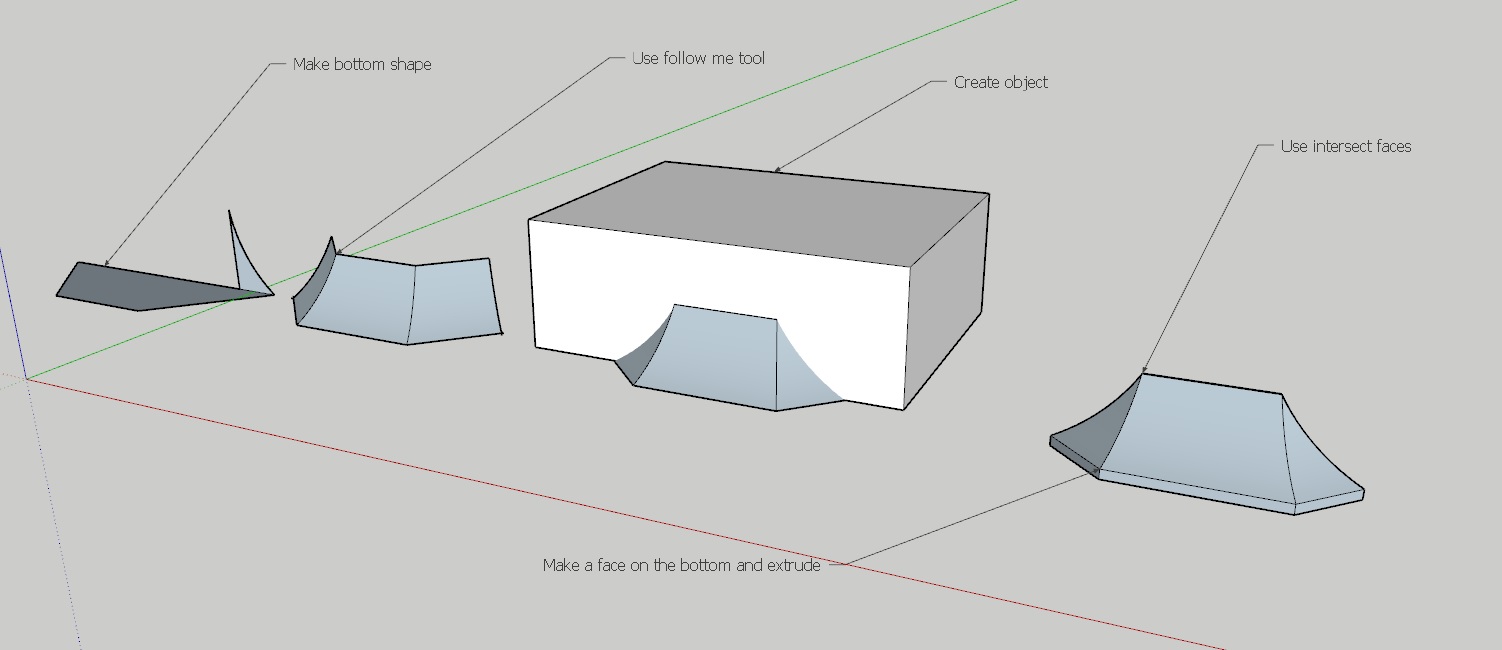 If you are just trying to model the outside surface there are a couple of ways, by using "follow me" or "From contours" what is shown in the attachement is using the follow me tool. If you are trying to build a model of the timber construction you could build it using the outside form as your template. And again using the "intersect faces" tool, lot of work though.
 -
Using arc tool, push pull, rotate/duplicate. Intersect faces (both to cut hip shape and roof faces at the wall), move/duplicate, flip along red axis, move and delete edges.
-
Thanks! It worked perfect with "Follow me" too. Much easier than I was thinking!
-
Curviloft is very simple too.



Hello! It looks like you're interested in this conversation, but you don't have an account yet.
Getting fed up of having to scroll through the same posts each visit? When you register for an account, you'll always come back to exactly where you were before, and choose to be notified of new replies (either via email, or push notification). You'll also be able to save bookmarks and upvote posts to show your appreciation to other community members.
With your input, this post could be even better 💗
Register Login


Advertisement