Annoying banner on API doc site :-(
-
Hi all,
Since a few days the SU Ruby API doc site seems to have changed its banner, so now I can't select among "Classes", "Methods", "Constants" links that were before above the "Search" field. No way to hide the banner, this is very annoying

Anyone encountered this too (on Firefox) ?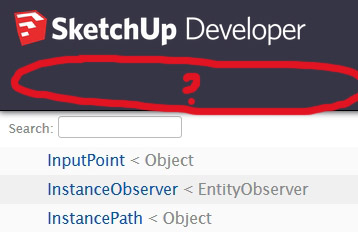
-
Someone has added a Trimble linked image to the right-hand end of the top-banner.
That image [ https://www.sketchup.com/sites/developers.sketchup.com/files/core/trimble-logo-white.png ] is not found, and as a result the default place-holder is making the top-banner deeper because the default place-holder is larger.
As a result the top part of the main page is covered over by the top-banner...
The broken-link place-holder in Firefox and IE are quite large, in Edge and Chrome they are much smaller and they avoid this 'overlapping'.Report it to Trimble/SketchUp direct...
-
Thanks TIG !!!
-
The API docs wasn't changed. But I suspect that a logo we used changed when site updates for SU2019 was released. I'll look into it.
-
@thomthom said:
The API docs wasn't changed. But I suspect that a logo we used changed when site updates for SU2019 was released. I'll look into it.
If you inspect the code the Trimble-linked image PNG is missing from the files needed by the html to render the top-banner properly.
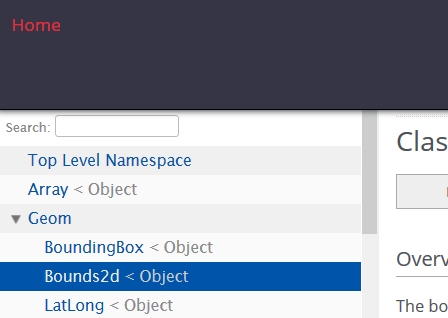
In Edge and Chrome the default place-holder is quite small so the top banner's size is OK and the whole page below it is accessible, however, in Firefox and IE the place-holder is much bigger and that increases the height of the top-banner, which then obscures the first few lines of the left-most column in the main-page.
It didn't used to be like that, so I suspect that either the Trimble-link is either a badly constructed recent addition, OR it's older and the expected PNG file has been deleted or perhaps renamed - either way, thereby breaking the proper rendering of the html... -
Thanks thomthom, for using your super-powers - the banner's images/html all work properly now...
-
Hi all,
Is it me or this bug is back again (06.14.19) ? -
It's back again !
I'm in touch with thomthom... -
Thanx TIG !
-
Checked it this morning and its a broken link still.
However, it doesn't really affect the option to choose from Methods, Classes etc... below it.
-
Hi Medeek,
Here is what I get on Firefox, no way to select classes or methods as you can see.
I must use Edge to read the API doc, and I HATE Edge
-
I initially loaded it up in Chrome. I guess each browser renders it slightly differently.
Someone really needs to fix this.
-
It's a very easy fix - either the missing PNG specified in the HTML code needs adding to the HTML's file-set, or the HTML's code needs changing to find a PNG that does exists in its file-set.
When I contacted thomthom before he got it fixed very quickly.
But I've been in touch with thomthom by PM again recently - and this time it's taking much longer to fix !




Hello! It looks like you're interested in this conversation, but you don't have an account yet.
Getting fed up of having to scroll through the same posts each visit? When you register for an account, you'll always come back to exactly where you were before, and choose to be notified of new replies (either via email, or push notification). You'll also be able to save bookmarks and upvote posts to show your appreciation to other community members.
With your input, this post could be even better 💗
Register Login


Advertisement