sketchucation logo sketchucation
    • 登入
    Oops, your profile's looking a bit empty! To help us tailor your experience, please fill in key details like your SketchUp version, skill level, operating system, and more. Update and save your info on your profile page today!
    🔌 Smart Spline | Fluid way to handle splines for furniture design and complex structures. Download

    Medeek Electrical

    已排程 已置頂 已鎖定 已移動 Plugins
    205 貼文 6 Posters 226.2k 瀏覽 5 Watching
    正在載入更多貼文
    • 從舊到新
    • 從新到舊
    • 最多點贊
    回覆
    • 在新貼文中回覆
    登入後回覆
    此主題已被刪除。只有擁有主題管理權限的使用者可以查看。
    • medeekM 離線
      medeek
      最後由 編輯

      Version 1.1.7 - 08.13.2020

      • Created the Medeek Electrical UK (British Standard) toolbar, with two additional functions/tools: Draw Switch, Draw Outlet.
      • Enabled the Draw Switch (UK) tool with the following switch types (MK Logic Plus): single pole, dimmer, blank.

      http://design.medeek.com/resources/images/electrical_uk_su_menu_active.jpg

      Nathaniel P. Wilkerson PE
      Medeek Engineering Inc
      design.medeek.com

      1 條回覆 最後回覆 回覆 引用 0
      • medeekM 離線
        medeek
        最後由 編輯

        Since I am using manufacturer's part numbers to specify the switch and box with the new UK module I thought it made sense to provide a thumbnail to aid in the selection process:

        https://aws1.discourse-cdn.com/sketchup/original/3X/f/8/f85039920b69d103d0dbf6a3a5cd38dd2061fb43.gif

        Nathaniel P. Wilkerson PE
        Medeek Engineering Inc
        design.medeek.com

        1 條回覆 最後回覆 回覆 引用 0
        • medeekM 離線
          medeek
          最後由 編輯

          Version 1.1.7b - 08.13.2020

          • Added preview thumbnails to the draw and edit menus of the UK switch tool.
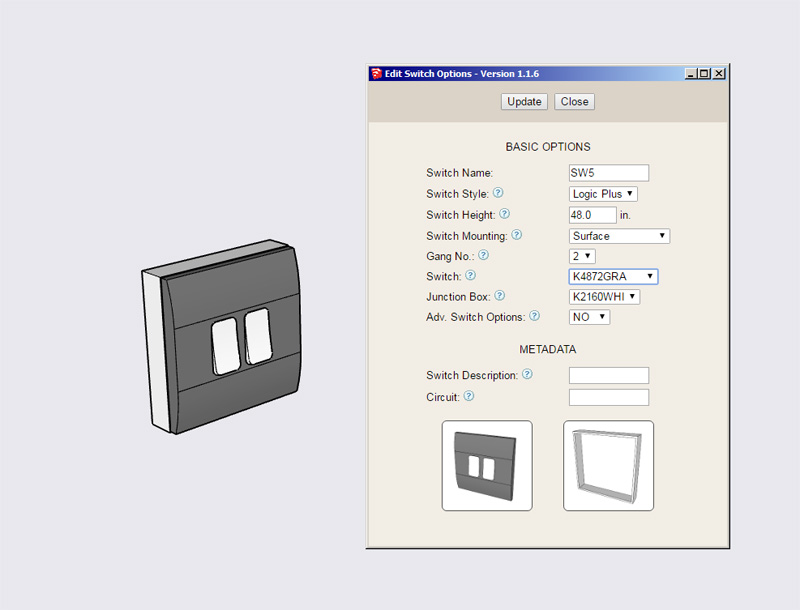
          http://design.medeek.com/resources/electricalplugin/images/elec_su203_800.jpg

          Nathaniel P. Wilkerson PE
          Medeek Engineering Inc
          design.medeek.com

          1 條回覆 最後回覆 回覆 引用 0
          • medeekM 離線
            medeek
            最後由 編輯

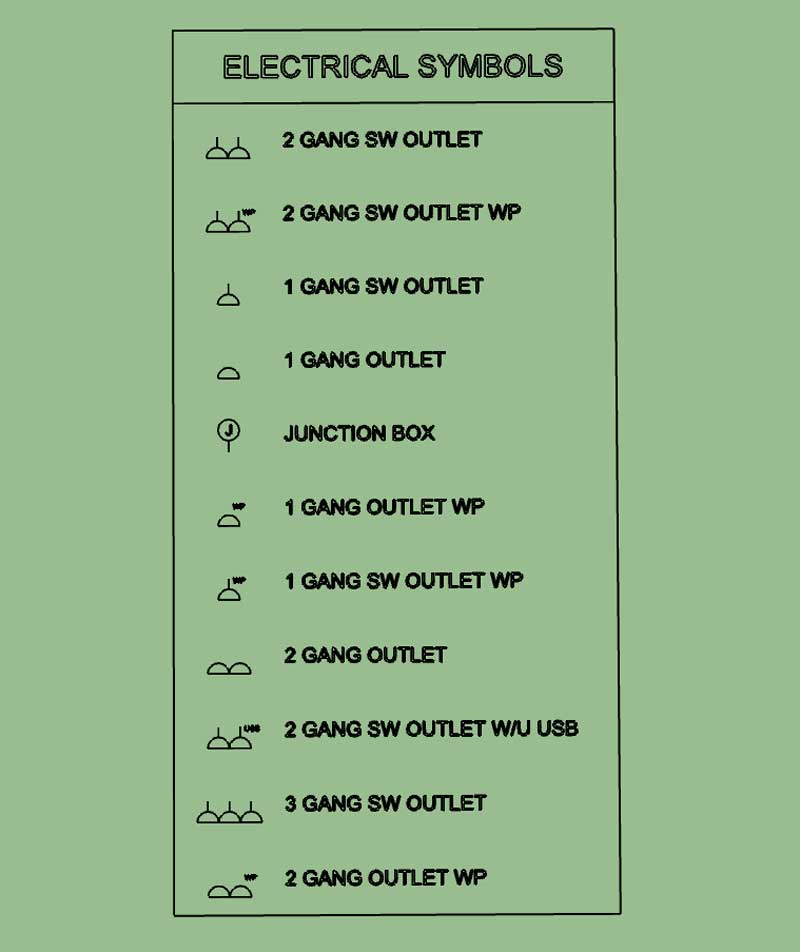
            After some further digging about on the internet I really only came upon three or four reference documents for UK outlet symbols. Based on those examples here are my proposed symbols:

            https://aws1.discourse-cdn.com/sketchup/original/3X/c/5/c559bacc35d3d4db1d66843efce6e40c258bc51f.jpeg

            Please provide feedback or suggestions.

            I planning on using the abbreviation "SW" for switched since I am trying to keep the length of the text in the legend to a manageable length, or I could spell it out in full.

            There will probably be other outlet types (ie. fused outlets or connector outlets), but this is all I have for now.

            Nathaniel P. Wilkerson PE
            Medeek Engineering Inc
            design.medeek.com

            1 條回覆 最後回覆 回覆 引用 0
            • medeekM 離線
              medeek
              最後由 編輯

              Version 1.1.8 - 08.15.2020

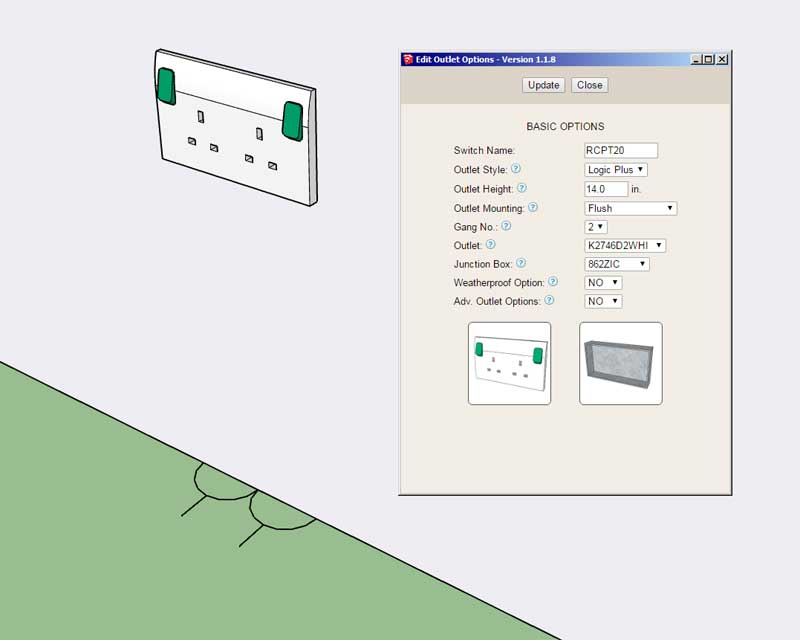
              • Enabled the Draw Outlet (UK) tool with the following outlets types (MK Logic Plus): unswitched, switched, switched w/ USB, weatherproof, blank.
              • Added preview thumbnails to the draw and edit menus of the UK outlet tool.
              • Added UK outlet (2D) symbols to the Legend tool.
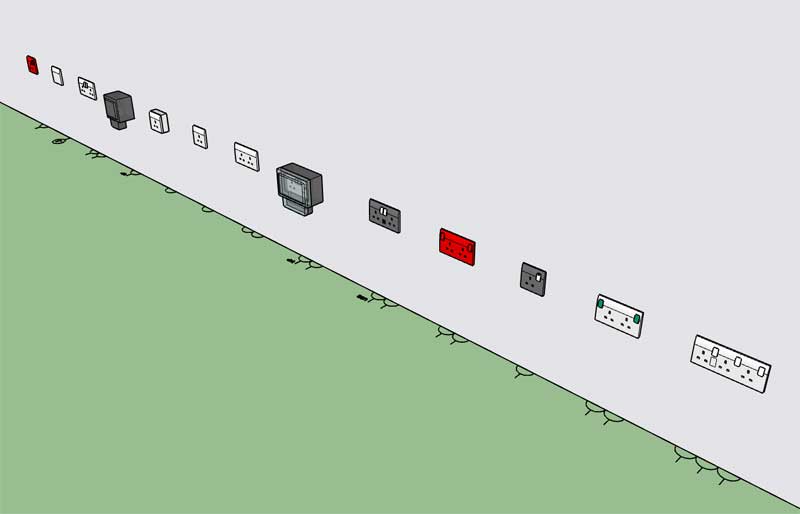
              http://design.medeek.com/resources/electricalplugin/images/elec_su205_800.jpg

              http://design.medeek.com/resources/electricalplugin/images/elec_su206_800.jpg

              http://design.medeek.com/resources/electricalplugin/images/elec_su204_800.jpg

              Nathaniel P. Wilkerson PE
              Medeek Engineering Inc
              design.medeek.com

              1 條回覆 最後回覆 回覆 引用 0
              • medeekM 離線
                medeek
                最後由 編輯

                Editing a UK outlet:

                https://aws1.discourse-cdn.com/sketchup/original/3X/2/e/2e6a5760d97bcfb14c24757805e83e8f4350574a.gif

                Nathaniel P. Wilkerson PE
                Medeek Engineering Inc
                design.medeek.com

                1 條回覆 最後回覆 回覆 引用 0
                • jujuJ 離線
                  juju
                  最後由 編輯

                  As opposed to choosing the outlet by a code (and having the visual reference appear then), can we do the search for the outlet module by scrolling through a visual reference as well?

                  Save the Earth, it's the only planet with chocolate.

                  1 條回覆 最後回覆 回覆 引用 0
                  • medeekM 離線
                    medeek
                    最後由 編輯

                    Tutorial 4: UK Toolbar

                    Nathaniel P. Wilkerson PE
                    Medeek Engineering Inc
                    design.medeek.com

                    1 條回覆 最後回覆 回覆 引用 0
                    • medeekM 離線
                      medeek
                      最後由 編輯

                      Version 1.1.9 - 09.10.2020

                      • Added optional metadata parameters for outlets: description, circuit.

                      Nathaniel P. Wilkerson PE
                      Medeek Engineering Inc
                      design.medeek.com

                      1 條回覆 最後回覆 回覆 引用 0
                      • medeekM 離線
                        medeek
                        最後由 編輯

                        Custom Wiring Feature:

                        I've been getting some requests for the ability to add in wiring.

                        After giving this some additional thought I think I can add in a rudimentary wiring module that will allow the user to create their own wire types. The basic parameters would be:

                        1.) Name: NM-B_14/3, NM-B_8/3 etc...
                        2.) Shape: RND or RECT
                        3.) Dia.
                        4.) Width
                        5.) Depth
                        6.) Color
                        7.) Bend Radius

                        https://aws1.discourse-cdn.com/sketchup/original/3X/6/8/6864bd21ed4046fbf7f0e740a413640beee5b2c3.jpeg

                        Nathaniel P. Wilkerson PE
                        Medeek Engineering Inc
                        design.medeek.com

                        1 條回覆 最後回覆 回覆 引用 0
                        • medeekM 離線
                          medeek
                          最後由 編輯

                          The second toolbar will include a new icon for wiring:

                          https://aws1.discourse-cdn.com/sketchup/original/3X/b/f/bfac9af4e4997565c4f2f13dd2289fdd944aca52.jpeg

                          Additionally the wiring assemblies will not be embedded into any other assemblies (ie. wall, roof, floor etc...), this way they can be edited and regenerated. I will have two context menu items for wiring assemblies: edit and regen.

                          Nathaniel P. Wilkerson PE
                          Medeek Engineering Inc
                          design.medeek.com

                          1 條回覆 最後回覆 回覆 引用 0
                          • medeekM 離線
                            medeek
                            最後由 編輯

                            The bend radius is the parameter that is the most unique feature of this tool. One could easily use a tool like profile builder to generate the wiring but with the bend radius the tool will introduce another level of complexity.

                            In some cases the line segment(s) will be too short to allow for the bend to occur, in these cases the radius will not be applied, the segments will simply be followed as is.

                            The wire types can be configured in the global settings of the plugin.

                            Nathaniel P. Wilkerson PE
                            Medeek Engineering Inc
                            design.medeek.com

                            1 條回覆 最後回覆 回覆 引用 0
                            • medeekM 離線
                              medeek
                              最後由 編輯

                              First look at the Custom Wire Library tab in the global settings:

                              https://aws1.discourse-cdn.com/sketchup/original/3X/d/2/d2accdf34374e9f603f1a8387ed963c54da58bb6.jpeg

                              Nathaniel P. Wilkerson PE
                              Medeek Engineering Inc
                              design.medeek.com

                              1 條回覆 最後回覆 回覆 引用 0
                              • medeekM 離線
                                medeek
                                最後由 編輯

                                Version 1.2.0 - 10.11.2020

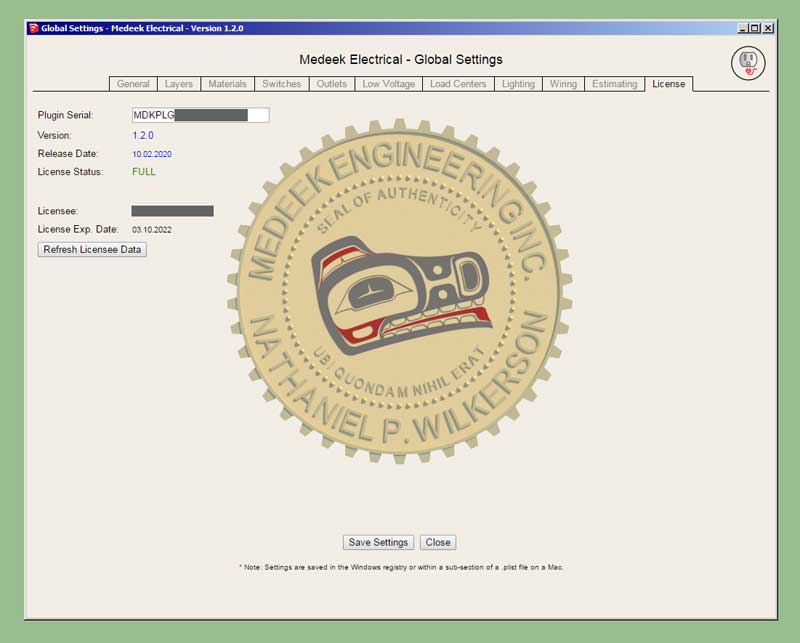
                                • Added a "Refresh Licensee Data" button within the License tab of the Global Settings.
                                http://design.medeek.com/resources/electricalplugin/images/elec_su209_800.jpg

                                Nathaniel P. Wilkerson PE
                                Medeek Engineering Inc
                                design.medeek.com

                                1 條回覆 最後回覆 回覆 引用 0
                                • medeekM 離線
                                  medeek
                                  最後由 編輯

                                  Version 1.2.1 - 10.14.2020

                                  • Added a Custom Wire Library to the Global Settings which allows user defined rectangular or circular cross section wires/cables/conduit.
                                  • Enabled the Wiring Tool with three additional context menu functions: Edit Wire Assembly, Regen Wire Assembly, Edit Wire Path.
                                  • Added a 4th dimensioning layer specifically for wire callouts in the Layers tab of the Global Settings.
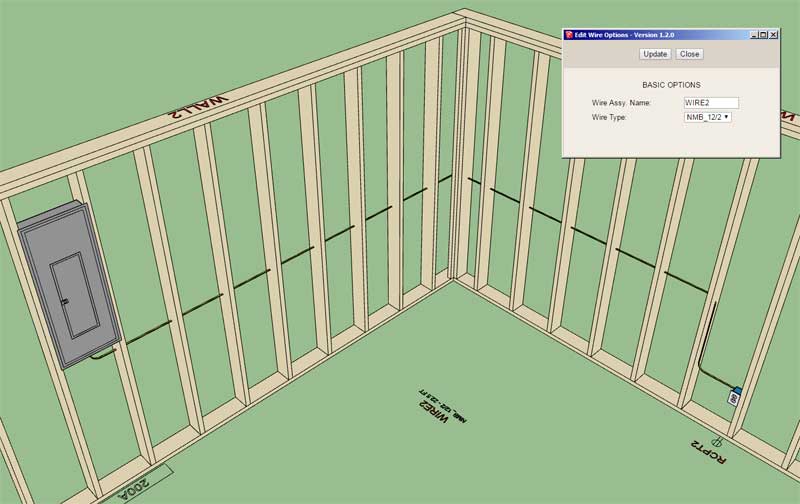
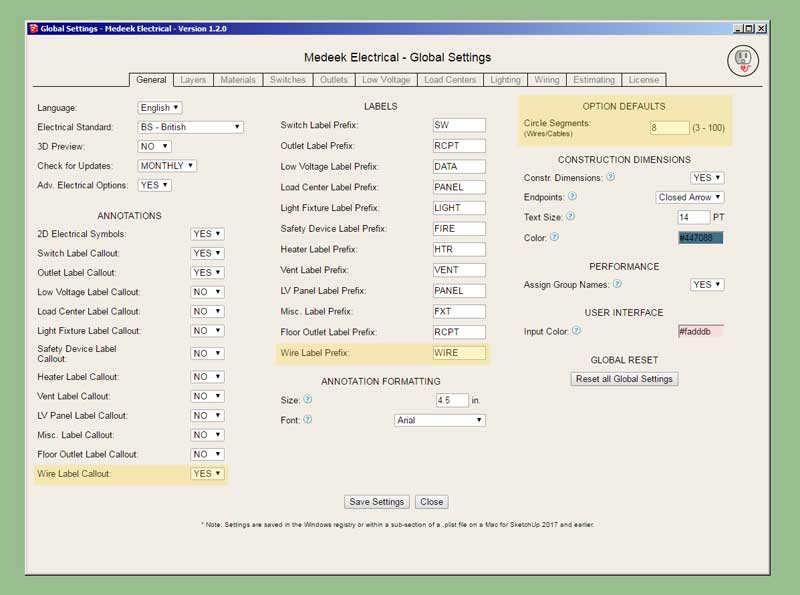
                                  • Added the following parameters to the General tab of the Global Settings: Wire Label Callout, Wire Label Prefix, Circle Segments.
                                  http://design.medeek.com/resources/electricalplugin/images/elec_su210_800.jpg

                                  http://design.medeek.com/resources/electricalplugin/images/elec_su211_800.jpg

                                  I think I need a few additional tools to round out this wiring module and make it more intuitive and efficient to use:

                                  • Move Segment Tool (rather than having to edit the wire path directly)
                                  • Integrate the Estimating tool with the wiring statistics

                                  Nathaniel P. Wilkerson PE
                                  Medeek Engineering Inc
                                  design.medeek.com

                                  1 條回覆 最後回覆 回覆 引用 0
                                  • pbacotP 離線
                                    pbacot
                                    最後由 編輯

                                    Quite impressive, though it didn't occur to me someone would model house wiring. Gotta be more fun than actually running it though.

                                    MacOSX MojaveSketchUp Pro v19 Twilight v2 Thea v3 PowerCADD

                                    1 條回覆 最後回覆 回覆 引用 0
                                    • medeekM 離線
                                      medeek
                                      最後由 編輯

                                      Note that the wire callout gives the name of the wire, the type and the length.

                                      I would tend to agree with Pbacot, I didn't think people would want to go to the trouble of modeling wires but I've received enough features for this request that I decided I should include it as part of the plugin.

                                      For round wires I have the "circle segment" parameter which allows ones to decrease the number of segments in order to keep the polycount down in the model.

                                      The draw tool needs a feature or switch which allows one to simply select a pre-drawn polyline (of edges) rather than picking points.

                                      Nathaniel P. Wilkerson PE
                                      Medeek Engineering Inc
                                      design.medeek.com

                                      1 條回覆 最後回覆 回覆 引用 0
                                      • medeekM 離線
                                        medeek
                                        最後由 編輯

                                        Version 1.2.1b - 10.15.2020

                                        • Draw Wire Tool input extended to two options: Points, Edges

                                        Tutorial 5 - Wiring (11:15 min.)

                                        Nathaniel P. Wilkerson PE
                                        Medeek Engineering Inc
                                        design.medeek.com

                                        1 條回覆 最後回覆 回覆 引用 0
                                        • medeekM 離線
                                          medeek
                                          最後由 編輯

                                          Just for fun I created some "wire" sizes at your typical HVAC duct sizes and then laid out some geometry (polylines) with the help of the SketchUp grid extension:

                                          https://aws1.discourse-cdn.com/sketchup/original/3X/2/d/2ddf1e94290bd02f458a8756254787d06c4076d9.jpeg

                                          The only thing I could not draw with the wire tool was the rectangular reducer shown in blue.

                                          HVAC (duct work) is fairly straight forward in my opinion however there needs to be a few more specific parts and pieces in order to terminate and make transitions. So there would need to be a separate tool (and library) for common size reducers, boots and grilles.

                                          I'm not really an HVAC (mechanical engineer), I've done a little work in the field about 15 years ago while doing some contract work at BYU, but then again I'm not an electrician either and look how far this plugin has come. I guess it just takes some interest and a desire to learn, but I do think HVAC is a bit more involved than Electrical.

                                          Nathaniel P. Wilkerson PE
                                          Medeek Engineering Inc
                                          design.medeek.com

                                          1 條回覆 最後回覆 回覆 引用 0
                                          • jujuJ 離線
                                            juju
                                            最後由 編輯

                                            @medeek said:

                                            Just for fun I created some "wire" sizes at your typical HVAC duct sizes and then laid out some geometry (polylines) with the help of the SketchUp grid extension:

                                            https://aws1.discourse-cdn.com/sketchup/original/3X/2/d/2ddf1e94290bd02f458a8756254787d06c4076d9.jpeg

                                            The only thing I could not draw with the wire tool was the rectangular reducer shown in blue.

                                            HVAC (duct work) is fairly straight forward in my opinion however there needs to be a few more specific parts and pieces in order to terminate and make transitions. So there would need to be a separate tool (and library) for common size reducers, boots and grilles.

                                            I'm not really an HVAC (mechanical engineer), I've done a little work in the field about 15 years ago while doing some contract work at BYU, but then again I'm not an electrician either and look how far this plugin has come. I guess it just takes some interest and a desire to learn, but I do think HVAC is a bit more involved than Electrical.

                                            An useful HVAC tool would be nice, it doesn't have to do the complex calculations but rather be useful as a tool with the options (size of ducts, grilles, etc.) to be set/chosen by the end-user whilst being able to handle the transformations automatically.


                                            Save the Earth, it's the only planet with chocolate.

                                            1 條回覆 最後回覆 回覆 引用 0
                                            • 1
                                            • 2
                                            • 6
                                            • 7
                                            • 8
                                            • 9
                                            • 10
                                            • 11
                                            • 8 / 11
                                            • 第一個貼文
                                              最後的貼文
                                            Buy SketchPlus
                                            Buy SUbD
                                            Buy WrapR
                                            Buy eBook
                                            Buy Modelur
                                            Buy Vertex Tools
                                            Buy SketchCuisine
                                            Buy FormFonts

                                            Advertisement