sketchucation logo sketchucation
    • 登入
    Oops, your profile's looking a bit empty! To help us tailor your experience, please fill in key details like your SketchUp version, skill level, operating system, and more. Update and save your info on your profile page today!
    🔌 Smart Spline | Fluid way to handle splines for furniture design and complex structures. Download

    Medeek Electrical

    已排程 已置頂 已鎖定 已移動 Plugins
    205 貼文 6 Posters 226.2k 瀏覽 5 Watching
    正在載入更多貼文
    • 從舊到新
    • 從新到舊
    • 最多點贊
    回覆
    • 在新貼文中回覆
    登入後回覆
    此主題已被刪除。只有擁有主題管理權限的使用者可以查看。
    • medeekM 離線
      medeek
      最後由 編輯

      Tomorrow I will finish modeling up some typical load centers (breaker boxes) like the one below (200 Amp, 40 Spaces):
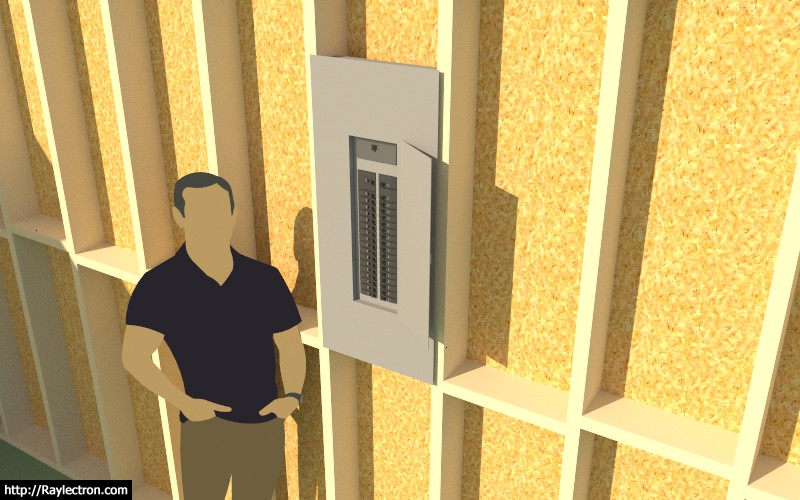
      http://design.medeek.com/resources/images/electrical_su18_800.jpg

      I'm not going to put any special logic into this module yet, just a simply positioning and selection. However at some point it would be really cool to use the plugin to setup the various breakers and identify circuits as well as assign specific elements to a circuit.

      For now three sizes of breaker components are provided and it is up to the user to manually configure their panel if they so choose to do so, otherwise is is more representational than anything else.

      When it comes to setting the vertical height of the load center what is the method used to measure from the floor? Center, Top or Bottom of the panel?

      I will provide some common panel sizes (spaces): 24, 30, 40, 42, 54, and 60.

      My breakers are based on the SquareD QO series as are my load centers however they are considerably simplified to maintain a low poly count.

      Also for now I am only going to provide flush mount and not surface mount however I will probably enable both in the future.

      View model here:

      Link Preview Image
      3D Warehouse

      3D Warehouse is a website of searchable, pre-made 3D models that works seamlessly with SketchUp.

      favicon

      (3dwarehouse.sketchup.com)

      Nathaniel P. Wilkerson PE
      Medeek Engineering Inc
      design.medeek.com

      1 條回覆 最後回覆 回覆 引用 0
      • medeekM 離線
        medeek
        最後由 編輯

        Various load center sizes, view model here:

        Link Preview Image
        3D Warehouse

        3D Warehouse is a website of searchable, pre-made 3D models that works seamlessly with SketchUp.

        favicon

        (3dwarehouse.sketchup.com)

        All load centers are 200 Amp except for the 24 space unit which would be rated for 100 or 125 Amp.

        Nathaniel P. Wilkerson PE
        Medeek Engineering Inc
        design.medeek.com

        1 條回覆 最後回覆 回覆 引用 0
        • medeekM 離線
          medeek
          最後由 編輯

          The inside of these boxes and the breakers are very simple and low poly. The idea is mostly to convey the number and location of breakers and overall dimensions:
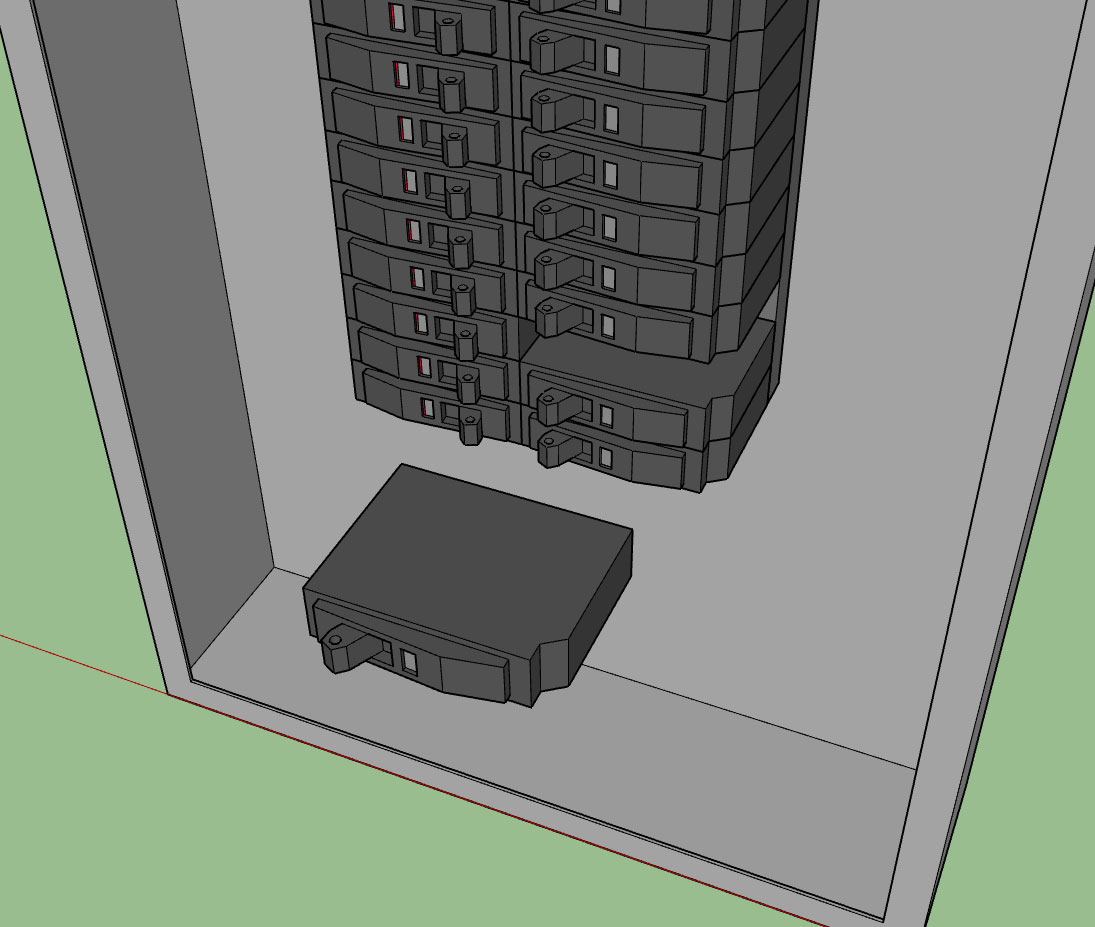
          http://design.medeek.com/resources/images/electrical_su19_800.jpg

          Nathaniel P. Wilkerson PE
          Medeek Engineering Inc
          design.medeek.com

          1 條回覆 最後回覆 回覆 引用 0
          • medeekM 離線
            medeek
            最後由 編輯

            In the parameters for the load centers I identified the following options:

            1.) Style: Flush Mount, Surface Mount
            2.) Indoor/Outdoor: Indoor, Outdoor
            3.) Height: Distance from floor to bottom of box (in./mm)
            4.) Breaker No.: 6, 8, 12, 24, 30, 40, 42, 54, 60
            5.) Amperage: 100, 200
            6.) Main Lug: Main Breaker, Main Lug
            7.) Adv. Options: None Currently

            There is no material/color assignment.

            I've created a 6 and 8 breaker box (main lugs only). I will need to add in additional boxes that only have main lugs and not a main breaker for the other sizes, but that is work for another day.

            Nathaniel P. Wilkerson PE
            Medeek Engineering Inc
            design.medeek.com

            1 條回覆 最後回覆 回覆 引用 0
            • jujuJ 離線
              juju
              最後由 編輯

              Here we mainly use board arrangements with a horizontal breaker alignment, in rows as many as may be required. Thus breakers switches are up/down (up = on & down = off). Interestingly enough, light switches work the other way around here, up = off & down = on.

              Save the Earth, it's the only planet with chocolate.

              1 條回覆 最後回覆 回覆 引用 0
              • medeekM 離線
                medeek
                最後由 編輯

                @juju said:

                Here we mainly use board arrangements with a horizontal breaker alignment, in rows as many as may be required. Thus breakers switches are up/down (up = on & down = off). Interestingly enough, light switches work the other way around here, up = off & down = on.

                In the global settings I will have a parameter that allows one to switch to the electrical standard of their choice. Right now the only option is NEMA:

                Link Preview Image
                National Electrical Manufacturers Association - Wikipedia

                favicon

                (en.wikipedia.org)

                Perhaps the next standard that should be added is the British standards and its derivatives (BS 545, BS 1363, BS 4573):

                https://en.wikipedia.org/wiki/AC_power_plugs_and_sockets#BS_546_and_related_types_(Type_D_and_M

                The South African standard is also of some interest:

                Link Preview Image
                SANS 164 - Wikipedia

                favicon

                (en.wikipedia.org)

                Who is the predominant manufacturer of outlets, switches and wallplates in South Africa?

                Nathaniel P. Wilkerson PE
                Medeek Engineering Inc
                design.medeek.com

                1 條回覆 最後回覆 回覆 引用 0
                • jujuJ 離線
                  juju
                  最後由 編輯

                  @medeek said:

                  The South African standard is also of some interest:

                  Link Preview Image
                  SANS 164 - Wikipedia

                  favicon

                  (en.wikipedia.org)

                  Who is the predominant manufacturer of outlets, switches and wallplates in South Africa?

                  in alphabetical order:
                  Clipsal
                  Crabtree
                  Legrand
                  Veti

                  Save the Earth, it's the only planet with chocolate.

                  1 條回覆 最後回覆 回覆 引用 0
                  • medeekM 離線
                    medeek
                    最後由 編輯

                    First look a the output of the load center or service panel module:
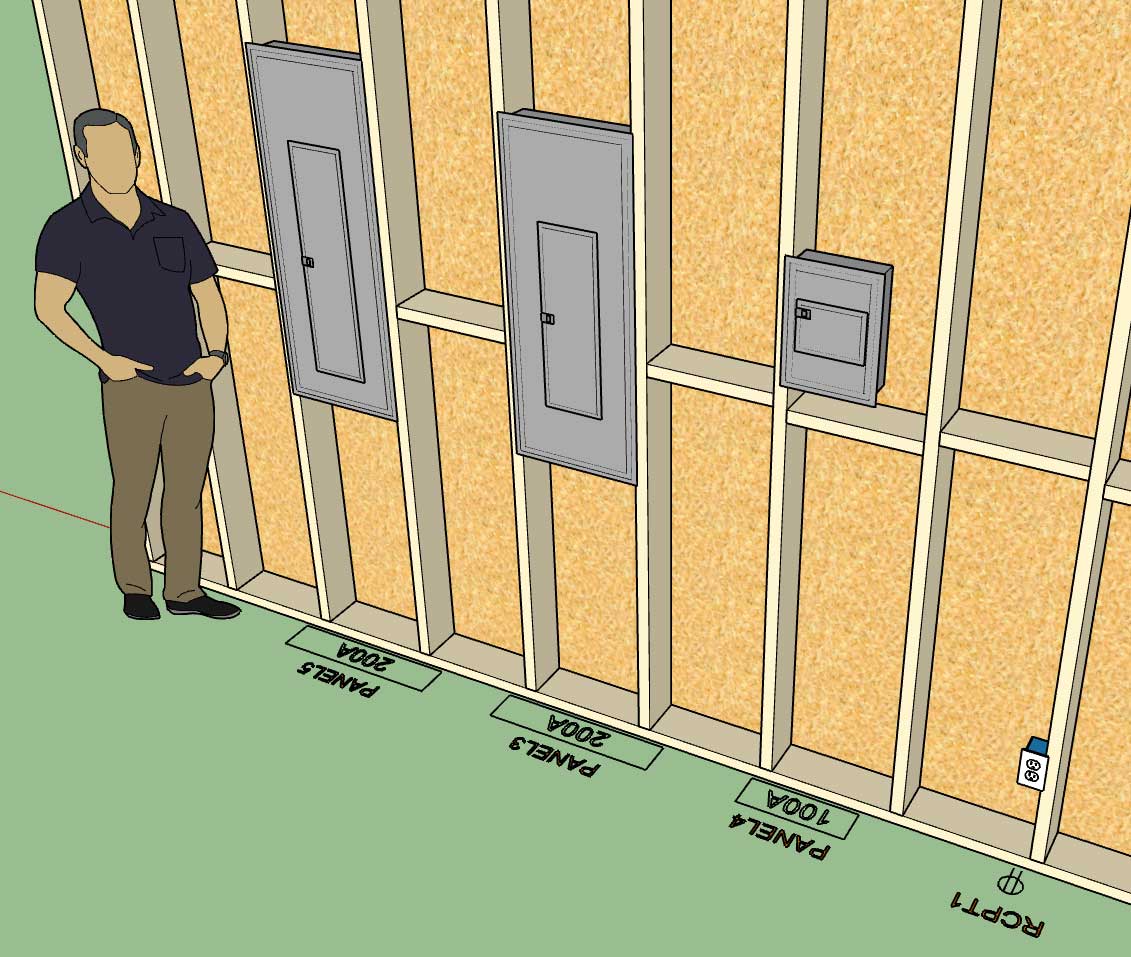
                    http://design.medeek.com/resources/images/electrical_su20_800.jpg

                    Nathaniel P. Wilkerson PE
                    Medeek Engineering Inc
                    design.medeek.com

                    1 條回覆 最後回覆 回覆 引用 0
                    • medeekM 離線
                      medeek
                      最後由 編輯

                      For wall mounted light fixtures what is the most common type of electrical box used?

                      Nathaniel P. Wilkerson PE
                      Medeek Engineering Inc
                      design.medeek.com

                      1 條回覆 最後回覆 回覆 引用 0
                      • medeekM 離線
                        medeek
                        最後由 編輯

                        Perusing the selection of electrical outlets and boxes at my local Ace Hardware this morning it became painfully obvious that I should have added the option for "amperage" to the outlet parameters.

                        Standard and Decora outlets now are available in 15A or 20A:
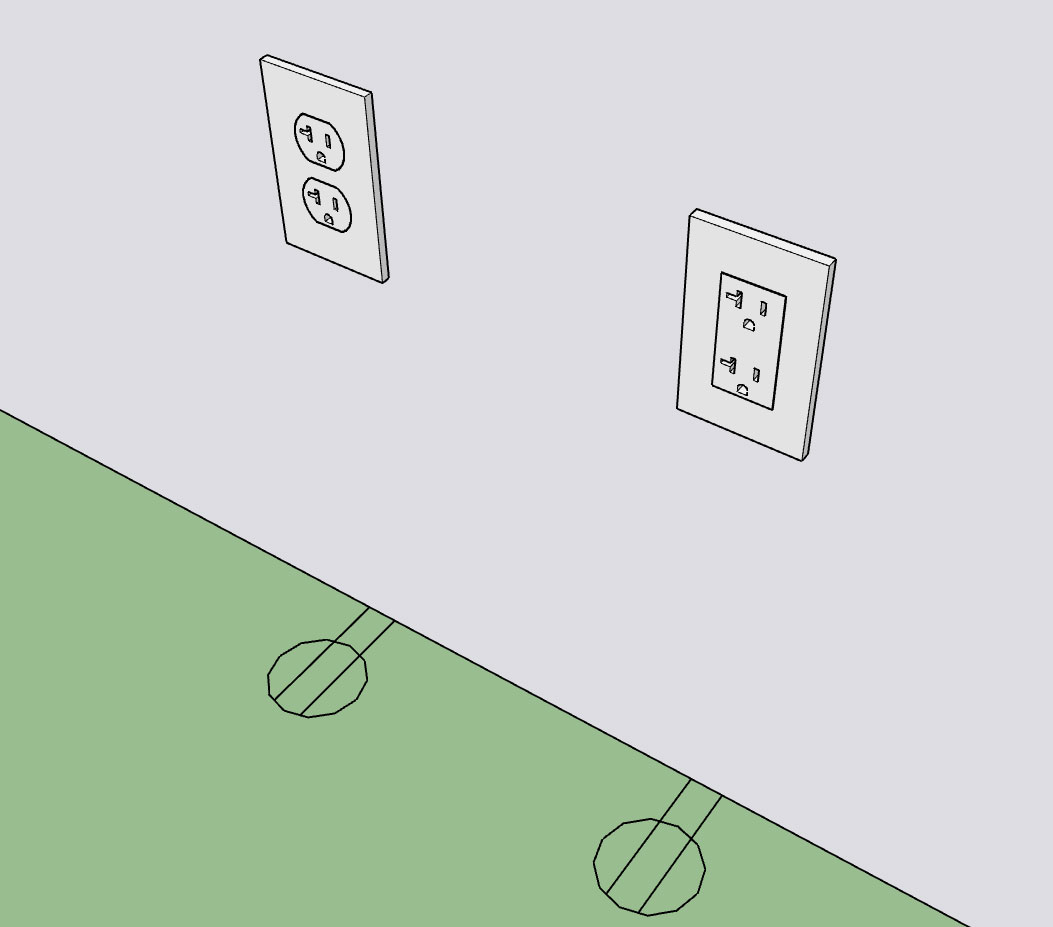
                        http://design.medeek.com/resources/images/electrical_su21_800.jpg

                        I've never actually seen this type of outlet (NEMA 5-20R) installed in any residence I've ever lived at or in any new construction I've worked on but I'm sure it has its place.

                        Currently the 240V outlets are limited to only 30A and 50A outlets. At some point I may add in NEMA 6-15R and NEMA 6-20R if there is call for it.

                        Nathaniel P. Wilkerson PE
                        Medeek Engineering Inc
                        design.medeek.com

                        1 條回覆 最後回覆 回覆 引用 0
                        • medeekM 離線
                          medeek
                          最後由 編輯

                          Just a reminder to everyone that is following the development of this plugin:

                          This plugin is an add-on plugin/extension. In other words it currently only installs switches, outlets, low voltage outlets and panels into the walls that are created by the Medeek Wall extension.

                          At some point I may attempt to extend it to allow for operation with any solid walls but for now it is limited to working with the geometry created by the mdkBIM suite. There are a number of technical issues/reasons for this which I will not delve into at this time.

                          Since it is not a stand alone plugin and is dependent (currently only on the Medeek Wall extension) I will probably not charge as much for it if it were a standalone extension. As such I am thinking about $20.00 USD for a permanent license with a $10.00 USD renewal for upgrades.

                          Eventually it will be packaged with the mdkMEP suite but for now it is a standalone purchase and separate from the mdkBIM suite.

                          It will eventually include its own estimating module which again is separate from the Medeek Estimator (Wall Plugin). I really haven't gotten that far yet but I will solicit feedback from the user base of this plugin once I release the BETA and determine how we want to put that together.

                          Nathaniel P. Wilkerson PE
                          Medeek Engineering Inc
                          design.medeek.com

                          1 條回覆 最後回覆 回覆 引用 0
                          • medeekM 離線
                            medeek
                            最後由 編輯

                            Electrical boxes for light fixtures:

                            Link Preview Image
                            3D Warehouse

                            3D Warehouse is a website of searchable, pre-made 3D models that works seamlessly with SketchUp.

                            favicon

                            (3dwarehouse.sketchup.com)

                            I'll start with the simple nail mounted 3/0 and 4/0 boxes (Carlon B518 and B520). I should also add the hanger bar variants as well but I'll need to purchase a few more samples from the local hardware store first so that I can create semi-decent models.

                            Nathaniel P. Wilkerson PE
                            Medeek Engineering Inc
                            design.medeek.com

                            1 條回覆 最後回覆 回覆 引用 0
                            • jujuJ 離線
                              juju
                              最後由 編輯

                              while it is an incentive to your current userbase, it is rather limiting in the broader sense as I only know of 1x other extension for electrical layouts currently, thus quite a potentially large market for a standalone version

                              Save the Earth, it's the only planet with chocolate.

                              1 條回覆 最後回覆 回覆 引用 0
                              • medeekM 離線
                                medeek
                                最後由 編輯

                                @juju said:

                                while it is an incentive to your current userbase, it is rather limiting in the broader sense as I only know of 1x other extension for electrical layouts currently, thus quite a potentially large market for a standalone version

                                I am tending to agree with your assessment. I will see what I can do.

                                Nathaniel P. Wilkerson PE
                                Medeek Engineering Inc
                                design.medeek.com

                                1 條回覆 最後回覆 回覆 引用 0
                                • medeekM 離線
                                  medeek
                                  最後由 編輯

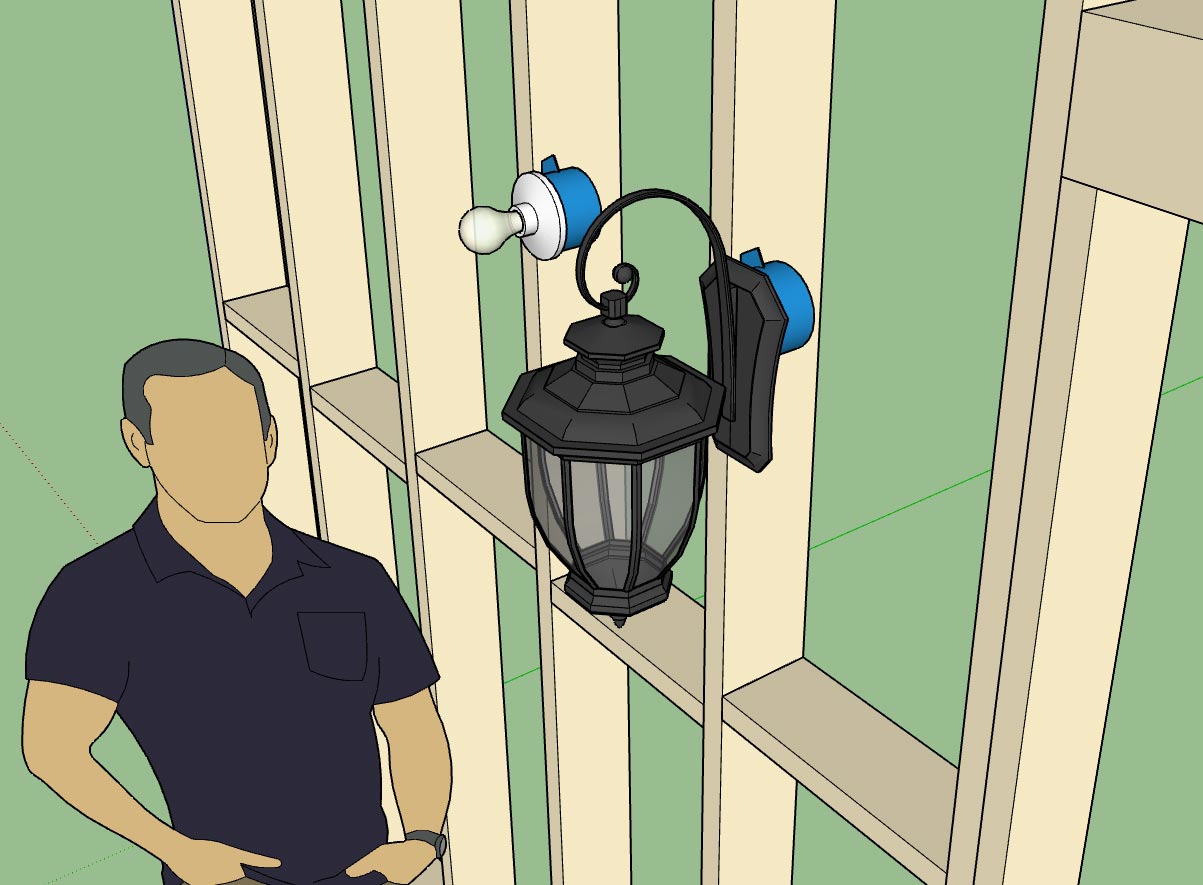
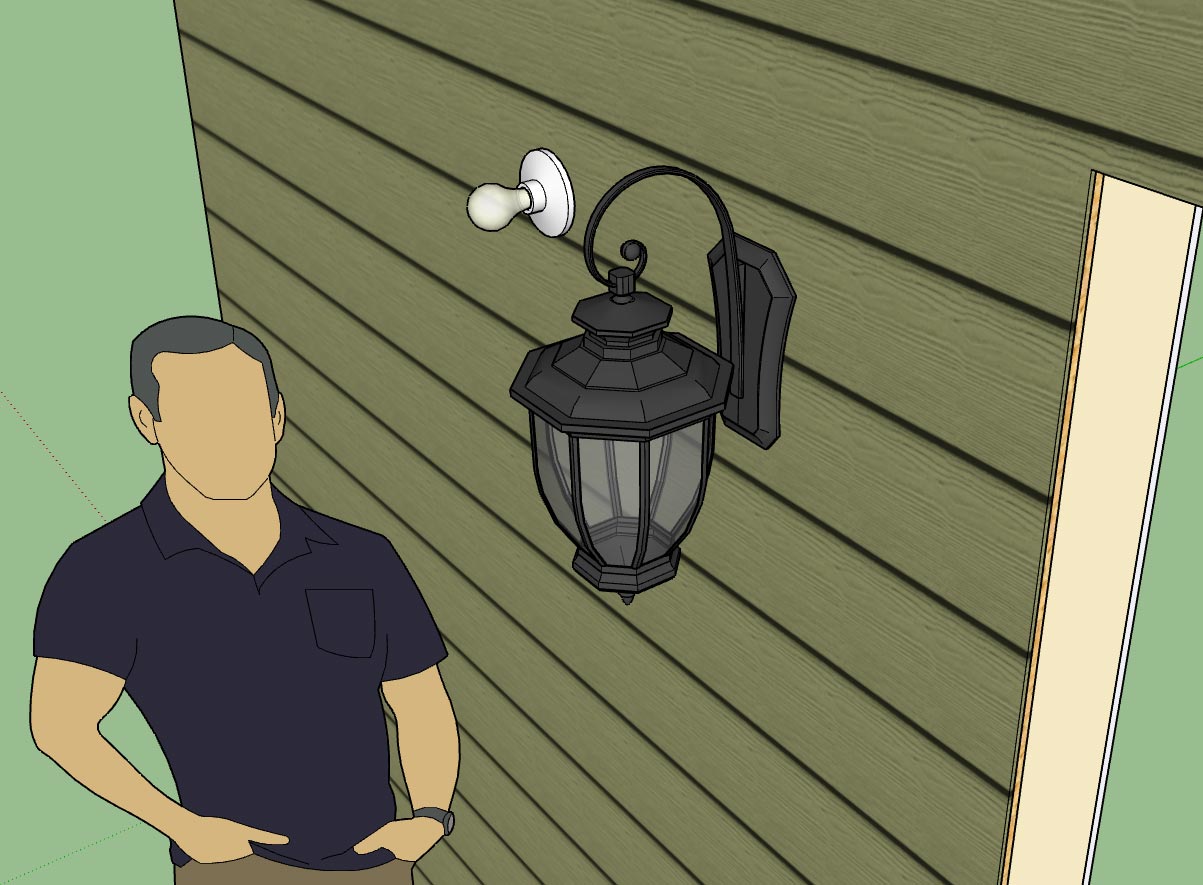
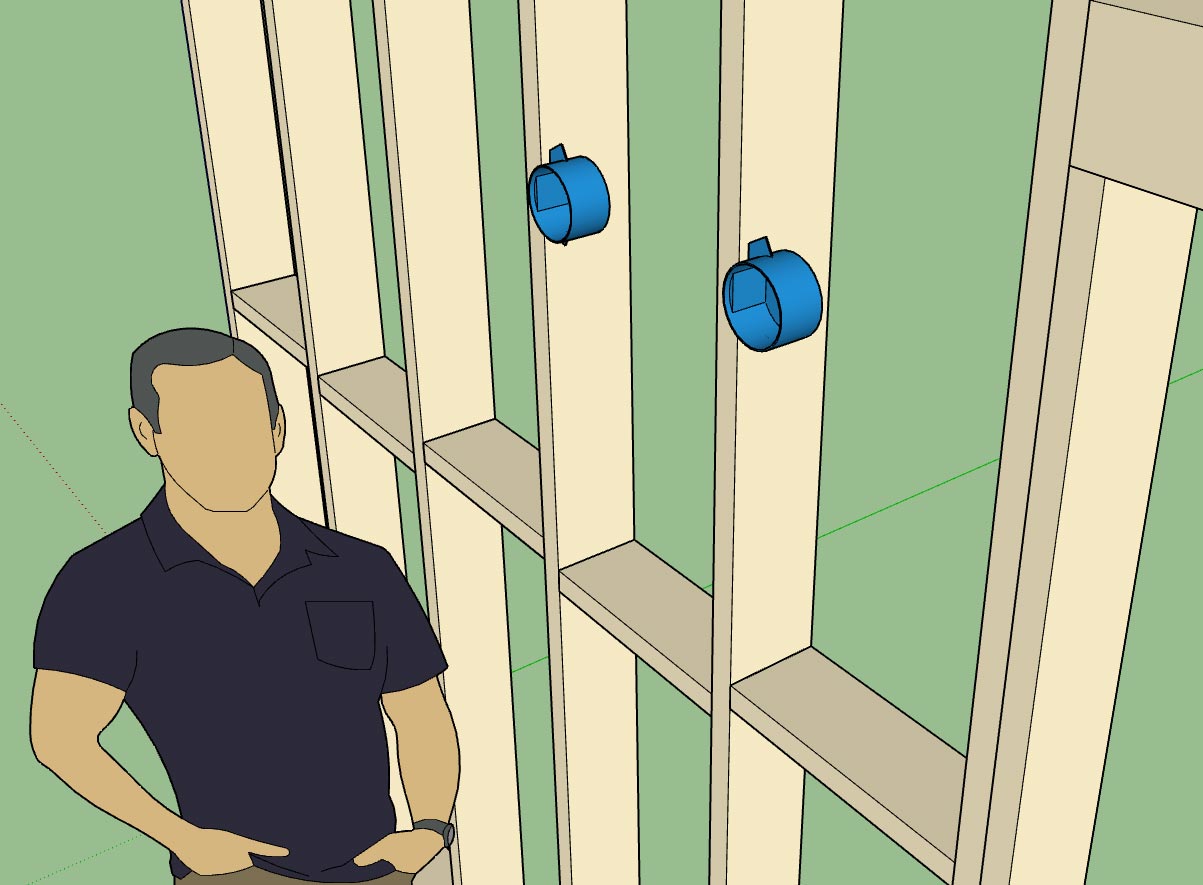
                                  First look at the output of the Light Fixture Module:
                                  http://design.medeek.com/resources/images/electrical_su24_800.jpg

                                  http://design.medeek.com/resources/images/electrical_su22_800.jpg

                                  http://design.medeek.com/resources/images/electrical_su23_800.jpg

                                  The plugin allows you to drop your own light fixtures into the library sub-folder so you can have as many custom light fixtures as you like (and I don't need to spend anymore time modeling things up).

                                  The fancy ext. wall lantern shown was simply downloaded from the warehouse, minor edit to make sure the origin of the file was in the correct place and then dropped into the light_fixture sub-folder. I will not be including this fixture in the distribution simply due to its size (1.2 Mb). However I will include some basic lampholders like the Leviton 49875 shown.

                                  Another thing to note, since the light fixtures are custom I will not be attempting to apply any material or color to them. For that reason there is no need to explode the component into a unique group.

                                  I will add some additional simple light fixtures and junction boxes as time allows or as requests are made.

                                  Currently the light fixture tool is limited to wall mounted fixtures. I am still contemplating how best to deal with ceiling mounted fixtures and what type of system/organization to employ.

                                  Nathaniel P. Wilkerson PE
                                  Medeek Engineering Inc
                                  design.medeek.com

                                  1 條回覆 最後回覆 回覆 引用 0
                                  • medeekM 離線
                                    medeek
                                    最後由 編輯

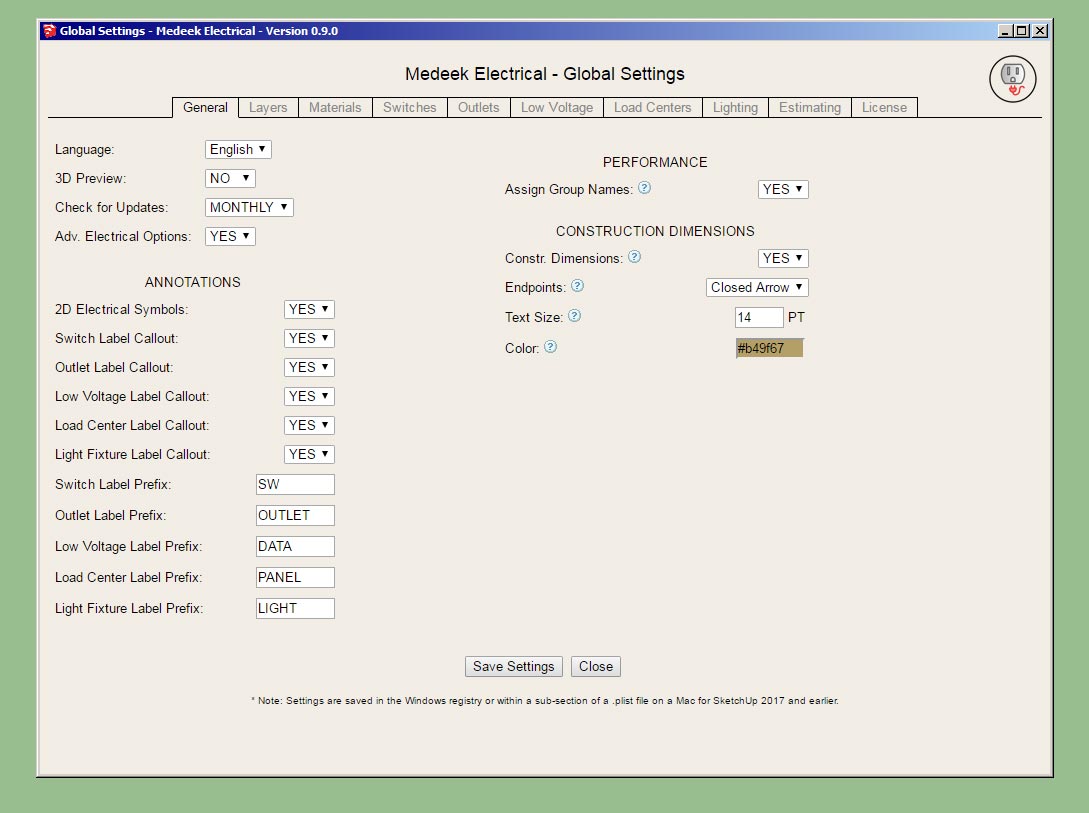
                                    Pulling the global settings together:

                                    http://design.medeek.com/resources/images/electrical_su25_800.jpg

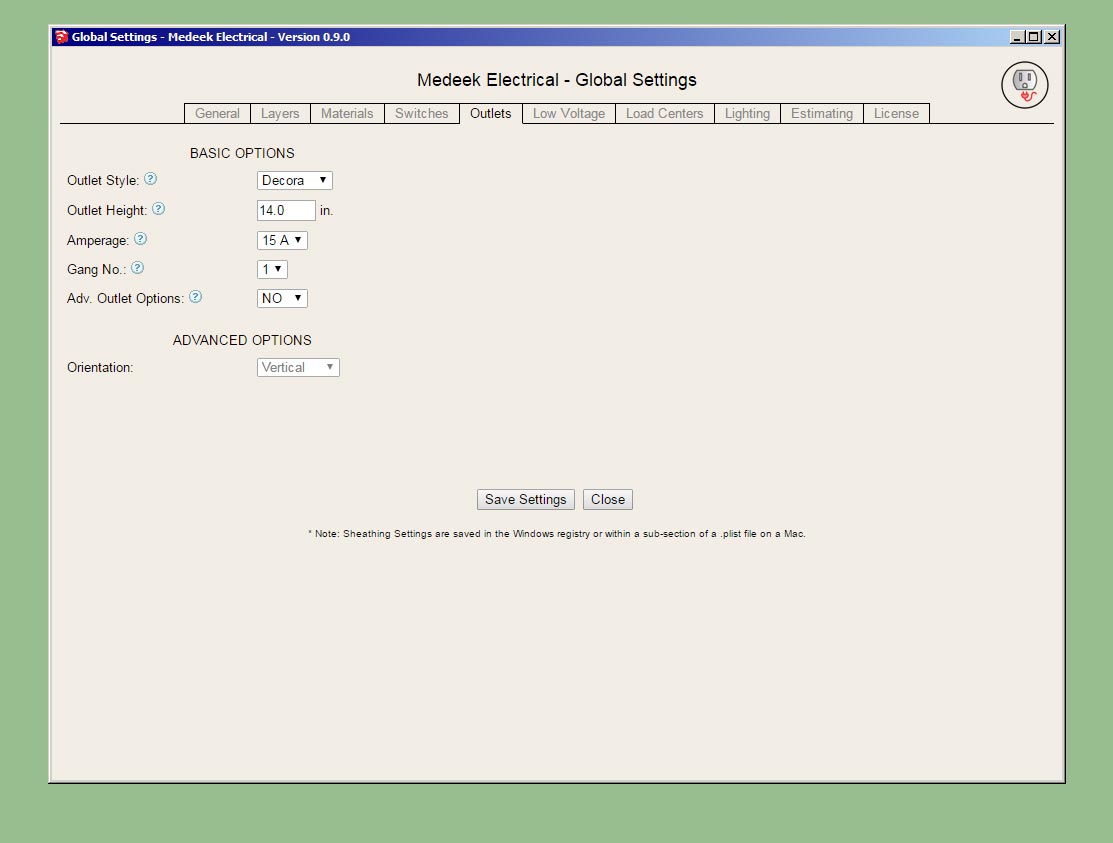
                                    Outlets tab:

                                    http://design.medeek.com/resources/images/electrical_su26_800.jpg

                                    The estimating piece will be after I release the BETA.

                                    I'm almost ready to put this new plugin out there but I'm waffling on whether to spend some additional time on the draw tool and see if I can't make the plugin work with any (wall) geometry rather than just limiting it to an add on for the Medeek Wall plugin.

                                    Nathaniel P. Wilkerson PE
                                    Medeek Engineering Inc
                                    design.medeek.com

                                    1 條回覆 最後回覆 回覆 引用 0
                                    • jujuJ 離線
                                      juju
                                      最後由 編輯

                                      @medeek said:

                                      I'm almost ready to put this new plugin out there but I'm waffling on whether to spend some additional time on the draw tool and see if I can't make the plugin work with any (wall) geometry rather than just limiting it to an add on for the Medeek Wall plugin.

                                      +1 for this

                                      Save the Earth, it's the only planet with chocolate.

                                      1 條回覆 最後回覆 回覆 引用 0
                                      • medeekM 離線
                                        medeek
                                        最後由 編輯

                                        ***** BETA RELEASE *****

                                        Version 0.9.0 - 02.14.2019

                                        • Created the Medeek Electrical Plugin, utilizing SketchUp's Ruby API.
                                        • Added tools to create switches, outlets, low voltage outlets, load centers and lights.

                                        Download the BETA version here:

                                        Link Preview Image
                                        Medeek Design Inc. - Medeek Electrical

                                        Medeek Design Inc. - Medeek Electrical

                                        favicon

                                        (design.medeek.com)

                                        Just a reminder that this plugin is currently dependent on the Medeek Wall extension to function. Also a new version of the Wall plugin is required in order to retain the electrical components within the wall panels. The upgraded version of the wall plugin will be released later tonight.

                                        Items needing further attention:

                                        • Ceiling light fixtures.
                                        • Parametric ability (edit menus for all fixtures).
                                        • Combo switch/outlets
                                        • Estimating
                                        • Ability to use the plugin with any wall geometry (non-plugin dependent)
                                        • Link to purchase plugin within Account Manager (currently only a TRIAL version is available)

                                        Nathaniel P. Wilkerson PE
                                        Medeek Engineering Inc
                                        design.medeek.com

                                        1 條回覆 最後回覆 回覆 引用 0
                                        • medeekM 離線
                                          medeek
                                          最後由 編輯

                                          Version 0.9.0b - 02.15.2019

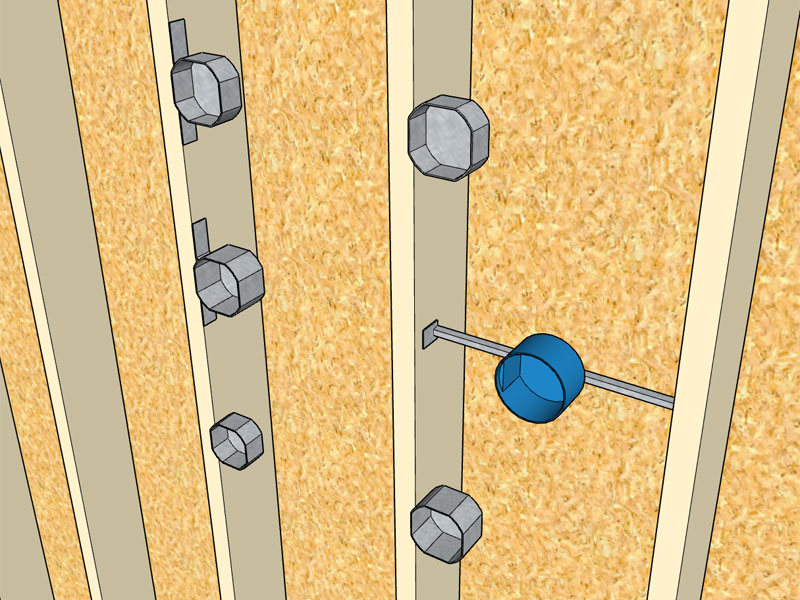
                                          • Added additional Carlon and Raco octagon boxes into the Light Fixture module.
                                          http://design.medeek.com/resources/images/electrical_su29_800.jpg

                                          Per customer request I've added some additional electrical boxes.

                                          The full list of junction boxes available for light fixtures is:

                                          Junction Boxes: Carlon (B518, B520, B620H), Raco (111, 112, 119, 128, 146, 164, 175, 177)

                                          The reason I have to add these boxes in is because I need to hard code in the dimensions so that the plugin knows what the width is when the box justification is toggled to left or right. Its not a big deal, it only takes me a couple minutes to add in a new box and its dimensions.

                                          If you have a particular box or light fixture you would like to see added please let me know

                                          As far as other international standards (British, France, South Africa etc...), I would be excited to add these in as well but I don't have the time or the energy to model up quality, low poly models of typical boxes, faceplates and electrical components. If you would like to see these added to the plugin I would need to have low poly models provided to me.

                                          Nathaniel P. Wilkerson PE
                                          Medeek Engineering Inc
                                          design.medeek.com

                                          1 條回覆 最後回覆 回覆 引用 0
                                          • medeekM 離線
                                            medeek
                                            最後由 編輯

                                            Version 0.9.1 - 02.16.2019

                                            • Enabled the ability to draw switches with any wall geometry (removed the dependency on the Medeek Wall extension).

                                            I've been blasted with emails the last couple of days requesting that I make the plugin work with any walls, so I figured I might as well see if I can make this happen.

                                            This is largely experimentally at this stage since dealing with random (walls) geometry can be a bit tricky.

                                            I've only enabled this feature with the Draw Switches tool for now. Once I am satisfied with its performance I can easily migrate it to all the other tools.

                                            The wall must be a group, and its faces must be only one level deep, not nested group within group.

                                            Please download this latest release and attempt to break it, let me know your findings.

                                            Nathaniel P. Wilkerson PE
                                            Medeek Engineering Inc
                                            design.medeek.com

                                            1 條回覆 最後回覆 回覆 引用 0
                                            • 1
                                            • 2
                                            • 3
                                            • 4
                                            • 5
                                            • 10
                                            • 11
                                            • 3 / 11
                                            • 第一個貼文
                                              最後的貼文
                                            Buy SketchPlus
                                            Buy SUbD
                                            Buy WrapR
                                            Buy eBook
                                            Buy Modelur
                                            Buy Vertex Tools
                                            Buy SketchCuisine
                                            Buy FormFonts

                                            Advertisement