[Plugin][$] FredoCorner - v2.7a - 31 Mar 24



-
This is phenomenal! Thank you, thank you, thank you Fredo!
-
Congratulations Fredo!!

This is a incredible tool and it's very useful to make the complex shapes more realistic, thanks for your efforts. -
AWESOME!!!

This really looks fantastic. Great work. Thank you very much!


-
@jiminy-billy-bob said:
Did you consider having a simpler toggle button like SubD's, instead of the undo/repair?
That would be useful.
-
Impressive.

-
The great return of Fredo
-
@fredo6 said:
I take the idea of the Modifier, which was my initial goal, but is more complex to do.
A real modifier system in SU would be great. Maybe if some of you plugin geniuses could join together to get Trimble to at least support this effort, if it would be possible with some modifications in the SU code.
Based on the experience of the last years i think we won't see any real improvements of SU in the near future, but maybe there would be a way to extend the capability in form of payed extentions that go deeper than the current plugins.btw. If you can store this rounding information with the object, would it be possible to implement material IDs on this level?
-
@numerobis said:
btw. If you can store this rounding information with the object, would it be possible to implement material IDs on this level?
What do you mean exactly by storing "material id"
Fredo
PS: The modifier concept is difficult to implement in Sketchup, native or within extension, because Sketchup does not track the operations, except locally in the Undo stack, but anyway not with the parameters and description of what has been done. So I am afraid that:
- a modifier system would require you use its framework for everything you do in SU (grasshopper approach)
- or you have very specialized modifiers for some functions provided by extensions, as I may come up with with FredoCorner.
-
@fredo6 said:
What do you mean exactly by storing "material id"
I mean material IDs like in other other programs, which can be used for multi materials, random materials, object distribution or selection sets.
Here in max:
1 https://www.youtube.com/watch?v=yJiwnQ3anwM
2 https://www.youtube.com/watch?v=K8qQlb8HupIOr used in RailClone for distribution of objects
https://youtu.be/Xe0MPT0S0wI?t=625Btw. would it be possible to get material informations from lines, when you extrude lines to a face? Then you could have a set of lines with assigned materials and they will be applied to the extruded faces. Combined with an automatic generation of mapping coordinates that follow the extrusion like it is already possible in ThruPaint, this could be really helpful i think (video 2).
-
Thanks Fredo for this incredible tool!!
There is an issue on macOS 10.13.6 & SU2016, when the tool is activated I can't orbit (through shortcut: Ctrl+Cmd) to select edges.
I created the Spanish language file, here is: -
@oxer said:
There is an issue on macOS 10.13.6 & SU2016, when the tool is activated I can't orbit (through shortcut: Ctrl+Cmd) to select edges.
What is Ctrl+Command doing exactly.
Note: I had to implement a custom orbit and Pan tool within FredoCorner, because otherwise, it would not be possible to see the preview, which is simply drawn in the viewport.
You will notice it, because unlike the native orbiter, mine stops orbiting when the mouse is not in the viewport (i.e. over toolbars or dialog boxes).
On Windows, the following is implemented
- Middle mouse button --> orbit
- Middle mouse button + shift --> Pan
- Middle mouse button + Ctrl --> Free orbit (i.e. not keeping horizontal floor)
- Middle mouse button + Left mouse button --> Pan
I have assumed it would be the same on Mac.
So please tell me if it is different and also if there are extra features that I missed.
Fredo
PS: For the translation, very kind of you. Thank you. Actually, in v1.1a, not all strings are exposed yet, so there will be a remaining part (same for LibFredo6)
-
@numerobis said:
@fredo6 said:
What do you mean exactly by storing "material id"
I mean material IDs like in other other programs, which can be used for multi materials, random materials, object distribution or selection sets.
Ok, I see the concept, and it might be useful.
However, all what is shown in the videos seems to be beyond the power of Sketchup, unless this is implemented natively or explicitely supported by the Ruby API.Since SU2017, where a change was introduced that severely damaged the only robust pattern to control the generation of geometry based on temporary groups, it is extremely difficult to propagate information when you create new geometry derived from an old one containing this information. It is challenging, even for something as simple a FredoCorner, where the only information I propagate is about edge properties and face materials.
So I am afraid that extensions will remain fairly limited in this domain, and for the concept of modifiers too, except in some specific situations.
Fredo
-
Hello Fredo. Great stuff!! Thanks for building this.
I am seeing a possible bug. --> Except for zoom, I am not able to navigate the model with my mouse while FredoCorner is active. To be specific, Pan (Middle mouse button + shift) and Orbit (Middle mouse button) do not work via the mouse controls.
Navigation DOES work while using your Round Corner extension
Mac HighSeirra 10.13.6
SketchUp Pro 2018, Version 18.0.16976Cheers
CMD -
Thank You Fredo
i hope i can do this in paid version
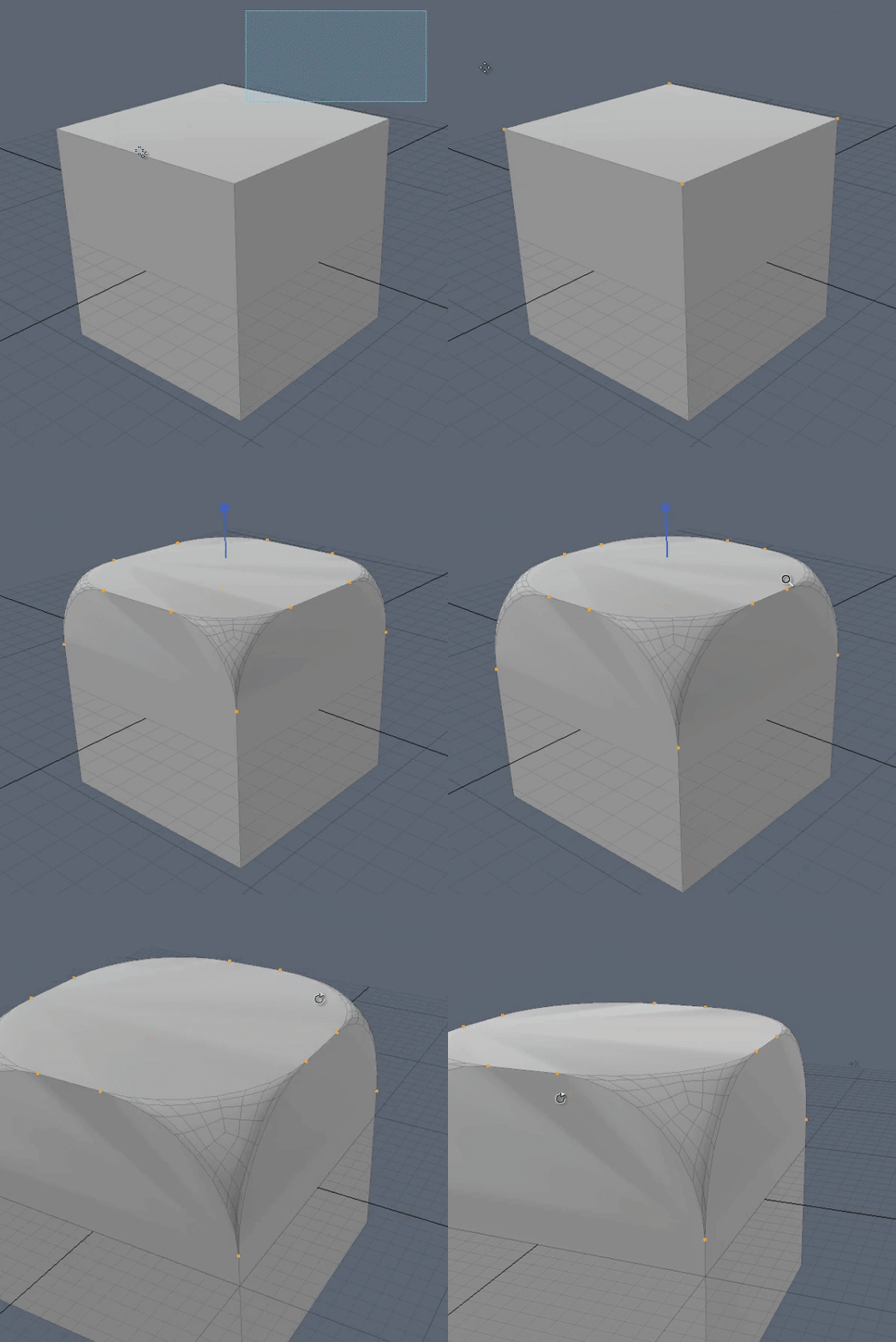
-
@fredo6 said:
What is Ctrl+Command doing exactly.
On Mac you can orbit while you use another tool (i.e draw a line) without the neccesity to exit of the tool to orbit.
I can't test the shortcuts above because I use a Apple Magic Mouse, there isn't middle button:
- Middle mouse button --> orbit
- Middle mouse button + shift --> Pan
- Middle mouse button + Ctrl --> Free orbit (i.e. not keeping horizontal floor)
- Middle mouse button + Left mouse button --> Pan@cmd said:
To be specific, Pan (Middle mouse button + shift) and Orbit (Middle mouse button) do not work via the mouse controls.
Navigation DOES work while using your Round Corner extension
Mac HighSeirra 10.13.6
SketchUp Pro 2018, Version 18.0.16976@fredo6 said:
PS: For the translation, very kind of you. Thank you. Actually, in v1.1a, not all strings are exposed yet, so there will be a remaining part (same for LibFredo6)
Ok, I will translate it when you add all strings.
-
Are you interested by the French version ?

-
@pilou said:
Are you interested by the French version ?
Pilou,
Thanks, I think I will manage. The point is that I did not expose yet all the strings.
Fredo
-
@cmd said:
Hello Fredo. Great stuff!! Thanks for building this.
I am seeing a possible bug. --> Except for zoom, I am not able to navigate the model with my mouse while FredoCorner is active. To be specific, Pan (Middle mouse button + shift) and Orbit (Middle mouse button) do not work via the mouse controls.
Navigation DOES work while using your Round Corner extension
Mac HighSeirra 10.13.6
SketchUp Pro 2018, Version 18.0.16976Cheers
CMDWell, Yes, I should have thought that Macs would have a problem with this, probably in relation with the values of flags in the mouse events, which I forgot are not the same as on Windows.
Could a Mac user does the following:
- Copy the attached rb file TestMacMouse.rb ito its Plugin directory
- Open the Ruby console and type
flag_mac. This starts a dummy tool tracing the Move and Middle button events - Press the Middle Mouse button, move around and release. Type Spacebar to end the test
- Reply to this post with what is displayed in the Ruby console
Thanks in advance.
And sorry for inconvenience for Mac users.
Fredo
-
@Fredo : Pas de problème, d'ailleurs je n'avais même pas trouvé le fichier!
Windows est un tel labyrinthe !
-
On ORBITING on MAC.
I jut published LibFredo6 8.6b, where I tried 'blindly' to fix the problem of Orbiting on Mac.
Thanks to adviseFredo







Hello! It looks like you're interested in this conversation, but you don't have an account yet.
Getting fed up of having to scroll through the same posts each visit? When you register for an account, you'll always come back to exactly where you were before, and choose to be notified of new replies (either via email, or push notification). You'll also be able to save bookmarks and upvote posts to show your appreciation to other community members.
With your input, this post could be even better 💗
Register Login


Advertisement