sketchucation logo sketchucation
    • Login
    Oops, your profile's looking a bit empty! To help us tailor your experience, please fill in key details like your SketchUp version, skill level, operating system, and more. Update and save your info on your profile page today!
    ⚠️ Update | Sketchucation Tools 5.0.8 released with licensing improvements and bugfixes Download

    Sketchup 3d warehouse blank

    Scheduled Pinned Locked Moved SketchUp Discussions
    sketchup
    17 Posts 6 Posters 7.4k Views 6 Watching
    Loading More Posts
    • Oldest to Newest
    • Newest to Oldest
    • Most Votes
    Reply
    • Reply as topic
    Log in to reply
    This topic has been deleted. Only users with topic management privileges can see it.
    • D
      Dprince
      last edited by

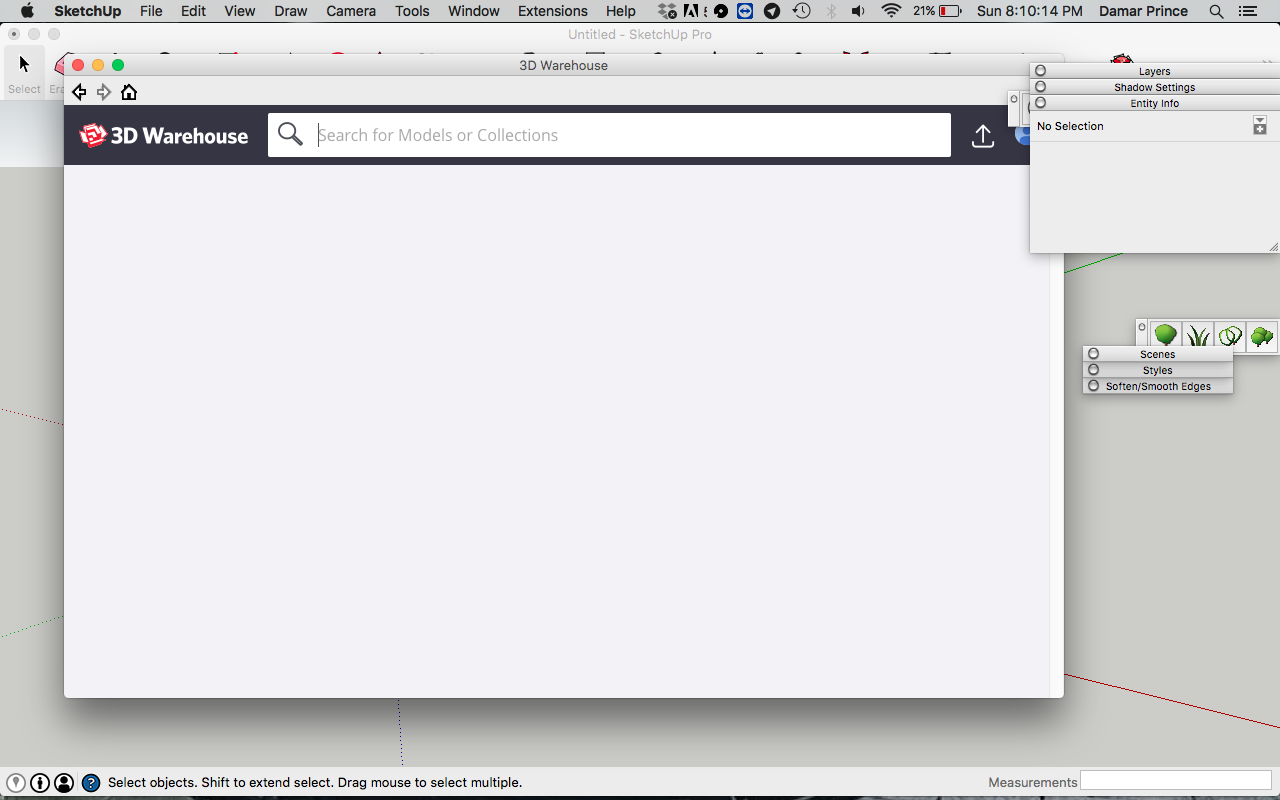
      Hey guys I need some help. whenever i open the 3d warehouse from sketchup it shows blank. What can i do to fx this?

      Screen Shot 2018-08-26 at 8.10.13 PM.png

      1 Reply Last reply
      Reply Quote 0
      • L
        L i am
        last edited by

        If you are in a bind and need something soon, I would google 3 d warehouse and open the model you require outside sketchup and cut and past the model into the model you are working on. Does not help your issue but I tend to do it that way anyway just out of habit.

        1 Reply Last reply
        Reply Quote 0
        • D
          Dprince
          last edited by

          I do that. but i still want to fix this issues.

          1 Reply Last reply
          Reply Quote 0
          • pilouP
            pilou
            last edited by

            Maybe you must be registered too?

            Frenchy Pilou
            Is beautiful that please without concept!
            My Little site :)

            1 Reply Last reply
            Reply Quote 0
            • D
              Dprince
              last edited by

              I am registered. im logged in

              1 Reply Last reply
              Reply Quote 0
              • B
                boverstreet1220
                last edited by

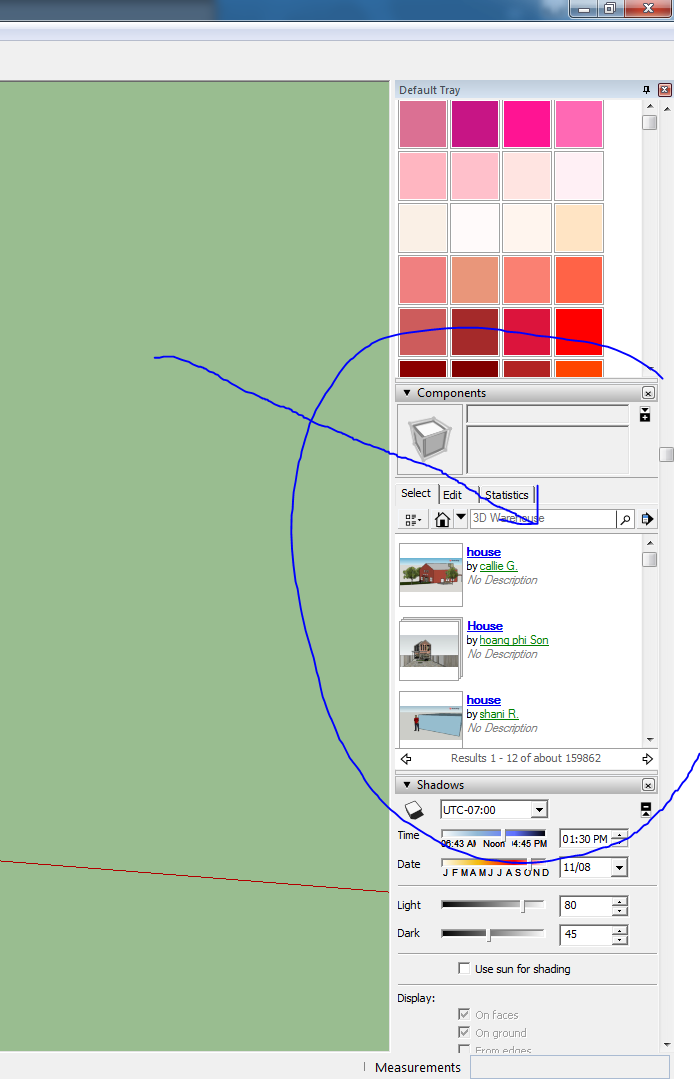
                I'm having this exact same issue. The only way I am able to search anything in the 3D Warehouse through the SketchUp desktop app, is by searching in the Components section of the Default Tray. This allows me to find the component I need, and will then open it in the 3D Warehouse window, but when I click "Download" I am not getting any response at all. Anyone know of any fixes for this and the blank 3D Warehouse in general?

                Capture.PNG

                1 Reply Last reply
                Reply Quote 0
                • Dave RD
                  Dave R
                  last edited by

                  From the SketchUp team, dated 2 March of this year.

                  @unknownuser said:

                  Hello 3D Warehouse users,

                  If you’re using SketchUp 2016 or earlier on Microsoft Windows, this message is for you.

                  Later this year 3D Warehouse will no longer be compatible with Microsoft Internet Explorer.
                  While we do our best to maintain backward-compatibility, many new web technologies simply can’t run in older internet browsers.

                  How does this affect me?

                  You will no longer be able to access all features of 3D Warehouse using the web dialog in SketchUp 2016 and earlier. The built-in dialog uses an embedded version of Internet Explorer even when you have Chrome, Firefox or Edge installed on the same computer.

                  SketchUp 2017 and later use an embedded Chromium browser that is fully compatible with 3D Warehouse.

                  What can I do?

                  Upgrade SketchUp

                  For non-commercial use you can use SketchUp Free online or download SketchUp Make from this page. If you use SketchUp for commercial purposes you need SketchUp Pro.

                  Use A Browser

                  If you want to stick with your current version of SketchUp you can still access 3D Warehouse using Google Chrome, Mozilla Firefox, or Microsoft Edge.

                  Etaoin Shrdlu

                  %

                  (THERE'S NO PLACE LIKE)

                  G28 X0.0 Y0.0 Z0.0

                  M30

                  %

                  1 Reply Last reply
                  Reply Quote 0
                  • D
                    Dprince
                    last edited by

                    This worked. but now i have another problem. the plugins tab is not showing up

                    1 Reply Last reply
                    Reply Quote 0
                    • Dave RD
                      Dave R
                      last edited by

                      @dprince said:

                      This worked. but now i have another problem. the plugins tab is not showing up

                      What worked? Did you upgrade to SU2017 or 2018?

                      Do you mean the Plugins menu? If you upgraded to a newer version, it is a separate installation. Extensions are not copied from a previous version. Best practice is to install all of your extensions fresh from their sources. You can install the Sketchucation Plugin Store tool and use it's tool for installing your bundle which includes any extensions you installed using the plugin Store tool before. There's a similar feature in the Extension Warehouse. Sign in to the EW through Window>Extension Warehouse. Hover the cursor on your name in the upper right corner and you'll see the link.

                      If you enjoy creating extra work for yourself and chasing load errors, you can copy extensions from your older installation. Some people do seem to prefer although I prefer to work smarter and make sure I have the current versions of the extensions.

                      Etaoin Shrdlu

                      %

                      (THERE'S NO PLACE LIKE)

                      G28 X0.0 Y0.0 Z0.0

                      M30

                      %

                      1 Reply Last reply
                      Reply Quote 0
                      • D
                        Dprince
                        last edited by

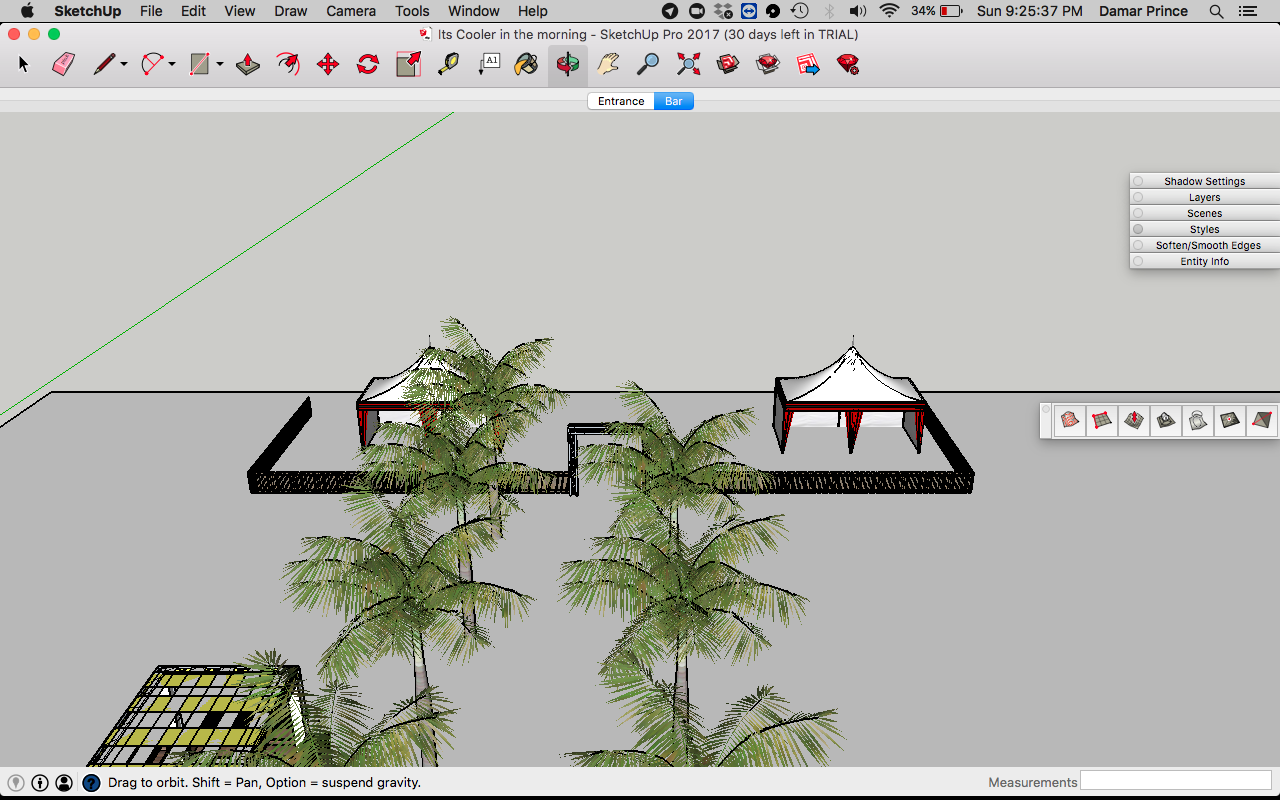
                        SketchUp 2017 is what I installed. I installed all extension fresh. Normally there's a plugin menu/extension menu at the top but there's not. and when I check preferences its not there either

                        Screen Shot 2018-09-02 at 9.25.37 PM.png

                        1 Reply Last reply
                        Reply Quote 0
                        • Dave RD
                          Dave R
                          last edited by

                          How did you install the extensions?

                          Etaoin Shrdlu

                          %

                          (THERE'S NO PLACE LIKE)

                          G28 X0.0 Y0.0 Z0.0

                          M30

                          %

                          1 Reply Last reply
                          Reply Quote 0
                          • D
                            Dprince
                            last edited by

                            From the warehouse. the ones that are available there that i use.

                            1 Reply Last reply
                            Reply Quote 0
                            • Dave RD
                              Dave R
                              last edited by

                              Did you install them via the Extension Warehouse interface in SU2017?

                              Etaoin Shrdlu

                              %

                              (THERE'S NO PLACE LIKE)

                              G28 X0.0 Y0.0 Z0.0

                              M30

                              %

                              1 Reply Last reply
                              Reply Quote 0
                              • D
                                Dprince
                                last edited by

                                yes i did

                                1 Reply Last reply
                                Reply Quote 0
                                • Dave RD
                                  Dave R
                                  last edited by

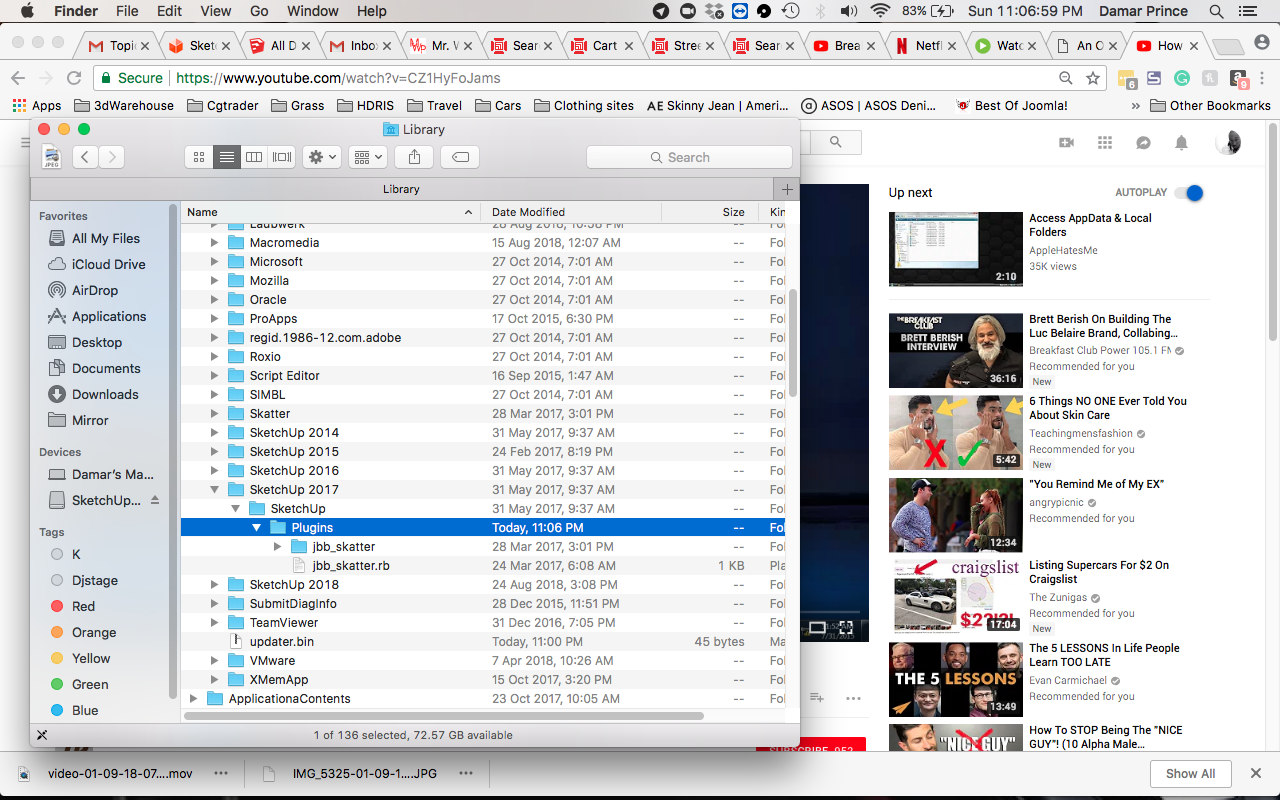
                                  What extensions did you install? Maybe there are none that should show up in the Extensions menu. BTW, the menu will be labeled Extensions, not Plugins. Maybe you can show a screen shot of the User/Library/App Data/.../Plugins folder for SU2017?

                                  Etaoin Shrdlu

                                  %

                                  (THERE'S NO PLACE LIKE)

                                  G28 X0.0 Y0.0 Z0.0

                                  M30

                                  %

                                  1 Reply Last reply
                                  Reply Quote 0
                                  • D
                                    Dprince
                                    last edited by

                                    here it is i hope this is the right folder

                                    Screen Shot 2018-09-02 at 11.06.59 PM.png

                                    1 Reply Last reply
                                    Reply Quote 0
                                    • M
                                      mgfranz
                                      last edited by

                                      Ensure you have not disabled or are missing the file sketchup_webhelper.exe, it is the connection file that allows SU to connect to the warehouse.


                                      "If you like what you do, it will never be work..."
                                      In memory of Sam Maloof, 1916-2009

                                      1 Reply Last reply
                                      Reply Quote 0

                                      Hello! It looks like you're interested in this conversation, but you don't have an account yet.

                                      Getting fed up of having to scroll through the same posts each visit? When you register for an account, you'll always come back to exactly where you were before, and choose to be notified of new replies (either via email, or push notification). You'll also be able to save bookmarks and upvote posts to show your appreciation to other community members.

                                      With your input, this post could be even better 💗

                                      Register Login
                                      • 1 / 1
                                      • First post
                                        Last post
                                      Buy SketchPlus
                                      Buy SUbD
                                      Buy WrapR
                                      Buy eBook
                                      Buy Modelur
                                      Buy Vertex Tools
                                      Buy SketchCuisine
                                      Buy FormFonts

                                      Advertisement