sketchucation logo sketchucation
    • Login
    Oops, your profile's looking a bit empty! To help us tailor your experience, please fill in key details like your SketchUp version, skill level, operating system, and more. Update and save your info on your profile page today!
    Mac User? | Join the Rayscaper Beta for Mac Learn More

    [Plugin] ClothWorks v1.8.0 - 28 Apr 2024

    Scheduled Pinned Locked Moved Plugins
    729 Posts 170 Posters 940.4k Views 170 Watching
    Loading More Posts
    • Oldest to Newest
    • Newest to Oldest
    • Most Votes
    Reply
    • Reply as topic
    Log in to reply
    This topic has been deleted. Only users with topic management privileges can see it.
    • Mike AmosM
      Mike Amos
      last edited by Mike Amos

      Korean language detected by google.

      I am a SketchUp 2026 (version 26.2.243.64-bit) user. My graphics card is an NVIDIA GeForce RTX 2070 Super.

      포럼 사용자들에게 질문이 있으신가요?
      poleom sayongjadeul-ege jilmun-i iss-eusingayo?

      What is your question for the forum?

      Absentia mortis praesentiam vitae probat, vita autem est argumentum constantiae.

      1 Reply Last reply
      Reply Quote 0
      • P
        PEDROELIASCARLOS1998
        last edited by

        Hello,

        I'm having an issue with the plugin. It seems that the installation file may be corrupted or possibly infected, as my antivirus detects it as a threat during the download.

        Also, when I manage to download and install the plugin in SketchUp, SketchUp starts freezing and crashing immediately after the installation.

        Could you please check whether there is an issue with the installation file or provide an updated version?

        Thank you!

        1 Reply Last reply
        Reply Quote 0
        • Dave RD
          Dave R
          last edited by

          I haven't had any freezing or other weird behavior with Clothworks. It works as expected for me.

          Which version do you have installed? What operating system? What SketchUp version? What version of the Sketchucation ExtensionStore do you have installed?

          Etaoin Shrdlu

          %

          (THERE'S NO PLACE LIKE)

          G28 X0.0 Y0.0 Z0.0

          M30

          %

          1 Reply Last reply
          Reply Quote 0
          • V
            voegel
            last edited by voegel

            Excellent work, but how can I use it for (maybe rare) reversed gravity use cases? 😊

            Robert Hooke (1635-1703)
            Robert Hooke (1635-1703).jpg

            Dave RD 1 Reply Last reply
            Reply Quote 0
            • Dave RD
              Dave R @voegel
              last edited by

              @voegel said:

              but how can I use it for (maybe rare) reversed gravity use cases?

              Invert the object after running the extension.

              Etaoin Shrdlu

              %

              (THERE'S NO PLACE LIKE)

              G28 X0.0 Y0.0 Z0.0

              M30

              %

              1 Reply Last reply
              Reply Quote 0
              • V
                voegel
                last edited by voegel

                I know that workaround but that is not what I really like
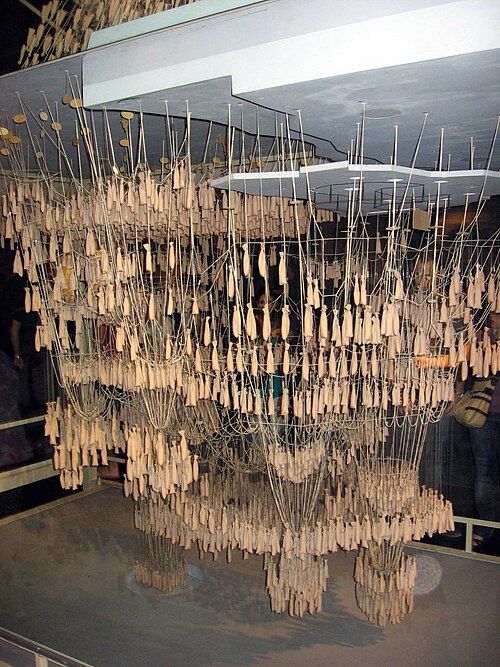
                Maqueta_funicular.jpg

                Sagrada Familia Museum - Barcelona - Hanging Model (= analog computing)

                1 Reply Last reply 🙄
                Reply Quote 0
                • J
                  jsinmichael
                  last edited by

                  Can you please confirm that this extension works with the latest SU version? Thanks!

                  Rich O BrienR 1 Reply Last reply
                  Reply Quote 0
                  • Rich O BrienR
                    Rich O Brien Moderator @jsinmichael
                    last edited by

                    @jsinmichael said:

                    Can you please confirm that this extension works with the latest SU version? Thanks!

                    It does. You can install it using Sketchucation Tools: https://sketchucation.com/plugin/696-sketchucationtools and trial it to check for yourself

                    Download the free D'oh Book for SketchUp 📖

                    1 Reply Last reply 👍
                    Reply Quote 0
                    • Dave RD
                      Dave R
                      last edited by

                      Visual proof:

                      CW.gif

                      Etaoin Shrdlu

                      %

                      (THERE'S NO PLACE LIKE)

                      G28 X0.0 Y0.0 Z0.0

                      M30

                      %

                      1 Reply Last reply
                      Reply Quote 1
                      • C
                        Carlarochasoares Newcomers
                        last edited by

                        Hi everyone,

                        I'm trying to model a tensile tent in ClothWorks, with one side attached to the roof of a house.

                        I'm looking for some advice on the best ClothWorks settings for this type of tensioned membrane, but my main difficulty is positioning the pins accurately.

                        Is there a way to move the pins more precisely? The arrows are very large, so I have to zoom out to click on them, which makes it difficult to position the fixing points accurately.

                        Any advice would be really appreciated. Thanks!

                        1 Reply Last reply
                        Reply Quote 0
                        • F
                          FlawinneF
                          last edited by

                          Do you know if the developer is going to release an update for SketchUp 2027?

                          1 Reply Last reply
                          Reply Quote 0
                          • TIGT
                            TIG Moderator
                            last edited by TIG

                            @anton_s
                            He is the developer and only he can confirm compatibility - and I know the PluginStore only lists up to v2024 for 'compatibility',
                            BUT if it's working in newer versions than that [and it seems that others have been using it successfully in v2026] then it should also work in v2027.
                            Download it and try it - report back on your experiences with it in v2027 - it will be helpful feedback for others and the author...

                            TIG

                            Dave RD R 2 Replies Last reply
                            Reply Quote 0
                            • Dave RD
                              Dave R @TIG
                              last edited by

                              @TIG This is the error when opening SU2027.

                              Extension Errors Report
                              SketchUp: 27.0.264
                              OS: Windows 11 
                              Ruby: 3.4.9
                              
                              Extension: ClothWorks (1.8.0a)
                              Error: IOError (Stage directory, "c:/users/drkr4/appdata/roaming/sketchup/sketchup 2027/sketchup/plugins/ams_clothworks/libraries/stage/win64/3.4", is missing!)
                              c:/users/drkr4/appdata/roaming/sketchup/sketchup 2027/sketchup/plugins/ams_clothworks/extension_manager.rbe:97:in 'AMS::ClothWorks::ExtensionManager#require_all'
                              c:/users/drkr4/appdata/roaming/sketchup/sketchup 2027/sketchup/plugins/ams_clothworks/main.rbe:747:in '<main>'
                              C:/Program Files/SketchUp/SketchUp 2027/SketchUp/Tools/extensions.rb:209:in 'Kernel.eval'
                              C:/Program Files/SketchUp/SketchUp 2027/SketchUp/Tools/extensions.rb:209:in 'Sketchup.require'
                              C:/Program Files/SketchUp/SketchUp 2027/SketchUp/Tools/extensions.rb:209:in 'SketchupExtension#load'
                              C:/Users/drkr4/AppData/Roaming/SketchUp/SketchUp 2027/SketchUp/Plugins/ams_ClothWorks.rb:38:in 'Sketchup.register_extension'
                              C:/Users/drkr4/AppData/Roaming/SketchUp/SketchUp 2027/SketchUp/Plugins/ams_ClothWorks.rb:38:in '<module:ClothWorks>'
                              C:/Users/drkr4/AppData/Roaming/SketchUp/SketchUp 2027/SketchUp/Plugins/ams_ClothWorks.rb:7:in '<module:AMS>'
                              C:/Users/drkr4/AppData/Roaming/SketchUp/SketchUp 2027/SketchUp/Plugins/ams_ClothWorks.rb:6:in '<top (required)>'


                              Etaoin Shrdlu

                              %

                              (THERE'S NO PLACE LIKE)

                              G28 X0.0 Y0.0 Z0.0

                              M30

                              %

                              1 Reply Last reply
                              Reply Quote 0
                              • R
                                rv1974 @TIG
                                last edited by

                                @TIG many v2026 compatible plugins don't work in v2027. all mindsight, TT, this one, etc

                                Dave RD 1 Reply Last reply
                                Reply Quote 0
                                • Dave RD
                                  Dave R @rv1974
                                  last edited by

                                  @rv1974 said:

                                  @TIG many v2026 compatible plugins don't work in v2027. all mindsight, TT, this one, etc

                                  Which "TT" extensions don't work in 2027? All the ones I have work as expected.

                                  Etaoin Shrdlu

                                  %

                                  (THERE'S NO PLACE LIKE)

                                  G28 X0.0 Y0.0 Z0.0

                                  M30

                                  %

                                  1 Reply Last reply
                                  Reply Quote 0
                                  • TIGT
                                    TIG Moderator
                                    last edited by

                                    So it looks like @anton_s needs to comment / update [and others] ...
                                    It looks like Anton needs some ../ams_ClothWorks/libraries/stage/win64/3.4 .so file making and adding for compatibility - the Ruby version was updated to 3.4 in v2027 !

                                    TIG

                                    1 Reply Last reply 👍
                                    Reply Quote 1
                                    • D
                                      drjennings7
                                      last edited by TIG

                                      Hi this is a question for @anton_s

                                      I love ClothWorks, and use it all the time professionally. I also teach and get my students to start using your free version, and most buy the full license. It is a great tool. However I was distressed to find that it does not run on SU 2027. It is early in the year I understand, but do you have plans to upgrade the plugin to work with the new Ruby environment on SU 2027?

                                      I sincerely hope that you do, I would be happy to purchase a new pro licence from you if needed and i am sure a lot of the users in our community would as well.

                                      My thanks,
                                      DRJENNINGS7

                                      1 Reply Last reply
                                      Reply Quote 0
                                      • P
                                        pipinek
                                        last edited by

                                        Greetings,

                                        any chance to get an update for SU 2027?

                                        1 Reply Last reply
                                        Reply Quote 0
                                        • C
                                          chjblack1234
                                          last edited by

                                          There are too many things that don't work in the 2027 version. all mindsight, TT, clothwork...

                                          Dave RD 1 Reply Last reply
                                          Reply Quote 0
                                          • TIGT
                                            TIG Moderator
                                            last edited by TIG

                                            There was a major Ruby change with v2027.
                                            This 'broke' many extensions.
                                            When an author finds out often a swift fix is issued.
                                            Many authors pre-empt the update by issuing changes early when they find out about the impending changes.
                                            However, if they've written dozens of extensions for several SketchUp version compatibility across all operating systems, sometimes these changes slip through and extensions fail to work properly.
                                            You can help get this fixed quickly by posting in the relevant thread for an affected extension - giving as much useful information as possible about your particular setup and what went wrong - including any error messages and all of the error messages that might pop up in the Ruby Console etc...


                                            TIG

                                            1 Reply Last reply
                                            Reply Quote 0

                                            Hello! It looks like you're interested in this conversation, but you don't have an account yet.

                                            Getting fed up of having to scroll through the same posts each visit? When you register for an account, you'll always come back to exactly where you were before, and choose to be notified of new replies (either via email, or push notification). You'll also be able to save bookmarks and upvote posts to show your appreciation to other community members.

                                            With your input, this post could be even better 💗

                                            Register Login
                                            • 1
                                            • 2
                                            • 33
                                            • 34
                                            • 35
                                            • 36
                                            • 37
                                            • 37 / 37
                                            • First post
                                              Last post
                                            Buy SketchPlus
                                            Buy SUbD
                                            Buy WrapR
                                            Buy eBook
                                            Buy Modelur
                                            Buy Vertex Tools
                                            Buy SketchCuisine
                                            Buy FormFonts

                                            Advertisement