[Plugin] ClothWorks v1.8.0 - 28 Apr 2024
-
All of the 3 seats are allocated, presumably using your old computer[s] details.
You need to free up the seats so that you can reactivate them for your new computer[s].
If you have the latest versions of the extension and the SketchUcation toolset [for the licensing] installed, and SketchUp restarted to sync, you should be able to do this using the submenu items for the extension under the Tools menu.
You can also manage each of your licenses by logging in to SketchUcation.com and using the menu item PluginStore > My Licenses... page...3개의 자리는 모두 할당되었으며, 아마도 이전 컴퓨터의 세부 정보를 사용하고 있을 것입니다.
새 컴퓨터에서 다시 활성화할 수 있도록 자리를 비워야 합니다.
최신 버전의 확장 프로그램과 SketchUcation 도구 세트[라이선스용]가 설치되어 있고 SketchUp을 다시 시작하여 동기화한 경우 도구 메뉴 아래에 있는 확장 프로그램의 하위 메뉴 항목을 사용하여 이 작업을 수행할 수 있습니다.
SketchUcation.com에 로그인하여 메뉴 항목 PluginStore > 내 라이선스... 페이지를 사용하여 각 라이선스를 관리할 수도 있습니다. -
Amazing plugin, great job
 I wanted to purchase a 1 seat license, since I wont be using Sketchup that often, but it is not currently available on the list, would it be available maybe in future?
many thanks -
@Sara37 said in [Plugin] ClothWorks v1.8.0 - 28 Apr 2024:
but it is not currently available on the list, would it be available maybe in future?
-
결재 관련 질문이 있습니다. 회사에 구매 요청 예정인데 결제하면 계속 사용인 가능한 구매 서비스 인가요? 일정기간 사용 후 추가결제가 이루어지는 구독 서비스 인가요?
I have a question about payment. I am planning to request a purchase from the company. Is this a purchase service that I can continue to use after payment? Is this a subscription service that requires additional payment after a certain period of use?
-
@jabledesign License is perpetual with no ongoing payments.
-
Hi there... I have SketchUp 2026 version, is there any other way to buy licence and install to my Windows ?
-
Hello,
I have a problem with ClothWorks.
Everything is set correctly according to the manual:
- Cloth is assigned
- Pins are assigned on vertices
- Simulation runs correctly
But during simulation I cannot select pins.
When I try to drag/select pins:
- no yellow selection area appears
- no gizmo appears
- instead I only get a red dashed line (standard SketchUp drag)
Pins can be selected only when simulation is OFF.
During simulation they are not interactive.Because of this I cannot move pins to create folds (for curtains).
What could be the reason?
Is it a known bug or conflict with other plugins?Thank you.
-
When the simulation is running your cursor should be White and the box select has a slight yellow fill...
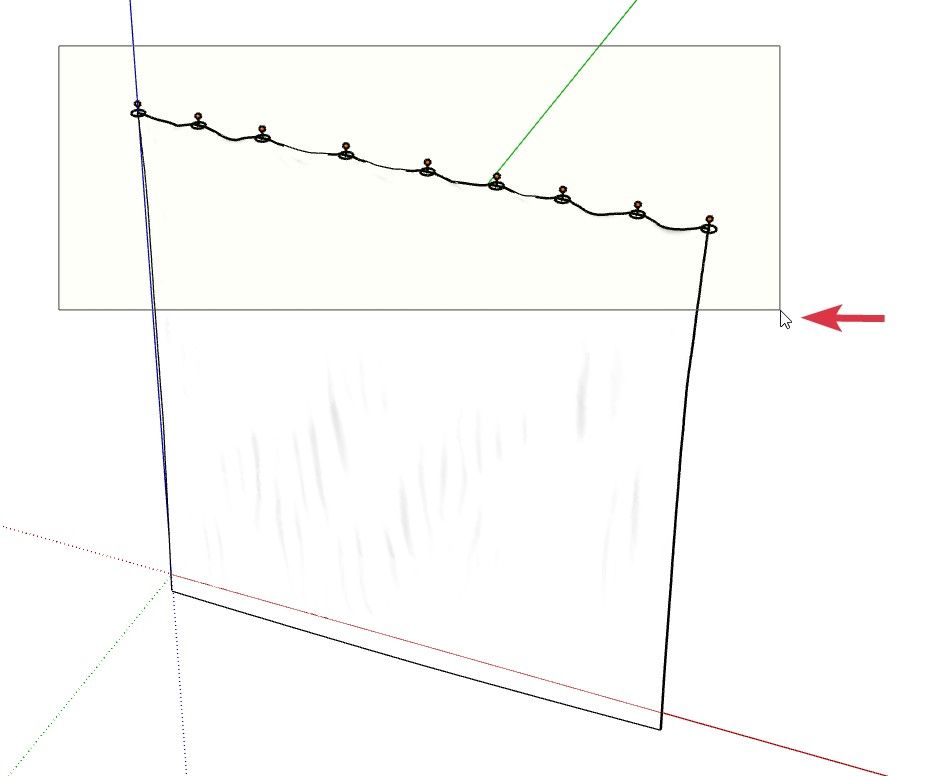
-
Yes, I understand that during simulation the cursor should turn white and a yellow selection box should appear.
In my case the cursor does turn white, but the selection still does not work:
- no yellow selection box appears
- pins cannot be selected
- no gizmo appears
So the issue is not the cursor, but that selection is not functioning during simulation.
-
Share the file that fails. Also your version SketchUp and the OS you are using.
For me its works on SketchUp 2023 to 2026 on Windows
-
Thank you for your response. The issue is resolved.
The problem was not the license itself. SketchUcationTools was either missing or not working correctly, so ClothWorks could not detect it and did not open the license window.
I reinstalled SketchUcationTools and now everything works fine.
-
스케치업 2026 (버전 26.2.243.64비트) 사용자 입니다. 그래픽카드 nvidia geforce rtx 2070 super 인데
-
@inuk228
And your question is ? -
Korean language detected by google.
I am a SketchUp 2026 (version 26.2.243.64-bit) user. My graphics card is an NVIDIA GeForce RTX 2070 Super.
포럼 사용자들에게 질문이 있으신가요?
poleom sayongjadeul-ege jilmun-i iss-eusingayo?What is your question for the forum?
-
Hello,
I'm having an issue with the plugin. It seems that the installation file may be corrupted or possibly infected, as my antivirus detects it as a threat during the download.
Also, when I manage to download and install the plugin in SketchUp, SketchUp starts freezing and crashing immediately after the installation.
Could you please check whether there is an issue with the installation file or provide an updated version?
Thank you!
-
I haven't had any freezing or other weird behavior with Clothworks. It works as expected for me.
Which version do you have installed? What operating system? What SketchUp version? What version of the Sketchucation ExtensionStore do you have installed?
-
Excellent work, but how can I use it for (maybe rare) reversed gravity use cases?

Robert Hooke (1635-1703)

-
-
I know that workaround but that is not what I really like
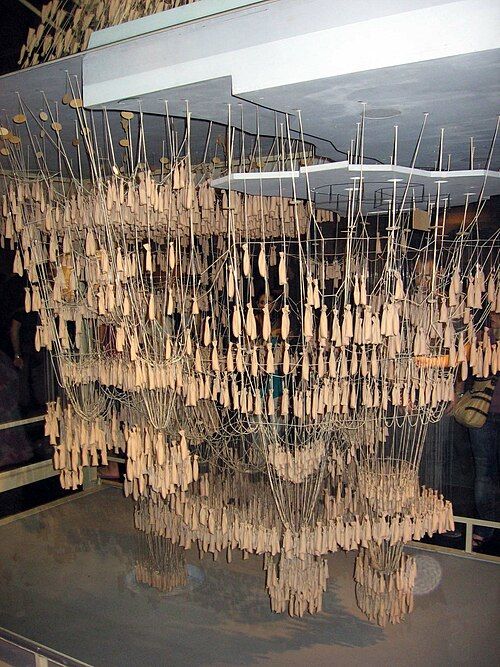
Sagrada Familia - Barcelona - Hanging Model (= analog computing)
-
Can you please confirm that this extension works with the latest SU version? Thanks!





Hello! It looks like you're interested in this conversation, but you don't have an account yet.
Getting fed up of having to scroll through the same posts each visit? When you register for an account, you'll always come back to exactly where you were before, and choose to be notified of new replies (either via email, or push notification). You'll also be able to save bookmarks and upvote posts to show your appreciation to other community members.
With your input, this post could be even better 💗
Register Login


Advertisement