[Plugin] ClothWorks v1.8.0 - 28 Apr 2024
-
@gazzato70 said:
@rich o brien said:
@gazzato70 said:
Hi, I have a licensing problem with ClothWorks. I had to format the pc without being able to release the license. After the new installation I entered the licenses of the paid plugins and ClothWorks tells me that I am using 3 licenses while in fact I only use 1 license. I don't have other PCs where I use ClothWorks. I need help resetting the licensing situation. Thank you very much
The license logs show 3 devices in use with the most recent validation occurring 8 days ago...

Thanks for the reply, so since I don't have release the licenses before formatting, nothing can be done? Did I get it right ? If this works I will be careful with the latest license actually in use (2021-10-08). However, the license of 2020-02-16 was of the old Laptop that I sold with only Windows 10 and the drivers installed while the license of 2021-05-25 is of the current Laptop that I purchased at the end of May 2021.
One last question, in case of hard disk failure or computer theft (I hope it never happens !!) I would also lose the last available license and I would be forced to buy it again ??? Many thanks for the help even if I think there must be a solution, you should be able to see if the license is actually in use on some pc and not rely on the installation. Only in this way do I consider it right to impose such a strict rule. ThanksI haven't received any answers or solutions yet. Thanks.
-
The license system philosophy is that no internet queries are needed to use a licensed plugin.
That means the user needs to be aware of license allocation. Of course hardware failure happens and in this instance we release further seats.
Just contact the extension dev. They can do it.
Future license system updates are planned to allow online license releases etc.
-
Hi, I wonder if anyone can help me: I have been using Clothworks paid version until today with no problem.
Today I tried it and as soon as I start the simulation, Sketchup become unresponsive and I have to force close.
It was working perfectly prior to today, I have already tried to delete it and reinstall, but to no avail. Any help would be appreciated.
I'm on windows 10, did a system update yesterday (could it be that?), working with Xeon processor and a 1070ti GPU.
-
Looking at what has changed on your computer since you last used it is a good idea. Clothworks didn't change. According to your profile you are using SketchUp 2017 Make and that hasn't changed in around 4 years. A Windows update might be the cause. Maybe a bad graphics driver that was included with the update?
Have you tried it with a very simple model? Few subdivisions of the cloth component and a simple shape as a collider?
-
Thanks for your reply, I should update my profile: I'm using the latest update of Sketchup (licensed of course), and it stops working when I try the simplest geometry.
I'll try to update my graphics drivers..
-
Can you share the .skp file you're trying to use Clothworks on? It would be interesting to also compare with another computer.
-
Hey Michael,
Windows update's cause me all kinds of trouble. I have no idea if it will help with this situation or not, but after Windows updates I often need to uninstall & reinstall 'Microsoft C++ Distributables' to get my programs functioning again. If Clothworks uses C++ it could be affected...?(After last months update, I lost one of my NVMe drives from showing up in BIOS...and I still havent' got it working again.... (thanks MS))

-
Hi, thanks for the heads up. I'll try and see what happens.
To add to this: I have this problem only on my Workstation. On my laptop (win 10, I7, gtx970) everything runs smoothly, but there I am using Sketchup 2020
-
@rich o brien said:
The license system philosophy is that no internet queries are needed to use a licensed plugin.
That means the user needs to be aware of license allocation. Of course hardware failure happens and in this instance we release further seats.
Just contact the extension dev. They can do it.
Future license system updates are planned to allow online license releases etc.
Thanks to those who restored the licenses, thanks for believing my words, in the future I will be more waiting in case of formatting or buying a new PC !!
-
Hello all,
I went through most Clothworks tutorials on Youtube. But there are still a few advanced setting options I don't know how to use.
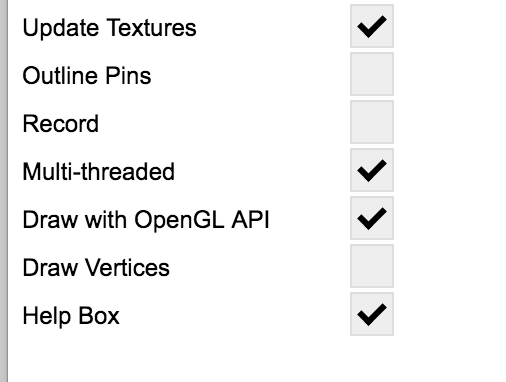
Outline Pins
Multi-threaded
Draw VerticesIs there any video tutorial that has some example explaining these.
Thanks
-
I have a small issue with clothworks. I purchased a licence 03.01.2022 and installed it according to your instructions. However, when I try to use a pin tool it seem not to be working. The arrows won´t simply occur.
Would be very glad for any help you could provide.
Thanks a lot, -
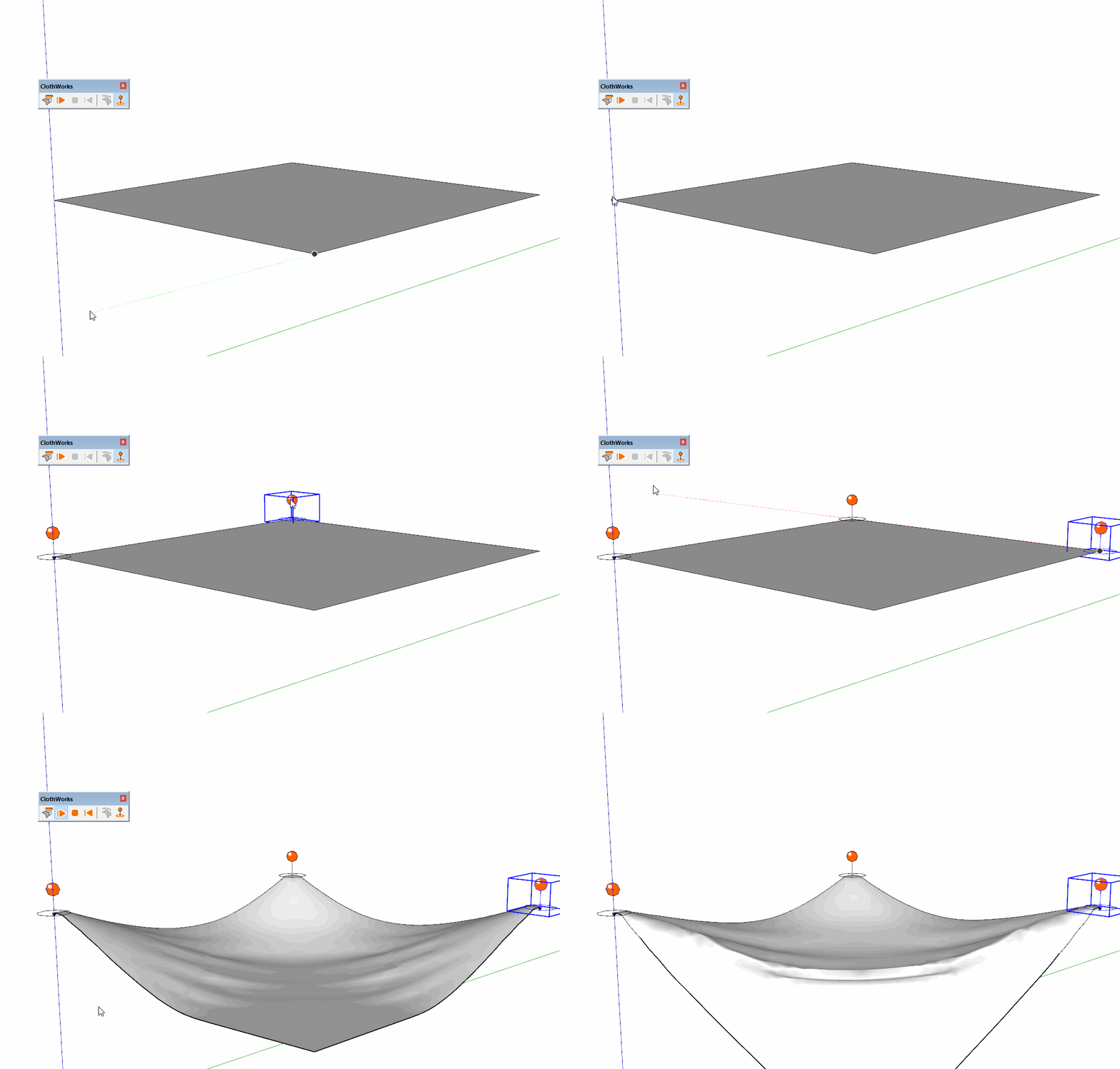
What are you doing when you try to insert them? I click once to place the pin, move the cursor up a little and click again. Click on the GIF. This is in SU 2021.
-
@dave r said:
What are you doing when you try to insert them? I click once to place the pin, move the cursor up a little and click again. Click on the GIF. This is in SU 2021.
[attachment=0:230xekdk]<!-- ia0 -->pins.gif<!-- ia0 -->[/attachment:230xekdk]Click -- Drag -- Click-Release
-
@tutorialsup said:
Can you please add that feature. that allow us to Scale the Cloth X Y and Z axis separately. Right now cloth Scale option scale uniformly from all axis.
Thanks
Hi, Anton_S I'm still waiting for this feature,
have you planned to add this feature?
Thanks -
-
@dave r said:
@tutorialsup said:
Click -- Drag -- Click-Release
Try doing it as I described.
Yes! It's worked as well

-
Hi there, I hope this is the right place to find help for clothworks, if not please help showing me the correct channel. I had been using clothworks with sketchup 2017 & 2018 in my old Mac a few years back. And currently I have problem using it with my new map m1 2021 running skectup pro 2021. I just couldn't select the pins at all during the animation..... I have triple checked and its not a licence issue..
Much appreciate if anyone can help or share experience. thanks many wayne -
Great Plugin for sketchup users!
I bought the plugin over a year now and it was all okay, but after the latest update; my activation key does not work anymore, also I tried reaching out via email for technical support but no reply. it's been a month now and I am not sure if it's only me or is there anyone else who has the same experience?
-
@indecrafts said:
Great Plugin for sketchup users!
I bought the plugin over a year now and it was all okay, but after the latest update; my activation key does not work anymore, also I tried reaching out via email for technical support but no reply. it's been a month now and I am not sure if it's only me or is there anyone else who has the same experience?
Have you updated to Sketchucation Tools 4.2.3?
-
Hello,
I use Clothworks to position objects by gravity on faces or in containers. Clothworks is unfortunately not designed for this and that's a shame.
Is an option of this type envisaged which as currently:- would take into account the gravity and mass of objects, their collision etc.
- would not alter their geometry
- would not multiply the components
- would still include the "drag" option to modify the position of objects.
This is a derivative use of the plugin that's true. But an answer in terms of productivity.
Here is what can illustrate a use.
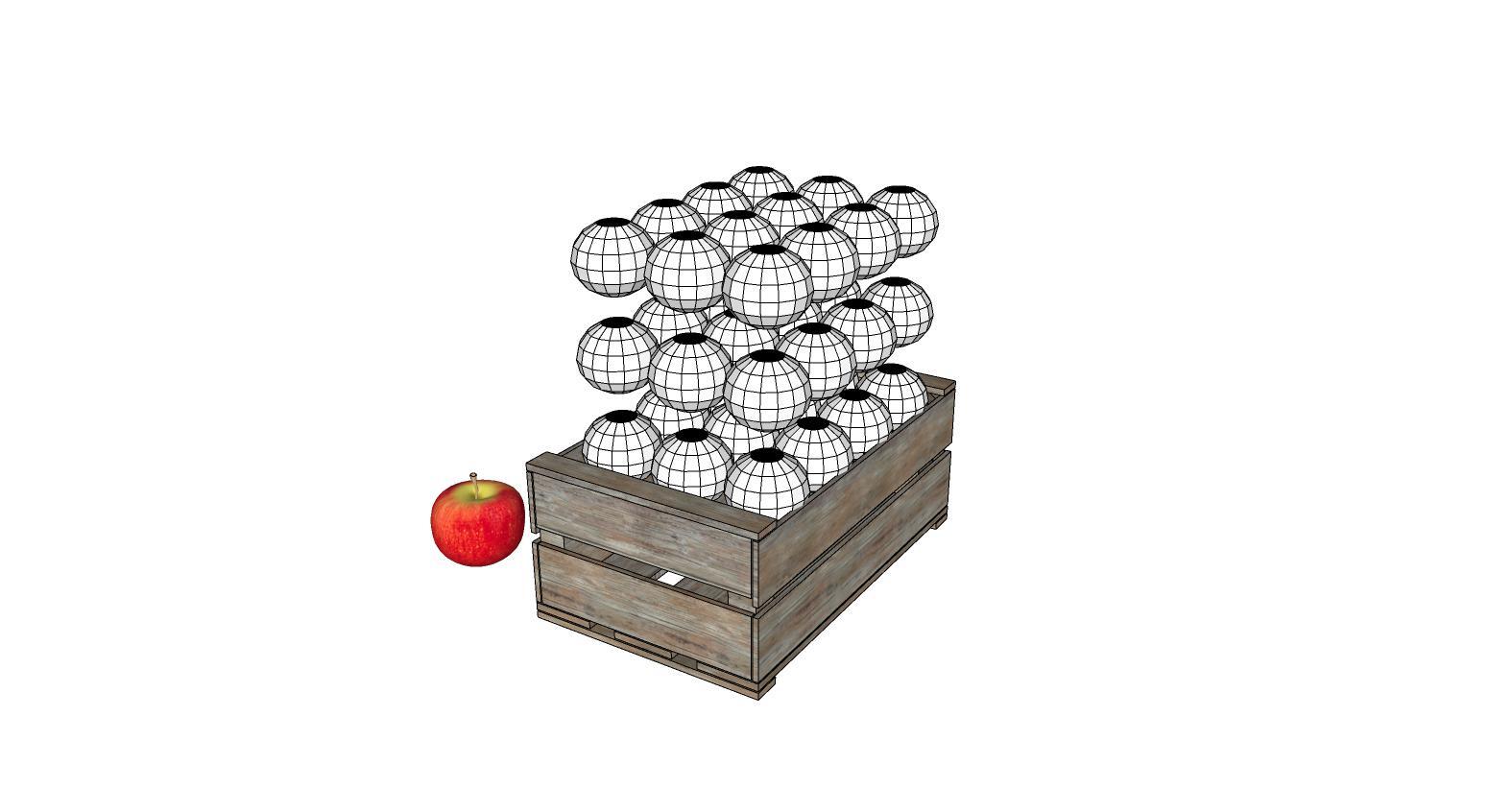
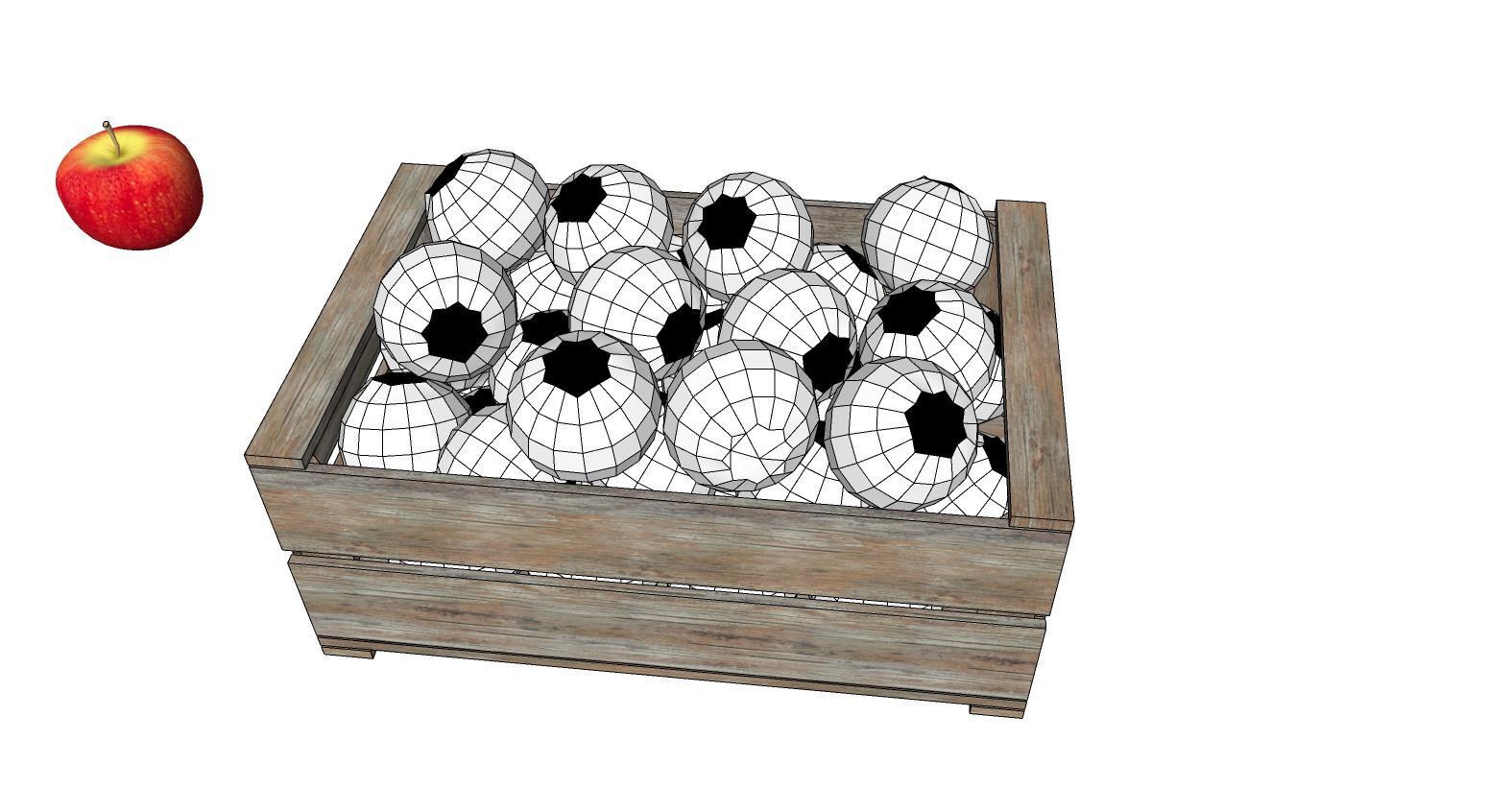
A finished example of this work.
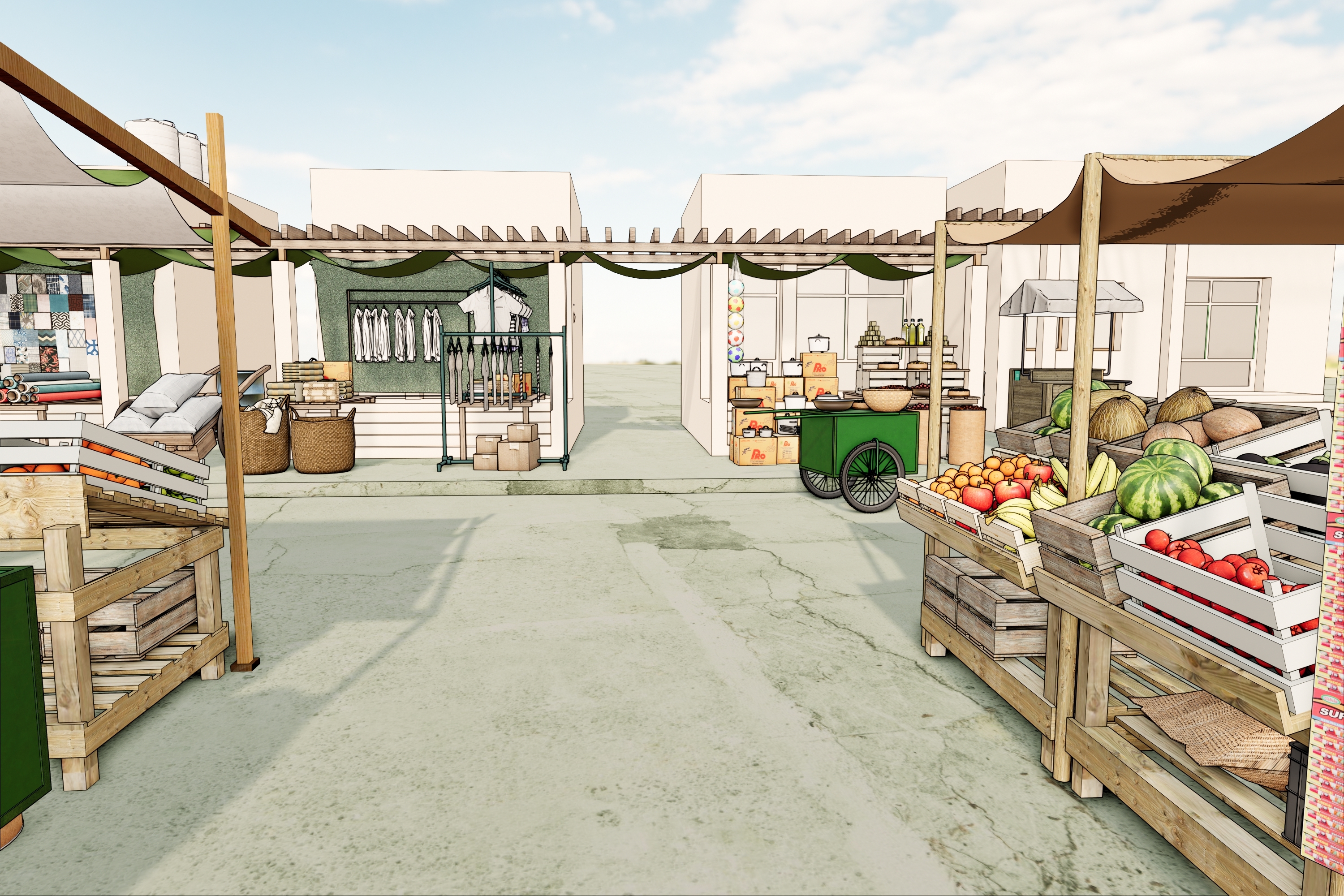
I don't know if I can explain here the scope and interest of this type of extension. This is the missing extension in Sketchup today to give realism to images.
Bonjour,
J'utilise Clothworks pour positionner des objets par gravité sur des faces ou dans des contenants. Clothworks n'est malheureusement pas prévu pour cela et c'est dommage.
Est-il envisagé une option de ce type qui comme actuellement :- tiendrait compte de la gravité et la masse des objets, leur collision etc.
- ne modifierait pas leur géométrie
- ne multiplierait pas les composants
- comporterait toujours l'option "drag" pour modifier la position d'objets.
C'est une utilisation dérivée du plugin c'est vrai. Mais une réponse en terme de productivité.
Voici ce qui peut illustrer un usage.
Un exemple fini de ce travail
Je ne sais pas si je peux bien faire comprendre ici la portée et l'intéret de ce type d'extension. C'est l'extension manquante a Sketchup aujourd'hui pour donner du réalisme aux images.




Hello! It looks like you're interested in this conversation, but you don't have an account yet.
Getting fed up of having to scroll through the same posts each visit? When you register for an account, you'll always come back to exactly where you were before, and choose to be notified of new replies (either via email, or push notification). You'll also be able to save bookmarks and upvote posts to show your appreciation to other community members.
With your input, this post could be even better 💗
Register Login


Advertisement