sketchucation logo sketchucation
    • Login
    Oops, your profile's looking a bit empty! To help us tailor your experience, please fill in key details like your SketchUp version, skill level, operating system, and more. Update and save your info on your profile page today!
    โš ๏ธ Update | Sketchucation Tools 5.0.8 released with licensing improvements and bugfixes Download

    [Plugin] ClothWorks v1.8.0 - 28 Apr 2024

    Scheduled Pinned Locked Moved Plugins
    716 Posts 167 Posters 883.4k Views 166 Watching
    Loading More Posts
    • Oldest to Newest
    • Newest to Oldest
    • Most Votes
    Reply
    • Reply as topic
    Log in to reply
    This topic has been deleted. Only users with topic management privileges can see it.
    • A
      Anton_S
      last edited by

      @rv1974 said:

      Anton, all examples I've seen so far looks like made of 2mm steel sheet. Is there a trick in settings to get much more sharper corners in bending areas (is creasing a good term for this)?

      I don't know actually. Perhaps increasing cloth resolution (applying a grid with smaller spacing), could do the trick with forming sharp corners. I will need to test this around a bit and see if there is a way to achieve the sharp corners.

      1 Reply Last reply
      Reply Quote 0
      • A
        Anton_S
        last edited by

        @rv1974 said:

        Can you implement a loop of edges as "linear pin"? Could be useful for long curtains and waterfalls. And maybe for sharp corners too.

        Can you provide more detail with that?

        1 Reply Last reply
        Reply Quote 0
        • soloS
          solo
          last edited by

          @rv1974 said:

          Can you implement a loop of edges as "linear pin"? Could be useful for long curtains and waterfalls. And maybe for sharp corners too.

          +1

          http://www.solos-art.com

          If you see a toilet in your dreams do not use it.

          1 Reply Last reply
          Reply Quote 0
          • J
            Jorgensen
            last edited by

            Mood. First image using ClothWorks ๐Ÿ˜„


            20180404 03.jpg

            sketchup pro 2016 16.1.1449 64 bit | windows 10 pro | i7-3770k @3.5 GHz | 16gb ram | gtx 780 ti / gtx 980 ti | nvidia driver 368.39

            1 Reply Last reply
            Reply Quote 0
            • R
              rv1974
              last edited by

              @anton_s said:

              @rv1974 said:

              Can you implement a loop of edges as "linear pin"? Could be useful for long curtains and waterfalls. And maybe for sharp corners too.

              Can you provide more detail with that?

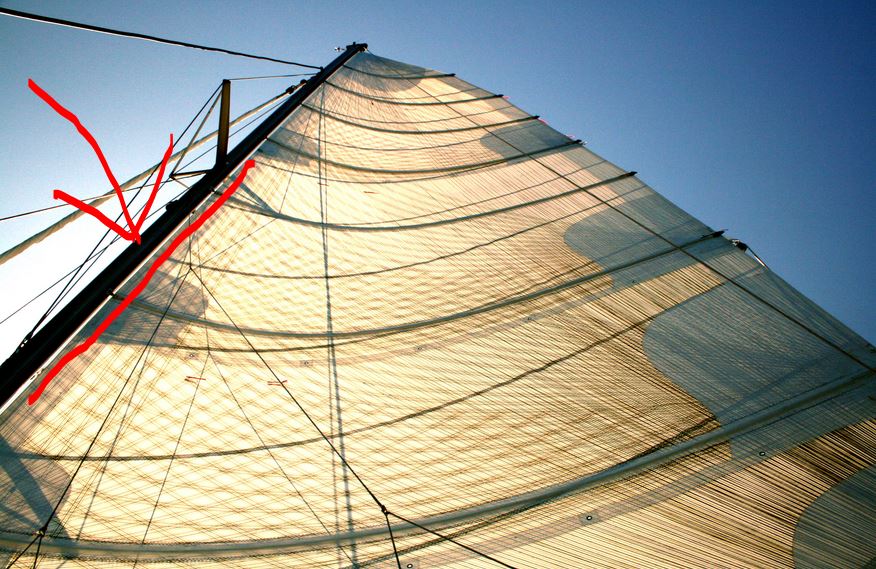
              it's a simple idea: you'd select a loop (or set of edges, even unconnected) and order it to stay fixed. instead of point pin you get a linear holder. What important is an easy access to those linear holders (for selecting\editing).

              Capture.JPG

              1 Reply Last reply
              Reply Quote 0
              • Rich O BrienR
                Rich O Brien Moderator
                last edited by

                If you look up Vertex Groups in Blender you can get an idea what RV is asking.

                Maybe you could add a feature that allows the user to make any object behave like a pin.

                So selected edge/s behave the same as a collection of pins.

                Download the free D'oh Book for SketchUp ๐Ÿ“–

                1 Reply Last reply
                Reply Quote 0
                • jiminy-billy-bobJ
                  jiminy-billy-bob
                  last edited by

                  @rv1974 said:

                  1. The buying process should be reworked.

                  I agree!

                  25% off Skatter for SketchUcation Premium Members

                  1 Reply Last reply
                  Reply Quote 0
                  • A
                    Anton_S
                    last edited by

                    @rv1974 said:

                    it's a simple idea: you'd select a loop (or set of edges, even unconnected) and order it to stay fixed. instead of point pin you get a linear holder. What important is an easy access to those linear holders (for selecting\editing).

                    For now, if you assign a pin type to the pole, and if the edges along the pole overlap the bounding box of the pole, they will be locked in place.

                    @rich o brien said:

                    If you look up Vertex Groups in Blender you can get an idea what RV is asking.

                    Maybe you could add a feature that allows the user to make any object behave like a pin.

                    So selected edge/s behave the same as a collection of pins.

                    I checked the blenders group pins video: https://www.youtube.com/watch?v=yzRS2cCiBnc

                    It seems like it would be useful. Added to my TODO list (it would be an easy feature to implement).

                    @jiminy-billy-bob said:

                    @rv1974 said:

                    1. The buying process should be reworked.

                    I agree!

                    Yeah... The buying process is not so user friendly. It's not the worst start though ๐Ÿ’š

                    1 Reply Last reply
                    Reply Quote 0
                    • BoxB
                      Box
                      last edited by

                      How sharp and linear do you want it?

                      https://i.imgur.com/dI14YqS.gif

                      1 Reply Last reply
                      Reply Quote 0
                      • S
                        sofie9536
                        last edited by

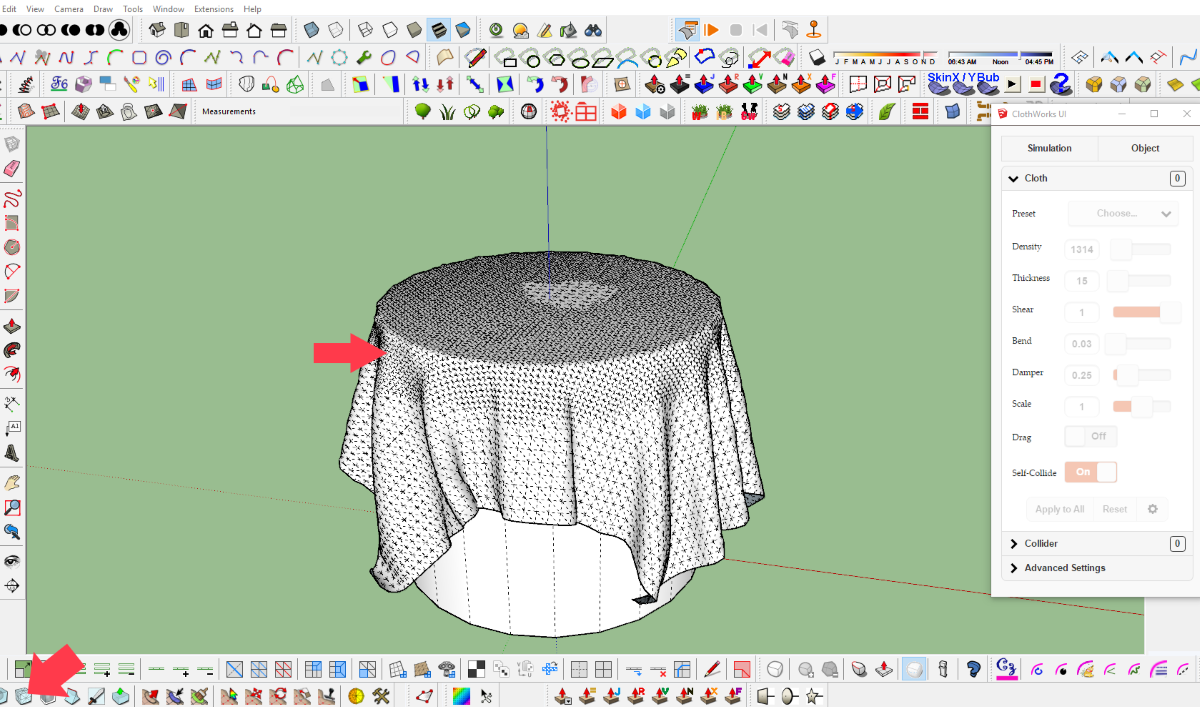
                        in order to get a sharp edge I doubled the mesh in the area of the edge with artisan.

                        artisan.png

                        1 Reply Last reply
                        Reply Quote 0
                        • C
                          cas45
                          last edited by

                          Hi have 3.04.2018 the plugin ClothWork via PayPal, so far no license has been received. Have had the experience to send it immediately. Ask for info Thank you

                          1 Reply Last reply
                          Reply Quote 0
                          • A
                            Anton_S
                            last edited by

                            @cas45 said:

                            Hi have 3.04.2018 the plugin ClothWork via PayPal, so far no license has been received. Have had the experience to send it immediately. Ask for info Thank you

                            Sent you a PM regarding this.

                            1 Reply Last reply
                            Reply Quote 0
                            • BoxB
                              Box
                              last edited by

                              A feature request of sorts, more of a think about this and see if it is possible.
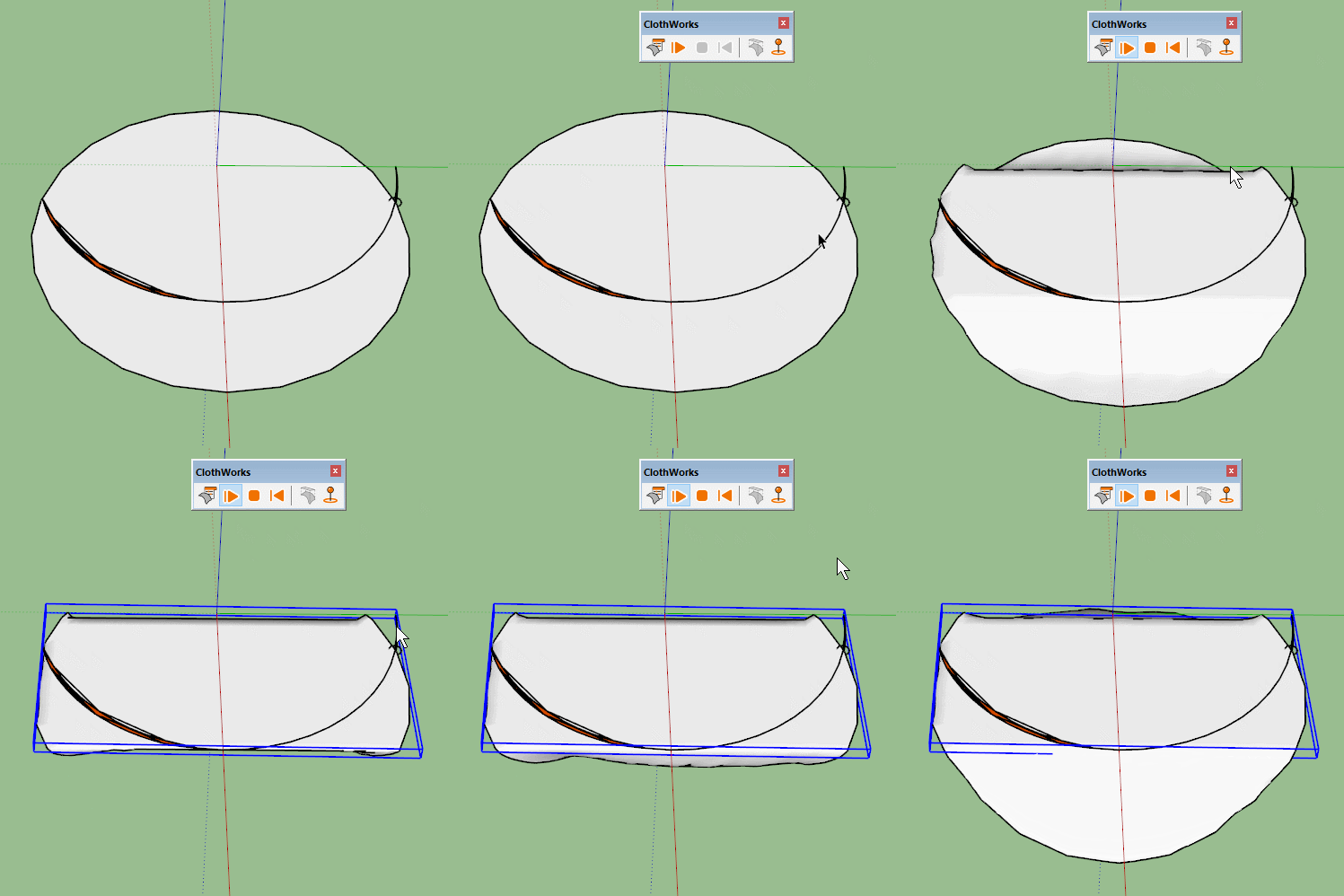
                              Can you make the shape of the geometry of the pin the thing that does the pinning rather than the bounding box of the pin/pin object.
                              I know we can point pin, multi point pin and linear pin, but the ability to pin along a curve would be great.
                              As you see here the pin itself is a curve but the bounding box makes it a rectangle.
                              Bounding.gif
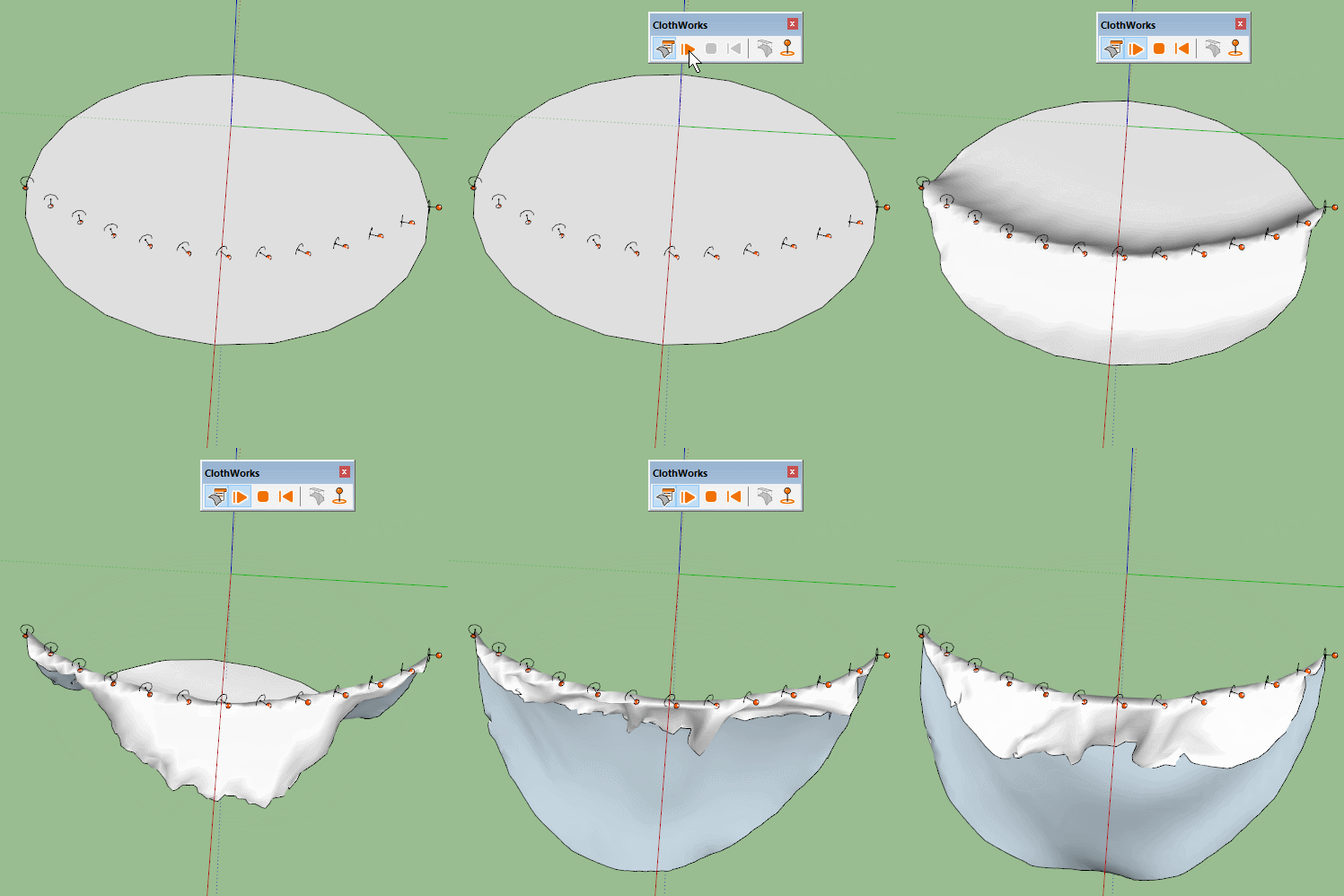
                              Whereas an array of small pins gives you a curve but it can be tricky to set up, gives you bumps and is less predictable than if you could use a specific edge.

                              I know you could use a shaped collider in this instance, but I can see uses for curved pins.

                              PinArray.gif

                              1 Reply Last reply
                              Reply Quote 0
                              • jiminy-billy-bobJ
                                jiminy-billy-bob
                                last edited by

                                Hey Anton, I was wondering today: what's the performance bottleneck? Is it the physics simulation itself, or moving the whole geometry at each frame?

                                25% off Skatter for SketchUcation Premium Members

                                1 Reply Last reply
                                Reply Quote 0
                                • R
                                  rv1974
                                  last edited by

                                  I saw today some crazy project:
                                  https://architizer.com/projects/cluster-h-the-backyard/
                                  Notice those sail shades. In this case linear pins could be useful

                                  1 Reply Last reply
                                  Reply Quote 0
                                  • D
                                    david harned
                                    last edited by

                                    Hi Anton, thanks so much for your quick replies to my questions! Looking forward to seeing what else you can do! Dave Harned

                                    1 Reply Last reply
                                    Reply Quote 0
                                    • A
                                      Anton_S
                                      last edited by

                                      @jiminy-billy-bob said:

                                      Hey Anton, I was wondering today: what's the performance bottleneck? Is it the physics simulation itself, or moving the whole geometry at each frame?

                                      There are three components to simulation:

                                      1. Physics computation
                                      2. Vertex transformations via transform_by_vectors
                                      3. Dynamic texture UV updating for faces with texture (which can be disabled)

                                      The transform_by_vectors takes quite a reasonable amount of performance out of this (and I do wrap every frame in its own operation with second parameter set to true). On a draping cylinder sample (with no textures), with transform_by_vectors enabled, the performance is 17 FPS; with transform_by_vectors disabled, the performance is 32 FPS.

                                      However, the physics computation also takes its chunk out of performance. Assuming transform_by_vectors is off, with physics enabled, the performance is 32 FPS; with physics disabled, the performance 60 FPS.

                                      The physics computation aspect can and will be improved, if not so much algorithm and optimization-wise, then with multithreading. At the moment, the part of physics that consumes most performance is collision detection and contact processing.

                                      Thus at the moment there are no bottlenecks but as physics computation performance is improved, transform_by_vectors (and rendering) might become the bottleneck. I would be interested in finding out if SU could optimize this, say avoid updating edge lengths (in case they do) or other things that occur.

                                      1 Reply Last reply
                                      Reply Quote 0
                                      • jiminy-billy-bobJ
                                        jiminy-billy-bob
                                        last edited by

                                        @anton_s said:

                                        The transform_by_vectors takes quite a reasonable amount of performance out of this (and I do wrap every frame in its own operation with second parameter set to true). On a draping cylinder sample (with no textures), with transform_by_vectors enabled, the performance is 17 FPS; with transform_by_vectors disabled, the performance is 32 FPS.

                                        That's what I was suspecting.
                                        Have you considered displaying an openGL preview during the simulation, instead of the full geometry? Like a wireframe of the cloth, or even a fully shaded preview using Christina's FaceShader.

                                        Considering it would instantly double the performance, and more orders of magnitude once you implement multi threading, you should seriously consider it.

                                        Or am I missing something? Is there a particular reason why you need to transform the whole SU geometry at each frame?

                                        25% off Skatter for SketchUcation Premium Members

                                        1 Reply Last reply
                                        Reply Quote 0
                                        • HieruH
                                          Hieru
                                          last edited by

                                          Personally I prefer the full preview during simulation, especially when it comes to live dragging to create a little randomness. I canโ€™t say that Iโ€™ve noticed a performance issue unless using super dense grids (which generally arenโ€™t necessary).

                                          www.davidhier.co.uk

                                          1 Reply Last reply
                                          Reply Quote 0
                                          • jiminy-billy-bobJ
                                            jiminy-billy-bob
                                            last edited by

                                            Well, this would look identical as the full geometry:

                                            @jiminy-billy-bob said:

                                            or even a fully shaded preview using Christina's FaceShader.

                                            EDIT: Without textures, actually.

                                            25% off Skatter for SketchUcation Premium Members

                                            1 Reply Last reply
                                            Reply Quote 0

                                            Hello! It looks like you're interested in this conversation, but you don't have an account yet.

                                            Getting fed up of having to scroll through the same posts each visit? When you register for an account, you'll always come back to exactly where you were before, and choose to be notified of new replies (either via email, or push notification). You'll also be able to save bookmarks and upvote posts to show your appreciation to other community members.

                                            With your input, this post could be even better ๐Ÿ’—

                                            Register Login
                                            • 1
                                            • 2
                                            • 6
                                            • 7
                                            • 8
                                            • 9
                                            • 10
                                            • 35
                                            • 36
                                            • 8 / 36
                                            • First post
                                              Last post
                                            Buy SketchPlus
                                            Buy SUbD
                                            Buy WrapR
                                            Buy eBook
                                            Buy Modelur
                                            Buy Vertex Tools
                                            Buy SketchCuisine
                                            Buy FormFonts

                                            Advertisement