sketchucation logo sketchucation
    • 登入
    Oops, your profile's looking a bit empty! To help us tailor your experience, please fill in key details like your SketchUp version, skill level, operating system, and more. Update and save your info on your profile page today!
    🔌 Smart Spline | Fluid way to handle splines for furniture design and complex structures. Download

    [Plugin] ClothWorks v1.8.0 - 28 Apr 2024

    已排程 已置頂 已鎖定 已移動 Plugins
    699 貼文 161 Posters 669.5k 瀏覽 161 Watching
    正在載入更多貼文
    • 從舊到新
    • 從新到舊
    • 最多點贊
    回覆
    • 在新貼文中回覆
    登入後回覆
    此主題已被刪除。只有擁有主題管理權限的使用者可以查看。
    • S 離線
      smashor
      最後由 編輯

      @box said:

      @smashor said:

      How can I create wrinkles? Like in a piece of cloth in a chair or bed, something like that

      Have you looked at any of the tutorial videos or the user manual in the first post of the thread!?

      yes, but they dont teach that...

      1 條回覆 最後回覆 回覆 引用 0
      • BoxB 離線
        Box
        最後由 編輯

        Ok then, explain where you are having a problem and attach your model so we can see what the problem might be.

        1 條回覆 最後回覆 回覆 引用 0
        • D 離線
          david harned
          最後由 編輯

          Hi Anton, Dave Harned here, friend of Pete Stoppel. Congratulations on Clothworks; phenomenal piece of work!

          I have two quick questions:

          • I can't seem to figure out how to drape a cloth so that it tucks into crevices fully, like a slip cover falling down "into" a sofa. I suspect the solution is to form a basic slip cover as opposed to draping a flat cloth, but wanted to ask.
          • Kind of related to that ... could you envision a way to use Clothworks to make ocean waves? I would kill for the ability to create realistic waves hitting a beach, but so far I can't seem to manage it in SU. I tried draping cloth over "humps" that I've "Skattered" over a surface, but I haven't quite been able to achieve what I'm trying to.

          Happy for any feedback. Thank you again for creating Clothworks for our community! Dave

          1 條回覆 最後回覆 回覆 引用 0
          • Rich O BrienR 離線
            Rich O Brien Moderator
            最後由 編輯

            The higher the resolution of the cloth the better the drape result. This does mean the simulation runs slower to compute the draping.

            Download the free D'oh Book for SketchUp 📖

            1 條回覆 最後回覆 回覆 引用 0
            • HieruH 離線
              Hieru
              最後由 編輯

              @box said:

              Here's a bit of a mix with SUbD to make a rudimentary bed.

              Very cool. Are those dimples made using pins on the underside of the cloth?

              www.davidhier.co.uk

              1 條回覆 最後回覆 回覆 引用 0
              • BoxB 離線
                Box
                最後由 編輯

                @hieru said:

                pins on the underside of the cloth?

                not on the underside, right there on top, just with the pin layer turned off.

                1 條回覆 最後回覆 回覆 引用 0
                • Rich O BrienR 離線
                  Rich O Brien Moderator
                  最後由 編輯

                  Pins have a falloff range based on there size.

                  Well worth playing around with the scale to get very interesting results and surprises.

                  Download the free D'oh Book for SketchUp 📖

                  1 條回覆 最後回覆 回覆 引用 0
                  • M 離線
                    marvsweden
                    最後由 編輯

                    @anton_s said:

                    @marvsweden said:

                    Purchased. It's going to be exciting using it.
                    I'm on Mac/SU2018 and the toggle UI window/button doesn't work. It shows up once but if I toggle it by hitting the button it never shows up again until i shut down and restart SU.

                    Thanks for an important report! I will fix this by as soon as tomorrow (if possible).

                    Also found that I have to activate license on each SU restart.

                    1 條回覆 最後回覆 回覆 引用 0
                    • Rich O BrienR 離線
                      Rich O Brien Moderator
                      最後由 編輯

                      @mars

                      A fix for that on Mac should come next. It occurs when you shutdown a Mac.

                      Download the free D'oh Book for SketchUp 📖

                      1 條回覆 最後回覆 回覆 引用 0
                      • S 離線
                        smashor
                        最後由 編輯

                        I was trying to make something like this, both cloths, but I cant quite the wrinkles and I dont know how I could do it like the part next to the pillow, thats folded up

                        Link Preview Image
                        3D Warehouse

                        3D Warehouse is a website of searchable, pre-made 3D models that works seamlessly with SketchUp.

                        favicon

                        (3dwarehouse.sketchup.com)

                        1 條回覆 最後回覆 回覆 引用 0
                        • A 離線
                          Anton_S
                          最後由 編輯

                          @david harned said:

                          Hi Anton, Dave Harned here, friend of Pete Stoppel. Congratulations on Clothworks; phenomenal piece of work!

                          Thank you, Dave! This plugin needs improvement but overtime with a few releases it will be perfect.

                          @david harned said:

                          I can't seem to figure out how to drape a cloth so that it tucks into crevices fully, like a slip cover falling down "into" a sofa. I suspect the solution is to form a basic slip cover as opposed to draping a flat cloth, but wanted to ask.

                          Drop cloth at an angle with the horizontal, so that more surface are of the cloth covers the part being draped. That way there will be more cloth in an area. Another thing you can do is initially drop cloth with high stiffness and then change it to low stiffness. That way it will reach the corners.

                          @david harned said:

                          Kind of related to that ... could you envision a way to use Clothworks to make ocean waves? I would kill for the ability to create realistic waves hitting a beach, but so far I can't seem to manage it in SU. I tried draping cloth over "humps" that I've "Skattered" over a surface, but I haven't quite been able to achieve what I'm trying to.

                          It is not possible to do waves yet.

                          The demand for waves and wrinkles is high. It seems that waves and wrinkles are in the same area, so adding one could fulfill the other. I will include this functionality in one of the next releases, which could be used to add linear/radial wave/wrinkle effect to the cloth. Shouldn't be to difficult (if not simple) to code.

                          1 條回覆 最後回覆 回覆 引用 0
                          • A 離線
                            Anton_S
                            最後由 編輯

                            @smashor said:

                            How can I create wrinkles? Like in a piece of cloth in a chair or bed, something like that

                            Drop cloth at an angle. Say, 60 degrees with the horizontal. Could produce wrinkles. Then apply loop subdivision and follow with a couple iterations of Laplacian smoothing to eliminte self-overlaps and of course better the result.

                            Edit: But yes, easy way to add waves and wrinkles will be added in the next release.

                            1 條回覆 最後回覆 回覆 引用 0
                            • A 離線
                              Anton_S
                              最後由 編輯

                              @box said:

                              Here's a bit of a mix with SUbD to make a rudimentary bed.

                              Box... One word. Clever! Just clever!

                              1 條回覆 最後回覆 回覆 引用 0
                              • A 離線
                                Anton_S
                                最後由 編輯

                                @huckrorick said:

                                I don't know if I'll have time to do a lot with this, but I just bought it because watching what people have done with it, or just playing with it, is more fun than the movies.
                                Great work Anton.

                                Can you post something that explains a bit of how it works? What are the factors that influence the simulation?

                                I was imagining using it in the design of tent structures and hanging structures. Knowing how it works would help in understanding how to use it and how good it would be for such structures.

                                Also, the "end" state would be most important in this case.

                                In ClothWorks, for objects with cloth property, every vertex is treated as a particle. Every edge is treated as spring. Every two linked faces have a bending spring. Same applies to two linked, faceless edges.

                                As Rich said, the higher the resolution you apply to the cloth, the higher quality result. Performance aspect will be addressed in next release.

                                Speaking of an end state, once you perform simulation and apply loop subdivision to the cloth, performing simulation over a subdivided cloth will have the cloth behave differently. So, generally, simulation shouldn't be performed on a post-subdivided cloth object.

                                Also, a small tutorial about tents will come later. Basically, you can make it by creating six pins at a rectangular cloth, with four at cloth corners and two at middle, and raising the two middle pins in simulation (Movable Pins) feature. Ropes (linked edges) could be attached too to make it look as if the ropes are supporting the tent.

                                1 條回覆 最後回覆 回覆 引用 0
                                • BoxB 離線
                                  Box
                                  最後由 編輯

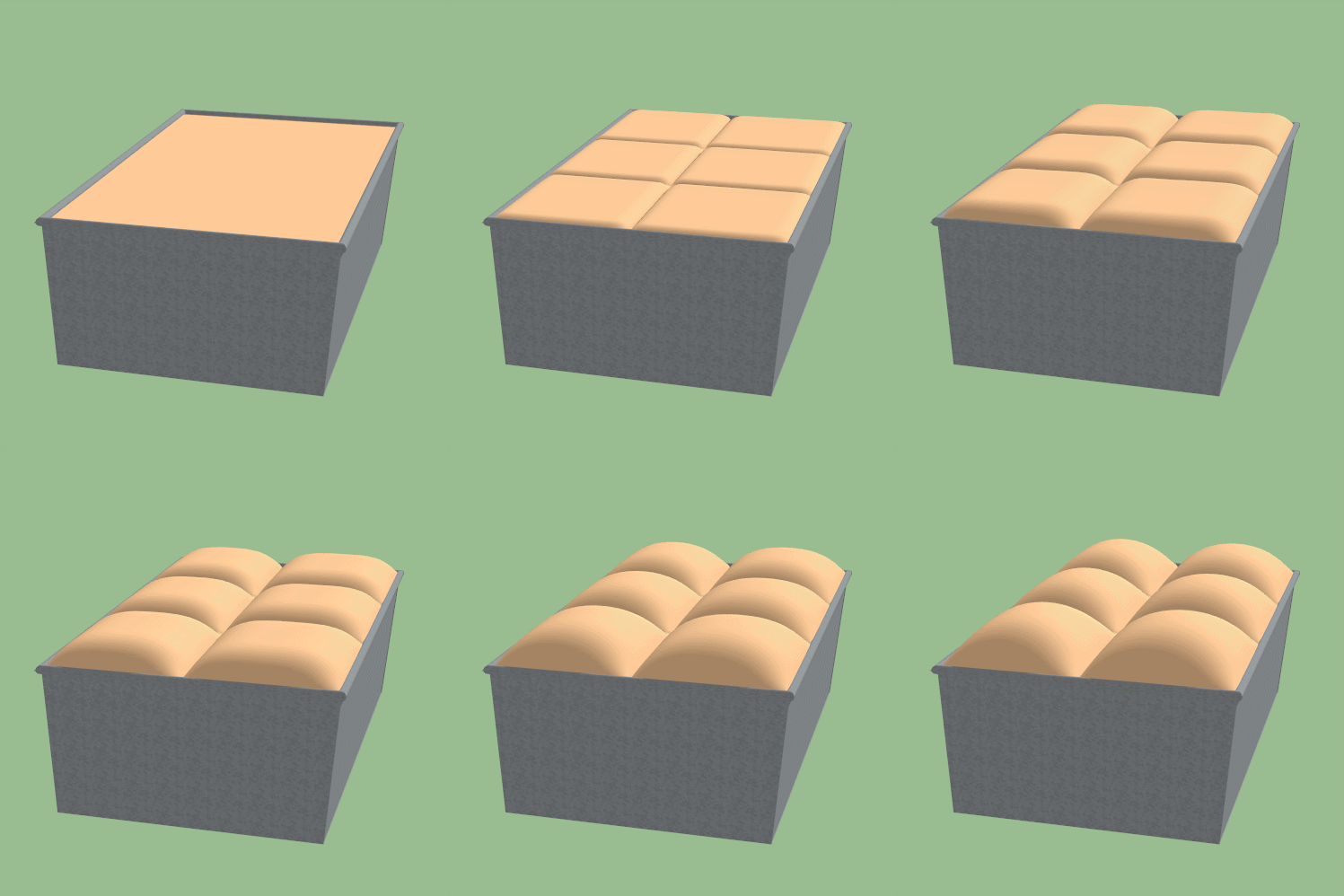
                                  Loaf of bread anyone?


                                  Bread.gif

                                  1 條回覆 最後回覆 回覆 引用 0
                                  • Rich O BrienR 離線
                                    Rich O Brien Moderator
                                    最後由 編輯

                                    Nice buns handsome

                                    Download the free D'oh Book for SketchUp 📖

                                    1 條回覆 最後回覆 回覆 引用 0
                                    • BoxB 離線
                                      Box
                                      最後由 編輯

                                      Oh You sweet talker... I always knew you wanted to get your hands on my buns.

                                      1 條回覆 最後回覆 回覆 引用 0
                                      • pilouP 離線
                                        pilou
                                        最後由 編輯

                                        Remind the Bubble & Soap plugin! 😄

                                        Frenchy Pilou
                                        Is beautiful that please without concept!
                                        My Little site :)

                                        1 條回覆 最後回覆 回覆 引用 0
                                        • StinkieS 離線
                                          Stinkie
                                          最後由 編輯

                                          @box said:

                                          Oh You sweet talker... I always knew you wanted to get your hands on my buns.

                                          Don't believe him when he tells you he loves you. He does that every time.

                                          1 條回覆 最後回覆 回覆 引用 0
                                          • MichaelNeysesM 離線
                                            MichaelNeyses
                                            最後由 編輯

                                            Hi Anton,
                                            I certainly got captured on my desktop rather than fetching Easter Eggs with the kids during the holidays. I can only express my admiration to your work. So fine done! Thanks so much!

                                            Michael

                                            nothing beats the joy of accomplishing a design that meets previous vision

                                            1 條回覆 最後回覆 回覆 引用 0
                                            • 1
                                            • 2
                                            • 3
                                            • 4
                                            • 5
                                            • 6
                                            • 7
                                            • 8
                                            • 34
                                            • 35
                                            • 6 / 35
                                            • 第一個貼文
                                              最後的貼文
                                            Buy SketchPlus
                                            Buy SUbD
                                            Buy WrapR
                                            Buy eBook
                                            Buy Modelur
                                            Buy Vertex Tools
                                            Buy SketchCuisine
                                            Buy FormFonts

                                            Advertisement