sketchucation logo sketchucation
    • 登入
    Oops, your profile's looking a bit empty! To help us tailor your experience, please fill in key details like your SketchUp version, skill level, operating system, and more. Update and save your info on your profile page today!
    ⚠️ Important | Libfredo 15.6b introduces important bugfixes for Fredo's Extensions Update

    Toolbar Icon Size on 4K Monitor

    已排程 已置頂 已鎖定 已移動 SketchUp Discussions
    sketchup
    41 貼文 10 Posters 7.6k 瀏覽 10 Watching
    正在載入更多貼文
    • 從舊到新
    • 從新到舊
    • 最多點贊
    回覆
    • 在新貼文中回覆
    登入後回覆
    此主題已被刪除。只有擁有主題管理權限的使用者可以查看。
    • Bob JamesB 離線
      Bob James
      最後由 編輯

      I know this must have been discussed last year, but the search tool rejects "4K" as being too small to find.

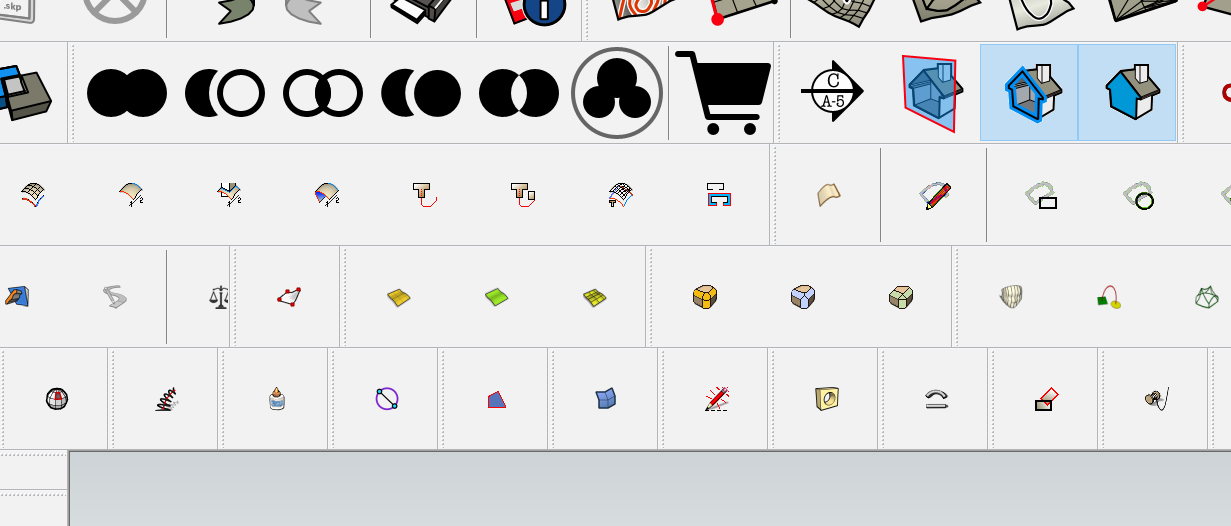
      I am using a 55" 4K OLED monitor set at full resolution and 300% scale. The problem is that although SU toolbar icons appear "full size", the icons for extension toolbars are too small to see. How have you who are using 4K monitors solved this problem?
      Icons. small.png

      i7-4930K 3.4Ghz, 2x GTX780 6GB, 32GB DDR3-1600 ECC, OCZ Vertex 4 500GB, WD Black 3TB, 32TB NAS, 4x 27" Monitors, SpaceMouse Pro, X-keys XK-60

      1 條回覆 最後回覆 回覆 引用 0
      • Bob JamesB 離線
        Bob James
        最後由 編輯

        Anybody???

        i7-4930K 3.4Ghz, 2x GTX780 6GB, 32GB DDR3-1600 ECC, OCZ Vertex 4 500GB, WD Black 3TB, 32TB NAS, 4x 27" Monitors, SpaceMouse Pro, X-keys XK-60

        1 條回覆 最後回覆 回覆 引用 0
        • fredo6F 離線
          fredo6
          最後由 編輯

          Well, difficult to say as I don't have such monitor.

          However, it would be good to understand what can be done for plugins. I guess that Sketchup has addressed the problem for itself with vector-based icons.

          Do you have some plugins which have icons with 'normal' scaled size? (mine apparently do not scale).

          Fredo

          1 條回覆 最後回覆 回覆 引用 0
          • Bob JamesB 離線
            Bob James
            最後由 編輯

            @unknownuser said:

            Do you have some plugins which have icons with 'normal' scaled size? (mine apparently do not scale).Fredo

            Thank you for replying Fredo 😄
            You can see two in the picture. There are two or three others, but all the rest are tiny,
            I'm sure there are many others with 4k monitors: I wonder how they've solved the problem. I tried to do a search, but the search engine on this forum is not up to the job.

            i7-4930K 3.4Ghz, 2x GTX780 6GB, 32GB DDR3-1600 ECC, OCZ Vertex 4 500GB, WD Black 3TB, 32TB NAS, 4x 27" Monitors, SpaceMouse Pro, X-keys XK-60

            1 條回覆 最後回覆 回覆 引用 0
            • Bob JamesB 離線
              Bob James
              最後由 編輯

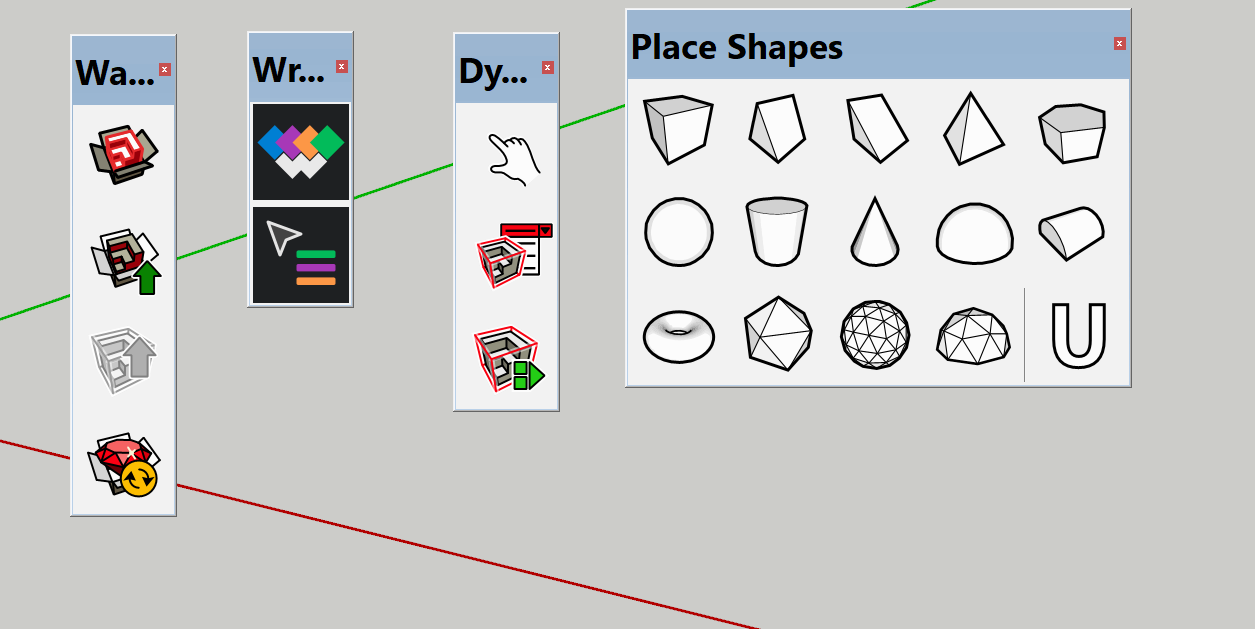
              Here are the other four that scale correctly:
              icon.PNG

              i7-4930K 3.4Ghz, 2x GTX780 6GB, 32GB DDR3-1600 ECC, OCZ Vertex 4 500GB, WD Black 3TB, 32TB NAS, 4x 27" Monitors, SpaceMouse Pro, X-keys XK-60

              1 條回覆 最後回覆 回覆 引用 0
              • oceanembersO 離線
                oceanembers
                最後由 編輯

                Looks like the plugins that scale all have icons in .svg and .pdf(???) as well as .png

                I don't know enough about the Sketchup API to comment on how the icons are being loaded

                1 條回覆 最後回覆 回覆 引用 0
                • T 離線
                  TBoy
                  最後由 編輯

                  The only possible way in my point of view is to resize icons manually. Yes it is not the solution you are looking for. But if you desperately need resizing you can do it.
                  Backup Plugins folder first.
                  Make some test resizing of any icon from plugins folder. Remember the best size for you. For example if you use big icons original image is 24/24 px, try resizing to 48/48 or bigger - after restart of Sketchup you will see the result.
                  Use graphic editor supporting batch processing (XnView), search for .png, narrow the search by size of the icons - this will eliminate some pictures not used as icons, use "delete original file" + "use original path (as output)" and resize icons to size of your tests.
                  Sounds idiotic but is possible.
                  (Updating of plugins will bring back original small icons.)
                  May be someone can write a script to automate this task >>> Search plugins folders for images 24x24px and resize to new value...???

                  Obviously only one external plugin is made with .SVG icons > "PLACE SHAPES TOOLBAR" and the author - Alexander Schreyer - deserves admiration.

                  1 條回覆 最後回覆 回覆 引用 0
                  • S 離線
                    slbaumgartner
                    最後由 編輯

                    I too do not have a monitor to investigate this behavior and you didn't give a list of extensions/plugins that misbehave so I can't look at them to see what they do. As of SU 2016 the Ruby API supports vector icons (svg on Windows, pdf on Mac) for toolbars. Your profile says SU 2018, so scaling ought to work. Any extension that has been revised to use vector icons should see them scaled. The older-style png icons will not be scaled.

                    But I have read that there are remaining issues with very-high-dpi displays when the scaling is set to more than 150%. You write that you have set 300%. You may be encountering that issue - though I can't explain why it would affect some extensions and not others.

                    1 條回覆 最後回覆 回覆 引用 0
                    • Bob JamesB 離線
                      Bob James
                      最後由 編輯

                      @slbaumgartner said:

                      ..you didn't give a list of extensions/plugins that misbehave so I can't look at them to see what they do.

                      Granted I did not list the names, but all of the toolbars that behave are shown:
                      Solid Tools
                      SectionCutFace
                      Bool Tools
                      3D Warehouse
                      Wrapr
                      Dynamic Components
                      Place Shapes

                      i7-4930K 3.4Ghz, 2x GTX780 6GB, 32GB DDR3-1600 ECC, OCZ Vertex 4 500GB, WD Black 3TB, 32TB NAS, 4x 27" Monitors, SpaceMouse Pro, X-keys XK-60

                      1 條回覆 最後回覆 回覆 引用 0
                      • Bob JamesB 離線
                        Bob James
                        最後由 編輯

                        Please
                        Can anyone using a 4K monitor shed any light on this problem?

                        i7-4930K 3.4Ghz, 2x GTX780 6GB, 32GB DDR3-1600 ECC, OCZ Vertex 4 500GB, WD Black 3TB, 32TB NAS, 4x 27" Monitors, SpaceMouse Pro, X-keys XK-60

                        1 條回覆 最後回覆 回覆 引用 0
                        • dereiD 離線
                          derei
                          最後由 編輯

                          It seems that all bitmap icons (png) are not scaled, but only the vector icons are (svg, respectively pdf on mac).
                          So, the solution is for the plugin developers to start including svg toolbar icons.

                          DESIGNER AND ARTIST [DEREI.UK](http://derei.uk/l)

                          1 條回覆 最後回覆 回覆 引用 0
                          • Dave RD 離線
                            Dave R
                            最後由 編輯

                            derei is correct. SketchUp has switched to using SVG icons to deal with high res displays. Some extension authors have followed suit. Not all have, however. I expect the icons will get updates one of these days. Considering most of these extensions are free, patience is called for. Or perhaps one could hire someone to make new SVG icons for these extensions.

                            Etaoin Shrdlu

                            %

                            (THERE'S NO PLACE LIKE)

                            G28 X0.0 Y0.0 Z0.0

                            M30

                            %

                            1 條回覆 最後回覆 回覆 引用 0
                            • PixeroP 離線
                              Pixero
                              最後由 編輯

                              Does anyone know if there is something special that needs to be done in the scripts code to use SVG icons or can we just put SVG icons in the plugins directory?

                              1 條回覆 最後回覆 回覆 引用 0
                              • Dave RD 離線
                                Dave R
                                最後由 編輯

                                I think SketchUp will look first for SVG icons and use them if they exist.

                                Etaoin Shrdlu

                                %

                                (THERE'S NO PLACE LIKE)

                                G28 X0.0 Y0.0 Z0.0

                                M30

                                %

                                1 條回覆 最後回覆 回覆 引用 0
                                • Bob JamesB 離線
                                  Bob James
                                  最後由 編輯

                                  Many thanks to the three of you for taking the time to reply ❗

                                  It seems somewhat incredible that given the vast amount of plugins/extensions .jpg toolbar icons being used by every SU user that SU would be modified to only use svg icons.
                                  How in the world did this get past beta testing????

                                  i7-4930K 3.4Ghz, 2x GTX780 6GB, 32GB DDR3-1600 ECC, OCZ Vertex 4 500GB, WD Black 3TB, 32TB NAS, 4x 27" Monitors, SpaceMouse Pro, X-keys XK-60

                                  1 條回覆 最後回覆 回覆 引用 0
                                  • Dave RD 離線
                                    Dave R
                                    最後由 編輯

                                    SVG icons were chosen specifically because they can be scaled to compensate for high res screens. Open a PNG icon in your image editor and scale it up so you can see it. The quality will be crap. SVG just makes sense.

                                    Etaoin Shrdlu

                                    %

                                    (THERE'S NO PLACE LIKE)

                                    G28 X0.0 Y0.0 Z0.0

                                    M30

                                    %

                                    1 條回覆 最後回覆 回覆 引用 0
                                    • PixeroP 離線
                                      Pixero
                                      最後由 編輯

                                      Could we make a community effort to update all these icons to SVG if the authors don’t do it?

                                      1 條回覆 最後回覆 回覆 引用 0
                                      • Dave RD 離線
                                        Dave R
                                        最後由 編輯

                                        That sounds like a good idea. I would suggest offering the same icon packages to the authors so they can include them in updates of their extensions.

                                        Etaoin Shrdlu

                                        %

                                        (THERE'S NO PLACE LIKE)

                                        G28 X0.0 Y0.0 Z0.0

                                        M30

                                        %

                                        1 條回覆 最後回覆 回覆 引用 0
                                        • S 離線
                                          slbaumgartner
                                          最後由 編輯

                                          @pixero said:

                                          Does anyone know if there is something special that needs to be done in the scripts code to use SVG icons or can we just put SVG icons in the plugins directory?

                                          The icon files are given explicitly by the plugin code, which has to choose between the old png for SketchUp versions prior to 2016, and between svg and pdf for Windows vs Mac. It doesn't take a lot of code, but has to be changed, and no, simply dropping a svg file into the folder won't do the trick.

                                          1 條回覆 最後回覆 回覆 引用 0
                                          • fredo6F 離線
                                            fredo6
                                            最後由 編輯

                                            ...in addition to the relevant comment by slbaumgartner, I would add that there is no automated way to generate a nice SVG from a PNG. Basically, the icon has be redrawn in SVG (via Inskape or similar drawing software).

                                            Fredo

                                            1 條回覆 最後回覆 回覆 引用 0
                                            • 1
                                            • 2
                                            • 3
                                            • 1 / 3
                                            • 第一個貼文
                                              最後的貼文
                                            Buy SketchPlus
                                            Buy SUbD
                                            Buy WrapR
                                            Buy eBook
                                            Buy Modelur
                                            Buy Vertex Tools
                                            Buy SketchCuisine
                                            Buy FormFonts

                                            Advertisement




