sketchucation logo sketchucation
    • 登入
    Oops, your profile's looking a bit empty! To help us tailor your experience, please fill in key details like your SketchUp version, skill level, operating system, and more. Update and save your info on your profile page today!
    🔌 Smart Spline | Fluid way to handle splines for furniture design and complex structures. Download

    Image Trimmer Plugin issue

    已排程 已置頂 已鎖定 已移動 SketchUp Discussions
    sketchup
    43 貼文 8 Posters 10.8k 瀏覽 8 Watching
    正在載入更多貼文
    • 從舊到新
    • 從新到舊
    • 最多點贊
    回覆
    • 在新貼文中回覆
    登入後回覆
    此主題已被刪除。只有擁有主題管理權限的使用者可以查看。
    • D 離線
      Dprince
      最後由 編輯

      i keep getting this error with immage trimmer https://www.screencast.com/t/hePdoETQ

      1 條回覆 最後回覆 回覆 引用 0
      • TIGT 線上
        TIG Moderator
        最後由 編輯

        @dprince said:

        i keep getting this error with immage trimmer https://www.screencast.com/t/hePdoETQ
        Please read the post, just before yours: https://sketchucation.com/forums/viewtopic.php?p=646097#p646097
        I suspect that your PNG's transparency is not set up correctly...

        TIG

        1 條回覆 最後回覆 回覆 引用 0
        • D 離線
          Dprince
          最後由 編輯

          I got the same error message after doing what you suggested

          1 條回覆 最後回覆 回覆 引用 0
          • Dave RD 離線
            Dave R
            最後由 編輯

            Share the image so we can help you out.

            Etaoin Shrdlu

            %

            (THERE'S NO PLACE LIKE)

            G28 X0.0 Y0.0 Z0.0

            M30

            %

            1 條回覆 最後回覆 回覆 引用 0
            • D 離線
              Dprince
              最後由 編輯

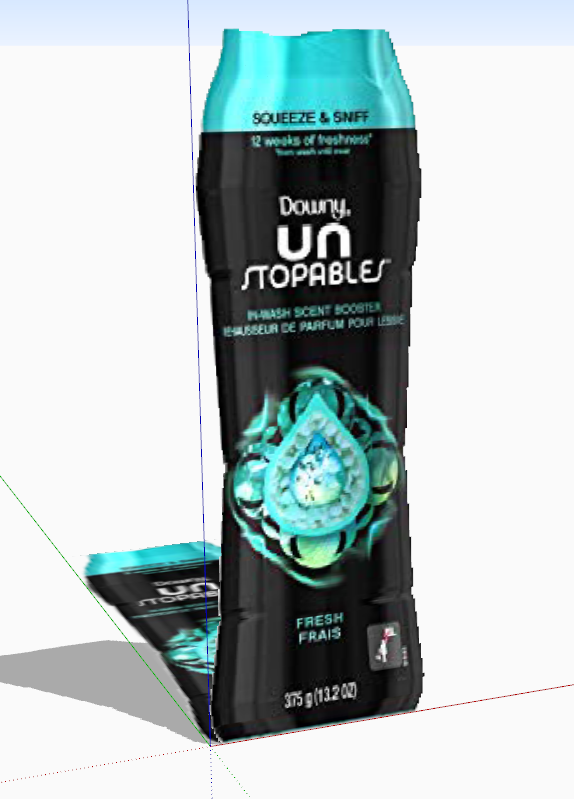
              Thanks. here's the image


              bottle.png

              1 條回覆 最後回覆 回覆 引用 0
              • TIGT 線上
                TIG Moderator
                最後由 編輯

                First off, do yourself a favor and crop the PNG to remove all of the unwanted 'white' surrounds.
                Otherwise the processing time extends unnecessarily.

                Next flatten the PNG and reset an Alpha layer.
                Now pick all of the unwanted white parts around the edges, and delete them...

                Import the PNG Image.
                Run ImageTrimmer...

                Near the end, when you are prompted, do NOT choose to 'smooth' the cut-out image's outline - something about this particular shape causes its faces to fail - without any obvious errors... 😲
                If this happens unexpectedly, you can just hit Undo, and the un-smoothed cut-out is reverted and kept anyway...

                But now by skipping the 'smooth' step you will get a trimmed image...Capture.PNG

                TIG

                1 條回覆 最後回覆 回覆 引用 0
                • Dave RD 離線
                  Dave R
                  最後由 編輯

                  Interesting.

                  Thank you.

                  Etaoin Shrdlu

                  %

                  (THERE'S NO PLACE LIKE)

                  G28 X0.0 Y0.0 Z0.0

                  M30

                  %

                  1 條回覆 最後回覆 回覆 引用 0
                  • D 離線
                    Dprince
                    最後由 編輯

                    im not sure how to do that

                    1 條回覆 最後回覆 回覆 引用 0
                    • TIGT 線上
                      TIG Moderator
                      最後由 編輯

                      @dprince said:

                      im not sure how to do that
                      Do what ?
                      Your overly cryptic comment is not helpful !
                      If you mean the skipping the 'smoothing' step, just cancel it or do it and immediately Undo it to get the unsmoothed form back.

                      If you mean adjusting the PNG file...
                      You need an image-editing tool, like Gimp or Photoshop.
                      Open the PNG usig that editor.
                      Auto-Crop the image to remove all of the unwanted 'white' surrounds.
                      Otherwise the processing time extends unnecessarily as that'll be ignored eventually but still needs analyzing..
                      Next flatten the PNG to remove all transparent pixels.
                      Next add an Alpha Layer [for the transparent parts].
                      Pick all of the unwanted white parts around the edges [using the magic-wand], and delete them...
                      You should now see through the parts that will be removed by ImageTrimmer.

                      Import the PNG Image into SketchUp.
                      Run ImageTrimmer...
                      The 'background' parts are removed, and the face is 'cut-out'...
                      Follow the tip about skipping/undoing the final 'smoothing' step - because with some images it can fail [inexplicably] and can delete the whole face....

                      TIG

                      1 條回覆 最後回覆 回覆 引用 0
                      • D 離線
                        Dprince
                        最後由 編輯

                        is it possible for me to send you the image and you do it for me. I did what you mention and im still getting the same issue.

                        1 條回覆 最後回覆 回覆 引用 0
                        • TIGT 線上
                          TIG Moderator
                          最後由 編輯

                          At which step does it fail ?

                          TIG

                          1 條回覆 最後回覆 回覆 引用 0
                          • D 離線
                            Dprince
                            最後由 編輯

                            After I flatten the image.

                            1 條回覆 最後回覆 回覆 引用 0
                            • TIGT 線上
                              TIG Moderator
                              最後由 編輯

                              What do you mean by 'flatten' ?

                              The 'smooth' step I referred to is actually called 'simplify' in the closing dialog [it attempts to 'smooth' the outline], and it is optional - so just cancel it...
                              Because of something unfathomable in your image the 'simplifying' fails, so do not do it...
                              I'll try and see if I can get to the bottom of this issue, but as I'm not getting any error messages of use, then I have a lot to get through...

                              TIG

                              1 條回覆 最後回覆 回覆 引用 0
                              • TIGT 線上
                                TIG Moderator
                                最後由 編輯

                                I think I've found the cause for the 'simplify' failure.
                                It's how the newer version of SketchUp handles exploded entities !
                                I can fix that...
                                I'll publish an update in the ImageTrimmer main thread asap.

                                But it might not fix your issue, because your Gimp-processed PNG might not be correct...
                                Can you attach a PNG that you think you've fixed a that we can check it...
                                The 'Flatten' issue might be relevant then ??

                                TIG

                                1 條回覆 最後回覆 回覆 引用 0
                                • TIGT 線上
                                  TIG Moderator
                                  最後由 編輯

                                  Here's the fixed version which addresses the 'Simplify' step issue: https://sketchucation.com/pluginstore?pln=SKMtools

                                  Is the 'Flatten' issue still relevant ?
                                  If so attach your adjusted PNG...

                                  TIG

                                  1 條回覆 最後回覆 回覆 引用 0
                                  • D 離線
                                    Dprince
                                    最後由 編輯

                                    The new version worked. THANKS!!

                                    1 條回覆 最後回覆 回覆 引用 0
                                    • TIGT 線上
                                      TIG Moderator
                                      最後由 編輯

                                      Hooray !

                                      TIG

                                      1 條回覆 最後回覆 回覆 引用 0
                                      • maxhouserocksM 離線
                                        maxhouserocks
                                        最後由 編輯

                                        TIG, Thank you so much for your detailed response and the updated script.
                                        I was also able to get it to work by NOT doing the smoothing option. I used "Simplify Selected Curves" in "Edge Tools2" to smooth the alpha selection once converted to lines. Worked great!
                                        I will try the new updated one shortly also. It is an AMAZING time saver for us creating products from images for retail store stocking.

                                        I hope people thank you enough on a daily basis, because there are a handful of you guys that really make sketchup an amazingly powerful tool when applying the scripts you create. I try to avoid tedious, repetitive tasks as much as possible and usually, someone like your self has run into the same problem and solved it. A mighty "Huzzah" to you sir!

                                        Thanks again for the help,
                                        Bob

                                        Robert A. Christman
                                        http://rachristman.blogspot.com/

                                        1 條回覆 最後回覆 回覆 引用 0
                                        • K 離線
                                          kucher
                                          最後由 編輯

                                          Hi,

                                          I have trouble with trimming speed, it took 20 minutes to trim the FRONT view attached. The TOP view didn't respond still after half an hour of processing. Maybe there is a way to optimize the files or something? Thanks.


                                          TOP view


                                          FRONT view

                                          1 條回覆 最後回覆 回覆 引用 0
                                          • TIGT 線上
                                            TIG Moderator
                                            最後由 編輯

                                            You could speed things up by trimming the PNG to miss out all of the white-space around its edges - then use it...
                                            Use something like Gimp or PhotoShop.

                                            Every transparent pixel has to be examined, so the fewer the better...

                                            Also the front trimmed image gas relatively few 'holes', but the top view has hundreds !
                                            Again finding all of the holes etc takes time.

                                            You can also speed things up by down-sizing the images.
                                            For example - the top-view is 640 x 640 [409600 pixels], reducing it to say 450 x 450 means there are under half the pixels to process, and not a lot of sharpness is lost.
                                            Incidentally - on its own, trimming that image to remove the perimeter white-space removes 50800 pixels from the checking process [about 1/8th fewer pixels]. Reducing the image size to about half of the total makes additional savings...

                                            So doing some image tweaking before trying to trim them...

                                            TIG

                                            1 條回覆 最後回覆 回覆 引用 0
                                            • 1
                                            • 2
                                            • 3
                                            • 3 / 3
                                            • 第一個貼文
                                              最後的貼文
                                            Buy SketchPlus
                                            Buy SUbD
                                            Buy WrapR
                                            Buy eBook
                                            Buy Modelur
                                            Buy Vertex Tools
                                            Buy SketchCuisine
                                            Buy FormFonts

                                            Advertisement