sketchucation logo sketchucation
    • 登入
    Oops, your profile's looking a bit empty! To help us tailor your experience, please fill in key details like your SketchUp version, skill level, operating system, and more. Update and save your info on your profile page today!
    🔌 Smart Spline | Fluid way to handle splines for furniture design and complex structures. Download

    Medeek Wall Plugin

    已排程 已置頂 已鎖定 已移動 Plugins
    1.5k 貼文 27 Posters 1.1m 瀏覽 26 Watching
    正在載入更多貼文
    • 從舊到新
    • 從新到舊
    • 最多點贊
    回覆
    • 在新貼文中回覆
    登入後回覆
    此主題已被刪除。只有擁有主題管理權限的使用者可以查看。
    • medeekM 離線
      medeek
      最後由 編輯

      Version 1.3.7b - 04.25.2020

      • Added a Global Reset button in the General tab of the Global Settings.
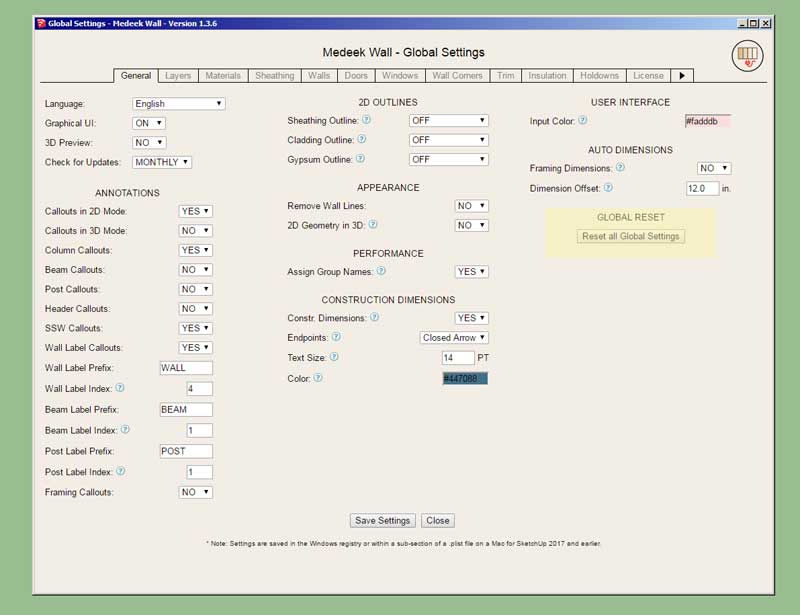
      http://design.medeek.com/resources/trussplugin/images/truss_su687_800.jpg

      No more messing around with registry entries, plist files and JSON files. Just click the button and you start with a clean slate, why didn't I think of this before.

      Nathaniel P. Wilkerson PE
      Medeek Engineering Inc
      design.medeek.com

      1 條回覆 最後回覆 回覆 引用 0
      • medeekM 離線
        medeek
        最後由 編輯

        Version 1.3.8 - 04.26.2020

        • Added additional logic to the blocking and insulation modules for short wall panels.
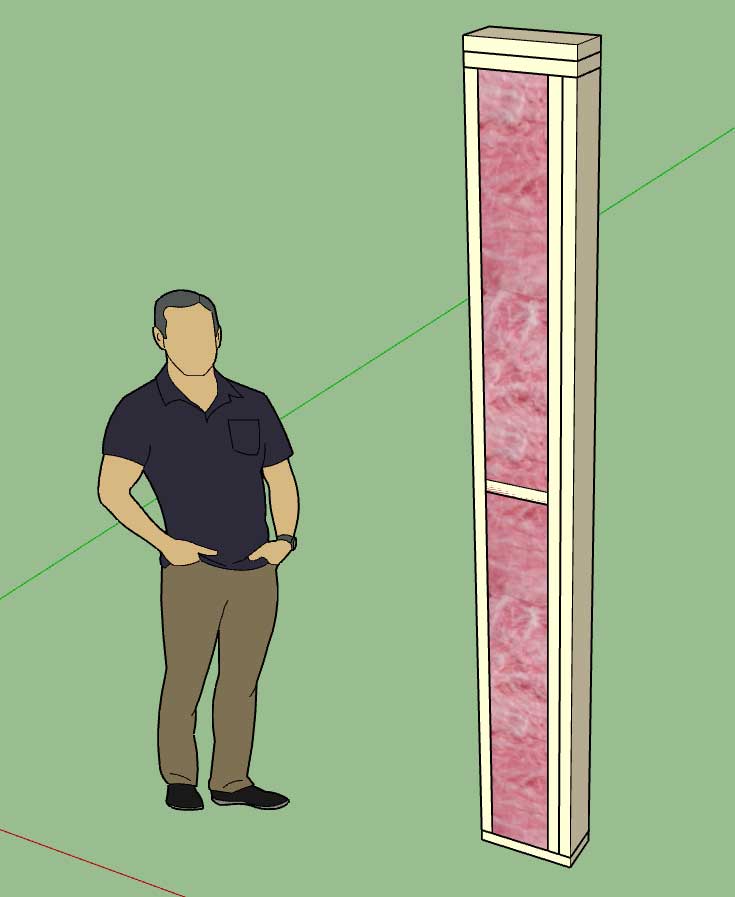
        http://design.medeek.com/resources/trussplugin/images/truss_su688_800.jpg

        Nathaniel P. Wilkerson PE
        Medeek Engineering Inc
        design.medeek.com

        1 條回覆 最後回覆 回覆 引用 0
        • medeekM 離線
          medeek
          最後由 編輯

          Version 1.3.9 - 04.28.2020

          • Added a "Terminal" end wall condition.
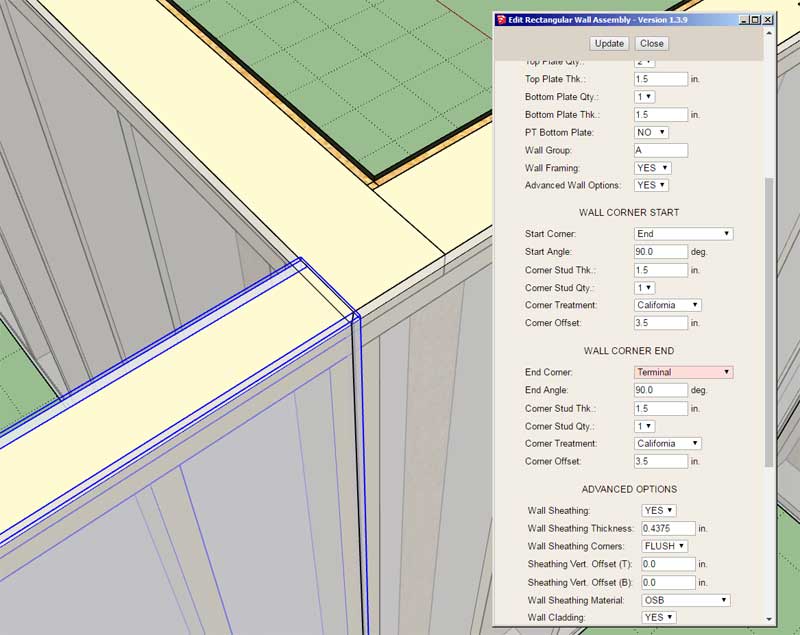
          http://design.medeek.com/resources/trussplugin/images/truss_su691_800.jpg

          The principal use of this end condition is for interior walls terminating against multi-wall corners as shown above.

          Nathaniel P. Wilkerson PE
          Medeek Engineering Inc
          design.medeek.com

          1 條回覆 最後回覆 回覆 引用 0
          • medeekM 離線
            medeek
            最後由 編輯

            Version 1.4.0 - 05.01.2020

            • Enabled a second layer of gypsum for interior and exterior walls.
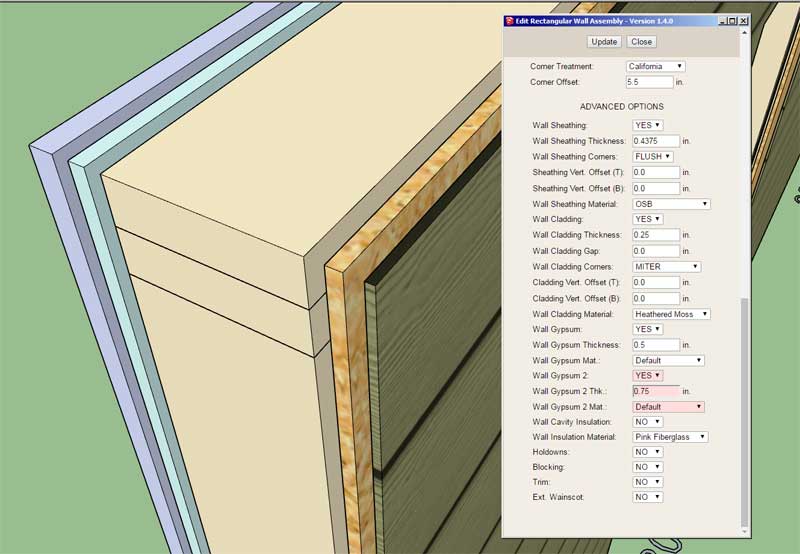
            http://design.medeek.com/resources/trussplugin/images/truss_su692_800.jpg

            This update adds an optional 2nd layer of gypsum to the wall assembly. By disabling the first layer of gypsum one can create an air gap between the 2nd layer of gypsum and the framed wall.

            This update also addresses a minor bug caused by the updates in Version 1.3.8.

            This latest update will require the user to recreate their wall presets since three new parameters have been added to the wall attribute library.

            View an example of double gypsum walls here:

            Link Preview Image
            3D Warehouse

            3D Warehouse is a website of searchable, pre-made 3D models that works seamlessly with SketchUp.

            favicon

            (3dwarehouse.sketchup.com)

            Nathaniel P. Wilkerson PE
            Medeek Engineering Inc
            design.medeek.com

            1 條回覆 最後回覆 回覆 引用 0
            • medeekM 離線
              medeek
              最後由 編輯

              Version 1.4.0b - 05.01.2020

              • Fixed a critical bug with the tee intersection ladder blocking with walls with no openings.
              • Added a "Rustic Shiplap" built-in material into the material library.
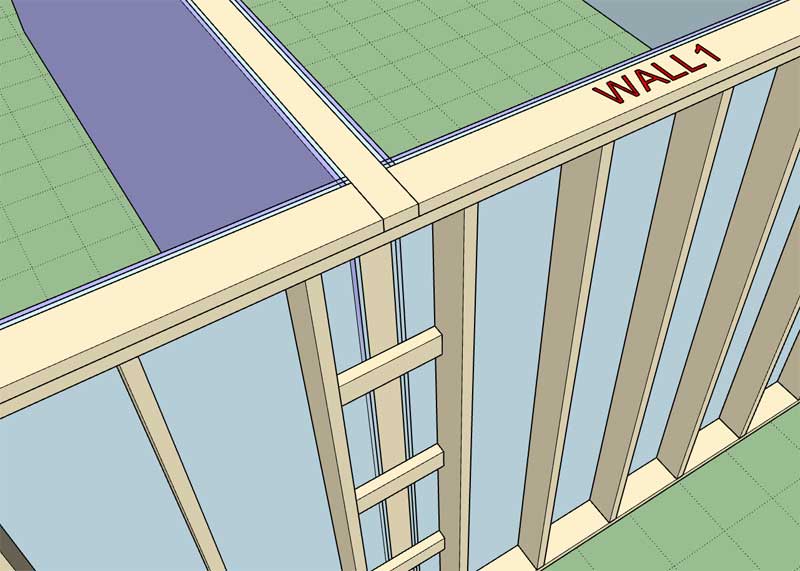
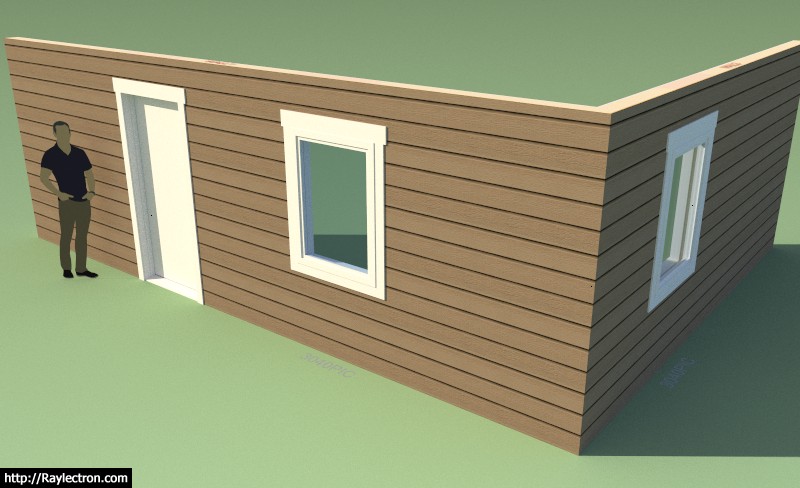
              http://design.medeek.com/resources/trussplugin/images/truss_su693_800.jpg

              http://design.medeek.com/resources/trussplugin/images/truss_su694_800.jpg

              Nathaniel P. Wilkerson PE
              Medeek Engineering Inc
              design.medeek.com

              1 條回覆 最後回覆 回覆 引用 0
              • medeekM 離線
                medeek
                最後由 編輯

                The Wall plugin has been slowly maturing over the last few months, however I am quite sure there are still a few more bugs that I am hoping to uncover and resolve.

                In an effort to flush out these last remaining bugs I will be offering a "Bug Discovery" incentive program. If you find and report a bug and I then verify that it is indeed a bug in the code (not an unfinished feature/module or user error), you will then be entitled to an additional year added on to your current update expiration date of your license/serial number.

                This program will also be extended to all other Medeek plugins. The credit can only be applied to the plugin(s) in which they were found.

                Hopefully this will encourage users to help find and report bugs and ultimately make all of the plugins that much more robust.

                Please send all bug reports directly to me at nathan@medeek.com

                Please do not include any SketchUp models large than 2 MB or large video files or MS Word documents. Screen shots and output from the ruby console is always very helpful.

                Nathaniel P. Wilkerson PE
                Medeek Engineering Inc
                design.medeek.com

                1 條回覆 最後回覆 回覆 引用 0
                • jujuJ 離線
                  juju
                  最後由 編輯

                  @medeek said:

                  Version 2.7.4 - 05.02.2020

                  • Fixed a bug with the soffit and fascia module for all truss types.

                  This bug fix is specifically for the boxed soffit for truss roofs. Previously if one did not enable the fascia but enabled the soffit then it would throw an error. There may be other similar bugs in this module or others so I am constantly testing combinations of various parameters to make sure no interdependencies have been overlooked.

                  wrong thread?

                  Save the Earth, it's the only planet with chocolate.

                  1 條回覆 最後回覆 回覆 引用 0
                  • medeekM 離線
                    medeek
                    最後由 編輯

                    Oops, you're right.

                    Nathaniel P. Wilkerson PE
                    Medeek Engineering Inc
                    design.medeek.com

                    1 條回覆 最後回覆 回覆 引用 0
                    • medeekM 離線
                      medeek
                      最後由 編輯

                      Version 2.7.4 - 05.02.2020

                      • Fixed a bug with the soffit and fascia module for all truss types.

                      This bug fix is specifically for the boxed soffit for truss roofs. Previously if one did not enable the fascia but enabled the soffit then it would throw an error. There may be other similar bugs in this module or others so I am constantly testing combinations of various parameters to make sure no interdependencies have been overlooked.

                      *** This should have been posted in the Truss plugin thread ***

                      Nathaniel P. Wilkerson PE
                      Medeek Engineering Inc
                      design.medeek.com

                      1 條回覆 最後回覆 回覆 引用 0
                      • jujuJ 離線
                        juju
                        最後由 編輯

                        @medeek said:

                        Oops, you're right.

                        yeah, but not as often as you are, thanks for the great work!

                        Save the Earth, it's the only planet with chocolate.

                        1 條回覆 最後回覆 回覆 引用 0
                        • medeekM 離線
                          medeek
                          最後由 編輯

                          Per a customer request I will be including a material for HardiPlank Colonial Roughsawn siding in the next release of the plugin. It is a slightly different texture than the lap siding with a 6.75" reveal (versus 7").

                          truss_su697_800.jpg

                          If you would like to utilize the material right away you can find it attached to this model:

                          Link Preview Image
                          3D Warehouse

                          3D Warehouse is a website of searchable, pre-made 3D models that works seamlessly with SketchUp.

                          favicon

                          (3dwarehouse.sketchup.com)

                          Nathaniel P. Wilkerson PE
                          Medeek Engineering Inc
                          design.medeek.com

                          1 條回覆 最後回覆 回覆 引用 0
                          • medeekM 離線
                            medeek
                            最後由 編輯

                            Version 1.4.1 - 05.12.2020

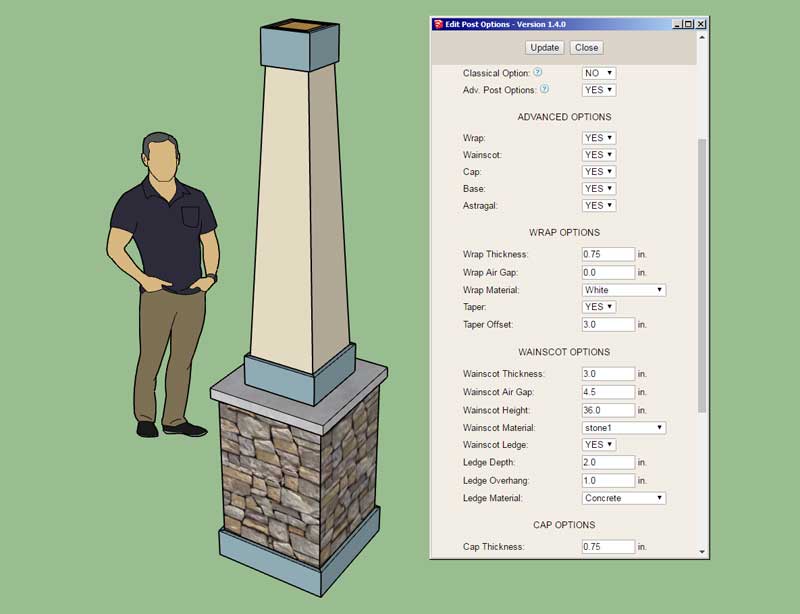
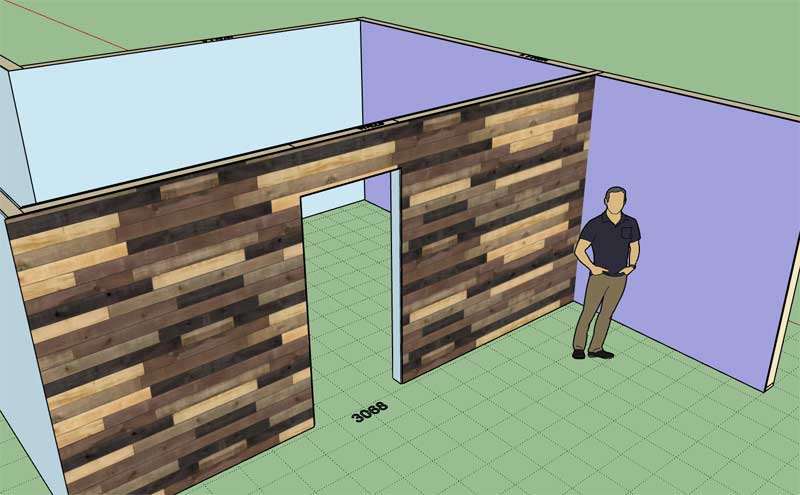
                            • Enabled a tapered wrap for a free standing columns.
                            • Added a HardiPlank Colonial (Rough Sawn) built-in material into the material library.
                            http://design.medeek.com/resources/wallplugin/images/wall_su354_800.jpg

                            Two new parameters: Taper and Taper Offset

                            View model here:

                            Link Preview Image
                            3D Warehouse

                            3D Warehouse is a website of searchable, pre-made 3D models that works seamlessly with SketchUp.

                            favicon

                            (3dwarehouse.sketchup.com)

                            Nathaniel P. Wilkerson PE
                            Medeek Engineering Inc
                            design.medeek.com

                            1 條回覆 最後回覆 回覆 引用 0
                            • medeekM 離線
                              medeek
                              最後由 編輯

                              Version 1.4.1b - 05.13.2020

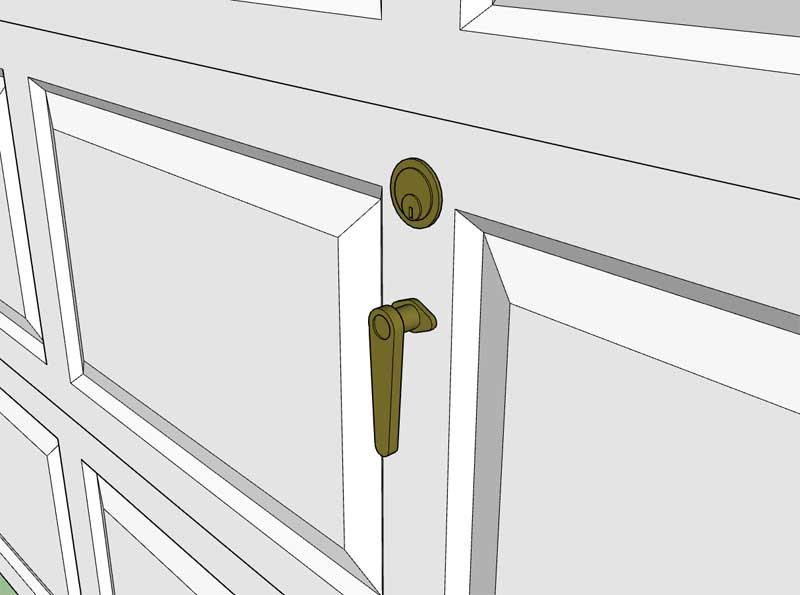
                              • Added a "Style2" hardware option (Lever & Lock) to the garage door module.
                              http://design.medeek.com/resources/wallplugin/images/wall_su355_800.jpg

                              This additional hardware option added per customer request.

                              Nathaniel P. Wilkerson PE
                              Medeek Engineering Inc
                              design.medeek.com

                              1 條回覆 最後回覆 回覆 引用 0
                              • medeekM 離線
                                medeek
                                最後由 編輯

                                Version 1.4.2 - 05.14.2020

                                • Added a layer for posts to the advanced layer options (Layer tab of the global settings).
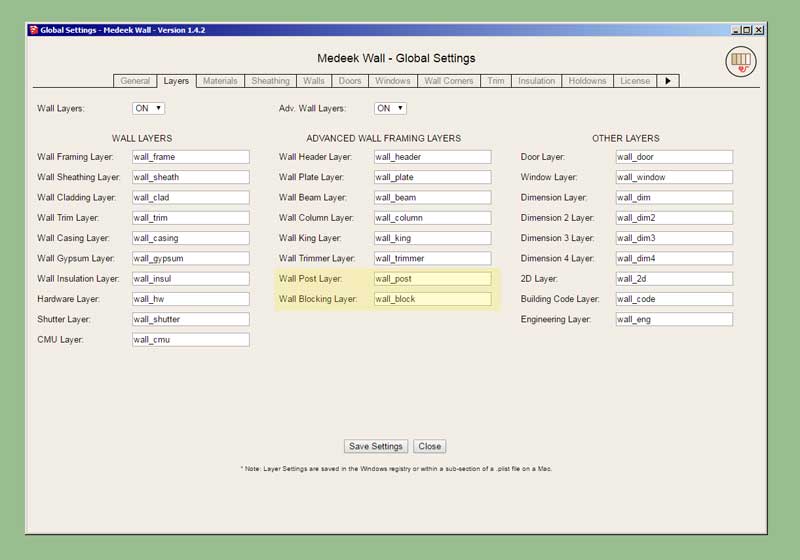
                                • Added a layer for blocking to the advanced layer options (Layer tab of the global settings).

                                http://design.medeek.com/resources/wallplugin/images/wall_su356_800.jpg

                                Nathaniel P. Wilkerson PE
                                Medeek Engineering Inc
                                design.medeek.com

                                1 條回覆 最後回覆 回覆 引用 0
                                • medeekM 離線
                                  medeek
                                  最後由 編輯

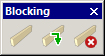
                                  First look at the blocking toolbar:

                                  wall_blocking_su_menu_active.jpg

                                  I will also be removing the Fixtures toolbar from the Wall plugin, this toolbar will become part of the upcoming Medeek Interior plugin.

                                  wall_fixtures_su_menu_active.jpg

                                  Nathaniel P. Wilkerson PE
                                  Medeek Engineering Inc
                                  design.medeek.com

                                  1 條回覆 最後回覆 回覆 引用 0
                                  • medeekM 離線
                                    medeek
                                    最後由 編輯

                                    My intent is to have the blocking tool place the blocks within the wall panel assembly/group. However would there be a case where the user would want to create the blocks as stand alone entities outside of any wall, roof or floor assembly?

                                    Nathaniel P. Wilkerson PE
                                    Medeek Engineering Inc
                                    design.medeek.com

                                    1 條回覆 最後回覆 回覆 引用 0
                                    • jujuJ 離線
                                      juju
                                      最後由 編輯

                                      @medeek said:

                                      My intent is to have the blocking tool place the blocks within the wall panel assembly/group. However would there be a case where the user would want to create the blocks as stand alone entities outside of any wall, roof or floor assembly?

                                      Probably only if you're adding an additional low level wall with some ledge or similar, which wouldn't normally form part of the usual wall.

                                      Save the Earth, it's the only planet with chocolate.

                                      1 條回覆 最後回覆 回覆 引用 0
                                      • medeekM 離線
                                        medeek
                                        最後由 編輯

                                        Version 1.4.3 - 05.17.2020

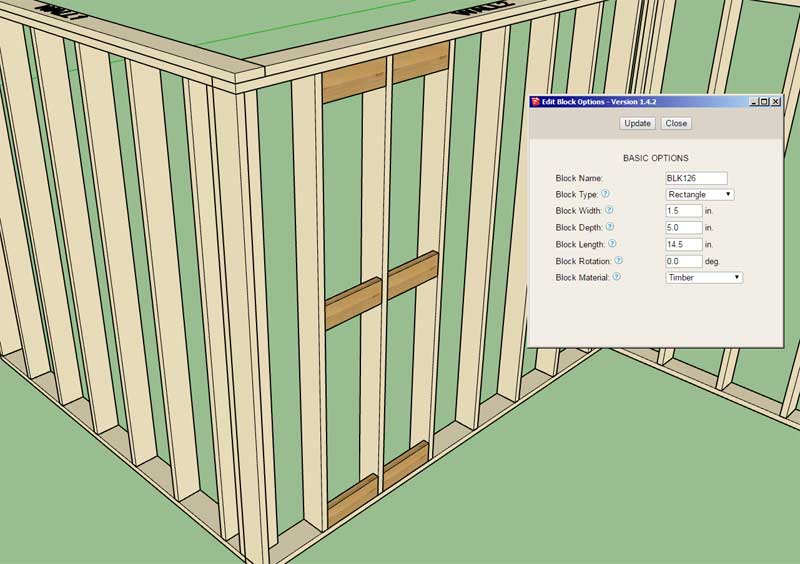
                                        • Added a blocking tool/module for inserting custom blocks into Medeek walls, roofs, floors or generic groups.
                                        • Added the Blocking toolbar and icons.
                                        • Removed the Fixtures toolbar and icons.
                                        http://design.medeek.com/resources/wallplugin/images/wall_su357_800.jpg

                                        Note, that the blocking is automatically retained within the wall, roof or floor assembly after a regen or edit of the primary assembly.

                                        After selecting the first point one can toggle the positioning of the blocking with the "Ctrl" key. There are nine possible positions the block can be inserted at.

                                        The blocking is placed on the framing layer unless the advanced layers are turned on, in which it is placed on a specific blocking layer.

                                        I will be releasing a tutorial video shortly on this new tool.

                                        Nathaniel P. Wilkerson PE
                                        Medeek Engineering Inc
                                        design.medeek.com

                                        1 條回覆 最後回覆 回覆 引用 0
                                        • medeekM 離線
                                          medeek
                                          最後由 編輯

                                          After putting this new tool through its paces for a few more minutes it immediately jumps out at me that it would be really nice to have a hot key for toggling the rotation (zero or ninety). For other custom rotations the user can simply key in the desire rotation in the menu.

                                          What key should I use to toggle the rotation? I’m already using the Ctrl key to toggle placement location.

                                          Nathaniel P. Wilkerson PE
                                          Medeek Engineering Inc
                                          design.medeek.com

                                          1 條回覆 最後回覆 回覆 引用 0
                                          • TIGT 離線
                                            TIG Moderator
                                            最後由 編輯

                                            TAB ?
                                            But remember that you need to spot it using onKeyUp, because onKeyDown with TAB fails on MACs...

                                            TIG

                                            1 條回覆 最後回覆 回覆 引用 0
                                            • 1
                                            • 2
                                            • 10
                                            • 11
                                            • 12
                                            • 13
                                            • 14
                                            • 75
                                            • 76
                                            • 12 / 76
                                            • 第一個貼文
                                              最後的貼文
                                            Buy SketchPlus
                                            Buy SUbD
                                            Buy WrapR
                                            Buy eBook
                                            Buy Modelur
                                            Buy Vertex Tools
                                            Buy SketchCuisine
                                            Buy FormFonts

                                            Advertisement