sketchucation logo sketchucation
    • 登入
    Oops, your profile's looking a bit empty! To help us tailor your experience, please fill in key details like your SketchUp version, skill level, operating system, and more. Update and save your info on your profile page today!
    🔌 Smart Spline | Fluid way to handle splines for furniture design and complex structures. Download

    Medeek Wall Plugin

    已排程 已置頂 已鎖定 已移動 Plugins
    1.5k 貼文 27 Posters 1.1m 瀏覽 26 Watching
    正在載入更多貼文
    • 從舊到新
    • 從新到舊
    • 最多點贊
    回覆
    • 在新貼文中回覆
    登入後回覆
    此主題已被刪除。只有擁有主題管理權限的使用者可以查看。
    • medeekM 離線
      medeek
      最後由 編輯

      Since I've got the beam icons already active on the beams/columns toolbar I've decided to try and put together the beam module. The HTML edit menu (draw tool menu is very similar):
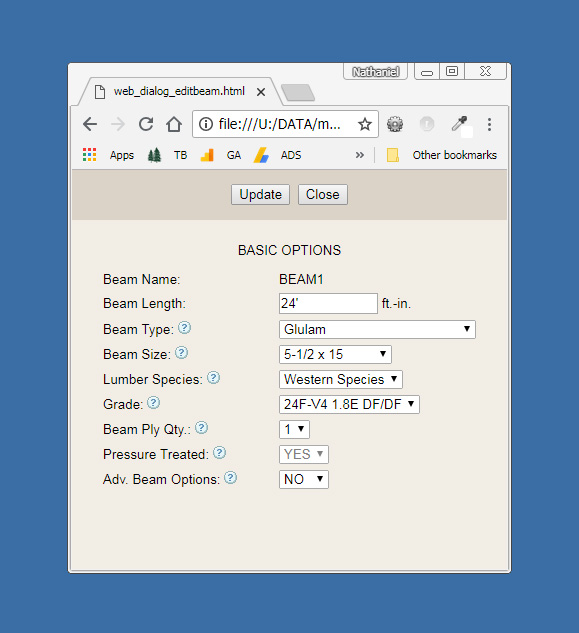
      http://design.medeek.com/resources/images/wall_su119_800.jpg

      Initially I will start with wood beams only: Sawn Lumber, Timber, Glulam, SCL (LVL, PSL, LSL)

      Similar to the truss plugin the beams created within the wall plugin will be able to be analyzed directly with the beam calculator on my website via the engineering tools (engineering icon). This chunk of code is already fairly well tested and is simply a matter of recycling some of it from the Truss Plugin.

      Later on I would also like to add steel beams (W, C, L, and HSS) but this will be based on user demand.

      I would also like to bring the engineering calcs directly within the plugin so that the user can run the numbers even if they are offline, something for the long term todo list.

      Nathaniel P. Wilkerson PE
      Medeek Engineering Inc
      design.medeek.com

      1 條回覆 最後回覆 回覆 引用 0
      • medeekM 離線
        medeek
        最後由 編輯

        @charlie__v said:

        Nathaniel, all

        Draw wall......exterior trim = yes....Draw wall in +X direction 10' long....Draw wall in +Y direction 10' long....Draw wall in +X direction 10' long, and new wall segment begins to draw over first wall segment drawn in +X direction.

        Can you replicate this? (anyone else?)

        V 0.8.1b 06_25_18

        Thanks,
        Charlie

        Figured it out. The plugin is assuming that both the ext. and int. corner trim pieces will be six sided L-shaped polygon profiles. However with a thickness equal to width of the trim the resulting profile should then be a square. A simple fix and also a check for the situation where the thickness is greater than the width. When the thickness = width then the profile is a square and only four points are needed to describe the face to generate the profile.

        Nathaniel P. Wilkerson PE
        Medeek Engineering Inc
        design.medeek.com

        1 條回覆 最後回覆 回覆 引用 0
        • medeekM 離線
          medeek
          最後由 編輯

          Version 0.8.1c - 06.26.2018

          • Fixed a bug where wall corner trim thickness equals trim width.

          This will now allow the user to specify a 1.5" x 1.5" interior corner trim.

          Nathaniel P. Wilkerson PE
          Medeek Engineering Inc
          design.medeek.com

          1 條回覆 最後回覆 回覆 引用 0
          • medeekM 離線
            medeek
            最後由 編輯

            Just about to wrap up the beam tool this morning and then I got thinking about the end treatment of beams:
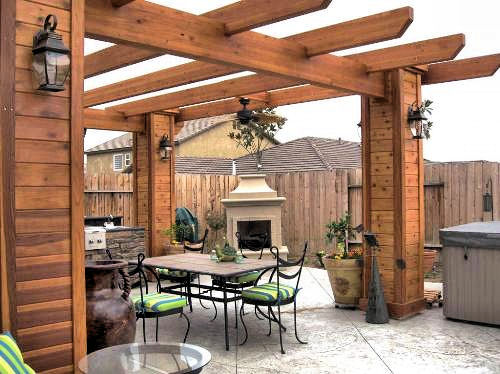
            http://fdratlanta.com/images/gallery/pergolas/all-wood-custom-end-cut-rafter-pergola-vegas-style-garden.jpg

            I don't know what the technical term is for this but I call it the Start Cut and End Cut of a beam.
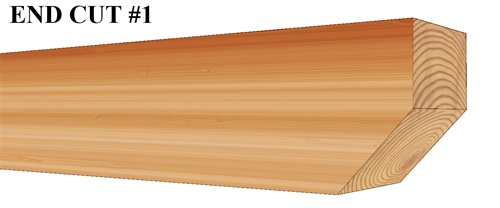
            http://www.tidewaterlumber.com/v/vspfiles/photos/End Cuts-2.jpg

            There could be any number of possibilities for the end cut profile:

            https://www.trexpergola.com/wp-content/uploads/2015/11/Trex-Pergola-Vision-Slight-End-Detail1.jpg

            I think I will just start with two options:

            • None
            • 45 deg (to mid height of beam)

            Nathaniel P. Wilkerson PE
            Medeek Engineering Inc
            design.medeek.com

            1 條回覆 最後回覆 回覆 引用 0
            • C 離線
              Charlie__V
              最後由 編輯

              @medeek said:

              Version 0.8.1c - 06.26.2018

              • Fixed a bug where wall corner trim thickness equals trim width.

              This will now allow the user to specify a 1.5" x 1.5" interior corner trim.

              Thank you Nathaniel, this resolves the issue.
              And for the sake of clarity as to what the description means/is.....see pic below
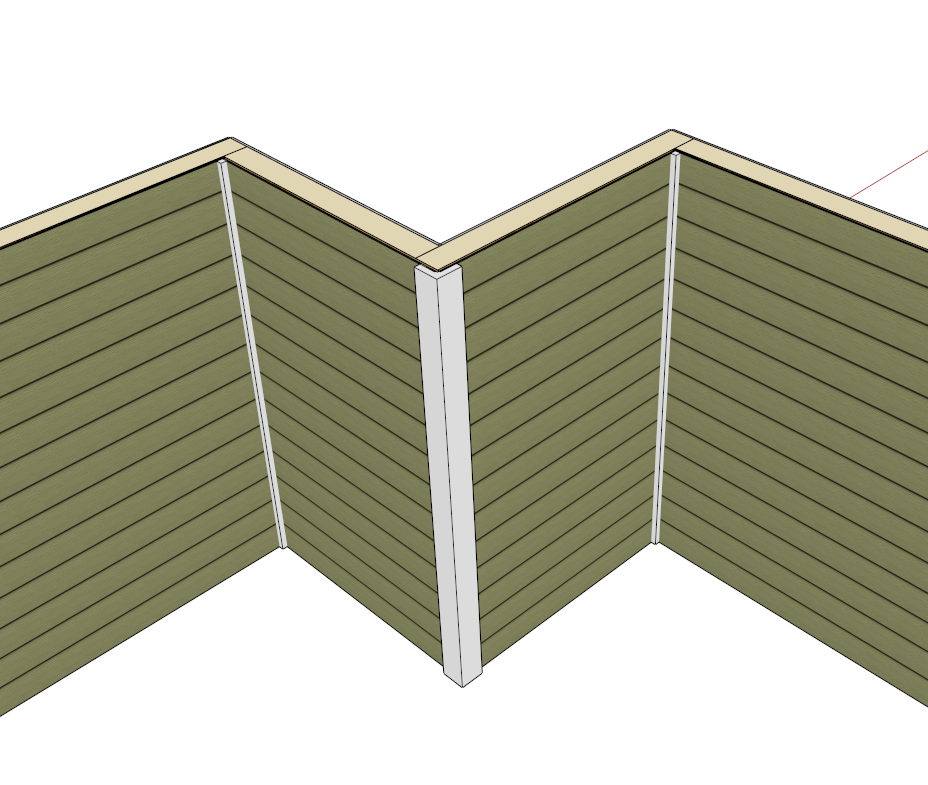

              Ext.Siding_1.5x1.5_Inside Corner_06_27_2018.PNG

              Precision M1710/Win 7 Pro 64 bit/i-7 6920 Quad core 2.9 Ghz -3.8/16Gb ram/NVIDIA M5000M 8Gb

              1 條回覆 最後回覆 回覆 引用 0
              • medeekM 離線
                medeek
                最後由 編輯

                @charlie__v said:

                @medeek said:

                Version 0.8.1c - 06.26.2018

                • Fixed a bug where wall corner trim thickness equals trim width.

                This will now allow the user to specify a 1.5" x 1.5" interior corner trim.

                Thank you Nathaniel, this resolves the issue.
                And for the sake of clarity as to what the description means/is.....see pic below

                Thank-you for providing the additional clarification.

                Inevitably I'm going to miss things, didn't even consider a square corner trim on an interior corner, funny thing is I've seen this sort of thing a million times though.

                Please keep sending in the bugs and feature requests, I know there is more out there. Please also post up your models you create with the plugin I am curious as to how the plugin is actually being utilized.

                Nathaniel P. Wilkerson PE
                Medeek Engineering Inc
                design.medeek.com

                1 條回覆 最後回覆 回覆 引用 0
                • Bob JamesB 離線
                  Bob James
                  最後由 編輯

                  I know this sounds somewhat heretical but how about an option to set the full version to match the lite version for the times when all that's initially needed is a concept drawing?
                  Or is it obvious how to do it?

                  i7-4930K 3.4Ghz, 2x GTX780 6GB, 32GB DDR3-1600 ECC, OCZ Vertex 4 500GB, WD Black 3TB, 32TB NAS, 4x 27" Monitors, SpaceMouse Pro, X-keys XK-60

                  1 條回覆 最後回覆 回覆 引用 0
                  • medeekM 離線
                    medeek
                    最後由 編輯

                    @bob james said:

                    I know this sounds somewhat heretical but how about an option to set the full version to match the lite version for the times when all that's initially needed is a concept drawing?
                    Or is it obvious how to do it?

                    Within the global settings under the Wall Tab you can set the default framing mode to one of the three options. This will then always bring up the wall draw tool with the selected mode, while still giving you the option to bump the wall to any of the other modes if you suddenly need to see the framing.

                    Nathaniel P. Wilkerson PE
                    Medeek Engineering Inc
                    design.medeek.com

                    1 條回覆 最後回覆 回覆 引用 0
                    • Bob JamesB 離線
                      Bob James
                      最後由 編輯

                      Thank you

                      i7-4930K 3.4Ghz, 2x GTX780 6GB, 32GB DDR3-1600 ECC, OCZ Vertex 4 500GB, WD Black 3TB, 32TB NAS, 4x 27" Monitors, SpaceMouse Pro, X-keys XK-60

                      1 條回覆 最後回覆 回覆 引用 0
                      • medeekM 離線
                        medeek
                        最後由 編輯

                        Version 0.8.2 - 06.28.2018

                        • Added the ability to draw and edit beams with the Beams/Column Toolset.
                        • Glulam, PSL, LVL, LSL, Timber and Lumber beam types added to the beam module.
                        • Start and end cut options (miter,firecut) added to the advanced options for beams.
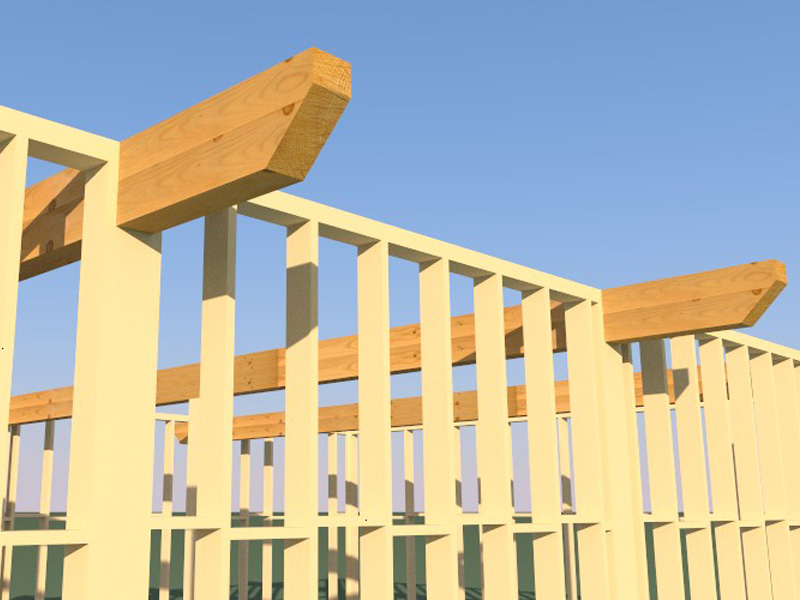
                        http://design.medeek.com/resources/images/wall_su120_800.jpg

                        View model here:

                        Link Preview Image
                        3D Warehouse

                        3D Warehouse is a website of searchable, pre-made 3D models that works seamlessly with SketchUp.

                        favicon

                        (3dwarehouse.sketchup.com)

                        Nathaniel P. Wilkerson PE
                        Medeek Engineering Inc
                        design.medeek.com

                        1 條回覆 最後回覆 回覆 引用 0
                        • Bob JamesB 離線
                          Bob James
                          最後由 編輯

                          Could you add the revision number to the rbz file?
                          medeek_wall_ext 0-8-1c.rbz
                          medeek_wall_ext 0-8-2.rbz

                          i7-4930K 3.4Ghz, 2x GTX780 6GB, 32GB DDR3-1600 ECC, OCZ Vertex 4 500GB, WD Black 3TB, 32TB NAS, 4x 27" Monitors, SpaceMouse Pro, X-keys XK-60

                          1 條回覆 最後回覆 回覆 引用 0
                          • medeekM 離線
                            medeek
                            最後由 編輯

                            @bob james said:

                            Could you add the revision number to the rbz file?
                            medeek_wall_ext 0-8-1c.rbz
                            medeek_wall_ext 0-8-2.rbz

                            Yes, that is probably not a bad idea.

                            Nathaniel P. Wilkerson PE
                            Medeek Engineering Inc
                            design.medeek.com

                            1 條回覆 最後回覆 回覆 引用 0
                            • medeekM 離線
                              medeek
                              最後由 編輯

                              Trying to find a decent wood grain to use for timber beams, any suggestions or images anyone is willing to share? I've got a decent end grain image, just looking for the side grain.

                              P.S. I am also looking for a good pressure treated texture/material.

                              Nathaniel P. Wilkerson PE
                              Medeek Engineering Inc
                              design.medeek.com

                              1 條回覆 最後回覆 回覆 引用 0
                              • medeekM 離線
                                medeek
                                最後由 編輯

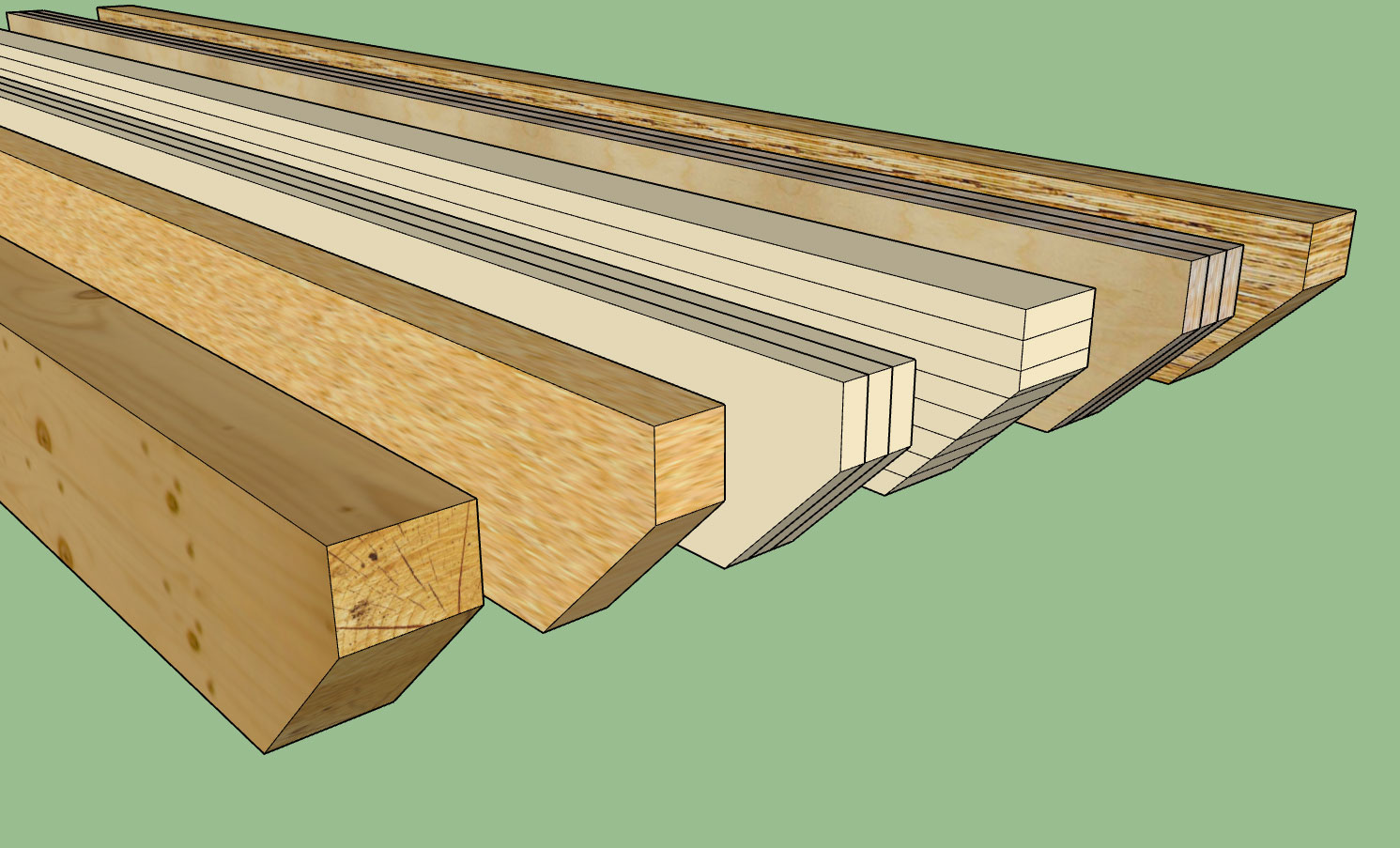
                                The currently available beam types are:

                                • Timber
                                • LSL
                                • Lumber
                                • Glulam
                                • LVL
                                • PSL

                                http://design.medeek.com/resources/images/wall_su121_800.jpg

                                The number of plies can be 1, 2, 3, and 4

                                Glulam species are currently Western Species and Southern Pine.

                                SCL lumber (LVL, LSL, PSL) are the US industry standard sizes (Weyerhauser, Boise Cascade, Louisiana- Pacific).

                                The miter cut puts the diagonal facing the bottom, the fire cut puts the diagonal facing the top.

                                Link Preview Image
                                3D Warehouse

                                3D Warehouse is a website of searchable, pre-made 3D models that works seamlessly with SketchUp.

                                favicon

                                (3dwarehouse.sketchup.com)

                                The materials shown are the default (built-in) materials for the plugin if the materials option is turned on. I'm not totally in love with the various textures I have for LSL, PSL, LVL and Timber but it is better than nothing I suppose.

                                For the timber and LVL option you can see that the end and edges have there own material assigned. Also if you apply a custom cut (after the fact) the way I have the materials assigned should allow you to maintain the proper end grain appearance.

                                The only thing really missing is steel beams which should not be too big of a leap now that I have the whole beam system/module in place.

                                Tomorrow I will jump back on the garage door module and see if we can make some headway with that.

                                Nathaniel P. Wilkerson PE
                                Medeek Engineering Inc
                                design.medeek.com

                                1 條回覆 最後回覆 回覆 引用 0
                                • medeekM 離線
                                  medeek
                                  最後由 編輯

                                  One last thing to note with the beam module is that all of the standard sizes are US/Imperial.

                                  I can add in standard sizes for metric however I will need that information. I currently have glulam beam data for the UK, South Africa and Australia but I will also need PSL, LVL, lumber, timbers and LSL.

                                  Nathaniel P. Wilkerson PE
                                  Medeek Engineering Inc
                                  design.medeek.com

                                  1 條回覆 最後回覆 回覆 引用 0
                                  • medeekM 離線
                                    medeek
                                    最後由 編輯

                                    Version 0.8.2b - 06.29.2018

                                    • Steel: Wide Flange (W) beam types added to the beam module.

                                    http://design.medeek.com/resources/images/wall_su122_800.jpg

                                    I've only added five wide flange sizes thus far. I just need to know what sizes are most typically used and I can add them in.

                                    Note that miter and fire cuts work with the steel beams as well.

                                    I was also thinking an advanced option for steel beams might be a nailer plate on top and/or bottom of the beam, again feedback in this regard will determine if I pursue this further.
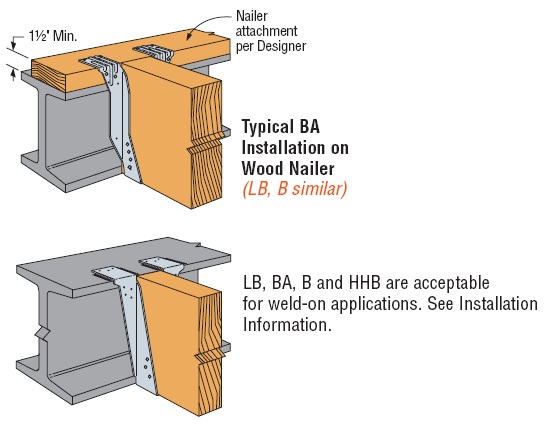
                                    http://seblog.strongtie.com/wp-content/uploads/2014/05/Hanger-Install.jpg

                                    Another thing to note with beams is that you can move them around just like any other object in SketchUp using the SU move tool, unlike the walls. Technically you can move the walls with he SU move tool as well its just they won't stay connected if you do.

                                    Another advanced option for beams would be a hanger library which can be added to or modified by the user. I am already doing this sort of thing for window and door components so it isn't a big stretch for beam hangers.

                                    Nathaniel P. Wilkerson PE
                                    Medeek Engineering Inc
                                    design.medeek.com

                                    1 條回覆 最後回覆 回覆 引用 0
                                    • medeekM 離線
                                      medeek
                                      最後由 編輯

                                      Version 0.8.2c - 06.29.2018

                                      • Added a hanger library (customizable) and the ability to place hangers at the start and/or end of a beam.

                                      Hangers shown are: HU612, LUC26Z and LUS26
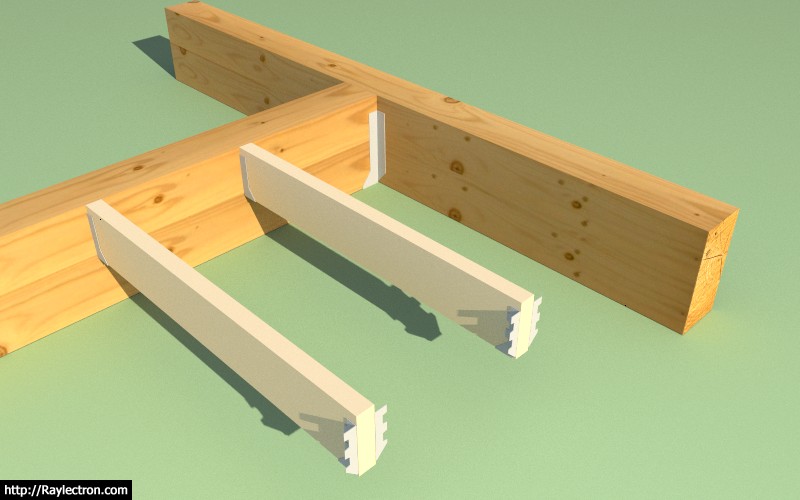
                                      http://design.medeek.com/resources/images/wall_su123_800.jpg

                                      The hanger library is located in the "hangers" sub-folder of the library folder of the plugin.

                                      I have a few Simpson Hangers included but any of these can be modified and additional SKP files can be put into this folder. The plugin will automatically allow the selection of any components found within this sub-folder when selecting hangers for beams within the draw and edit menus.

                                      I have contacted Simpson Strong-Tie in an effort to get a few more of their more common hangers that I can then simplify and include in the plugin. I am particularly interested in the HUCQ series.

                                      In order to minimize polygon count I typically eliminate most of the holes in the hangers and also any curved surfaces, the goal is to keep the file size below 50 kb if possible.

                                      I should also add that one could also include column caps in this sub-folder, like the CCQ/ECCQ/ECCLQ/CCTQ series.

                                      Nathaniel P. Wilkerson PE
                                      Medeek Engineering Inc
                                      design.medeek.com

                                      1 條回覆 最後回覆 回覆 引用 0
                                      • medeekM 離線
                                        medeek
                                        最後由 編輯

                                        @bob james said:

                                        As of 0.8.2c the only thing in

                                        C:\Users\Bob\AppData\Roaming\SketchUp\SketchUp 2018\SketchUp\Plugins*medeek_wall_ext\library*
                                        is one window and one door. 😕 : 😕 :

                                        You'll need to download 0.8.2d, I'll roll it out tomorrow.

                                        Nathaniel P. Wilkerson PE
                                        Medeek Engineering Inc
                                        design.medeek.com

                                        1 條回覆 最後回覆 回覆 引用 0
                                        • Bob JamesB 離線
                                          Bob James
                                          最後由 編輯

                                          As of 0.8.2b the only thing in

                                          C:\Users\Bob\AppData\Roaming\SketchUp\SketchUp 2018\SketchUp\Plugins*medeek_wall_ext\library*
                                          is one window and one door. 😕 : 😕 :

                                          i7-4930K 3.4Ghz, 2x GTX780 6GB, 32GB DDR3-1600 ECC, OCZ Vertex 4 500GB, WD Black 3TB, 32TB NAS, 4x 27" Monitors, SpaceMouse Pro, X-keys XK-60

                                          1 條回覆 最後回覆 回覆 引用 0
                                          • Bob JamesB 離線
                                            Bob James
                                            最後由 編輯

                                            The Hangers are in the 0.8.2c Library.
                                            I was looking in 0.8.2b
                                            My mistake: sorry

                                            i7-4930K 3.4Ghz, 2x GTX780 6GB, 32GB DDR3-1600 ECC, OCZ Vertex 4 500GB, WD Black 3TB, 32TB NAS, 4x 27" Monitors, SpaceMouse Pro, X-keys XK-60

                                            1 條回覆 最後回覆 回覆 引用 0
                                            • 1
                                            • 2
                                            • 68
                                            • 69
                                            • 70
                                            • 71
                                            • 72
                                            • 75
                                            • 76
                                            • 70 / 76
                                            • 第一個貼文
                                              最後的貼文
                                            Buy SketchPlus
                                            Buy SUbD
                                            Buy WrapR
                                            Buy eBook
                                            Buy Modelur
                                            Buy Vertex Tools
                                            Buy SketchCuisine
                                            Buy FormFonts

                                            Advertisement