sketchucation logo sketchucation
    • 登入
    Oops, your profile's looking a bit empty! To help us tailor your experience, please fill in key details like your SketchUp version, skill level, operating system, and more. Update and save your info on your profile page today!
    🔌 Smart Spline | Fluid way to handle splines for furniture design and complex structures. Download

    Version 2 is out!

    已排程 已置頂 已鎖定 已移動 SUbD
    renderpluginsextensions
    69 貼文 16 Posters 41.5k 瀏覽 16 Watching
    正在載入更多貼文
    • 從舊到新
    • 從新到舊
    • 最多點贊
    回覆
    • 在新貼文中回覆
    登入後回覆
    此主題已被刪除。只有擁有主題管理權限的使用者可以查看。
    • thomthomT 離線
      thomthom
      最後由 編輯

      Can you share an example model?

      Thomas Thomassen — SketchUp Monkey & Coding addict
      List of my plugins and link to the CookieWare fund

      1 條回覆 最後回覆 回覆 引用 0
      • T 離線
        TraxXx
        最後由 編輯

        @optimaforever said:

        Look at the subdivided mesh and you'll realize it's not quad at all.
        It's a triangle based mesh.
        So of course it will not work. You have the same problem as I had earlier.
        Convert to quad before launching Subd.

        Well, the difference between quads and triangles is quite unclear to me. Basically, a quad divided in two becomes two triangles, no ?

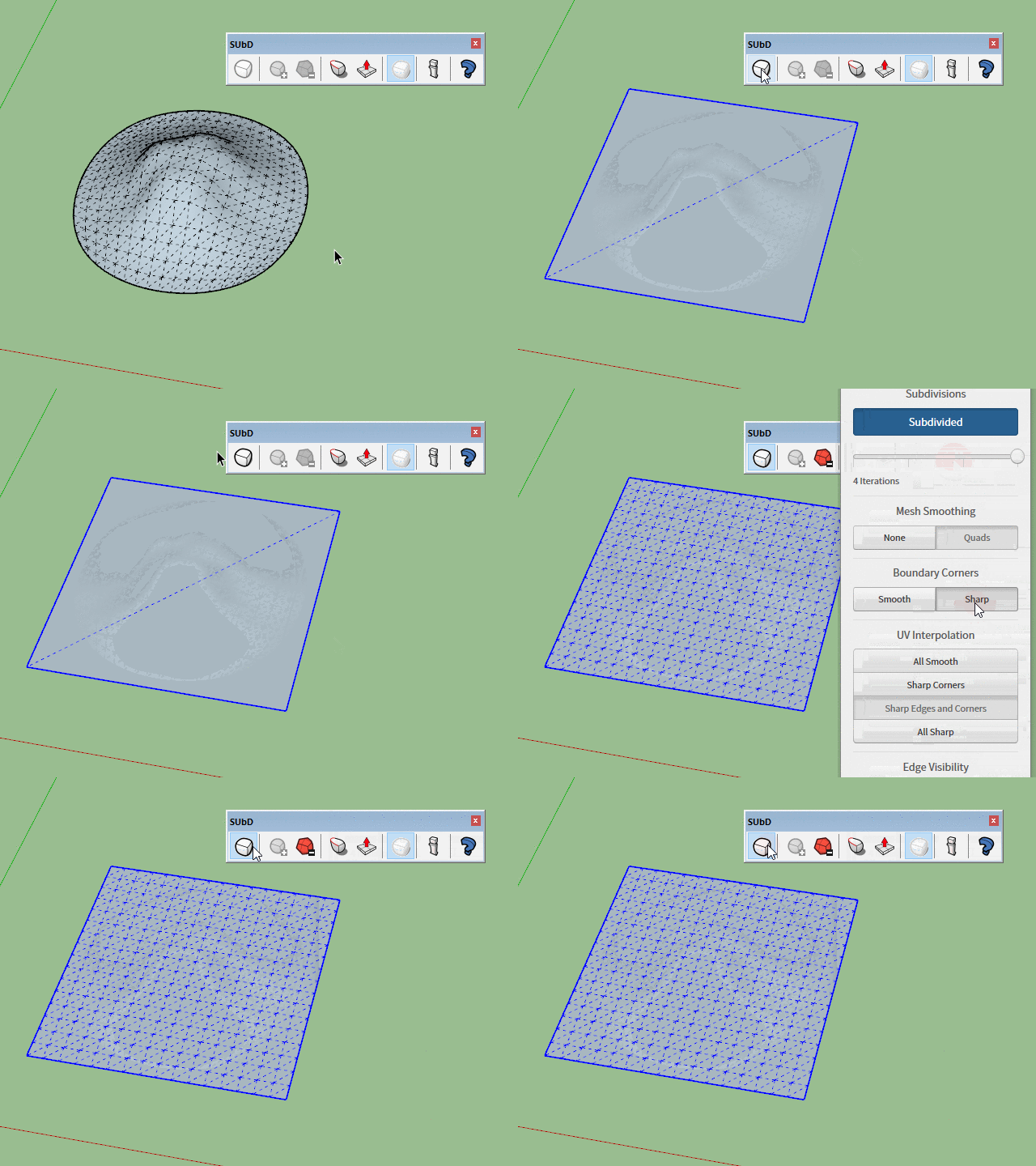
        Anyway, I just drawn a square in wireframe, converted to quad and subdivided directly from subD, the plugin still getting stuck when switching from sharp to smooth corners. Not getting where the problem comes from... I'll end up thinking that's my computer 😞


        EnregistrementAuto_Sans titre.skp

        1 條回覆 最後回覆 回覆 引用 0
        • thomthomT 離線
          thomthom
          最後由 編輯

          A QuadFace Tools compatible "quad" (by extension SUbD compatible quad) is either a coplanar face with four vertices, or two triangles where their shared edge is soft+smooth and casts-shadows turned off.

          Have a look at the QFT wiki for more details: https://bitbucket.org/thomthom/quadface-tools/wiki/Overview#!quadface-definition

          When Sandbox Tools create it's mesh it creates just soft+smooth edge between the triangles. So it's not automatically a compatible QFT quad. For that you need to use the "Convert Sandbox Quads to QuadFace Quads" function in QFT:
          https://bitbucket.org/thomthom/quadface-tools/wiki/Features#!convert-sandbox-quads-to-quadface-quads

          Thomas Thomassen — SketchUp Monkey & Coding addict
          List of my plugins and link to the CookieWare fund

          1 條回覆 最後回覆 回覆 引用 0
          • thomthomT 離線
            thomthom
            最後由 編輯

            I looked at your attached model, and it looks like you modified the subdivided mesh. Those changes will be lost if you toggle back from subdivided.

            But as for the getting stuck when switching, I'm not seeing that - here is what I observe:
            2017-03-21_12h48_56.gif

            Thomas Thomassen — SketchUp Monkey & Coding addict
            List of my plugins and link to the CookieWare fund

            1 條回覆 最後回覆 回覆 引用 0
            • T 離線
              TraxXx
              最後由 編輯

              Well I converted to quads using quad tools then I shaped the thing using vertex tools while it was smoothed edges and when switching to sharp edges, it removes the stuff I did with Vertex tools. As I remember, I didn't do any changes in the mesh but I'll work more with SubD, maybe I'm just not doing things in the proper order. And maybe my computer is actually not so good, don't know...

              Thanks for helping at least.

              1 條回覆 最後回覆 回覆 引用 0
              • thomthomT 離線
                thomthom
                最後由 編輯

                If you make changes after you subdivide you will lose those changes as soon as you interact with SUbD again.

                The workflow for subdividing is that you manipulate the original control mesh and subdivide as a final result.

                I'm a little unclear to exactly what you do, if you are able to do a video capture that would help a lot.

                Thomas Thomassen — SketchUp Monkey & Coding addict
                List of my plugins and link to the CookieWare fund

                1 條回覆 最後回覆 回覆 引用 0
                • thomthomT 離線
                  thomthom
                  最後由 編輯

                  @numerobis said:

                  One question about the licensing... I just purchased v2 and installed it over v1. Without applying the v2 license key it appears to be licensed already. Is the v1 key also working for v2 or will it expire in 30 days? It only says "Licensed" without any other info.

                  Yes, version 2 was a free update from version 1.

                  Thomas Thomassen — SketchUp Monkey & Coding addict
                  List of my plugins and link to the CookieWare fund

                  1 條回覆 最後回覆 回覆 引用 0
                  • N 離線
                    numerobis
                    最後由 編輯

                    Interesting... so then i have 2 versions now...

                    1 條回覆 最後回覆 回覆 引用 0
                    • thomthomT 離線
                      thomthom
                      最後由 編輯

                      There should be no need to ever use v1. Put it back into the shelf. 😄

                      Thomas Thomassen — SketchUp Monkey & Coding addict
                      List of my plugins and link to the CookieWare fund

                      1 條回覆 最後回覆 回覆 引用 0
                      • 1
                      • 2
                      • 3
                      • 4
                      • 4 / 4
                      • 第一個貼文
                        最後的貼文
                      Buy SketchPlus
                      Buy SUbD
                      Buy WrapR
                      Buy eBook
                      Buy Modelur
                      Buy Vertex Tools
                      Buy SketchCuisine
                      Buy FormFonts

                      Advertisement
