sketchucation logo sketchucation
    • 登入
    Oops, your profile's looking a bit empty! To help us tailor your experience, please fill in key details like your SketchUp version, skill level, operating system, and more. Update and save your info on your profile page today!
    🔌 Smart Spline | Fluid way to handle splines for furniture design and complex structures. Download

    Wrap-R for SketchUp

    已排程 已置頂 已鎖定 已移動 Extensions & Applications Discussions
    extensions
    191 貼文 43 Posters 163.3k 瀏覽 43 Watching
    正在載入更多貼文
    • 從舊到新
    • 從新到舊
    • 最多點贊
    回覆
    • 在新貼文中回覆
    登入後回覆
    此主題已被刪除。只有擁有主題管理權限的使用者可以查看。
    • lilchakaL 離線
      lilchaka
      最後由 編輯

      Looks amazing! I'm on a Mac as well and I hope a Mac version is on your to-do list in the (not too distant) future!?! I'll promote it to everyone I can.

      "I am a rooster illusion."

      1 條回覆 最後回覆 回覆 引用 0
      • J 離線
        jonorman
        最後由 編輯

        This is superb 😄 Are there any user manual available at this moment ?? or soon to come ??

        1 條回覆 最後回覆 回覆 引用 0
        • Rich O BrienR 線上
          Rich O Brien Moderator
          最後由 編輯

          Working hard to make docs for next week. But I cover most things in those videos above.

          Download the free D'oh Book for SketchUp 📖

          1 條回覆 最後回覆 回覆 引用 0
          • McGyverM 離線
            McGyver
            最後由 編輯

            Is this an acceptable place to ask questions about WrapR?
            I thought about starting a new thread, but in some forums people get annoyed with starting new threads or ones that can be perceived as somehow redundant.
            That and WrapR is still in Beta, so I could see where things might change and certain questions become moot.
            These are general questions about features, function and tools.
            Nothing about bugs, I get that those are submitted in a bug report.

            So far what I've seen/used... WrapR is very intuitive and a great asset for SketchUp users.

            If this isn't a great place or time to ask questions, I strongly feel that at least after WrapR is officially out and for sale that if at all possible, it get its own subforum like Thea, SubD and Vray have... I really feel that this is one of the top ten most important tools in SketchUp history.

            Thank you for the opportunity to test WrapR and addressing the need for this feature/tool/slice of awesomeness.

            Visit My ShareCG Freebie Gallery

            1 條回覆 最後回覆 回覆 引用 0
            • Rich O BrienR 線上
              Rich O Brien Moderator
              最後由 編輯

              create a topic if you want.

              it will get a dedicated place if it thats what people want.

              thanks for the nice words!

              Download the free D'oh Book for SketchUp 📖

              1 條回覆 最後回覆 回覆 引用 0
              • pilouP 離線
                pilou
                最後由 編輯

                French site 😄

                Frenchy Pilou
                Is beautiful that please without concept!
                My Little site :)

                1 條回覆 最後回覆 回覆 引用 0
                • EarthMoverE 離線
                  EarthMover
                  最後由 編輯

                  Thank you Rich. I finally had some time to play with WrapR and Substance Painter together and your videos were invaluable. This may be a dumb question but how do I alternatively get the UV layouts into Photoshop directly from WrapR? The .svg export doesn't seem to come into PS with any of the islands. Also the site says that tomorrow is the last day for the Beta. Is that for access only, or will all betas cease to work after tomorrow? Thanks!

                  3D Artist at Clearstory 3D Imaging
                  Guide Tool at Winning With Sketchup
                  Content Creator at Skapeup

                  1 條回覆 最後回覆 回覆 引用 0
                  • P 離線
                    pedrinalex
                    最後由 編輯

                    @oxer said:

                    Incredible work, to the end a UV Wrapper real and useful plugin with all features necessary to make a good mapping into Sketchup.
                    Congratulations!! 👍
                    I work on Mac, I'll have wait for the Mac version but I'm going to install it on a PC to test it.

                    Are you interesting in a Spanish translation?

                    Yes i am interest in a spanish translation ¡¡¡

                    Regards

                    Pedro

                    MB ASUS x99M-WS, Xeon e5 2695 v3, 64 GB RAM 2400, 2x gforce gtx 1060, 1 SSDH 1 tb & 3 HD 1 TB c/u

                    1 條回覆 最後回覆 回覆 引用 0
                    • Rich O BrienR 線上
                      Rich O Brien Moderator
                      最後由 編輯

                      @earthmover said:

                      Thank you Rich. I finally had some time to play with WrapR and Substance Painter together and your videos were invaluable. This may be a dumb question but how do I alternatively get the UV layouts into Photoshop directly from WrapR? The .svg export doesn't seem to come into PS with any of the islands. Also the site says that tomorrow is the last day for the Beta. Is that for access only, or will all betas cease to work after tomorrow? Thanks!

                      Hi Adam,

                      Use the File > Place Embedded... feature on a 1024px x 1024px canvas in PS...
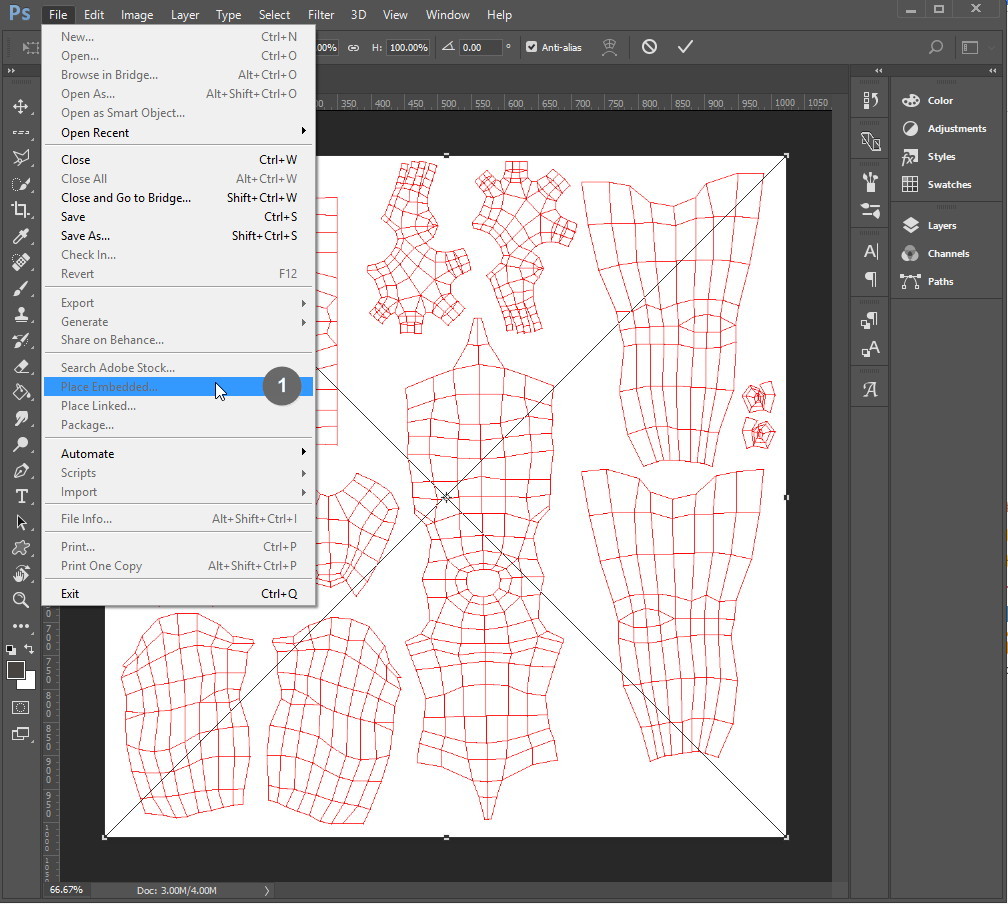
                      screen-grab_122.jpg

                      We export the SVG at 1024px x 1024px but since it is a scalable vector graphic you can resize to any square dimension without pixelation.

                      Or use and online SVG to PNG to convert it.

                      Download the free D'oh Book for SketchUp 📖

                      1 條回覆 最後回覆 回覆 引用 0
                      • Rich O BrienR 線上
                        Rich O Brien Moderator
                        最後由 編輯

                        @rv1974 said:

                        1. Why user should select\manipulate UV's with RMB? It's so bizarre and unnatural, are there any benefits?
                        2. Any plans to add some kind of lasso selecting mode?
                        3. Maybe it's a good idea to add a button for Saving the changes and applying them immediately in SU?
                        4. Wrap-R tends to exaggerate the texture scale approx x50, scaling the checkers down helps only partially (maybe 3 button clicks). Could the application try to pick up the initial texture size?
                        5. See attached. In case of serpentine\road like mesh, how can I straighten the UVs in orthogonal (so the sloped horizontals would get horizontal indeed) manner?

                        1 - Must be something with the way you work or your OS setup. RMB only used to Pan viewport

                        2 - Yes, you can grow a UV selection with NumPad + key

                        3 - Good idea, a lot of work to make it happen

                        4 - UV viewport uses 0-1 UV scale of the applied texture. Use [] to resize for visuals.

                        5 - Pin whole island then unpin and align each loop. We plan to add more unwrapping methods in future

                        Download the free D'oh Book for SketchUp 📖

                        1 條回覆 最後回覆 回覆 引用 0
                        • R 離線
                          rv1974
                          最後由 編輯

                          A couple of noob questions here:

                          1. Why user should select\manipulate UV's with RMB? It's so bizarre and unnatural, are there any benefits?
                          2. Any plans to add some kind of lasso selecting mode?
                          3. Maybe it's a good idea to add a button for Saving the changes and applying them immediately in SU?
                          4. Wrap-R tends to exaggerate the texture scale approx x50, scaling the checkers down helps only partially (maybe 3 button clicks). Could the application try to pick up the initial texture size?
                          5. See attached. In case of serpentine\road like mesh, how can I straighten the UVs in orthogonal (so the sloped horizontals would get horizontal indeed) manner?

                          Many thanks in advance
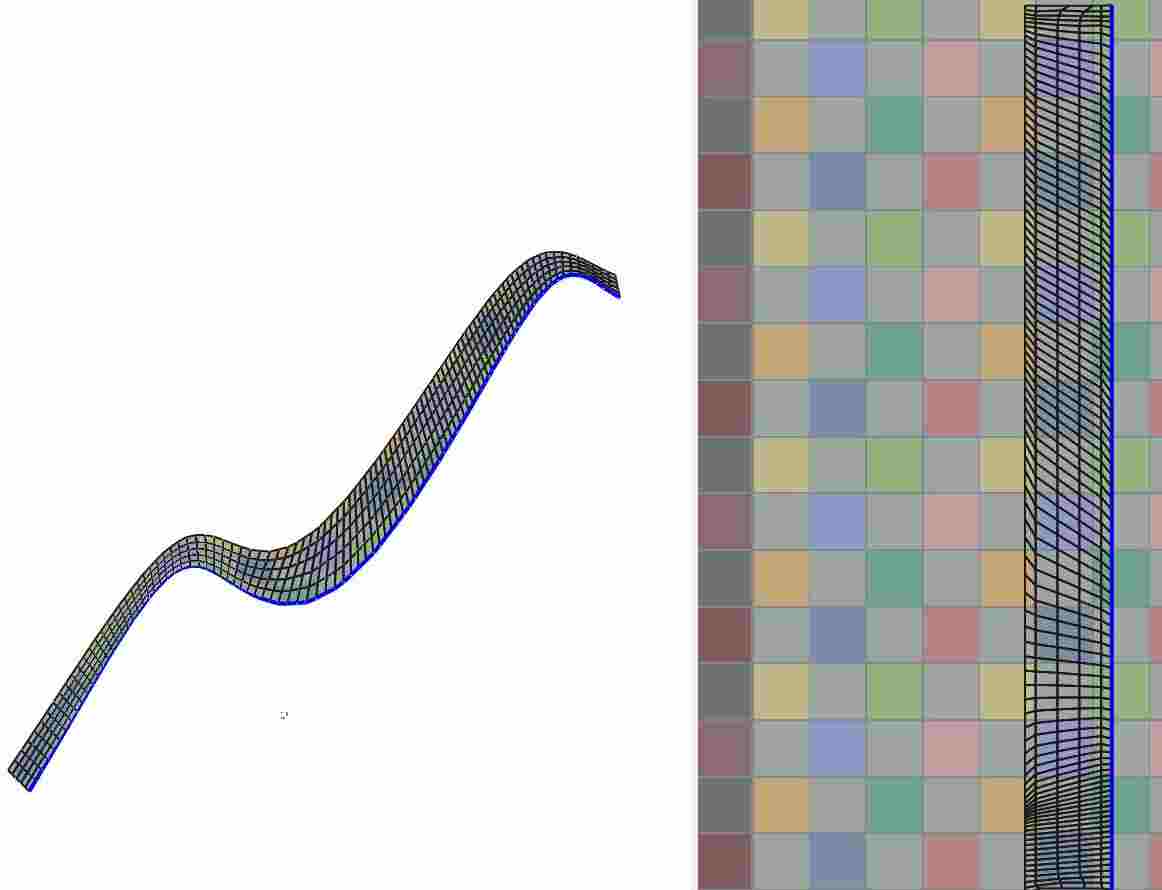

                          Capture_222.JPG

                          1 條回覆 最後回覆 回覆 引用 0
                          • R 離線
                            rv1974
                            最後由 編輯

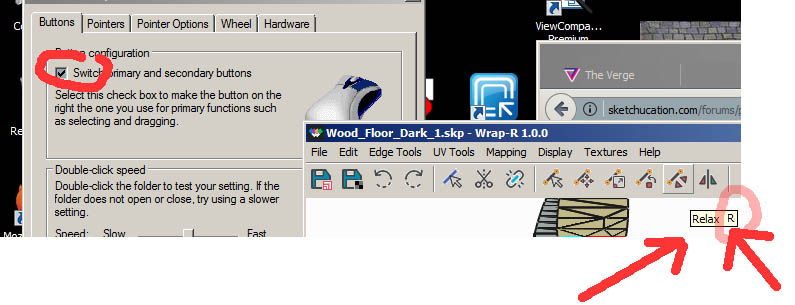
                            1. I'm a lefty, so my mouse setup is mirrored. And the Wrap-R (and Roadkill 😉 are the only softwares with this bug. could it be addressed?
                            2. Brackets (and relax) work only for first 3 shortcut hits.

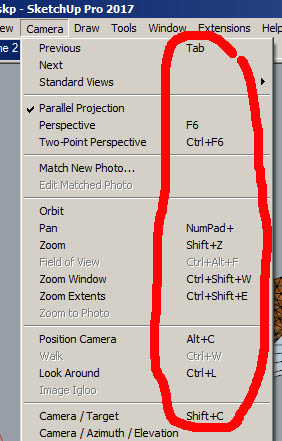
                            P.S. Could you put corresponding shortcut letters next to each menu item?
                            P.P.S. If I were one of Sketchucation moderators, I'd strongly recommend the authors to post video tutorials with keyboard\mouse recording (as you did in one of Wrap-R teasers)

                            1 條回覆 最後回覆 回覆 引用 0
                            • Rich O BrienR 線上
                              Rich O Brien Moderator
                              最後由 編輯

                              1 - this use roadkill core for openGL so it could be causing your problem. But I'm lefthanded too and i use a mouse like most lefties do.

                              2 - Adding shortcut keys to menu would mean reworking the shortcut editor in the File menu. Doesn't that list the keys for you?

                              3 - SketchUp needs a Screencast Keys addon similar to Blender. I do have a plugin that displays keys presses but a better option would be what KeyCastr does for Mac.

                              Download the free D'oh Book for SketchUp 📖

                              1 條回覆 最後回覆 回覆 引用 0
                              • R 離線
                                rv1974
                                最後由 編輯

                                @rich o brien said:

                                1 - this use roadkill core for openGL so it could be causing your problem. But I'm lefthanded too and i use a mouse like most lefties do.

                                2 - Adding shortcut keys to menu would mean reworking the shortcut editor in the File menu. Doesn't that list the keys for you?

                                3 - SketchUp needs a Screencast Keys addon similar to Blender. I do have a plugin that displays keys presses but a better option would be what KeyCastr does for Mac.

                                1. Donno what to tell you.. In mouse properties, I've got 'switch primary and secondary buttons' checked. All programs
                                  excluding Roadkil and Wrap-R obey this setting. It happens on several PCs.
                                2. As for shortcut hints please see atttached.
                                1.jpg


                                2.jpg

                                1 條回覆 最後回覆 回覆 引用 0
                                • C 離線
                                  cuttingedge
                                  最後由 編輯

                                  Hi Rich, This will be a real valuable tool! Maybe not 1 percent of SU users have an idea how this can bring their visualization skill to the next level. Not really very used to unwrapping myself but ive been searching for this kind of tool.

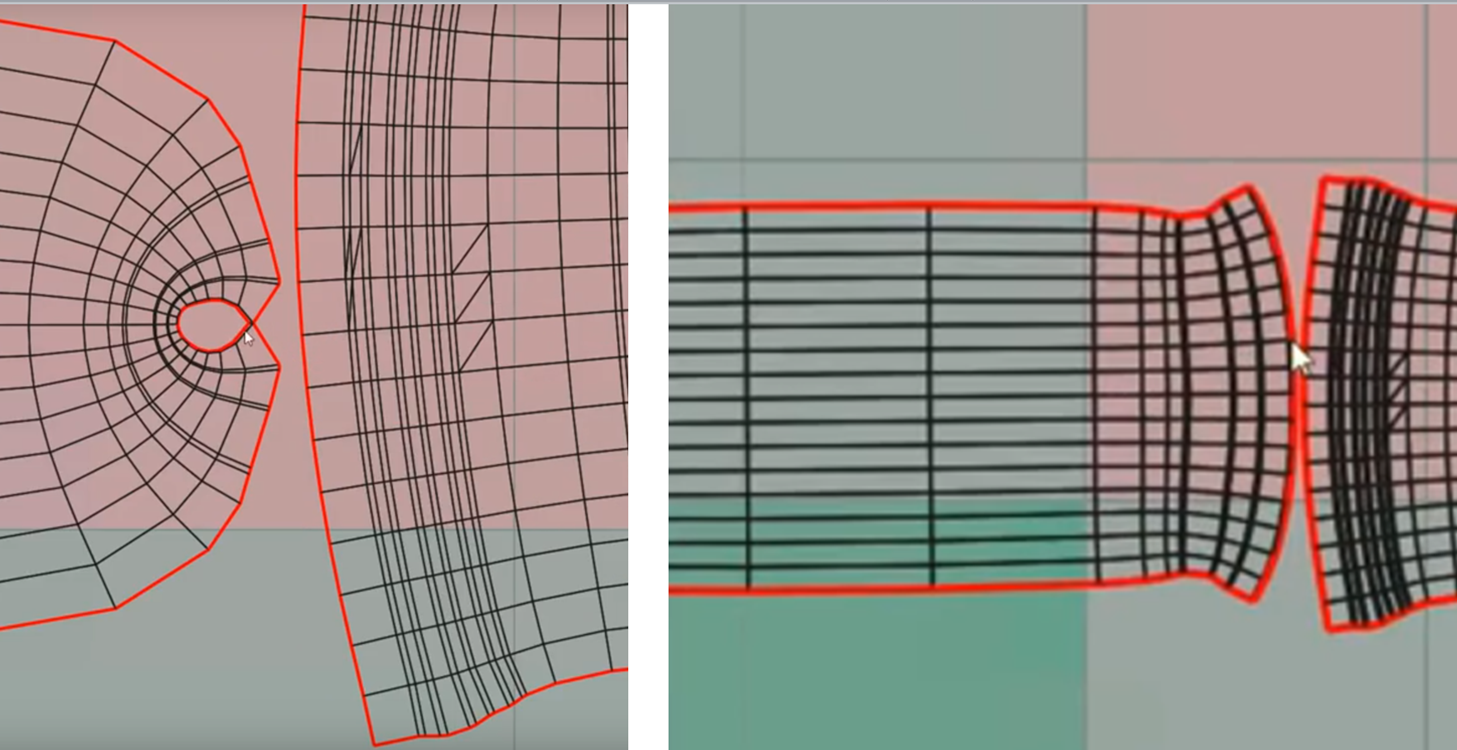
                                  Just wondering how you did this (see below). I didn't follow (you must be using keyboard shortcuts in the demo)
                                  wrap-rq.png

                                  Maybe a bit more videos and i'll be learning it soon.

                                  1 條回覆 最後回覆 回覆 引用 0
                                  • Rich O BrienR 線上
                                    Rich O Brien Moderator
                                    最後由 編輯

                                    C to cut edges.

                                    If someone needs or has a model that needs unwrapping or wants advise to how to approach it feel free to ask.

                                    Download the free D'oh Book for SketchUp 📖

                                    1 條回覆 最後回覆 回覆 引用 0
                                    • GubermenschG 離線
                                      Gubermensch
                                      最後由 編輯

                                      A couple of hours testing so far... Incredible tool. Thanks for making it. I look forward to the release so that I can support you!

                                      http://www.jacobgubler.com/

                                      1 條回覆 最後回覆 回覆 引用 0
                                      • C 離線
                                        cuttingedge
                                        最後由 編輯

                                        Thanks Rich! I wanna start with this:

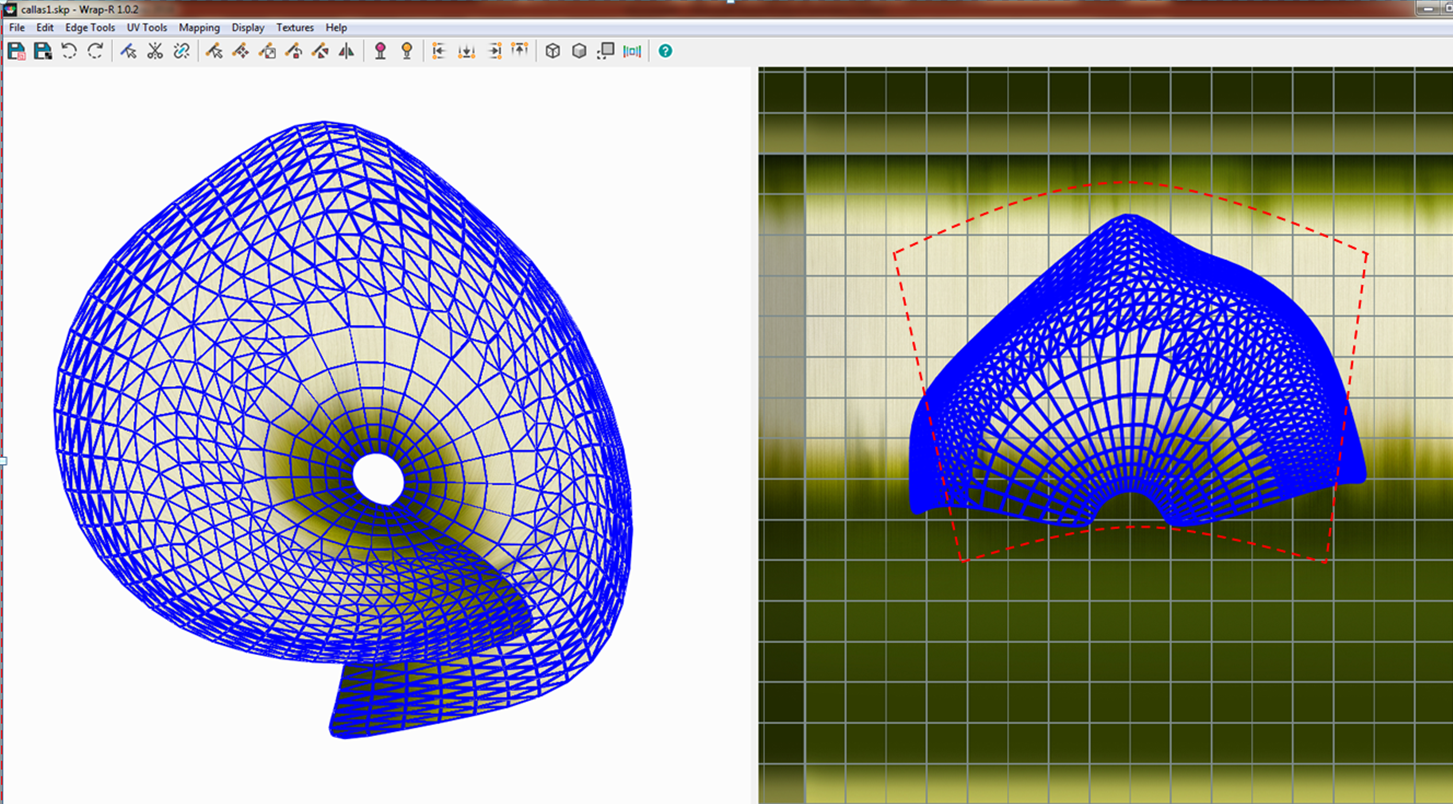
                                        I tried uv mapping the calla flower but I could get the map to have the gradient green fade upwards to white.
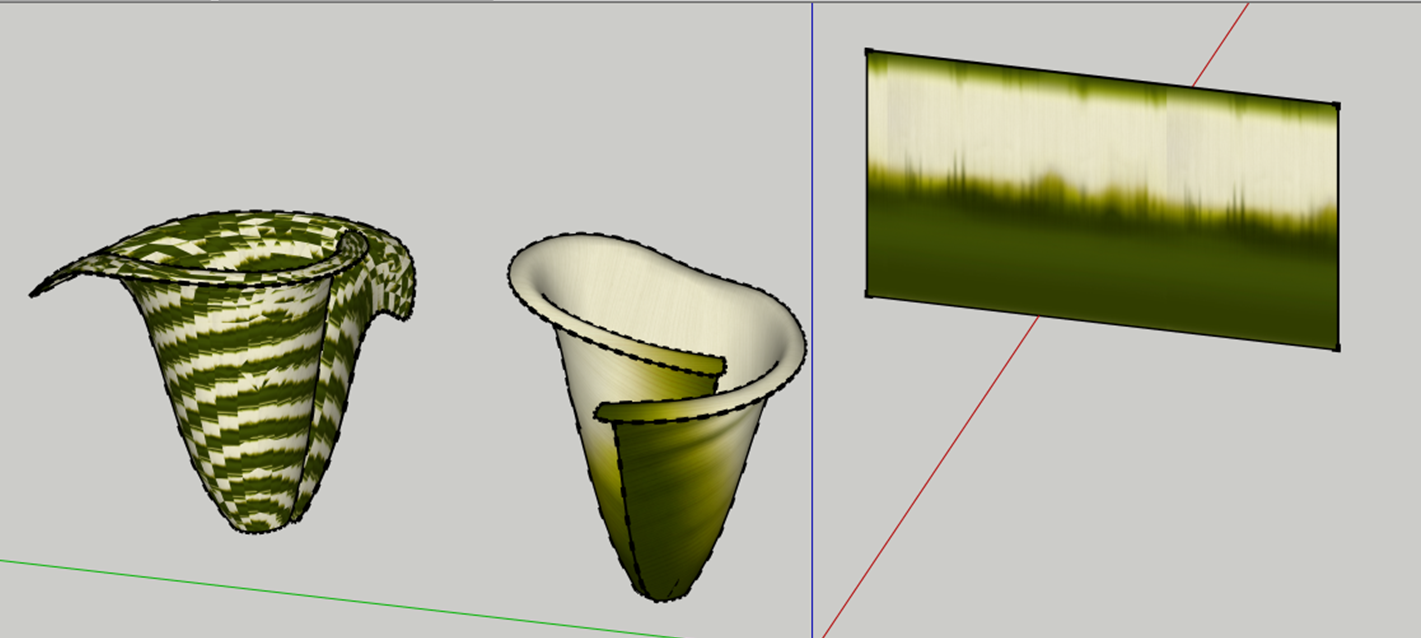
                                        calla1.png

                                        I think what I want to do is to stretch the uv to the shape of the red broken line.- if that's the correct approach to it.
                                        calla2.png

                                        anyways, attached is the file. Appreciate your help!

                                        calla-for UW.skp

                                        1 條回覆 最後回覆 回覆 引用 0
                                        • OxerO 離線
                                          Oxer
                                          最後由 編輯

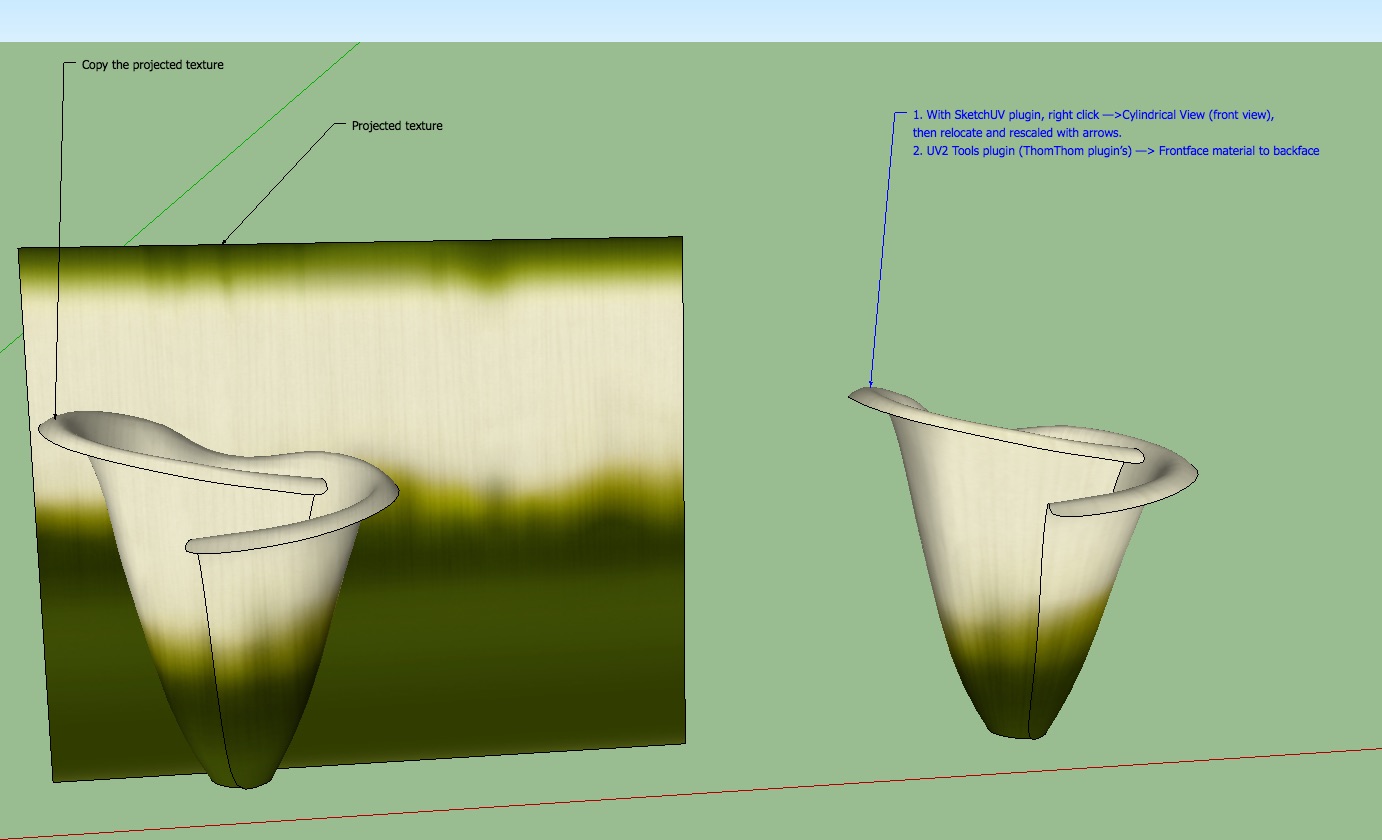
                                          You can relocate the plane with the texture and scale/project it, then copy the texture of the plane into the flower, viola!
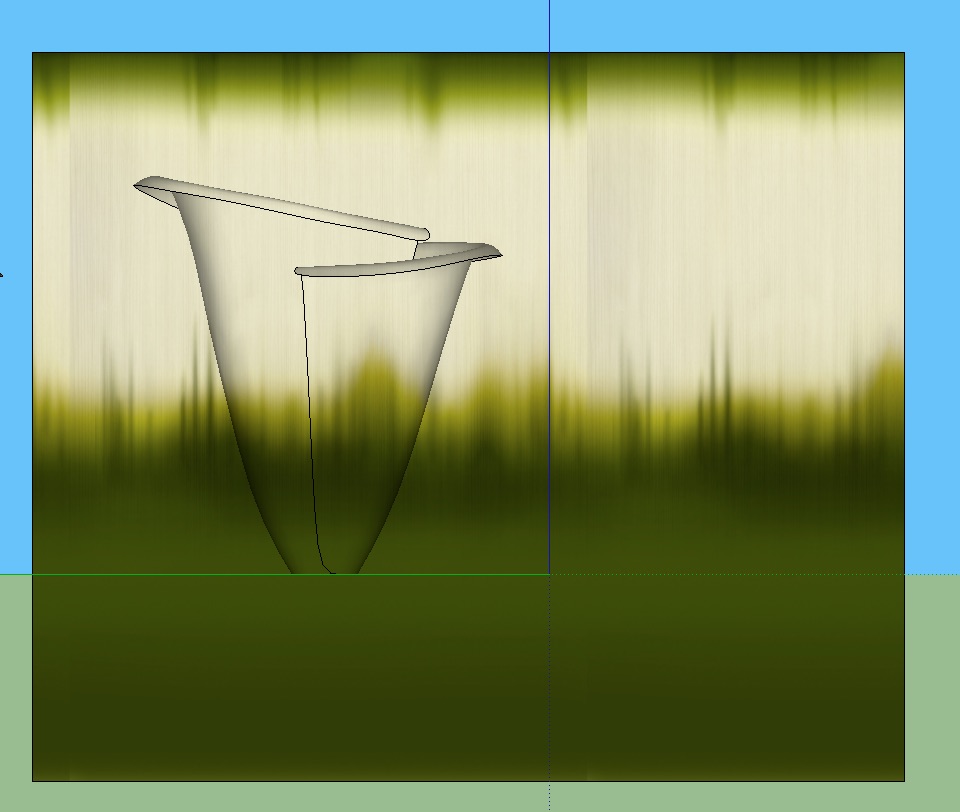
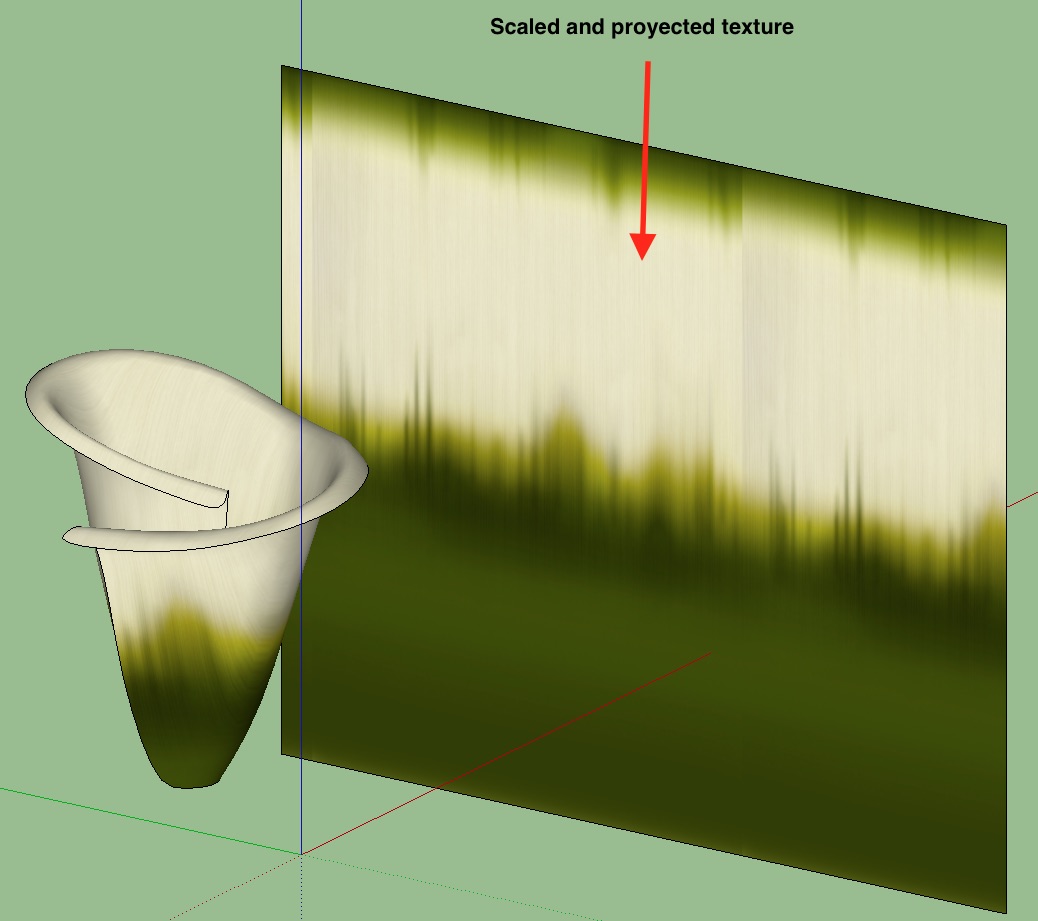
                                          Place the texture.jpg

                                          Scaled Texture.jpg

                                          With this method the result ins't perfect but is very quick.

                                          "The result is the end what is important is the process" by Oxer
                                          http://www.oxervision.blogspot.com/

                                          1 條回覆 最後回覆 回覆 引用 0
                                          • OxerO 離線
                                            Oxer
                                            最後由 編輯

                                            A second method, this give the best result, with SketchUV plugin.

                                            Secon method.jpg

                                            calla-0UW.skp.zip

                                            "The result is the end what is important is the process" by Oxer
                                            http://www.oxervision.blogspot.com/

                                            1 條回覆 最後回覆 回覆 引用 0
                                            • 1
                                            • 2
                                            • 3
                                            • 4
                                            • 5
                                            • 6
                                            • 9
                                            • 10
                                            • 4 / 10
                                            • 第一個貼文
                                              最後的貼文
                                            Buy SketchPlus
                                            Buy SUbD
                                            Buy WrapR
                                            Buy eBook
                                            Buy Modelur
                                            Buy Vertex Tools
                                            Buy SketchCuisine
                                            Buy FormFonts

                                            Advertisement