sketchucation logo sketchucation
    • 登入
    Oops, your profile's looking a bit empty! To help us tailor your experience, please fill in key details like your SketchUp version, skill level, operating system, and more. Update and save your info on your profile page today!
    🔌 Smart Spline | Fluid way to handle splines for furniture design and complex structures. Download

    Vertex tools

    已排程 已置頂 已鎖定 已移動 Plugins
    53 貼文 16 Posters 9.6k 瀏覽 16 Watching
    正在載入更多貼文
    • 從舊到新
    • 從新到舊
    • 最多點贊
    回覆
    • 在新貼文中回覆
    登入後回覆
    此主題已被刪除。只有擁有主題管理權限的使用者可以查看。
    • JQLJ 離線
      JQL
      最後由 編輯

      @pilou said:

      Yes please image(s)! 😄

      I have to reinstal Vertex tools. It will take some time.

      @thomthom said:

      Are we not talking about the Gizmo any more?

      Yes I believe we could be talking about it:

      • If you select the area you want to affect and then you are able to place the gizmo on the reference vertex, you could then scale, move, rotate, etc, in a way that it would then snap to an inference in the model.

      I am not able to do an animated mockup of the gizmo though... I could try making a still image of the gizmo mockup if you'd like...

      www.casca.pt
      Visit us on facebook!

      1 條回覆 最後回覆 回覆 引用 0
      • thomthomT 離線
        thomthom
        最後由 編輯

        @jql said:

        Yes I believe we could be talking about it:

        • If you select the area you want to affect and then you are able to place the gizmo on the reference vertex, you could then scale, move, rotate, etc, in a way that it would then snap to an inference in the model.

        Right, so you actually invoke an explicit pick of the reference point up front. That's an interesting idea. Basically, the inference will relate to the gizmo origin - then that combined with better custom placement of the gizmo. Do I interpret that right?

        Thomas Thomassen — SketchUp Monkey & Coding addict
        List of my plugins and link to the CookieWare fund

        1 條回覆 最後回覆 回覆 引用 0
        • JQLJ 離線
          JQL
          最後由 編輯

          Yes, I believe you are interpreting it right!

          It would be very cool if you'd want to further think on that subject. Having inference for scaling, moving and rotating would be key for accuracy.

          Usually when people move the gizmo around in other software (take a look at Layout for instance) it acts as the reference point for the move, or a center point for rotate or scale.

          This would be probably the intuitive aproach and my starting idea. Scaling or Rotating from the centerpoint using a point and an inference for accuracy might be trickier though.

          Moving the gizmo to a vertice or a model reference, and then moving that point to a precise place, while keeping the gradient effect and affecting the mesh would be intuitive.

          Moving the gizmo, as a centerpoint for rotation would also work nicelly, especially if it would also for a numeric angle input.

          Moving the gizmo and use it as the center point for scale would also be great and also with a numeric input for multiplier.

          However having the gizmo move and then also allow for a reference point to move/rotate to an inference, would probably require an off gizmo aproach.

          You can see that on FredoScale box scaling/box stretching to target and also on fredo scale rotation. It works great and intuitivelly.

          In your tool, in order that you can stay on the tool and keep using the gizmo without interruption, you would probably require a modifier key to be pressed while you were either scaling or rotating. It would then triger the reference+inference mechanism which would allow you to choose the reference point with a click and a Sketchup inference with a second click.

          For scale, it would then move the point from it's original position to the inference and the mesh would scale proportionally from the gizmo placement.

          For rotate, it would rotate the point towards the inference, as the Sketchup rotate tool does.

          What Sketchup isn't able to do is everything else VErtex tools is able to.

          www.casca.pt
          Visit us on facebook!

          1 條回覆 最後回覆 回覆 引用 0
          • pbacotP 離線
            pbacot
            最後由 編輯

            I'm with you guys.

            MacOSX MojaveSketchUp Pro v19 Twilight v2 Thea v3 PowerCADD

            1 條回覆 最後回覆 回覆 引用 0
            • thomthomT 離線
              thomthom
              最後由 編輯

              This is good stuff. Once I get SUbD v2 out the door VT 2 is on the radar - and the Gizmo is top on the list.

              Thomas Thomassen — SketchUp Monkey & Coding addict
              List of my plugins and link to the CookieWare fund

              1 條回覆 最後回覆 回覆 引用 0
              • JQLJ 離線
                JQL
                最後由 編輯

                @thomthom said:

                This is good stuff. Once I get SUbD v2 out the door VT 2 is on the radar - and the Gizmo is top on the list.

                Great!

                www.casca.pt
                Visit us on facebook!

                1 條回覆 最後回覆 回覆 引用 0
                • Bob JamesB 離線
                  Bob James
                  最後由 編輯

                  Great news!

                  I hope that the ability to select "horizontal" when selecting the "make planar" and select which vertex will be the one that determines the height of the plane. 😎

                  Similarly, the ability to select a row of vertices and put them into a straight horizontal line with the z-height determined by a specific vertex.

                  I'm confused: the current version already has that great gizmo. ❓

                  i7-4930K 3.4Ghz, 2x GTX780 6GB, 32GB DDR3-1600 ECC, OCZ Vertex 4 500GB, WD Black 3TB, 32TB NAS, 4x 27" Monitors, SpaceMouse Pro, X-keys XK-60

                  1 條回覆 最後回覆 回覆 引用 0
                  • Rich O BrienR 離線
                    Rich O Brien Moderator
                    最後由 編輯

                    @bob james said:

                    I'm confused: the current version already has that great gizmo. ❓

                    It does Bob. But the gizmo is lacking XY | ZX | ZY translations and the scaling handles need to snap incrementally.

                    Also the translation handles need to accept numeric input.

                    That said VT is still the best extension ever made 👍 IMHO

                    Download the free D'oh Book for SketchUp 📖

                    1 條回覆 最後回覆 回覆 引用 0
                    • JQLJ 離線
                      JQL
                      最後由 編輯

                      @rich o brien said:

                      That said VT is still the best extension ever made 👍 IMHO

                      That is clearly wrong, the best one is Edgetools2 splitface tool along with SectionCutFace

                      www.casca.pt
                      Visit us on facebook!

                      1 條回覆 最後回覆 回覆 引用 0
                      • BoxB 離線
                        Box
                        最後由 編輯

                        Not that I care, but in the interests of accuracy, you need two tools to beat Rich's one.

                        1 條回覆 最後回覆 回覆 引用 0
                        • Rich O BrienR 離線
                          Rich O Brien Moderator
                          最後由 編輯

                          Fo shizzle...

                          There's also something brewing called ReMeshR....
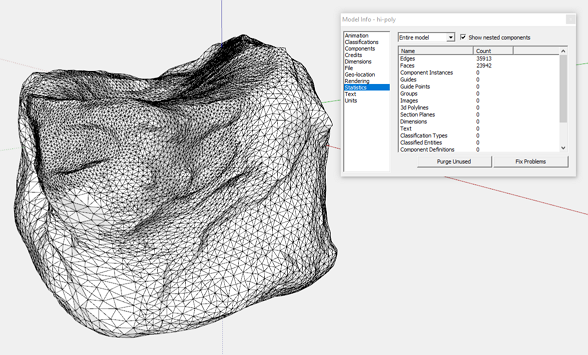
                          Image 1.png

                          Image 2.png

                          😛

                          Download the free D'oh Book for SketchUp 📖

                          1 條回覆 最後回覆 回覆 引用 0
                          • JQLJ 離線
                            JQL
                            最後由 編輯

                            @box said:

                            Not that I care, but in the interests of accuracy, you need two tools to beat Rich's one.

                            Let's say I can't decide which one of them is the best, I'd put them both above everything else basically. 😄

                            www.casca.pt
                            Visit us on facebook!

                            1 條回覆 最後回覆 回覆 引用 0
                            • JQLJ 離線
                              JQL
                              最後由 編輯

                              @rich o brien said:

                              Fo shizzle...

                              There's also something brewing called ReMeshR....
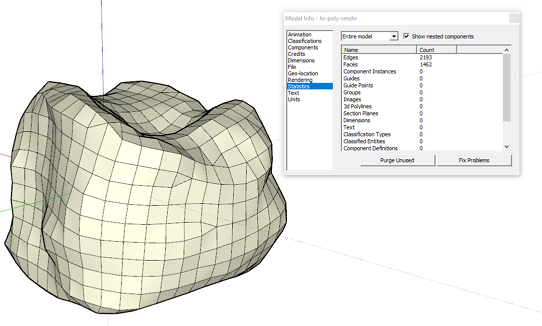
                              [attachment=1:jarulvus]<!-- ia1 -->Image 1.png<!-- ia1 -->[/attachment:jarulvus]

                              [attachment=0:jarulvus]<!-- ia0 -->Image 2.png<!-- ia0 -->[/attachment:jarulvus]

                              😛

                              So there is sound on that silence!

                              www.casca.pt
                              Visit us on facebook!

                              1 條回覆 最後回覆 回覆 引用 0
                              • Rich O BrienR 離線
                                Rich O Brien Moderator
                                最後由 編輯

                                Quietly moving forward.

                                WrapR goes to open beta soon.

                                Download the free D'oh Book for SketchUp 📖

                                1 條回覆 最後回覆 回覆 引用 0
                                • JQLJ 離線
                                  JQL
                                  最後由 編輯

                                  The sooner it's on sale the sooner I'll get to brag again about multigroups, atlases and UDIM... 😄

                                  www.casca.pt
                                  Visit us on facebook!

                                  1 條回覆 最後回覆 回覆 引用 0
                                  • O 離線
                                    optimaforever
                                    最後由 編輯

                                    Can't wait for VT2 and SubD2 (opensubdivs?)

                                    1 條回覆 最後回覆 回覆 引用 0
                                    • thomthomT 離線
                                      thomthom
                                      最後由 編輯

                                      @optimaforever said:

                                      SubD2 (opensubdivs?)

                                      Indeed 😄

                                      Thomas Thomassen — SketchUp Monkey & Coding addict
                                      List of my plugins and link to the CookieWare fund

                                      1 條回覆 最後回覆 回覆 引用 0
                                      • Collage ArchitectureC 離線
                                        Collage Architecture
                                        最後由 編輯

                                        @rich o brien said:

                                        Quietly moving forward.

                                        WrapR goes to open beta soon.

                                        Can we play with Wrap-R before Christmas?

                                        I love Sketchup

                                        1 條回覆 最後回覆 回覆 引用 0
                                        • pbacotP 離線
                                          pbacot
                                          最後由 編輯

                                          @jql said:

                                          @rich o brien said:

                                          That said VT is still the best extension ever made 👍 IMHO

                                          That is clearly wrong, the best one is Edgetools2 splitface tool along with SectionCutFace

                                          Why two together?

                                          Split face tool should be in SU. Actually maybe both these should have been. However SFT does fail to take sometimes with inferences. Need multiples and repeat action to be overwhelmingly great... Should be standalone tool.

                                          MacOSX MojaveSketchUp Pro v19 Twilight v2 Thea v3 PowerCADD

                                          1 條回覆 最後回覆 回覆 引用 0
                                          • S 離線
                                            sofie9536
                                            最後由 編輯

                                            I change my computer, do I need a new license?
                                            Thanks

                                            1 條回覆 最後回覆 回覆 引用 0
                                            • 1
                                            • 2
                                            • 3
                                            • 2 / 3
                                            • 第一個貼文
                                              最後的貼文
                                            Buy SketchPlus
                                            Buy SUbD
                                            Buy WrapR
                                            Buy eBook
                                            Buy Modelur
                                            Buy Vertex Tools
                                            Buy SketchCuisine
                                            Buy FormFonts

                                            Advertisement