sketchucation logo sketchucation
    • 登入
    Oops, your profile's looking a bit empty! To help us tailor your experience, please fill in key details like your SketchUp version, skill level, operating system, and more. Update and save your info on your profile page today!
    🔌 Easy Offset | Offset selected faces in SketchUp in positive and negative offsets. Download

    How do I create paralel lines trough two points?

    已排程 已置頂 已鎖定 已移動 Newbie Forum
    sketchup
    23 貼文 7 Posters 1.7k 瀏覽 7 Watching
    正在載入更多貼文
    • 從舊到新
    • 從新到舊
    • 最多點贊
    回覆
    • 在新貼文中回覆
    登入後回覆
    此主題已被刪除。只有擁有主題管理權限的使用者可以查看。
    • B 離線
      Buggy B
      最後由 編輯

      Hi there,

      Trying to make steelbeams in my models I often came to a problem:

      I have a point in the room where the bottom edge has to go trough and a point where the top edge goes trough. These edges are of course paralel and lets say 25cm apart. How do I solve this? I worked with rotating which is a pain or working with angles which is not accurate.

      If you need a picture I'll sketch something.

      1 條回覆 最後回覆 回覆 引用 0
      • Dave RD 離線
        Dave R
        最後由 編輯

        Yes. Please supply a sketch of what you are trying to do.

        My guess, though is that you want to achieve something like I've done with the diagonal in this screen shot.
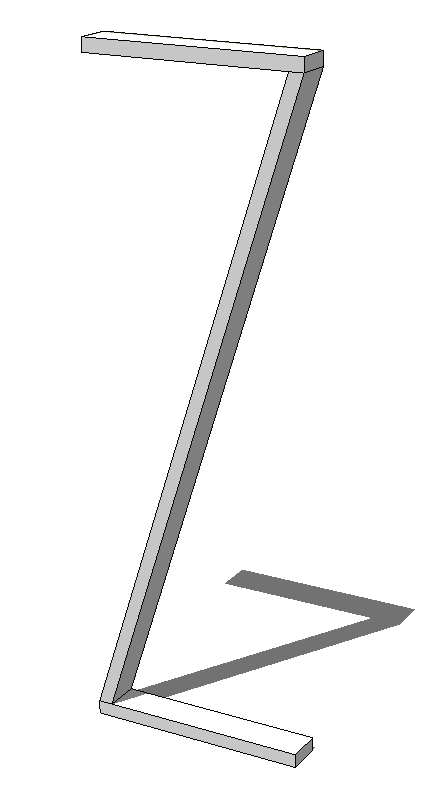
        Screenshot - 6_4_2016 , 10_36_39 AM.png
        If that's the idea, the "Rotation by selection of plane and angle" tool in Fredoscale makes that very simple. You can get Fredoscale from the Sketchucation Plugin Store.

        Etaoin Shrdlu

        %

        (THERE'S NO PLACE LIKE)

        G28 X0.0 Y0.0 Z0.0

        M30

        %

        1 條回覆 最後回覆 回覆 引用 0
        • BoxB 離線
          Box
          最後由 編輯

          How about just draw the edge and copy/paste it 25cm along an axis.

          1 條回覆 最後回覆 回覆 引用 0
          • K 離線
            kaas
            最後由 編輯

            Have à look at the profile builder plug-in. ITS commercial but worth every Buck.

            1 條回覆 最後回覆 回覆 引用 0
            • pilouP 離線
              pilou
              最後由 編輯

              @unknownuser said:

              If you need a picture I'll sketch something.

              A golden's rule: for any question, join a sketch image(s) and SKP file if possible! 🤓

              It's a time saver for anybody! 😎

              Frenchy Pilou
              Is beautiful that please without concept!
              My Little site :)

              1 條回覆 最後回覆 回覆 引用 0
              • Dave RD 離線
                Dave R
                最後由 編輯

                Clearly we didn't understand your question. I'm not entirely sure I understand your new one.

                If you want a line that is parallel to the first but offset by 0.25m, you can drag a guideline off the first line and place it at that distance. Then draw a new line.

                Or since V2016, you can use inferencing to place a copy of the line at the right distance.
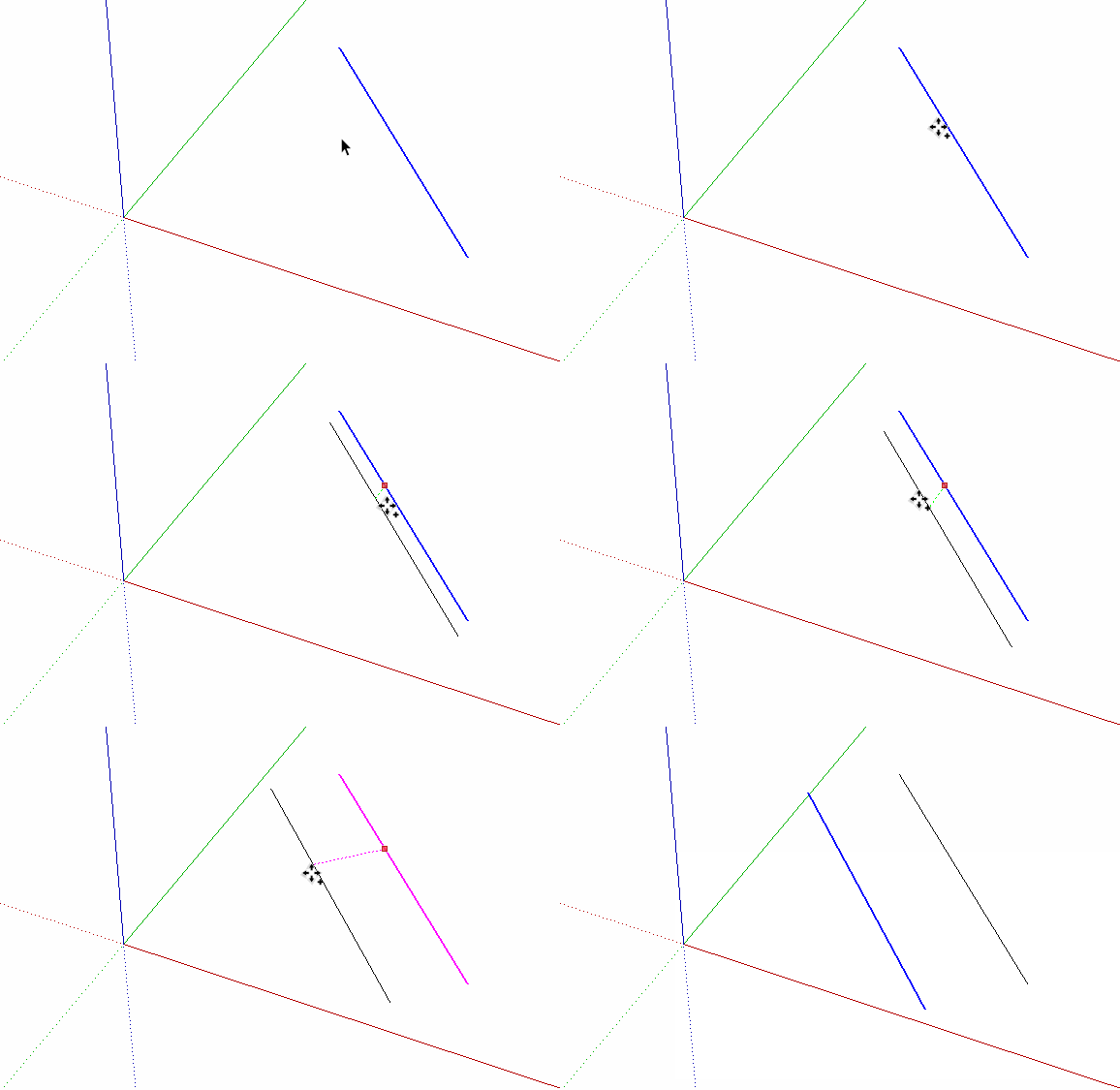
                Click on the picture.

                Etaoin Shrdlu

                %

                (THERE'S NO PLACE LIKE)

                G28 X0.0 Y0.0 Z0.0

                M30

                %

                1 條回覆 最後回覆 回覆 引用 0
                • BoxB 離線
                  Box
                  最後由 編輯

                  Maybe I'm missing the point, but it seems easy to me.
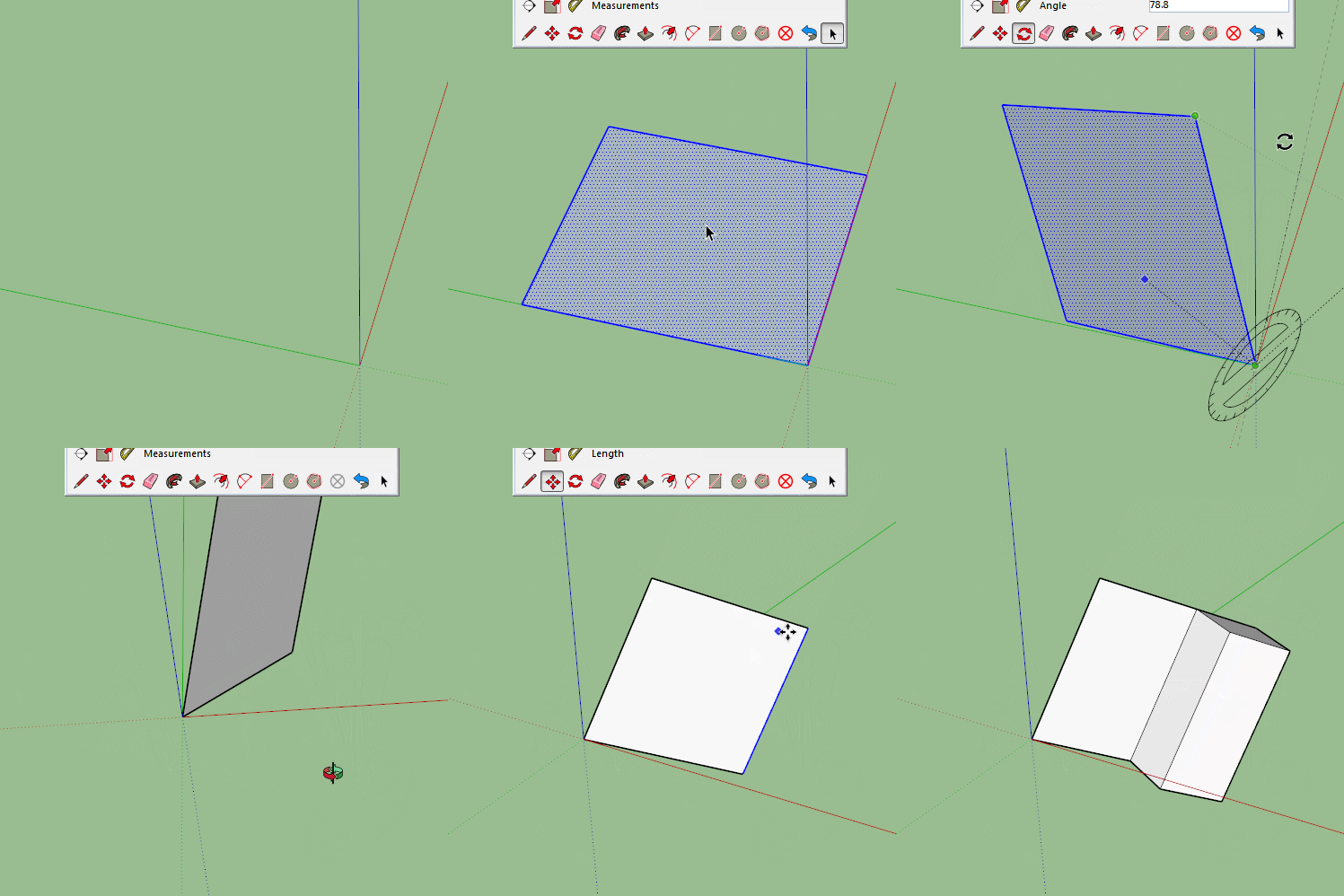

                  Offaxis.gif

                  1 條回覆 最後回覆 回覆 引用 0
                  • Wo3DanW 離線
                    Wo3Dan
                    最後由 編輯

                    @buggy b said:

                    ... Let's say I have a face which is tilted or whatever so the red/green/blue axis are not helpful.
                    I have two points on this face. And instead of connecting them I want to create a line that "misses" the point by a specific distance (in this example 0.25m)

                    I see what you are trying to do.

                    First of all if you do have that arbitrary face in space you can right click on it and select 'Align Axes' in the context menu. That would make the new drawing axes very helpful. Red and green are now in plane of the face and blue is perpendicular to the face. You can even rotate the red/green axes about blue to better suit your needs.

                    You are after a circle (blue dot is its center) with its (radius 25cm) forming a 90 degres angle with desired new edge or line. Try if by adjusting the axes you can get things working for you.
                    Your question has been asked many times.

                    1 條回覆 最後回覆 回覆 引用 0
                    • B 離線
                      Buggy B
                      最後由 編輯

                      To those who apply a parallel line to a new one: I have no line in the first place, nor can I create one because I dont have point trough which a line goes trough yet. Only two point where each line goes trough only one of these two points. The question simplified in the second posting should make it more clear, but maybe I should have said the black line is what I want to create, it doesnt exist yet!

                      @Wo3Dan: Sorry if this question is asked many times, couldn't imagine a fitting searchterm for it. if I align the new axes to the face, how do I rotate it to the fitting alignment? If I had a line already it would be easy but yet I'm not sure how you do it.

                      1 條回覆 最後回覆 回覆 引用 0
                      • B 離線
                        Buggy B
                        最後由 編輯

                        Okay I simplified the question:

                        Let's say I have a face which is tilted or whatever so the red/green/blue axis are not helpful.
                        I have two points on this face. And instead of connecting them I want to create a line that "misses" the point by a specific distance (in this example 0.25m)

                        http://i.imgur.com/JsKAjhw.png

                        (The black line has to be created, it doesnt exist yet!)

                        I'm not sure thos who gave first tips understood my matter, I will still look into the suggestions. Thanks!

                        1 條回覆 最後回覆 回覆 引用 0
                        • Wo3DanW 離線
                          Wo3Dan
                          最後由 編輯

                          @wo3dan said:

                          .....
                          Your question has been asked many times.

                          Hint: apply the 'Pie' tool as in attached image:
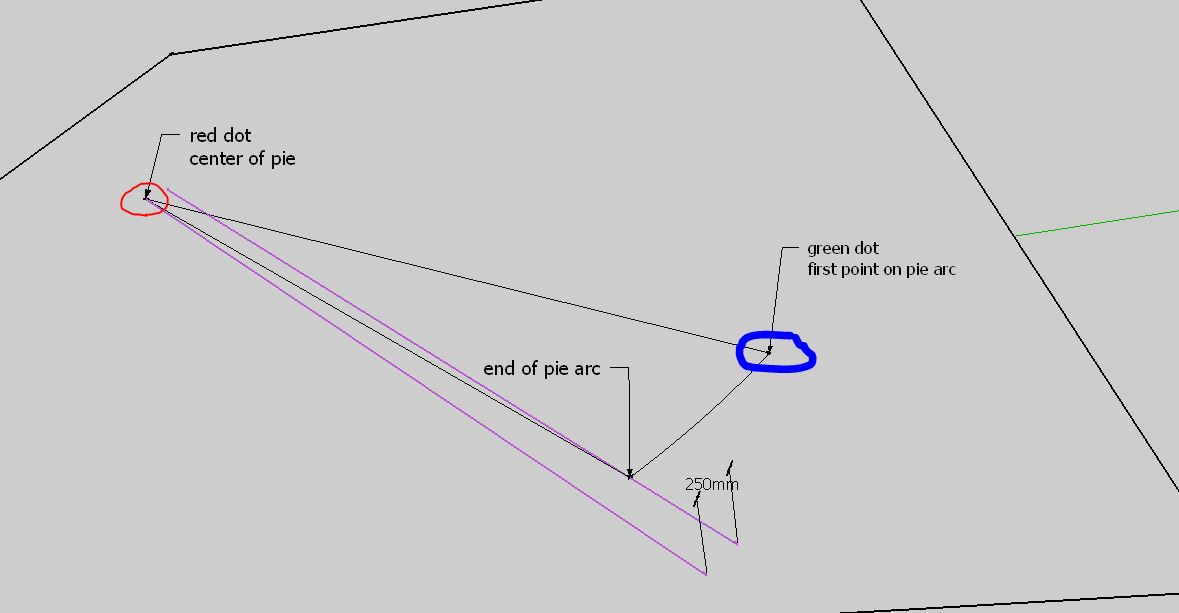

                          Pie tool to get fixed parallel lined trough two points

                          1 條回覆 最後回覆 回覆 引用 0
                          • Dave RD 離線
                            Dave R
                            最後由 編輯

                            It wasn't clear at all that you have no line. Well, until you edited the post. Maybe you could provide a drawing showing a real use case.

                            You can use a circle with the required radius centered on one point and draw a line tangent to the circle and through the other point. TIG's True Tangents would help with that.

                            Etaoin Shrdlu

                            %

                            (THERE'S NO PLACE LIKE)

                            G28 X0.0 Y0.0 Z0.0

                            M30

                            %

                            1 條回覆 最後回覆 回覆 引用 0
                            • B 離線
                              Buggy B
                              最後由 編輯

                              The problem I had with circles was they are not perfect, so the number of possible tangents is limited. But the plugin you mentioned sounds like exactly what I am looking for. Thanks! The others too for trying.

                              1 條回覆 最後回覆 回覆 引用 0
                              • Wo3DanW 離線
                                Wo3Dan
                                最後由 編輯

                                @buggy b said:

                                .....for trying.

                                Trying? All you need to do this with native tools is the 'Pie' tool.
                                Here's a practical situation Dave: (Jef once made a nice DC to resolve this but now SU can do it without plugins)
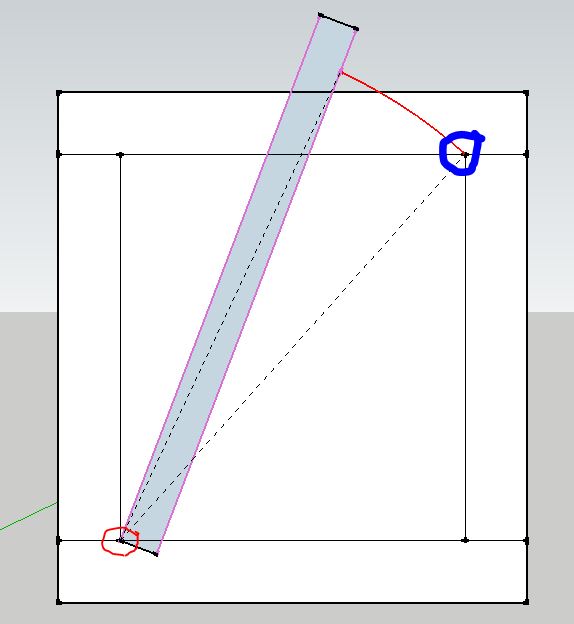

                                pie2.JPG

                                1 條回覆 最後回覆 回覆 引用 0
                                • B 離線
                                  Buggy B
                                  最後由 編輯

                                  You are right, I misunderstood your first postings. With trying I meant trying to make me understand to solve my problems. 😉

                                  1 條回覆 最後回覆 回覆 引用 0
                                  • Dave RD 離線
                                    Dave R
                                    最後由 編輯

                                    Gerrit, I know how all that works. I was just asking the OP for a real life example of what he is trying to accomplish as a way of getting clarification on what he's trying to do.

                                    Etaoin Shrdlu

                                    %

                                    (THERE'S NO PLACE LIKE)

                                    G28 X0.0 Y0.0 Z0.0

                                    M30

                                    %

                                    1 條回覆 最後回覆 回覆 引用 0
                                    • pilouP 離線
                                      pilou
                                      最後由 編輯

                                      One more time if a simple Skp was linkded at the first post with a "before / after"
                                      or "start / wished" inside how times and neurons saved! 😉

                                      Frenchy Pilou
                                      Is beautiful that please without concept!
                                      My Little site :)

                                      1 條回覆 最後回覆 回覆 引用 0
                                      • S 離線
                                        slbaumgartner
                                        最後由 編輯

                                        Here is an extension that I did a while ago but never published. It may solve your problem. It is designed for the situation in which you know the two diagonally opposite corners of a face of a rectangular beam, the beam width, and the beam depth. It solves the problem exactly without resorting to any of SketchUp's issues with polygons representing circles. This problem is in general not possible to solve directly via the SketchUp GUI.

                                        To use it, click one corner, move the mouse to the diagonally opposite corner and click there. Then move to a third point in the same plane as the face of the beam and click there. Unless you enter a value the tool will assume you clicked at a distance from the second point equal to the width of the beam. Then click a fourth point to define the thickness of the beam. Again, unless you enter a value the tool will assume that this click shows both the thickness and whether it is in front or in back of the face in the view. You can enter both width and depth separated by either , or ; depending on your locale.


                                        SB_diagonal_beam.rbz

                                        1 條回覆 最後回覆 回覆 引用 0
                                        • S 離線
                                          slbaumgartner
                                          最後由 編輯

                                          Here's a gif animation of the tool in use.
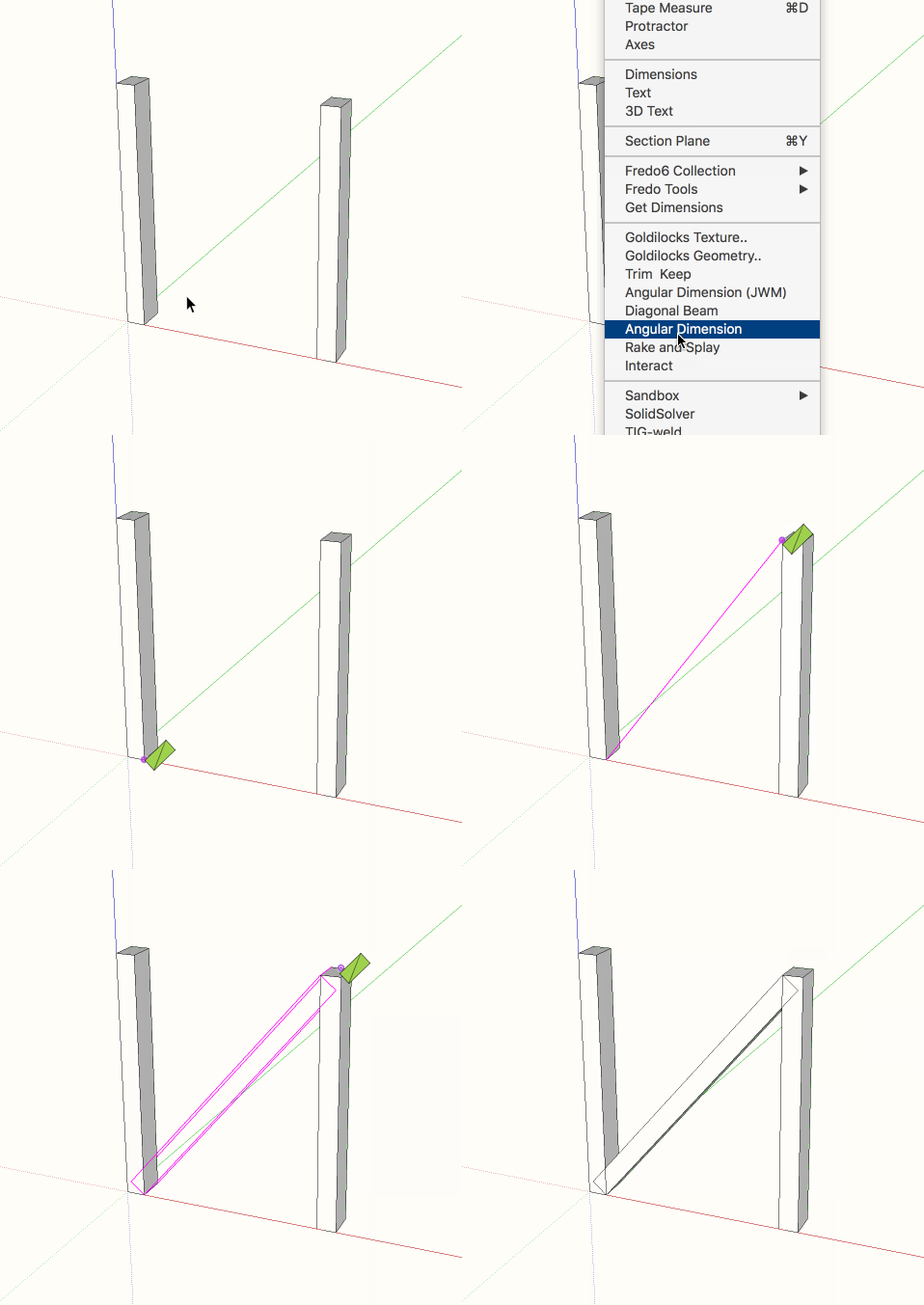
                                          diag_beam.gif

                                          1 條回覆 最後回覆 回覆 引用 0
                                          • Wo3DanW 離線
                                            Wo3Dan
                                            最後由 編輯

                                            @slbaumgartner said:

                                            Here is an extension that I did a while ago but never published. ....

                                            Great plugin you got here. It must be a joy to (be able) to program in Ruby to get such "simple" new tools.
                                            +1

                                            p.s. Dave, no doubt you know all that stuff. It was the image I wanted to post as a solution to "connect" your question (practical example) to what OP was looking for. More or less addressed to the wrong person.


                                            1 條回覆 最後回覆 回覆 引用 0
                                            • 1
                                            • 2
                                            • 1 / 2
                                            • 第一個貼文
                                              最後的貼文
                                            Buy SketchPlus
                                            Buy SUbD
                                            Buy WrapR
                                            Buy eBook
                                            Buy Modelur
                                            Buy Vertex Tools
                                            Buy SketchCuisine
                                            Buy FormFonts

                                            Advertisement
