[Plugin] Animator - v4.6a - 18 Dec 25




-
Ahem....

-
Wow! It's out
-
Hi,
I can't find the Animator plug-in on the extension warehouse. On the first post sais that it is on the pluginstore but I don't know what that is. Please can you help me?
By the way, I did find the LibFredo6 on the extension warehouse.
Thanks!!
-
@m3one said:
Hi,
I can't find the Animator plug-in on the extension warehouse. On the first post sais that it is on the pluginstore but I don't know what that is. Please can you help me?
By the way, I did find the LibFredo6 on the extension warehouse.
Thanks!!
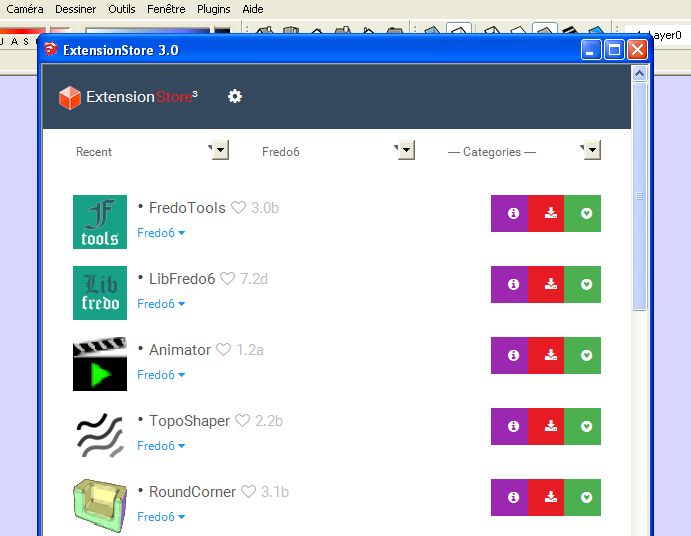
I answer myself, the pluginstore is on this web

I just installed both, the animator and the libfredo6, the problem is that I didn't find the same version letter (Animator is v1.2a and LibFredo6 is 7.2d) but I think they work.
It seems that this project is abandoned.. it's a real pity, I think is a real powerful tool.
-
@m3one said:
I answer myself, the pluginstore is on this web
I just installed both, the animator and the libfredo6, the problem is that I didn't find the same version letter (Animator is v1.2a and LibFredo6 is 7.2d) but I think they work.
It seems that this project is abandoned.. it's a real pity, I think is a real powerful tool.
I don't know where to start....
Why is not having the same letter a problem?
And why is an Extension that's 3 weeks old abandoned?
-
@m3one said:
Hi,
I can't find the Animator plug-in on the extension warehouse. On the first post sais that it is on the pluginstore but I don't know what that is. Please can you help me?
By the way, I did find the LibFredo6 on the extension warehouse.
Thanks!!
pluginstore -->
-
@m3one said:
It seems that this project is abandoned.. it's a real pity, I think is a real powerful tool.
Animator is still alive. The first public release is out for beta so that I can get an idea on whether the animation framework is robust. So please play with it and report any bug or misfunctioing.
I am working on some evolution for a next release before 20 Nov.
For the version numbering, I had to upgrade LibFredo6 due to some bugs and to SU2017. I confirm that Animator 1.2a is compatible with LibFredo6 7.2d.
Fredo
-
@rich o brien said:
@m3one said:
I answer myself, the pluginstore is on this web
I just installed both, the animator and the libfredo6, the problem is that I didn't find the same version letter (Animator is v1.2a and LibFredo6 is 7.2d) but I think they work.
It seems that this project is abandoned.. it's a real pity, I think is a real powerful tool.
I don't know where to start....
Why is not having the same letter a problem?
And why is an Extension that's 3 weeks old abandoned?
The issue of the letter is on the download section of the first post, but fredo just confirmed they are compatible.
Sorry guys for thinking that the project was abandoned, I took conclusions too fast. I didn't mean to upset you.
I'm currently preparating an animation for a project my company is developing. The animation consists on several cars going on a motorway, turning, accelerating, breaking and so on. I planned to do it with msphysics, but I think the animator is better.
I'll let you know any comments, bugs, etc. that I see.
Thanks for your hard work!
-
Hi,
After some tests I'm really impressed with capabilities and quality of this extension. It can be done almost anything, it's well structured and not difficult to learn, specially following the video-tutorials which are awesome.I've some comments/improvements if you want to consider:
-->Option to scale the timeline. If the animation longs more than 2 minutes takes time to move over the timeline.
-->I think it'd be awesome to be able to delete and duplicate Unit Movements, Cameras, etc. I don't mean their instances but the object itself.
-->Traslations and rotations are refered to SU global axes. It'd be great if there is an option to refer these movements to the object local axes. For example, if you are animating a forward traslation for a car, if you refer this traslation to its local axes and you rotate the car, it will go forward.
-->If you have a tracking camera followed by another tracking camera with different points of views but which both follow the same object you hope that the camera also follows the object in the traslation between the first and the second camera, but this doesn't happen. I think it's a good improvement.
-->Finally, I don't know if this is a bug or I don't know how to do it, but I tried to add two movements to the car wheels, two rotations, one for the movement and the other one for steering, but the results weren't as I expected. The wheels were rolling baddly.By the way, I'm quite new in SU and I don't know how to render the video with the Twilight V2 (I can render static images but not the movie). How is this done?
That's all for now. Thanks for the developing!
-
Thanks for your consideration. Here are some elements of response:
@m3one said:
-->Option to scale the timeline. If the animation longs more than 2 minutes takes time to move over the timeline.
that's planned
-->I think it'd be awesome to be able to delete and duplicate Unit Movements, Cameras, etc. I don't mean their instances but the object itself.
that's planned too, but in the meantime, you can use the Make unique feature
-->Traslations and rotations are refered to SU global axes. It'd be great if there is an option to refer these movements to the object local axes. For example, if you are animating a forward traslation for a car, if you refer this traslation to its local axes and you rotate the car, it will go forward.
For translation, you have a button for "local axes". For rotation, the best is to use Spin, not rotation. For Spin, you can define an axis in local coordinates
-->If you have a tracking camera followed by another tracking camera with different points of views but which both follow the same object you hope that the camera also follows the object in the traslation between the first and the second camera, but this doesn't happen. I think it's a good improvement.
this should work, and if not, would be a bug
-->Finally, I don't know if this is a bug or I don't know how to do it, but I tried to add two movements to the car wheels, two rotations, one for the movement and the other one for steering, but the results weren't as I expected. The wheels were rolling baddly.
Would be useful to have the model. But for rotation, use Spin to be on the safe side.By the way, I'm quite new in SU and I don't know how to render the video with the Twilight V2 (I can render static images but not the movie). How is this done?
First, you need to install FFmpeg, following the instructions. This will allow you to directly generate a movie in MP4, MOV, GIF, etc.... Then you need to install Twilight, the licensed versionThat's all for now. Thanks for the developing!
-
-
It would be fine for the "Screw" mouvement to have the option that it is the combination of translation+spin,or the combination of translation+rotation, so you could screw an object relatively to an external axis.
-
@gilles said:
It would be fine for the "Screw" mouvement to have the option that it is the combination of translation+spin,or the combination of translation+rotation, so you could screw an object relatively to an external axis.
Screw is just a shortcut to Translation + spin by the same direction as the translation, and gravity center.
For a Screw movement with custom or exotic parameters, then it's better to design the two movements and group them into a reusable clip.Otherwise, doing it in the standard tool "Screw" would make the GUI too complex.
Fredo
-
@fredo6 said:
@gilles said:
It would be fine for the "Screw" mouvement to have the option that it is the combination of translation+spin,or the combination of translation+rotation, so you could screw an object relatively to an external axis.
Screw is just a shortcut to Translation + spin by the same direction as the translation, and gravity center.
For a Screw movement with custom or exotic parameters, then it's better to design the two movements and group them into a reusable clip.Otherwise, doing it in the standard tool "Screw" would make the GUI too complex.
Fredo
This a good reason, thanks for reply.
-
First: THANK YOU! This is something that I have been waiting for, for a long time now!
Having a problem with v1.2h on one machine, (working on another)
I have updated LibFredo6 to 7.2h
When I click (generate a video for the film) button, nothing happens, dialog box never appears and seems animator is locked, cannot get back to other menus until closing and restarting sketchup.Windows 10
SketchUp 16 pro -
@06mx5er said:
First: THANK YOU! This is something that I have been waiting for, for a long time now!
Having a problem with v1.2h on one machine, (working on another)
I have updated LibFredo6 to 7.2h
When I click (generate a video for the film) button, nothing happens, dialog box never appears and seems animator is locked, cannot get back to other menus until closing and restarting sketchup.Windows 10
SketchUp 16 proCould you open the Ruby console before you call the video dialog box. There may be an error displayed.
Thanks
Fredo
-
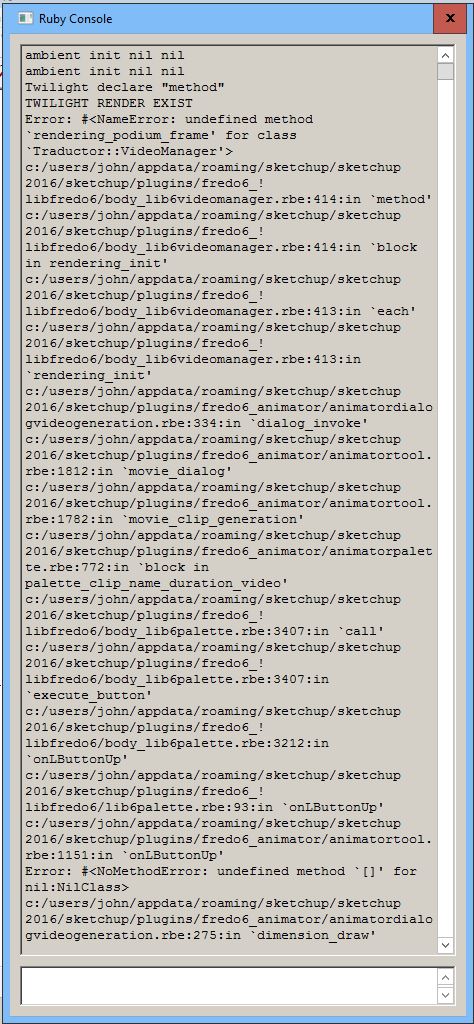
Here is a "shortened" view of the Ruby Console.
Error: #<NoMethodError: undefined method `[]' for nil:NilClass> Repeats forever after this point.
Thank you, 06MX5er
-
Just wanted to let you know, SU Podium was the culprit. I removed it and now Animator is working as it should.
Thanks for your time!
-
It's a minor point but, Is there a way to enlarge the palette? The top bar is only 3.5 inches wide and the icons are about 1/8 in.
BTW: this looks like the killer animation plugin app!!!
-
New Release: Animator - v1.3a - 24 Dec 16
Minor bugs fixing and prolongation of validtity till 25 Jan 17
See main post for RBZ files




Hello! It looks like you're interested in this conversation, but you don't have an account yet.
Getting fed up of having to scroll through the same posts each visit? When you register for an account, you'll always come back to exactly where you were before, and choose to be notified of new replies (either via email, or push notification). You'll also be able to save bookmarks and upvote posts to show your appreciation to other community members.
With your input, this post could be even better 💗
Register Login


Advertisement