[Plugin] S4u Scale Definition
-
S4u Scale Definition v1.2.0
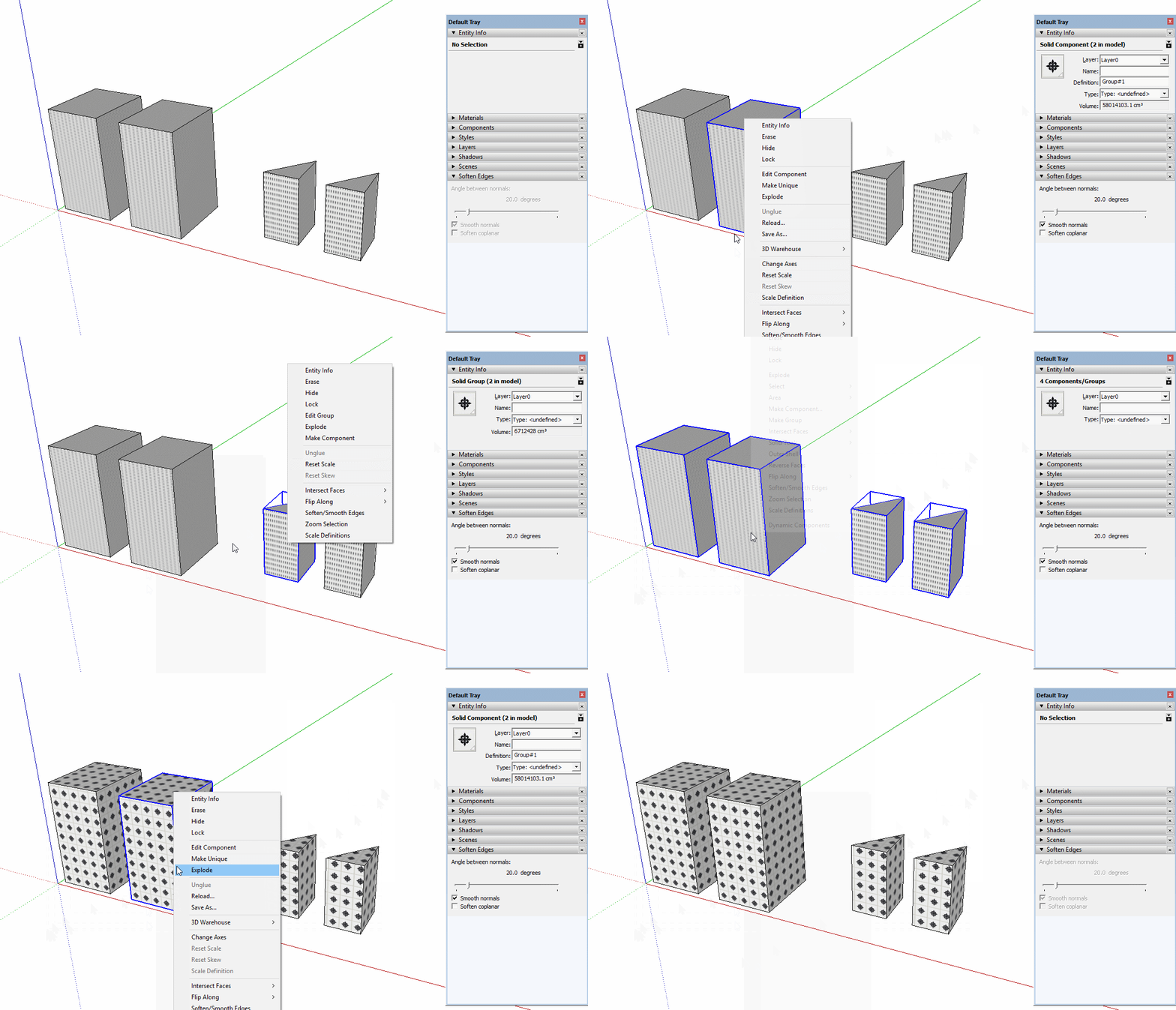
Set Scale Definitions for Components or Groups.
http://extensions.sketchup.com/en/content/s4u-scale-definition
http://sketchucation.com/pluginstore?pln=s4u_scale_definition
Usage: Extensions -> Suforyou or Right Click
-
Didn't get it what this plugin does? Bit more info or quick video tutorial would be great! Thanks.
-
It works with simple components or groups, however when I scale my dynamic components it doesn't work.
I have attached dynamic component:
Cabinet Base B.skp
Could you to take a look and try to figure out why is it so?
After all its superb plugin, can not figure out why sketchup doesn't have this by default.Thanks S4U!
-
Dimension of dynamic component follow its parametrics,not follow its definition.
-
Thank you for your effort in make this plugin that has been quite useful for me.
I'm just a bit upset, because it doesn't have a toolbar. So I'd be glad if you could modify your plugin just enough to support toolbar. I could do it by myself, but your script is crypted.
Then a simple way to add the toolbar support is like TIG commented in another topic (bit.ly/29PAk6T

@unknownuser said:
An example of the menu making command is:
unless file_loaded?(__FILE__)
>    cmd = UI;;Command.new("SomeCommandName"){ SomeCommand.new() }
>    UI.menu("Plugins").add_item(cmd)
> ### START - ADD TOOLBAR HERE...
> ### END -   ADD TOOLBAR HERE
>    file_loaded(__FILE__)
> end
If it's a 'Tool' the CMD setup is slightly different...
An example to use that within a toolbar is this additional code added between the ### markers:
cmd.tooltip = "SomeCommandName"
> cmd.status_bar_text = "SomeText"
> cmd.small_icon = File.join("SomeCommandFolder/ImagesFolder", 'icon-24.png')
> cmd.large_icon = File.join("SomeCommandFolder/ImagesFolder", 'icon-32.png')
> toolbar = UI;;Toolbar.new("SomeCommandName")
> toolbar.add_item(cmd)
> toolbar.show if toolbar.get_last_state.abs == 1 # TB_VISIBLE/NEVER
Note how addition properties are needed for the cmd to be used in a toolbar.
The path to the button icons and their names is up to you...And I attached icons that I created for the toolbar, if it can be helpful.


-
I have updated it.
You can replace your icon if you want. -
hdpv, what would you feel about adding a reset scale for multiple components too?
Thanks in advance!
-
Installed update dated Jan 5, 2021 in SketchUp 2021. I get the following load error on start.
Error Loading File s4u_scale_definition.rb Error: #<NoMethodError: undefined methodcopyright=' for nil:NilClass>
C:/Users/Orbital/AppData/Roaming/SketchUp/SketchUp 2021/SketchUp/Plugins/s4u_scale_definition.rb:14:in<module:S4u_Scale_Definition>' C:/Users/Orbital/AppData/Roaming/SketchUp/SketchUp 2021/SketchUp/Plugins/s4u_scale_definition.rb:4:inmodule:S4U'
C:/Users/Orbital/AppData/Roaming/SketchUp/SketchUp 2021/SketchUp/Plugins/s4u_scale_definition.rb:3:in<top (required)>' -
Surprisingly the extension's code is very malformed.
This extension's RB loader file contains the following errors...ext = SketchupExtension.new(('s4u-' + Strings.GetString(TOOL)),File.join(NAME,(NAME + "_loader"))) @ext.copyright= 'Huynh Duong Phuong Vi' @ext.creator = 'Suforyou' ext.version = '1.2.2' ext.description = Strings.GetString("Set Scale Definitions for Objects.") Sketchup.register_extension ext, trueShould read thus:
@ext = SketchupExtension.new(('s4u-' + Strings.GetString(TOOL)),File.join(NAME,(NAME + "_loader")))
@ext.copyright= 'Huynh Duong Phuong Vi'
@ext.creator =  'Suforyou'
@ext.version = '1.2.2'
@ext.description = Strings.GetString("Set Scale Definitions for Objects.")
Sketchup.register_extension(@ext, true)
You can edit the RB loader and it will work - however, it will break the 'signing' so the Loading Policy must be Unrestricted - at least until the author posts/signs a fixed RBZ...
It can never have worked during the author's testing pre-RBZ-making !?

-
@unknownuser said:
It can never have worked during the author's testing pre-RBZ-making !?
That what I would think, too. Made me wonder why he updated it both here and in the Extension Warehouse.
-
Sorry! I fixed it.
-
Thank you. Your ScaleTool has the same problem.





Hello! It looks like you're interested in this conversation, but you don't have an account yet.
Getting fed up of having to scroll through the same posts each visit? When you register for an account, you'll always come back to exactly where you were before, and choose to be notified of new replies (either via email, or push notification). You'll also be able to save bookmarks and upvote posts to show your appreciation to other community members.
With your input, this post could be even better 💗
Register Login


Advertisement