Animator: Parametric Animation plugin - Discussion
-
Fredo President!

-
New round of donations for Fredo - anyone?
-
@pilou said:
Sorry where is the plugin ?

It's only for happy fews ?
I am still resolving some basic issues with the animation representation framework. So there is some delay, again and again.
Fredo
-
I too am a Mac user as well as PC. I'd be more than willing to be your guinea pig for test on both.
-
Fredo, I see you've released 6 beta tutorial videos on your youtube channel. I hope that means something is coming soon.
-
fredo,
you can bundle 64-bit ffmpeg binary with your plugin for use on Snow Leopard, Lion, Mountain Lion, Mavericks, Yosemite and El Captain.it eliminates the need to download, instal, look for, etc...
john
-
@driven said:
fredo,
you can bundle 64-bit ffmpeg binary with your plugin for use on Snow Leopard, Lion, Mountain Lion, Mavericks, Yosemite and El Captain.it eliminates the need to download, instal, look for, etc...
john
John,
Not sure it's a feasible idea:
- I don't know if I have the right to distribute it.
- The exe file is roughly 40 Mb, so not light
- I would have 2 distributions, one for Windows (maybe 2 if 32bits is still around), one for Mac
If there is a right to redistribute, the solution would be to put it on the PluginStore. But again, it's an Exe file on Windows (and similar on Mac), so it's never simple to download such files by program.
Fredo
-
And I missed that. What a tool for animated explanations. I can't wait..
As Pilou said, Fredo President ! -
[RV444.1442] Thea for SketchUp - NEW
...
New: Support for Fredo's Animator plugin added
...Ciao,
Gio -
@gio said:
[RV444.1442] Thea for SketchUp - NEW
...
New: Support for Fredo's Animator plugin added
...Ciao,
GioHow about showing some examples......
-
I'm trying to animate movements with both translation and rotation and am finding that they interfere with one another, the object gets additionally displaced while rotating, ending up in the wrong spot / pivot point. In that model the components are nested, is there something with how the plugin interprets nested components that would cause that weirdness?
Also how does the positioner option work on the back end? It seems like I have functions that gets locked into place which make it impossible to modify a beginning position, in other words, I want to have my object have a new starting point and even though I set a new position through Positioned Load the plugin queue's back in time and my object jumps back to where I originally had it. It would be helpful to be able to delete Positions or access the coordinates manually somehow to wipe that information.
-
Thanks for sharing this Beta version. First results: Animation double canal lock (school project daughter) Great plugin and lots off fun to work with. https://youtu.be/aO1PnfoDu2g
-
@falstaff said:
I'm trying to animate movements with both translation and rotation and am finding that they interfere with one another, the object gets additionally displaced while rotating, ending up in the wrong spot / pivot point. In that model the components are nested, is there something with how the plugin interprets nested components that would cause that weirdness?
Also how does the positioner option work on the back end? It seems like I have functions that gets locked into place which make it impossible to modify a beginning position, in other words, I want to have my object have a new starting point and even though I set a new position through Positioned Load the plugin queue's back in time and my object jumps back to where I originally had it. It would be helpful to be able to delete Positions or access the coordinates manually somehow to wipe that information.
Can you post an animation so we can see your problems?
-
Attached are two videos of my biking guy. I've got this component organized so that his foot rotates with the pedal component, and now I am manipulating the rotation of his "leg" component and the rotation of his "calf" group within the leg.
I noticed the knee keeps shifting i.e. becoming unattached. The only clue that I have are in the videos below (which show the 360 rotation to emphasize). When I play in isolation mode the leg rotates the way I need it to with the knee intact. However, when I play the entire clip together the movement is wrong.
My guess is either its somehow being influenced by another recorded movement for some reason. Or the plugin is misinterpreting the axis.
@ntxdave said:
@falstaff said:
I'm trying to animate movements with both translation and rotation and am finding that they interfere with one another, the object gets additionally displaced while rotating, ending up in the wrong spot / pivot point. In that model the components are nested, is there something with how the plugin interprets nested components that would cause that weirdness?
Also how does the positioner option work on the back end? It seems like I have functions that gets locked into place which make it impossible to modify a beginning position, in other words, I want to have my object have a new starting point and even though I set a new position through Positioned Load the plugin queue's back in time and my object jumps back to where I originally had it. It would be helpful to be able to delete Positions or access the coordinates manually somehow to wipe that information.
Can you post an animation so we can see your problems?
-
@richardpmuller said:
Thanks for sharing this Beta version. First results: Animation double canal lock (school project daughter) Great plugin and lots off fun to work with. https://youtu.be/aO1PnfoDu2g
Nice animation. I am curious about how you accomplished the water level changes. It comes across very smoothly.

-
@richardpmuller said:
Thanks for sharing this Beta version. First results: Animation double canal lock (school project daughter) Great plugin and lots off fun to work with. https://youtu.be/aO1PnfoDu2g
Very well done. Bravo.
-
@falstaff said:
My guess is either its somehow being influenced by another recorded movement for some reason. Or the plugin is misinterpreting the axis.
First off, this is an animation that can better be done with a tool that supports "bones" which this version of Animator does not currently do. However, below you will see a very crude attempt to show you the steps that could currently need to be done (many more of them obviously). I did not animate the pedal, just the foot and lower leg. I also left a kind of reference (circle) to give you an idea. I also color coded the sequences to show you which one related to which object in the animation.
You mill notice that there are multiple animation sequences for each object. So what you are doing is rotating, spinning, and translating all at the same time.
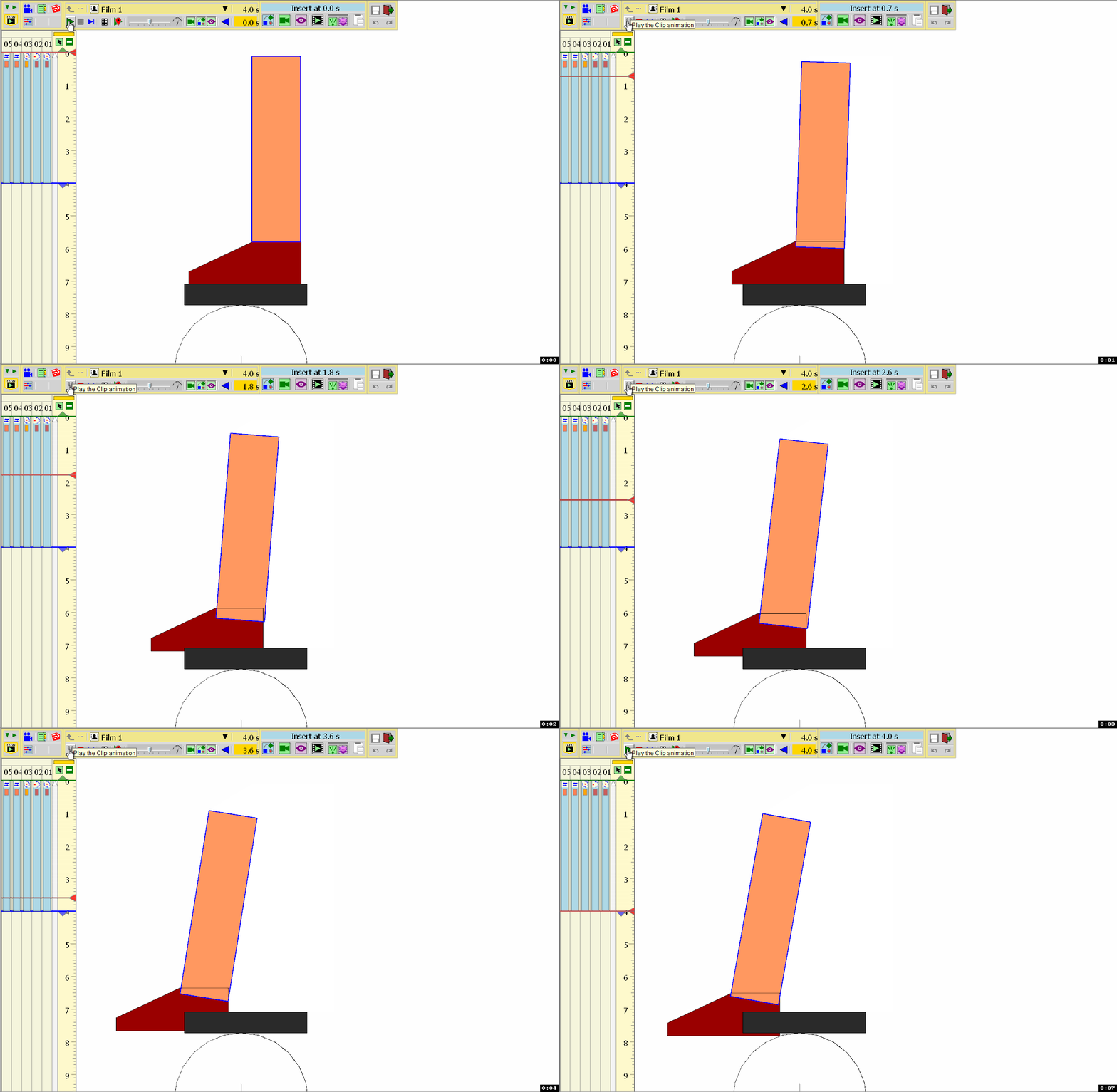
For the foot, there are two sequences. One is a rotation based on the reference circle below it and the other is a spin to adjust the ending position of the foot.
Tor the lower leg, there are three sequences. One is a translation that moves the leg to the left and the second is a translation that moves the leg down to match the position of the foot. The third sequence for the leg is a spin that adjust the angle of the leg and would occur in the pedaling action.
To complete the full rotation of the pedaling motion, you would have to perform multiple sets like these.
I did not use the save position anyplace in my animation. I generally only use that tool when I think I am going to make a bunch of revisions and may need a clean starting point.
Hope this helps you...............
-
Thanks, simple, the water is just a flat face moving up and down. Move the water in the lock and the boat at the same time and duration up or down the Z-axis. You have to soften some outlines off the water face were they come together, so they look one peace when the doors slide away.
Nice animation. I am curious about how you accomplished the water level changes. It comes across very smoothly.
[/quote] -
Thank you for your thorough response. That is exactly how I had it set up as far as rotation, in my video you can see the circle behind the foot divided into 12 sections.
My question is what could be the problem if nested components are not rotating around the indicated axis? It seemed to work well for me for the first few sections, and then somehow got bogged down or something.
@ntxdave said:
@falstaff said:
My guess is either its somehow being influenced by another recorded movement for some reason. Or the plugin is misinterpreting the axis.
For the foot, there are two sequences. One is a rotation based on the reference circle below it and the other is a spin to adjust the ending position of the foot.
. -
Just erase the "s" in "https" then use the balise

http://www.youtube.com/watch?v=Bs9x6pjaPLARetro style!










Advertisement