sketchucation logo sketchucation
    • Login
    Oops, your profile's looking a bit empty! To help us tailor your experience, please fill in key details like your SketchUp version, skill level, operating system, and more. Update and save your info on your profile page today!
    ⚠️ Update | Sketchucation Tools 5.0.8 released with licensing improvements and bugfixes Download

    Tube coping template wrappers

    Scheduled Pinned Locked Moved Newbie Forum
    sketchup
    18 Posts 7 Posters 2.8k Views 7 Watching
    Loading More Posts
    • Oldest to Newest
    • Newest to Oldest
    • Most Votes
    Reply
    • Reply as topic
    Log in to reply
    This topic has been deleted. Only users with topic management privileges can see it.
    • I
      Iceracer
      last edited by

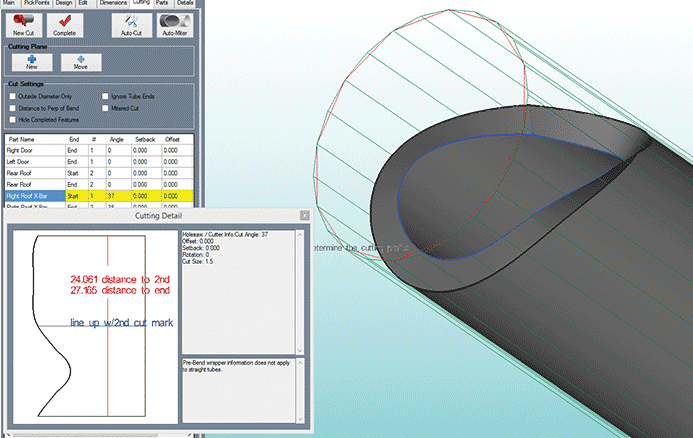
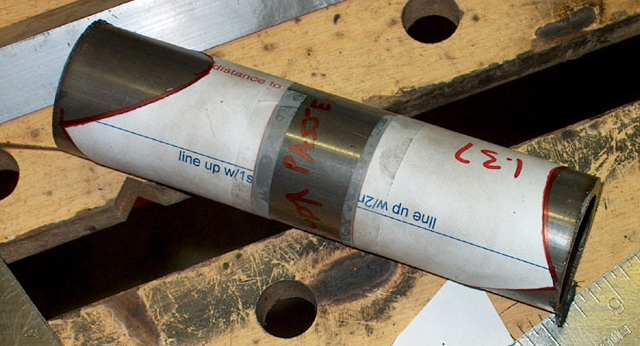
      Like this. There are simple calculators on line for bicycle frames, but Im into some multiple tube butt joints it would be helpful for.
      tube wrapper 2.PNGtube wrapper.PNG

      1 Reply Last reply
      Reply Quote 0
      • kenK
        ken
        last edited by

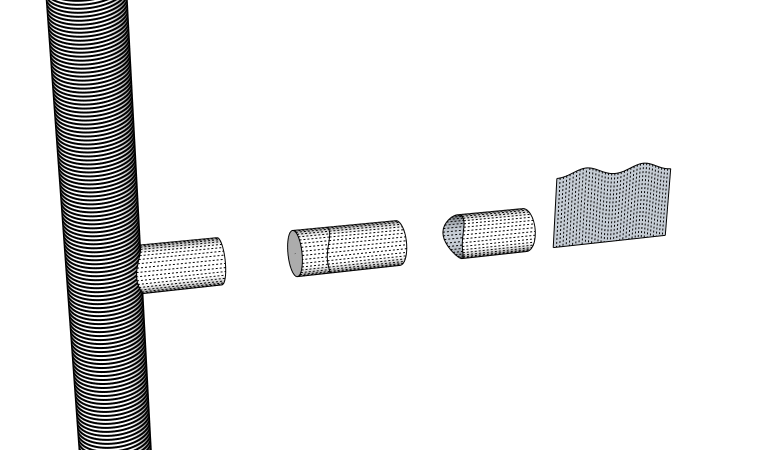
        I believe this is what he requires. However, if he is working with actual tubing, something less than 3" in dia. he should scale up.

        I do this procedure all the time to for Gulf of Mexico oil structures. I haven't found a plugin to accomplish this task. I do it the old hard way.

        1. Make vertical pipe, 360 segments, so I have good accuracy on the coped pipe.

        2. The cope pipe has segments to the amount of actual refence line I require. I alway make sure that the number of segments is always a whole number of degrees. As an example, 360 degrees divided by 50 would give you 7.2 degrees for each segment. That means there is one segment that is not whole. I usually use 36 segment, which gives me a segment for each 10 degrees.

        3. I use the plugin "flattery" to flatten out each segment. Note to see each segment, you will have to turn on hidden lines.

        There you are, the complete layout. I know it shouldn't be hard to make a plugin to do this, however, I don't have the skills. Wish you luck.

        Ken

        CopingTemplate.png

        Fight like your the third monkey on Noah's Ark gangway.

        1 Reply Last reply
        Reply Quote 0
        • G
          gregw
          last edited by

          it's been many years since I've used one,but we used to call them "pipe saddle templates". We would make a pattern out of sheet metal and then trace it onto a piece of paper.

          1 Reply Last reply
          Reply Quote 0
          • I
            Iceracer
            last edited by

            This is exactly what Im looking for. If there is no plug in for it I would give a go at making one if there is a tutorial on making plugins.
            1 Reply Last reply
            Reply Quote 0
            • Dave RD
              Dave R
              last edited by

              Once you do the intersect faces routine, you can use Jim Foltz's Unfold plugin to lay the wrapper out flat. Or as Ken did, use the Flattery plugin.

              Etaoin Shrdlu

              %

              (THERE'S NO PLACE LIKE)

              G28 X0.0 Y0.0 Z0.0

              M30

              %

              1 Reply Last reply
              Reply Quote 0
              • I
                Iceracer
                last edited by

                Ok I just looked at some ruby stuff way over my head....

                what the intersect faces routine?

                1 Reply Last reply
                Reply Quote 0
                • Dave RD
                  Dave R
                  last edited by

                  @iceracer said:

                  Ok I just looked at some ruby stuff way over my head....

                  what the intersect faces routine?

                  It's a basic native thing to intersect faces. Select the surface of the wrapper, right click on it and choose Intersect Faces>With Model to create the intersection. Make the pipe a component or group first so it doesn't get modified during the intersection process.

                  Etaoin Shrdlu

                  %

                  (THERE'S NO PLACE LIKE)

                  G28 X0.0 Y0.0 Z0.0

                  M30

                  %

                  1 Reply Last reply
                  Reply Quote 0
                  • sdmitchS
                    sdmitch
                    last edited by

                    @iceracer said:

                    This is exactly what Im looking for. If there is no plug in for it I would give a go at making one if there is a tutorial on making plugins.

                    Tube Coping.gif
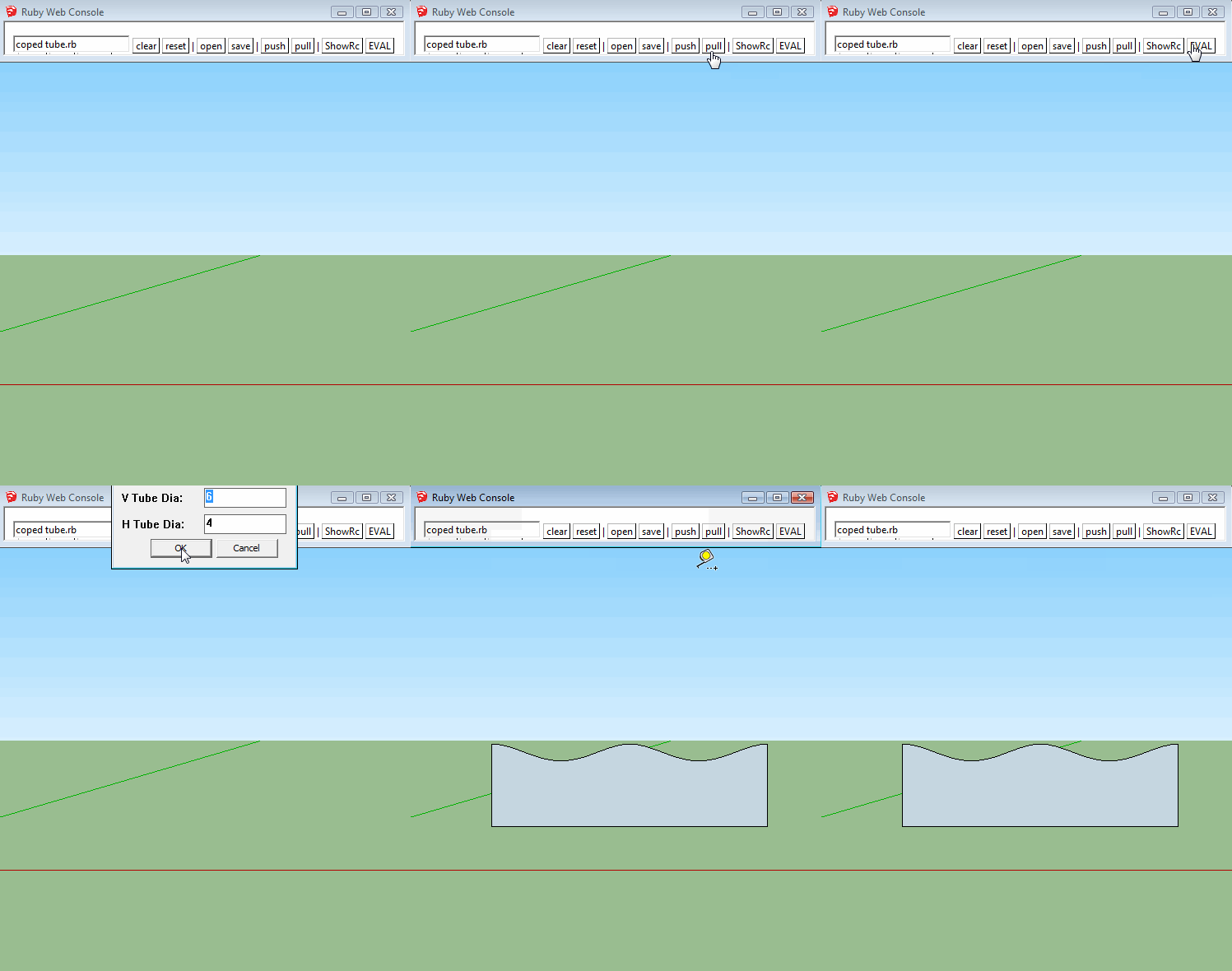
                    Here is a quick and dirty Plugin that duplicates Ken's process.

                    def tube_coping
                    
                    mod = Sketchup.active_model
                    ent = mod.active_entities
                    sel = mod.selection
                    vue = mod.active_view
                    @vtd ||= 6; @htd ||= 4
                    val = UI.inputbox(["V Tube Dia;","H Tube Dia;"],[@vtd,@htd],"Tube Coping")
                    if val
                     @vtd,@htd = val; grp = ent.add_group; gent = grp.entities
                     cir = gent.add_circle(ORIGIN,Z_AXIS,@vtd/2,360)
                     fac = gent.add_face cir
                     fac.pushpull -@htd*2
                     opt = ORIGIN.offset(X_AXIS,@vtd).offset(Z_AXIS,@htd)
                     htc = gent.add_circle(opt,X_AXIS,@htd/2,36)
                     vts = htc[0].curve.vertices.map{|v|v.position}
                     hpt = []; del = Math;;PI*@htd/36
                     #vts << vts[0]
                     vts.each{|v| hpt << mod.raytest([v,X_AXIS.reverse])[0]}
                     opt = ORIGIN.offset(X_AXIS,@vtd*2).offset(Z_AXIS,@htd/2);lpt=opt.clone
                     cpt = []; cpt << opt
                     for i in 0...vts.length
                      npt = lpt.offset(Z_AXIS,vts[i].distance(hpt[i]))
                      cpt << npt; lpt.offset!(X_AXIS,del) if i<vts.length-1
                     end
                     cpt << lpt
                     ent.add_face cpt
                     grp.erase!
                    end
                    
                    end


                    Nothing is worthless, it can always be used as a bad example.

                    http://sdmitch.blogspot.com/

                    1 Reply Last reply
                    Reply Quote 0
                    • kenK
                      ken
                      last edited by

                      Darn sdmitch your quick on the draw.

                      One problem with your plugin, I show a 90 angle just to simplify the drawing. However, the angle can be any reasonable angle.

                      So if you add an input for the angle it should be good to go.

                      Thanks

                      Ken

                      Fight like your the third monkey on Noah's Ark gangway.

                      1 Reply Last reply
                      Reply Quote 0
                      • sdmitchS
                        sdmitch
                        last edited by

                        @unknownuser said:

                        Darn sdmitch your quick on the draw.

                        One problem with your plugin, I show a 90 angle just to simplify the drawing. However, the angle can be any reasonable angle.

                        So if you add an input for the angle it should be good to go.

                        Thanks

                        Ken

                        How is the angle measured? From vertical? What should the min and max angle be?

                        Nothing is worthless, it can always be used as a bad example.

                        http://sdmitch.blogspot.com/

                        1 Reply Last reply
                        Reply Quote 0
                        • I
                          Iceracer
                          last edited by

                          The angle should be calculated from a existing centerline in two steps possibly 1 -3 tubes intersecting then select the tube we want to cope to the node.
                          Sdmitch are you in the US?

                          1 Reply Last reply
                          Reply Quote 0
                          • sdmitchS
                            sdmitch
                            last edited by

                            @iceracer said:

                            The angle should be calculated from a existing centerline in two steps possibly 1 -3 tubes intersecting then select the tube we want to cope to the node.
                            Sdmitch are you in the US?

                            Yes I am.

                            Please post a sample model,version <= 2014, to play with.

                            Please describe just how you would envision how the plugin should work and make it "Coping for Dummy's"

                            Nothing is worthless, it can always be used as a bad example.

                            http://sdmitch.blogspot.com/

                            1 Reply Last reply
                            Reply Quote 0
                            • I
                              Iceracer
                              last edited by

                              Ill have to get it Tommoro I can snap a picture of the actual piece and send you a file tommoro if you need it. And I appreciate the coping for dummies. This is way out of my expertise.

                              1 Reply Last reply
                              Reply Quote 0
                              • I
                                Iceracer
                                last edited by

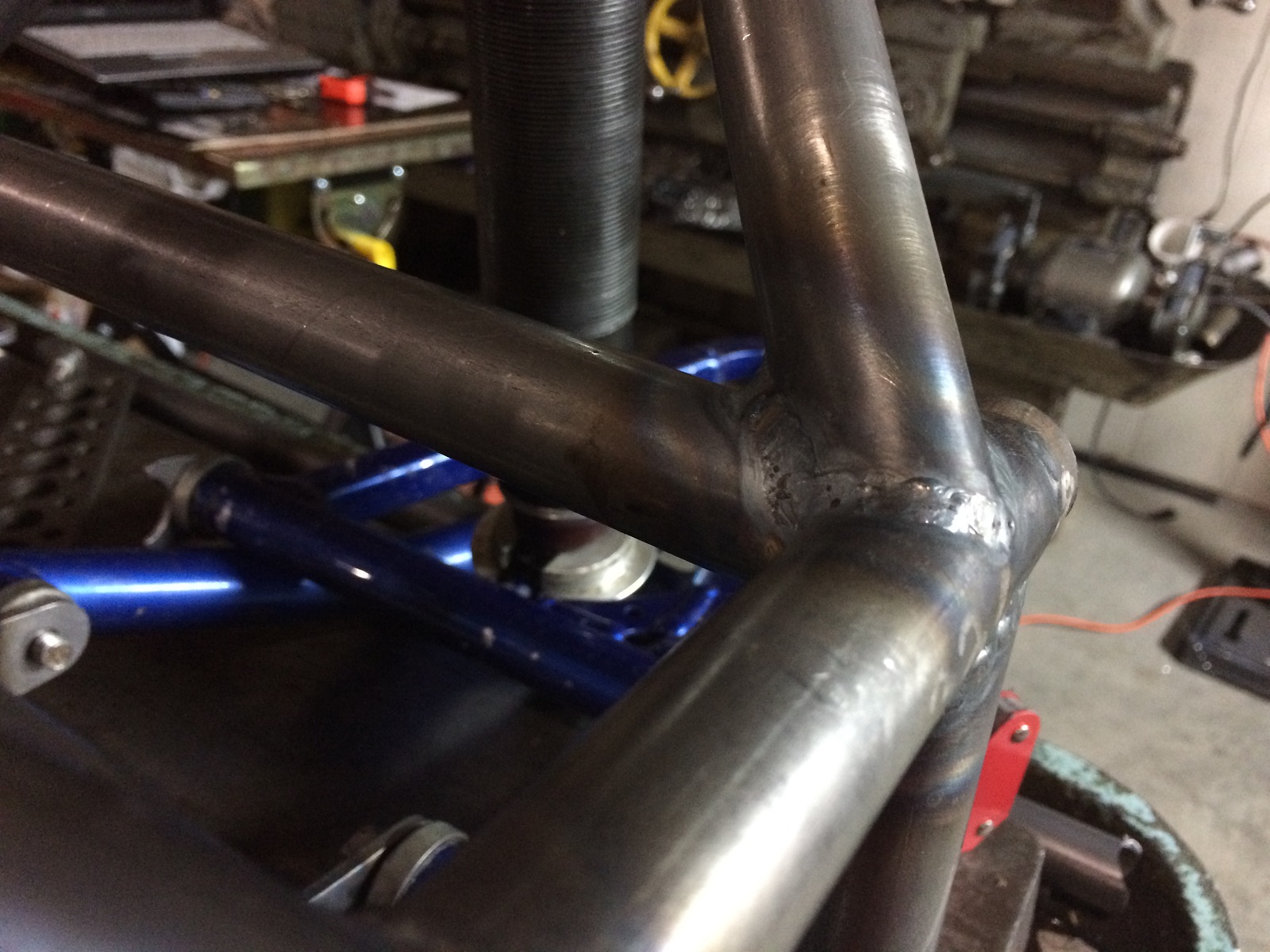
                                Here is my dilema coping a single angle is not a issue but adding multiple tubes and then rotating and angling back makes it difficult and then coming in on the other end of the tube make it more interesting.
                                Mitch apparently I cant add a skp file here for you. send me a pm with a email and Ill send the joint to you so you can see it more clearly with all the angles happening.
                                IMG_1008.JPG

                                1 Reply Last reply
                                Reply Quote 0

                                Hello! It looks like you're interested in this conversation, but you don't have an account yet.

                                Getting fed up of having to scroll through the same posts each visit? When you register for an account, you'll always come back to exactly where you were before, and choose to be notified of new replies (either via email, or push notification). You'll also be able to save bookmarks and upvote posts to show your appreciation to other community members.

                                With your input, this post could be even better 💗

                                Register Login
                                • 1 / 1
                                • First post
                                  Last post
                                Buy SketchPlus
                                Buy SUbD
                                Buy WrapR
                                Buy eBook
                                Buy Modelur
                                Buy Vertex Tools
                                Buy SketchCuisine
                                Buy FormFonts

                                Advertisement