sketchucation logo sketchucation
    • 登入
    Oops, your profile's looking a bit empty! To help us tailor your experience, please fill in key details like your SketchUp version, skill level, operating system, and more. Update and save your info on your profile page today!
    🔌 Smart Spline | Fluid way to handle splines for furniture design and complex structures. Download

    [Plugin] GKWare Cabinet Maker

    已排程 已置頂 已鎖定 已移動 Plugins
    627 貼文 69 Posters 459.4k 瀏覽 70 Watching
    正在載入更多貼文
    • 從舊到新
    • 從新到舊
    • 最多點贊
    回覆
    • 在新貼文中回覆
    登入後回覆
    此主題已被刪除。只有擁有主題管理權限的使用者可以查看。
    • G 離線
      Garry K
      最後由 編輯

      I've been asked to consider a lease to own program and I would like to hear from people on how they feel about this.

      For easy round numbers let's take a plugin that is 100 $
      If the lease to own program is a one year program then the monthly lease would be 10 $
      This means your total cost of ownership would be 120 $

      Any comments?

      1 條回覆 最後回覆 回覆 引用 0
      • G 離線
        Garry K
        最後由 編輯

        Version 1.0.30 is now ready for download

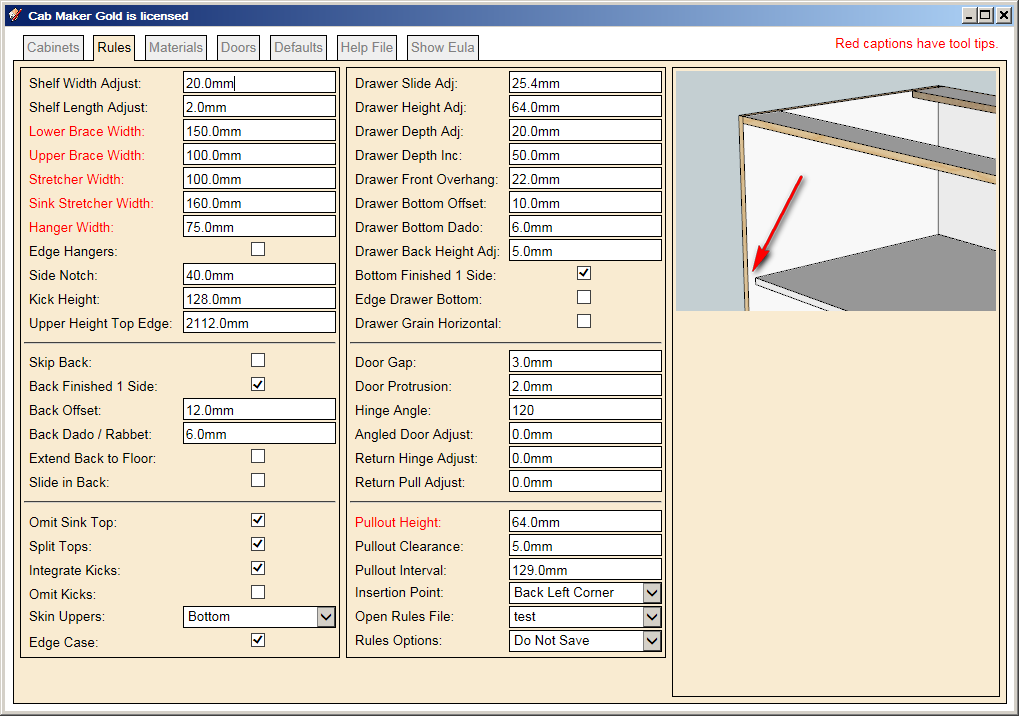
        1. Updated Rules editor. Fields now automatically enable / disable based on "Overlay / Inset" and "Construction".
        2. Added Drawer Back Length Adjustment for drawer boxes. This corrects the parts listing when cabinet makers want to create dovetail drawers.
        3. Added Back Overhang for finished panels. You can use a negative value if you wish.
        4. Added Filters so that examples can be filtered out. From main menu run 'Cab Maker - Edit Config'
        5. Fixed problem with un-profiled door panels. They were always showing up as 6mm or 1/4". Cab Maker now honors panel thickness from the materials template.
        1 條回覆 最後回覆 回覆 引用 0
        • G 離線
          Garry K
          最後由 編輯

          Set Filter to 1 of 4 values, 'None', 'Metric', 'Imperial', 'Both'

          All template examples now start with the text 'metric_' or the text 'imperial_'
          If you work in inches then filter out metric or vice versa.

          Filter Examples uses a text file called filters.txt for additional specific filtering.


          edit config.png

          1 條回覆 最後回覆 回覆 引用 0
          • G 離線
            Garry K
            最後由 編輯

            Version 1.0.31 - Feb 10 2016

            1. Single pullout door and pullout created error. Fixed.
            2. Fixed bug with tall cabinets and frameless construction.
            3. Run filler to floor when notch is set to 0 for base cabinets.
            4. Fixed parts report. Sorting and Summarizing now working.
            5. Added side by side drawers for Standard and Sink Base cabinets (not angled).
            6. Added auto size drawers. Works for Standard cabinets where there are at least 2 drawers and no doors. Works for Tall cabinets if there is at least 1 drawer.
            7. Added Top Filler for frameless construction when Top Gap is increased to more than 1/2 the thickness of the top.

            For faceframe construction you can now have side by side drawers for standard cabinets where there is at least 1 drawer (full frame) or exactly 1 drawer (partial frame). You can have 0, 1 or 2 doors.

            side by side.png

            For Drawer Banks and tall cabinets you can now ask Cab Maker to calculate the proper height of the bottom most drawer

            auto drawer.png

            Filler works for all cabinets. With sink cabinets the top filler takes precedence over the sink stretcher.

            Top Filler.png

            1 條回覆 最後回覆 回覆 引用 0
            • G 離線
              Garry K
              最後由 編輯

              Version 1.0.31 is now ready for download.

              1 條回覆 最後回覆 回覆 引用 0
              • G 離線
                Garry K
                最後由 編輯

                Version 1.0.31 has a number of bugs all relating to Top Gap for frame less construction.

                Version 1.0.32 addresses these issues and provides a solution.

                1. Fillers with frameless construction were too low when using Top Gap > 0. Fixed
                2. Upper cabinet insertion point with frameless construction was wrong when Top Gap > 0. Fixed
                3. Dividers overlapped Top Filler when Top Gap > 0. Fixed
                4. Top Filler wrong for Return and Angled cabinets. Fixed
                1 條回覆 最後回覆 回覆 引用 0
                • G 離線
                  Garry K
                  最後由 編輯

                  Version 1.0.32 ready for download

                  1 條回覆 最後回覆 回覆 引用 0
                  • utilerU 離線
                    utiler
                    最後由 編輯

                    Hi Garry, not sure what's going on here. I can't seem to get the plugin going....?
                    When I click to start the second point ['select right front corner"] won't happen. Neither will it allow me to enter a length in the VCB.

                    Any ideas?

                    Just Curious...

                    1 條回覆 最後回覆 回覆 引用 0
                    • G 離線
                      Garry K
                      最後由 編輯

                      Andrew

                      Not sure what's happening with your setup.
                      Please email me with the email address I PM'd you with. We will get this working for you.

                      In the meantime. If you would open the Ruby Console and then try - maybe there are some errors.
                      Also - when you email me - please include your OS version and SU version.

                      Garry

                      1 條回覆 最後回覆 回覆 引用 0
                      • G 離線
                        Garry K
                        最後由 編輯

                        For some unknown reason Andrew hasn't picked up the PM that I sent him.

                        Users can also contact me via my web site.
                        http://cabmaker32.com/contact/

                        I see these emails just as fast as if you emailed me directly. I also respond fairly quickly. After I respond you would have my email address and I will have yours.

                        The last few releases are in response to a few users that have had some issues. They emailed me and I dug into the issues. Thanks to Scott, Bill, Grant and Piere.

                        1 條回覆 最後回覆 回覆 引用 0
                        • utilerU 離線
                          utiler
                          最後由 編輯

                          Thanks Garry, all sorted now!

                          Just Curious...

                          1 條回覆 最後回覆 回覆 引用 0
                          • G 離線
                            Garry K
                            最後由 編輯

                            Here is a video with cab maker and cut list pro integration.

                            1 條回覆 最後回覆 回覆 引用 0
                            • G 離線
                              Garry K
                              最後由 編輯

                              I'm thinking about adding a feature where you create a cabinet with create options:

                              Create Options
                              Drop down that has "Full Cabinet", "Door Fronts Only", "Door Fronts and Frames Only"

                              1 條回覆 最後回覆 回覆 引用 0
                              • utilerU 離線
                                utiler
                                最後由 編輯

                                Hi Garry, is there a way for Cabmaker to identify material list as per what is in the current model?


                                2016-02-15_091501.jpg

                                Just Curious...

                                1 條回覆 最後回覆 回覆 引用 0
                                • G 離線
                                  Garry K
                                  最後由 編輯

                                  Yes - Go to the defaults tab.
                                  That will show you what all the defaults are.

                                  I do save defaults settings with each model.

                                  defaults.png

                                  1 條回覆 最後回覆 回覆 引用 0
                                  • utilerU 離線
                                    utiler
                                    最後由 編輯

                                    Thanks but my defaults only show imperial_rules & imperial_rules_upper...?
                                    How do I change it to metric?

                                    Just Curious...

                                    1 條回覆 最後回覆 回覆 引用 0
                                    • G 離線
                                      Garry K
                                      最後由 編輯

                                      From the main menu choose

                                      Extensions \ GKWare CabMaker \ Cab Maker - Edit Config

                                      Set Filter to Imperial to filter out Imperial
                                      OR - depending upon what you want
                                      Set Filter to Metric to filter out Metric

                                      Configuration Editor.PNG

                                      1 條回覆 最後回覆 回覆 引用 0
                                      • utilerU 離線
                                        utiler
                                        最後由 編輯

                                        I have that set to metric but still the defaults show imperial....


                                        2016-02-15_094932.jpg

                                        Just Curious...

                                        1 條回覆 最後回覆 回覆 引用 0
                                        • G 離線
                                          Garry K
                                          最後由 編輯

                                          Yes - you are filtering out Metric.
                                          This setting will show everything else.

                                          1 條回覆 最後回覆 回覆 引用 0
                                          • G 離線
                                            Garry K
                                            最後由 編輯

                                            Version 1.0.33 is now ready to download.

                                            1. Added width adjustment for cabinet sides and top / bottoms.
                                            2. Added bottom gap for frameless construction with overlay doors.
                                            3. Modified reports. Changed Solid to Dimensioned Lumber so that the report would work with Cut List Plus.
                                            1 條回覆 最後回覆 回覆 引用 0
                                            • 1
                                            • 2
                                            • 3
                                            • 4
                                            • 5
                                            • 6
                                            • 31
                                            • 32
                                            • 4 / 32
                                            • 第一個貼文
                                              最後的貼文
                                            Buy SketchPlus
                                            Buy SUbD
                                            Buy WrapR
                                            Buy eBook
                                            Buy Modelur
                                            Buy Vertex Tools
                                            Buy SketchCuisine
                                            Buy FormFonts

                                            Advertisement