Object hidden lines
-
Hi all!
I was looking to improve my animation and this i focused on edges. I tried to smoothen the edges but any angle above 90 degrees gives a shade kind of appearance on the material. So I tried this selected an object and trid to delete this lines. and you could make the difference in the picture posted. Please suggest me if there is a much more better way to do this.
-
Deleting the edges would also result in faces being deleted. You could hide the edges, though. Or, if you don't want to show edges at all, you could turn them off in the style setting. Untick the Edges and perhaps the Profiles box. Then update the style for all of your scenes.
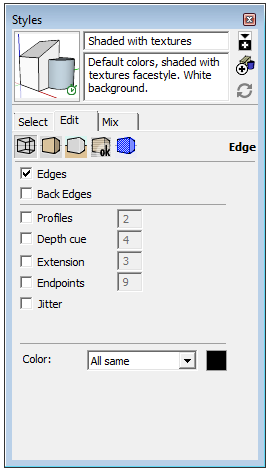
-
Smooth/Soft edges gives a rounded appearance between two facets - typically used when the facets form a 'surface'.
Hidden edges are not displayed - the junction between two facets is sharp.
Having View > Hidden-Geometry ON lets you see such edges as dotted line styles,You can apply these properties to selected edges, but if you want all of the edges in the model to be unseen. then it's easy - make/use a style which has the edges option unchecked.
EDIT: Dave beat me to the line !
Your working style will need edges showing to let you draw and edit things but your animation scene-tabs can use the edgeless style...


Hello! It looks like you're interested in this conversation, but you don't have an account yet.
Getting fed up of having to scroll through the same posts each visit? When you register for an account, you'll always come back to exactly where you were before, and choose to be notified of new replies (either via email, or push notification). You'll also be able to save bookmarks and upvote posts to show your appreciation to other community members.
With your input, this post could be even better 💗
Register Login


Advertisement