sketchucation logo sketchucation
    • 登入
    Oops, your profile's looking a bit empty! To help us tailor your experience, please fill in key details like your SketchUp version, skill level, operating system, and more. Update and save your info on your profile page today!
    🔌 Smart Spline | Fluid way to handle splines for furniture design and complex structures. Download

    [Plugin] TIG-DualDims

    已排程 已置頂 已鎖定 已移動 Plugins
    28 貼文 13 Posters 4.7k 瀏覽 13 Watching
    正在載入更多貼文
    • 從舊到新
    • 從新到舊
    • 最多點贊
    回覆
    • 在新貼文中回覆
    登入後回覆
    此主題已被刪除。只有擁有主題管理權限的使用者可以查看。
    • TIGT 離線
      TIG Moderator
      最後由 編輯

      DualDims.pnghttp://sketchucation.com/pluginstore?pln=TIG_DualDims
      A Tool to allow you to adjust Dimensions, which are within the Model, into a chosen 'Dual' format, usually a combination of metric & imperial units.
      Various Setting from a dialog...
      See More Info...
      Note it is for SketchUp >= v2014...

      TIG

      1 條回覆 最後回覆 回覆 引用 0
      • Rich O BrienR 離線
        Rich O Brien Moderator
        最後由 編輯

        Dual Dims are lightswitches! 😉

        Download the free D'oh Book for SketchUp 📖

        1 條回覆 最後回覆 回覆 引用 0
        • Rich O BrienR 離線
          Rich O Brien Moderator
          最後由 編輯

          Sorry, thank you also!

          Download the free D'oh Book for SketchUp 📖

          1 條回覆 最後回覆 回覆 引用 0
          • Dave RD 離線
            Dave R
            最後由 編輯

            Excellent!

            Thank you TIG!

            Etaoin Shrdlu

            %

            (THERE'S NO PLACE LIKE)

            G28 X0.0 Y0.0 Z0.0

            M30

            %

            1 條回覆 最後回覆 回覆 引用 0
            • cottyC 離線
              cotty
              最後由 編輯

              Thank you!
              One suggestion: can it itarate through nested groups/components in the selection?

              my SketchUp gallery

              1 條回覆 最後回覆 回覆 引用 0
              • TIGT 離線
                TIG Moderator
                最後由 編輯

                @cotty said:

                Thank you!
                One suggestion: can it iterate through nested groups/components in the selection?
                I'll look at an update... 🤓

                TIG

                1 條回覆 最後回覆 回覆 引用 0
                • TIGT 離線
                  TIG Moderator
                  最後由 編輯

                  Here's v1.1 http://sketchucation.com/pluginstore?pln=TIG_DualDims Now, if there is no selection it prompts you to see if you want to process all dims in the current context... AND also asks if you want to process any nested dims [inside Groups/Components].
                  There's also a fix for stupid d.p. values [i.e. < 0 !]

                  TIG

                  1 條回覆 最後回覆 回覆 引用 0
                  • KrisidiousK 離線
                    Krisidious
                    最後由 編輯

                    Nice TIG...

                    By: Kristoff Rand
                    Home DesignerUnique House Plans

                    1 條回覆 最後回覆 回覆 引用 0
                    • cottyC 離線
                      cotty
                      最後由 編輯

                      Thank you again, nice update!

                      my SketchUp gallery

                      1 條回覆 最後回覆 回覆 引用 0
                      • JQLJ 離線
                        JQL
                        最後由 編輯

                        I have a very small, very tiny, infinitesimal request now that you've worked with the dimension stuff...

                        What about creating a proper dimensioning set on SU? continuous dimensions, radial, angular, grouped, from edges or faces, expanded with a given offset from faces or edges, from section cut faces, wich would auto move text when too short...

                        With an incredibly simple interface and some fancy toolbar.

                        I'd also want a nice way of having height leaders with simpler outputs icons than the current leaders maybe a centered text above a triangle with it's vertex facing down, inclination leaders...

                        All that sort of stuff that is absolutely standard in Architectural design but we have to find incredibly convoluted methods to add in SU+LO!

                        Would it be asking too much? 😆

                        www.casca.pt
                        Visit us on facebook!

                        1 條回覆 最後回覆 回覆 引用 0
                        • TIGT 離線
                          TIG Moderator
                          最後由 編輯

                          Here's v1.2 http://sketchucation.com/pluginstore?pln=TIG_DualDims Now you can set the 'Upper Units' to 'Revert' - then the dimension[s] will revert to be the native single line type, with associative linking restored where appropriate.

                          TIG

                          1 條回覆 最後回覆 回覆 引用 0
                          • C 離線
                            cesaro36
                            最後由 編輯

                            👍 Awesome, very useful. Saddly I reallized this issue once my set of plans were done.
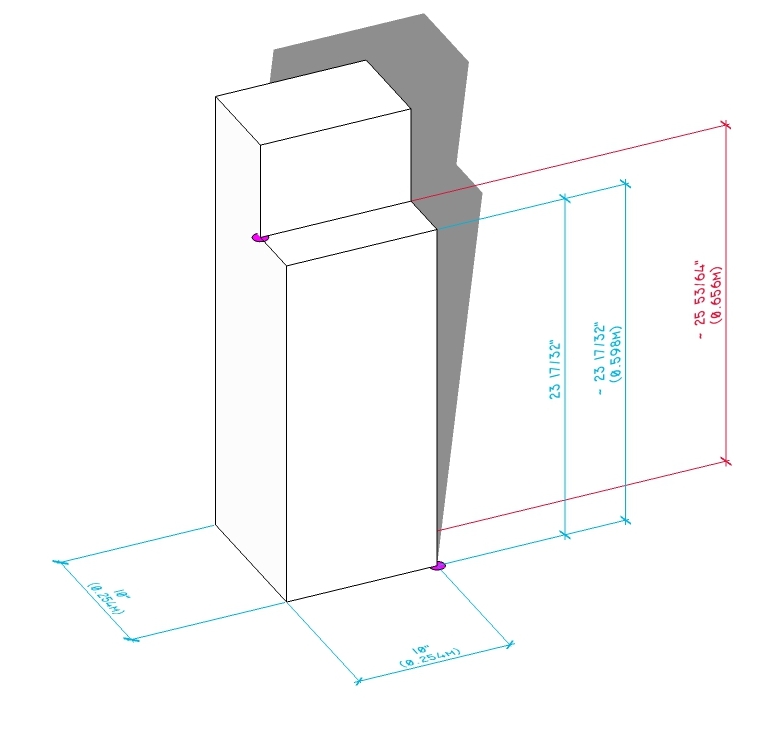
                            When the points that define the dimmension are not in the same plane the converted values don't match. Dim in red measures are the same 23 17/32" as the blue ones.

                            Thanks


                            issue in red

                            1 條回覆 最後回覆 回覆 引用 0
                            • pilouP 離線
                              pilou
                              最後由 編輯

                              Imperials don't want die ? 😄

                              Frenchy Pilou
                              Is beautiful that please without concept!
                              My Little site :)

                              1 條回覆 最後回覆 回覆 引用 0
                              • C 離線
                                cesaro36
                                最後由 編輯

                                LOL
                                At first I tried to move the company into the metric system (since we are in Mexico) But the owner of the company is from USA and most of the machinery too, and the carpenters at the shop were used to imperials too. So I couldn't help it.

                                1 條回覆 最後回覆 回覆 引用 0
                                • TIGT 離線
                                  TIG Moderator
                                  最後由 編輯

                                  @Cesar

                                  Thank you for the error report about dims with non-planar start/end points.
                                  Here's v1.3 - it addresses this issue http://sketchucation.com/pluginstore?pln=TIG_DualDims
                                  The issue was that although you must initially create 'planar' dimensions, you could subsequently move one [or both] of the associated vertices so that the start/end of the dimension's 'points' become non-planar [the dim itself stays locked onto its original plane].
                                  The API returns the start/end points of the associated 'picked vertices' etc, and the earlier versions simply measured the distance between them - when they are coplanar it is correct, but any non-planar points return the actual 'skewed' distance between them, not the dimension's measurement.
                                  Unfortunately there is limited access to a dimension's properties in the API... however, I found a useful method '.plane', which gives us the plane on which the dimension lies.
                                  Then we can project the dim's start and end points onto that plane and get the distance between those points - which is actually the true 'dimension' of the dim in every case - so this v1.3 should always work as you wish...

                                  Please update the plugin, and rerun the tool on your selected dims - they should then be corrected...

                                  TIG

                                  1 條回覆 最後回覆 回覆 引用 0
                                  • C 離線
                                    cesaro36
                                    最後由 編輯

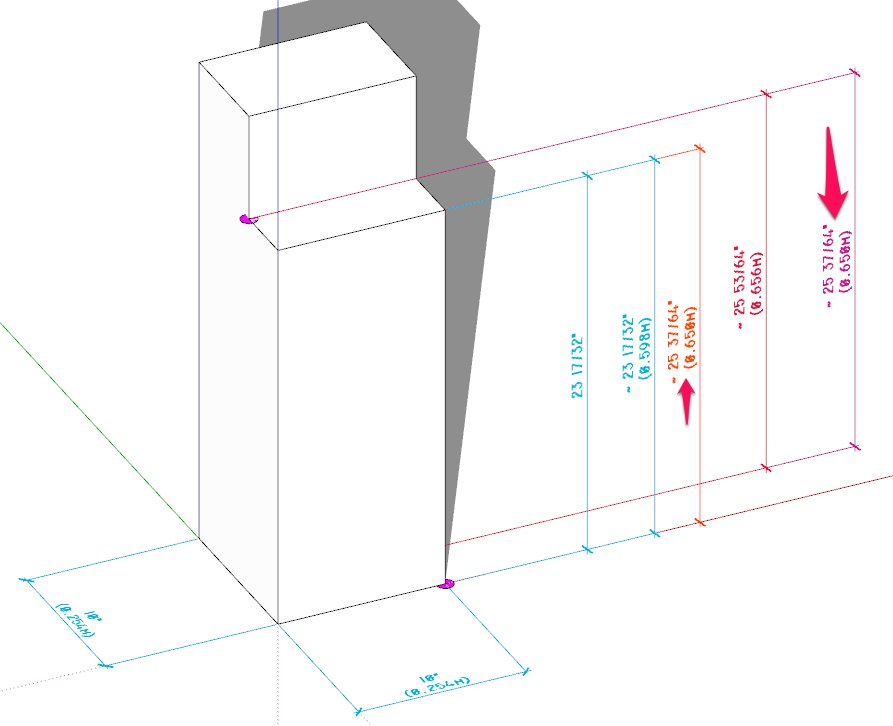
                                    😒 Not working yet. I'm attaching the SKP v2015


                                    Pink and orange for v1.3


                                    dualdims test.skp

                                    1 條回覆 最後回覆 回覆 引用 0
                                    • TIGT 離線
                                      TIG Moderator
                                      最後由 編輯

                                      @Cesar

                                      Thanks for the further reports...

                                      I can now see what's happening.
                                      The last fix flattened the start/end points onto the dim's plane, BUT if the points are on the plane but offset along it then the dim=length still returns wrongly.
                                      I think I can see how to make a final adjustment to align the two points to always return the true size...
                                      Watch out for tomorrow's update 😒

                                      TIG

                                      1 條回覆 最後回覆 回覆 引用 0
                                      • TIGT 離線
                                        TIG Moderator
                                        最後由 編輯

                                        @Cesar

                                        Here's v1.4 http://sketchucation.com/pluginstore?pln=TIG_DualDims
                                        It now takes into account any dims with planar start/end points which are themselves not aligned to be parallel with the dim's "arrow-line"...

                                        NOW it ought to do everything you wish 😒

                                        TIG

                                        1 條回覆 最後回覆 回覆 引用 0
                                        • C 離線
                                          cesaro36
                                          最後由 編輯

                                          Wow you really speak the ruby language.
                                          It works great. 99% correct 😉

                                          There is still a dimension that doesn't work well, but I can't figure out why. I drew it again now its ok.
                                          If it persist I'll tell you.

                                          Thanks a lot. Specially for your entusiasm.

                                          1 條回覆 最後回覆 回覆 引用 0
                                          • TIGT 離線
                                            TIG Moderator
                                            最後由 編輯

                                            @cesaro36 said:

                                            Wow you really speak the ruby language.
                                            It works great. 99% correct 😉

                                            There is still a dimension that doesn't work well, but I can't figure out why. I drew it again now its ok.
                                            If it persist I'll tell you.

                                            Thanks a lot. Specially for your entusiasm.
                                            @Cesar

                                            If you find this elusive 'exception', then please let me know, I'm sure it's fixable !
                                            Initially the simple tool only work on the originally created planar start/-end-point dims, then I fixed it for non-planar variants, then this latest one fixed any planar-but-non-aligned start/-end-point dims...
                                            There's probably some other variant that I can't think of... 😆
                                            If you find it, then we can fix it !!! 😕

                                            TIG

                                            1 條回覆 最後回覆 回覆 引用 0
                                            • 1
                                            • 2
                                            • 1 / 2
                                            • 第一個貼文
                                              最後的貼文
                                            Buy SketchPlus
                                            Buy SUbD
                                            Buy WrapR
                                            Buy eBook
                                            Buy Modelur
                                            Buy Vertex Tools
                                            Buy SketchCuisine
                                            Buy FormFonts

                                            Advertisement