sketchucation logo sketchucation
    • 登入
    Oops, your profile's looking a bit empty! To help us tailor your experience, please fill in key details like your SketchUp version, skill level, operating system, and more. Update and save your info on your profile page today!
    ⚠️ Important | Libfredo 15.6b introduces important bugfixes for Fredo's Extensions Update

    What's the best way to learn SketchUp Shortcut Keys?

    已排程 已置頂 已鎖定 已移動 SketchUp Discussions
    sketchup
    38 貼文 18 Posters 5.2k 瀏覽 18 Watching
    正在載入更多貼文
    • 從舊到新
    • 從新到舊
    • 最多點贊
    回覆
    • 在新貼文中回覆
    登入後回覆
    此主題已被刪除。只有擁有主題管理權限的使用者可以查看。
    • JQLJ 離線
      JQL
      最後由 編輯

      It's not just muscle memory at play here. It's also logic, intuitiveness and above all confort when working with the mouse simultaneously. I work with the right hand on the mouse, so I tend to have all my shortcuts on the left side of the keyboard, within confortable distance from the CTRL+ALT+SHIFT modifier keys. One key shortcuts like line, can be farther away from the modifiers...

      www.casca.pt
      Visit us on facebook!

      1 條回覆 最後回覆 回覆 引用 0
      • AureusA 離線
        Aureus
        最後由 編輯

        I myself leave native SU tools to the keys assigned. No much reason to change them as they are well chosen: "l" for Line, "e" for Erase etc...
        Then I see if there are some free keys left for other commands I use a lot. Of course there are some so I make them shortcuts: "n" - Top View, "x" - X-ray, "g" - Group, "k" - Component...
        I do this even when the commands have already more complex shortcuts such are "Ctrl+c". Simply, single key is more convinient for use than combination of keys.

        Then when all are occupied I use combinations with "Ctrl" (more often) and "Alt" (very rarelly).
        I don't bother to make shortcuts for commands used just occasionaly.
        I let the process of work decide what I need.
        What I always had on all versions of SU is:

        "Ctrl+e" - Explode (funny thing - this is so used command but with no shortcut originally assigned)
        "Ctrl+h" - Hide/Unhide the rest of the model (a very useful command - I recommend this to everyone)
        "Ctrl+g" - Hidden Geometry
        "Ctrl+i" - Paste in Place

        Eventually if I use some plugin a lot then I just see what key combination is "free" for it.

        So, if you ask me about shortcuts I can tell you two things:
        1) Let the process of work decide what you need, and
        2) Stick to some hierarchy.

        1 條回覆 最後回覆 回覆 引用 0
        • JQLJ 離線
          JQL
          最後由 編輯

          @aureus said:

          "Ctrl+h" - Hide/Unhide the rest of the model (a very useful command - I recommend this to everyone)

          So useful, in fact, that "H" without CTRL is much faster to use. Who cares for "H" as pan? That's why you have your mouse for!

          www.casca.pt
          Visit us on facebook!

          1 條回覆 最後回覆 回覆 引用 0
          • C 離線
            Calstock
            最後由 編輯

            I think the only "muscle memory" that's involved is the brain ! If I want to draw a circle, my finger goes to "C" not because my hand automatically goes there, (in a typing / Typist sort of way), but because my brain has learned the shortcut. I guess you could say I automatically then select C without looking down at the keyboard, but that's missing the point.

            I'm not sure I've made my point clearly but I think typing is true muscle memory in that you don't even consciously think about where the letters are on the keyboard - you just type ! Shortcuts are different in that you DO think about it, (for a split second granted), and then you type the letter.

            1 條回覆 最後回覆 回覆 引用 0
            • emerald15E 離線
              emerald15
              最後由 編輯

              Funny you should ask... about a week ago I finally (after 2-3 years with SU) decided to start using keystrokes. I found a list of the basics... & already I've almost forgotten using the icons. I guess it was just time!

              1 條回覆 最後回覆 回覆 引用 0
              • BoxB 離線
                Box
                最後由 編輯

                Just to make it all the more confusing, because I work in several languages I have a blind keyboard. Meaning there are no markings, so I simply know the relevant key depending on which language I am in. The keys I most often screw up are Z and y as they are the most often used but reversed in so many layouts.

                1 條回覆 最後回覆 回覆 引用 0
                • JQLJ 離線
                  JQL
                  最後由 編輯

                  @box said:

                  Just to make it all the more confusing, because I work in several languages I have a blind keyboard. Meaning there are no markings, so I simply know the relevant key depending on which language I am in. The keys I most often screw up are Z and y as they are the most often used but reversed in so many layouts.

                  Bah, seems like you're a genius!

                  www.casca.pt
                  Visit us on facebook!

                  1 條回覆 最後回覆 回覆 引用 0
                  • Rich O BrienR 離線
                    Rich O Brien Moderator
                    最後由 編輯

                    along with his blind keyboard he has three blind mice.

                    Download the free D'oh Book for SketchUp 📖

                    1 條回覆 最後回覆 回覆 引用 0
                    • BoxB 離線
                      Box
                      最後由 編輯

                      What a silly bunt I am.

                      1 條回覆 最後回覆 回覆 引用 0
                      • Rich O BrienR 離線
                        Rich O Brien Moderator
                        最後由 編輯

                        I was kidding. You're a good lad to have the place.

                        As for shortcuts...

                        I keep all app keys the same or close to the same.

                        Don't forget that SketchUcation Tools has a shortcut list tool under SketchUcation Tools > My Shortcuts

                        Download the free D'oh Book for SketchUp 📖

                        1 條回覆 最後回覆 回覆 引用 0
                        • AureusA 離線
                          Aureus
                          最後由 編輯

                          @jql said:

                          @aureus said:

                          "Ctrl+h" - Hide/Unhide the rest of the model (a very useful command - I recommend this to everyone)

                          So useful, in fact, that "H" without CTRL is much faster to use. Who cares for "H" as pan? That's why you have your mouse for!

                          How do you pan with your mouse?
                          What kind of mouse do you use?

                          With mine I can only zoom in, zoom out and orbit (scroll wheel).

                          Also, in my case the 'h' keyboard is reserved for "Hide". Here I made an exception - I changed an originally assigned shortcut for a SU native tool - Pan.
                          By the way, 'Pan' is also useful from time to time.
                          But I use 'Hide' more often.

                          ...............................

                          One more thing - if you assign a shortcut to some tool that is reserved for Windows commands (Ctrl+P, Ctrl+V, Ctrl+A...), you'll be able to use it untill you restart SketchUp.

                          Pan or Orbit?

                          1 條回覆 最後回覆 回覆 引用 0
                          • Rich O BrienR 離線
                            Rich O Brien Moderator
                            最後由 編輯

                            @aureus said:

                            How do you pan with your mouse?

                            Middle Mouse down + left mouse down

                            Download the free D'oh Book for SketchUp 📖

                            1 條回覆 最後回覆 回覆 引用 0
                            • AureusA 離線
                              Aureus
                              最後由 編輯

                              @rich o brien said:

                              @aureus said:

                              How do you pan with your mouse?

                              Middle Mouse down + left mouse down

                              Thanks.
                              One needs to press them one after another and not in the same time. Then you hold them both.

                              This topic encouraged me to make one more shortcut.

                              1 條回覆 最後回覆 回覆 引用 0
                              • JQLJ 離線
                                JQL
                                最後由 編輯

                                If you're a shortcut guy yourself, you'll probably use both hand for fast working on Sketchup.

                                I know I do...

                                Use shift while holding middle button and pan away. It's more stable than left click+middle button.

                                www.casca.pt
                                Visit us on facebook!

                                1 條回覆 最後回覆 回覆 引用 0
                                • AureusA 離線
                                  Aureus
                                  最後由 編輯

                                  @jql said:

                                  If you're a shortcut guy yourself, you'll probably use both hand for fast working on Sketchup.

                                  I know I do...

                                  Use shift while holding middle button and pan away. It's more stable than left click+middle button.

                                  You read my mind.
                                  I just wanted to say: "Ok, scroll wheel and left mouse in the same time does the job, but it's somehow...unstable..." 😄

                                  1 條回覆 最後回覆 回覆 引用 0
                                  • Rich O BrienR 離線
                                    Rich O Brien Moderator
                                    最後由 編輯

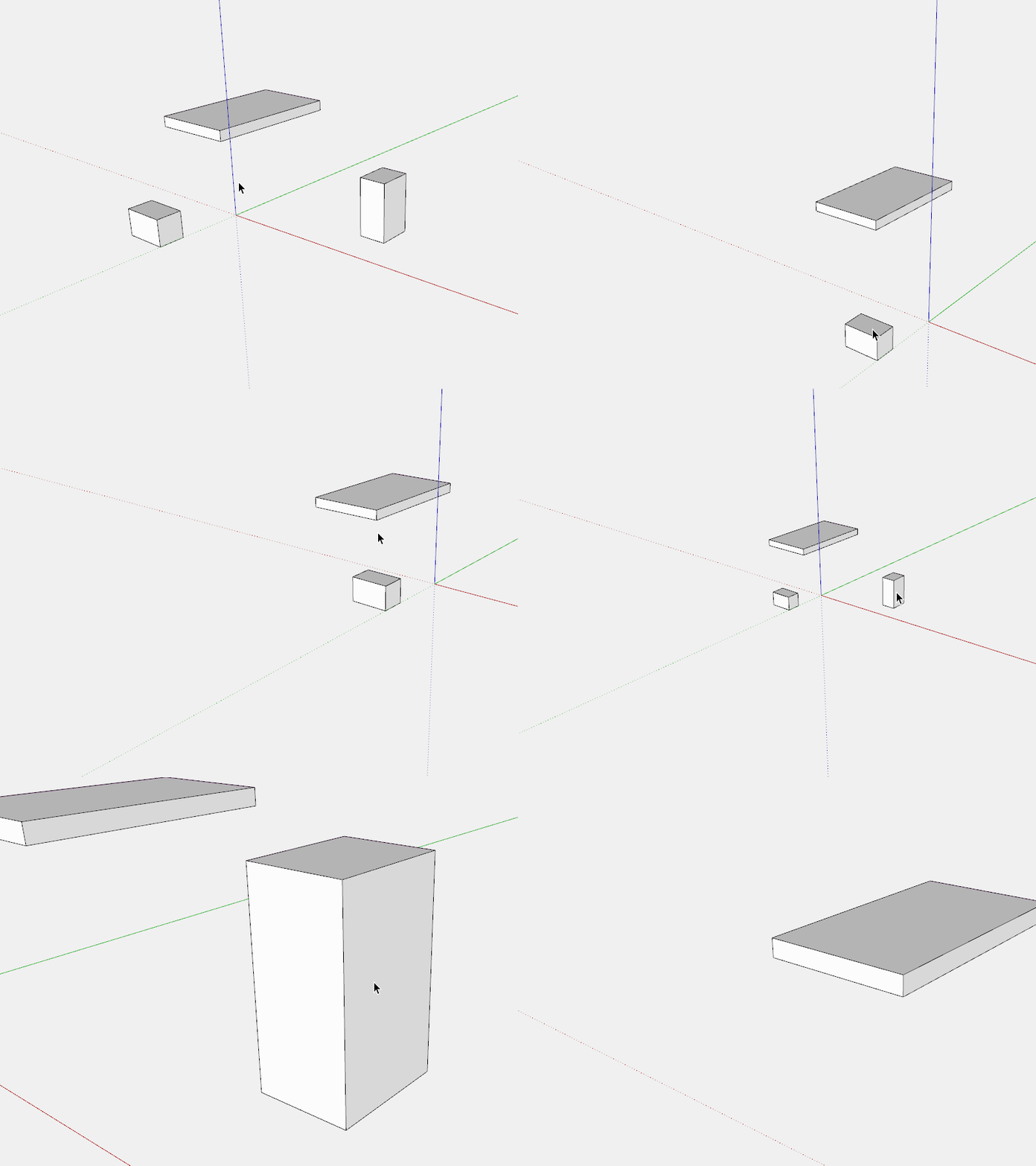
                                    there's also the double click middle mouse that centres to clicked area

                                    middle.gif

                                    Download the free D'oh Book for SketchUp 📖

                                    1 條回覆 最後回覆 回覆 引用 0
                                    • Mike LuceyM 離線
                                      Mike Lucey
                                      最後由 編輯

                                      @aureus said:

                                      How do you pan with your mouse?
                                      What kind of mouse do you use?

                                      I only learned recently that I can pan by pressing forward my scroll wheel on my Elecom Scope Node mouse. It was available on Amazon but any longer, here, http://www.amazon.com/Elecom-Wireless-Sensor-3-button-M-sn2dlsv2/dp/B00B08P934/ref=cm_cr_pr_pb_opt?ie=UTF8

                                      It might be possible to get one here, Special order anything from Japan.
                                      http://whiterabbitexpress.com/scope-node-mouse-elecom/

                                      Mike

                                      Support us so we can support you! Upgrade to Premium Membership!

                                      1 條回覆 最後回覆 回覆 引用 0
                                      • AureusA 離線
                                        Aureus
                                        最後由 編輯

                                        I can't imagine work without shortcuts.

                                        On the other hand, it seems there are people who are real SketchUp masters able to model excellent things in Sketchup by - clicking on tools.

                                        This person needs only three and half hour to model a good looking car, yet he or she doesn't use shortcuts (at least not in this video).

                                        He or she picks even the 'Select' tool from the toolbar. The 'Line' and 'Move' tool also...

                                        However, this may has been done just for the sake of this video, so that people can see what's happening...

                                        1 條回覆 最後回覆 回覆 引用 0
                                        • AureusA 離線
                                          Aureus
                                          最後由 編輯

                                          @mike lucey said:

                                          I only learned recently that I can pan by pressing forward my scroll wheel on my Elecom Scope Node mouse.
                                          It might be possible to get one here, Special order anything from Japan.
                                          http://whiterabbitexpress.com/scope-node-mouse-elecom/

                                          Mike

                                          I've been using the same mouse for 10.5 years already.

                                          Whenever I have to use someone other's mouse it feels strange...

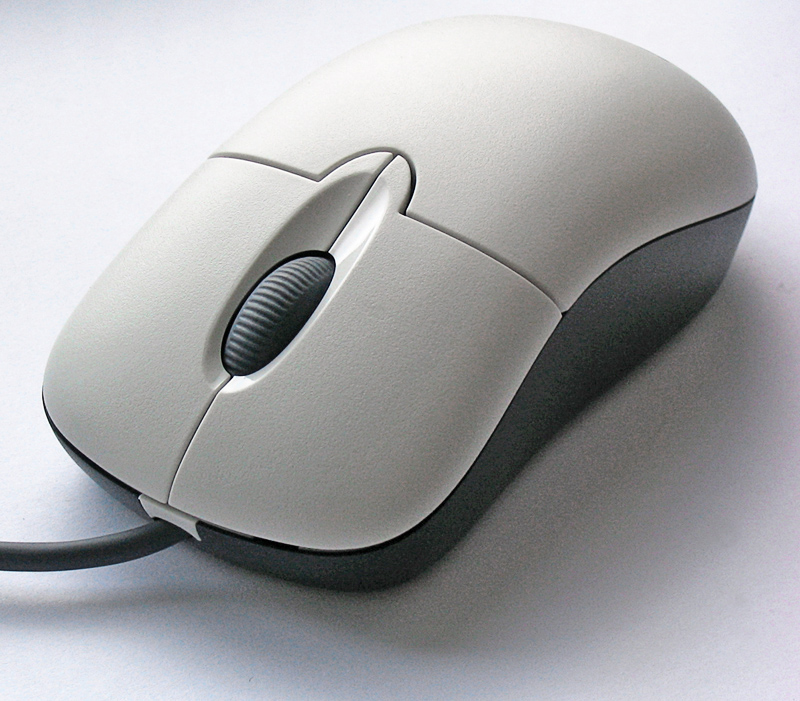
                                          This Microsoft baby is precise and reliable.

                                          1 條回覆 最後回覆 回覆 引用 0
                                          • cottyC 離線
                                            cotty
                                            最後由 編輯

                                            Print the Quick reference card and start with the most used tools ((l)ine, (r)ectangle, (c)ircle, (p)ushpull, ...).

                                            my SketchUp gallery

                                            1 條回覆 最後回覆 回覆 引用 0
                                            • 1
                                            • 2
                                            • 1 / 2
                                            • 第一個貼文
                                              最後的貼文
                                            Buy SketchPlus
                                            Buy SUbD
                                            Buy WrapR
                                            Buy eBook
                                            Buy Modelur
                                            Buy Vertex Tools
                                            Buy SketchCuisine
                                            Buy FormFonts

                                            Advertisement




