sketchucation logo sketchucation
    • 登入
    Oops, your profile's looking a bit empty! To help us tailor your experience, please fill in key details like your SketchUp version, skill level, operating system, and more. Update and save your info on your profile page today!
    ⚠️ Important | Libfredo 15.6b introduces important bugfixes for Fredo's Extensions Update

    [Plugin] Hide Overlapping Geometry (Updated 20150511)

    已排程 已置頂 已鎖定 已移動 Plugins
    29 貼文 10 Posters 8.5k 瀏覽 10 Watching
    正在載入更多貼文
    • 從舊到新
    • 從新到舊
    • 最多點贊
    回覆
    • 在新貼文中回覆
    登入後回覆
    此主題已被刪除。只有擁有主題管理權限的使用者可以查看。
    • C 離線
      CAUL
      最後由 CAUL 編輯

      Hide Overlapping geometry is a script that, well, hides overlapping geometry. It works as follows:
      1) Overlapping faces are always hidden. Two faces overlap if they have exactly opposite normals and share an interior point.

      2) If two faces overlap, the script will check their edges for overlap. An edge will be hidden if it overlaps another edge and A) is connected to only overlapping faces, or B) is connected to overlapping and non overlapping faces where the latter have an angle between the normals < 22.5 degrees.

      The problem is somewhat subtle and it's not always obvious what to hide. The script works best with solids. If a face or edge is hidden, it will be hidden in all group and component instances.

      Usage

      Select one or more groups or components and run the script. The script appears as "Hide overlapping" in the Extensions menu. If only one group or component is selected the option
      "Hide within nesting" has to be true.

      v0.0.2

      Interface added with four options:

      1. The smooth angle can be explicitly defined
      2. The geometry can be transfered to a specific layer
      3. Groups and components can be made unique
      4. Groups and component can be compared within the same nesting
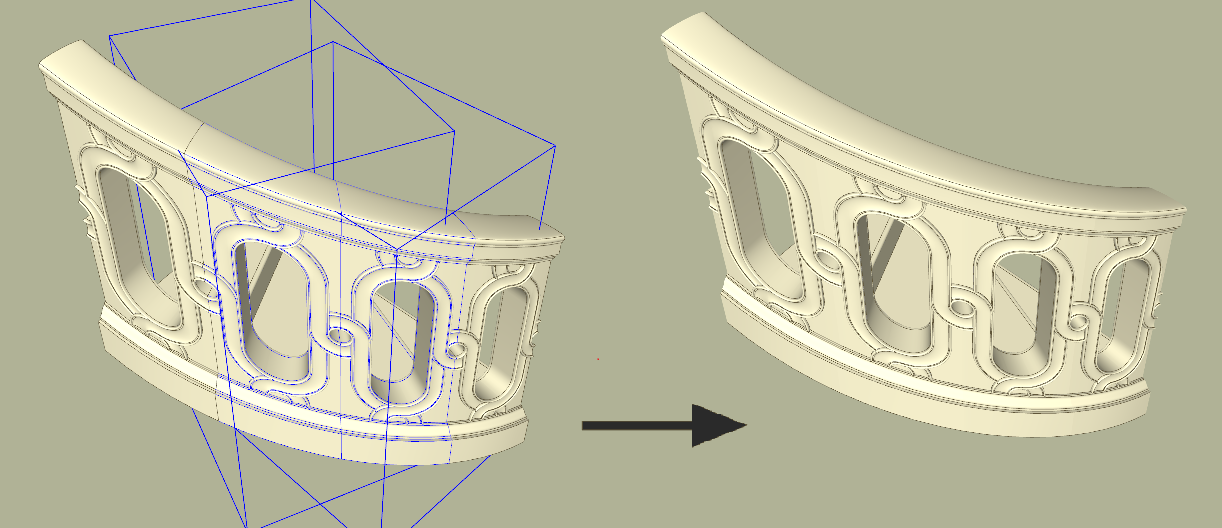
      Example.png


      Example2.png


      v0.0.2

      1 條回覆 最後回覆 回覆 引用 0
      • TIGT 離線
        TIG Moderator
        最後由 編輯

        Please always attach your Plugin's RB [without versioning in its filename] as an RBZ [edit your post accordingly] - so then it might then be considered for inclusion in the SCF PluginStore.

        Contact Rich O Brien by PM, asking to become registered as an 'SCF PluginStore Author' so that you can publish your Plugin[s] there...

        TIG

        1 條回覆 最後回覆 回覆 引用 0
        • D 離線
          DOD3R
          最後由 編輯

          wow, yes yes yes,
          dream come true.

          Thanks for such a great plugin.

          D.

          1 條回覆 最後回覆 回覆 引用 0
          • pilouP 離線
            pilou
            最後由 編輯

            I don't very well understand that this script must do! 😄


            overlapping.gif


            overlap.skp

            Frenchy Pilou
            Is beautiful that please without concept!
            My Little site :)

            1 條回覆 最後回覆 回覆 引用 0
            • C 離線
              CAUL
              最後由 編輯

              @pilou said:

              I don't very well understand that this script must do! 😄

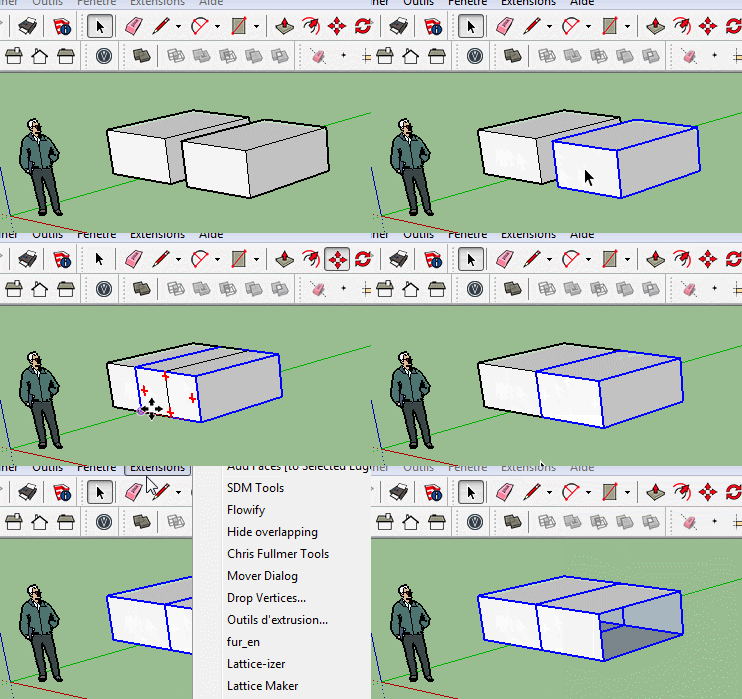
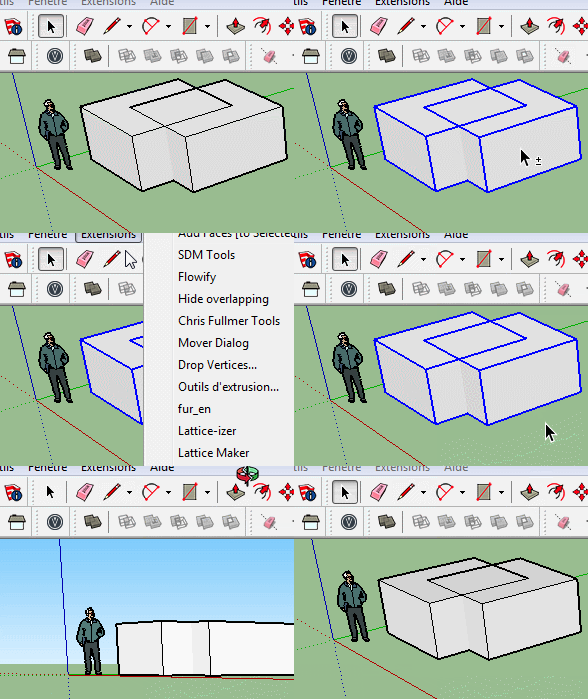
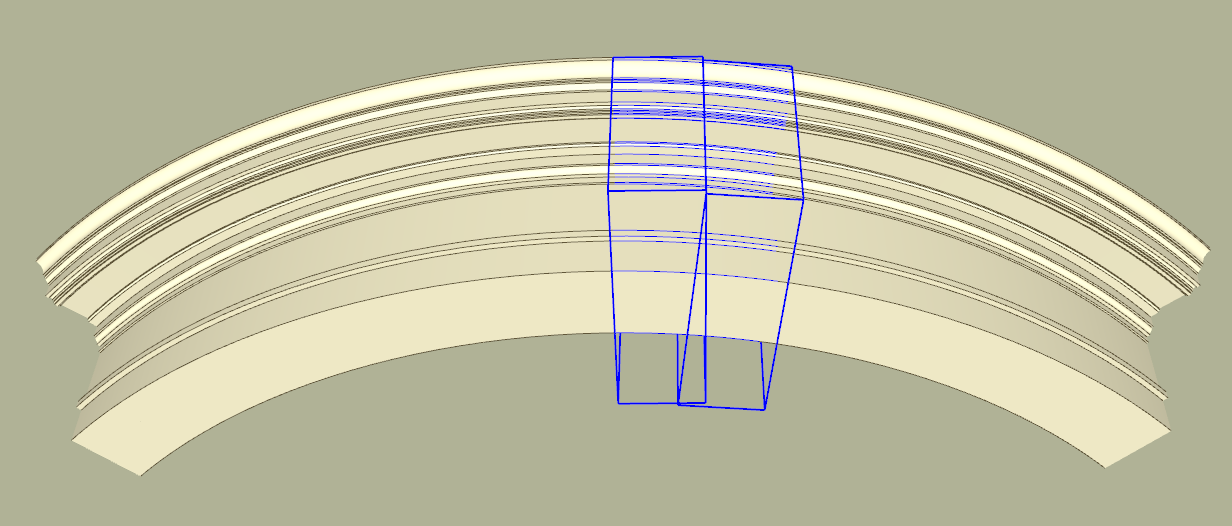
              In your example the faces intersect. Overlap is when the faces are aligned (and have exactly opposite normals) and occupy the same space. In the image below there are 16 instances of a solid group. For visual reasons the seams between the groups should be hidden, and the way to do this is to hide the overlapping faces and edges. If you select two adjacent groups and run the script the seams disappear.
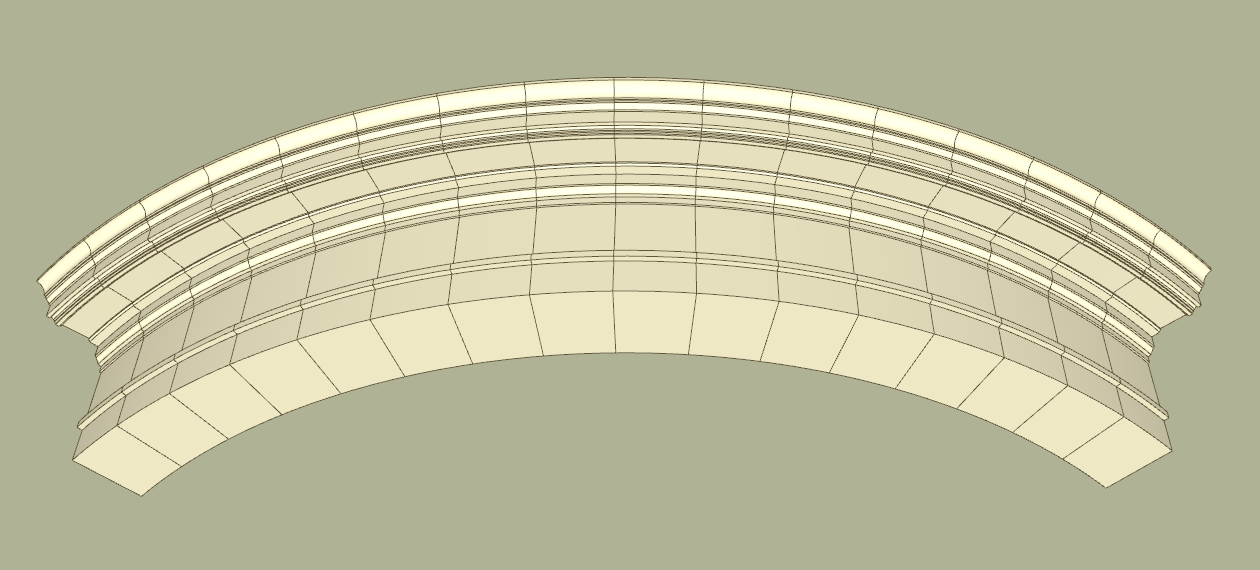
              Before


              After

              1 條回覆 最後回覆 回覆 引用 0
              • Dave RD 離線
                Dave R
                最後由 編輯

                This works great, CAUL! Thank you!

                Etaoin Shrdlu

                %

                (THERE'S NO PLACE LIKE)

                G28 X0.0 Y0.0 Z0.0

                M30

                %

                1 條回覆 最後回覆 回覆 引用 0
                • pilouP 離線
                  pilou
                  最後由 編輯

                  Ok! But seems there is a little glitch! 😉
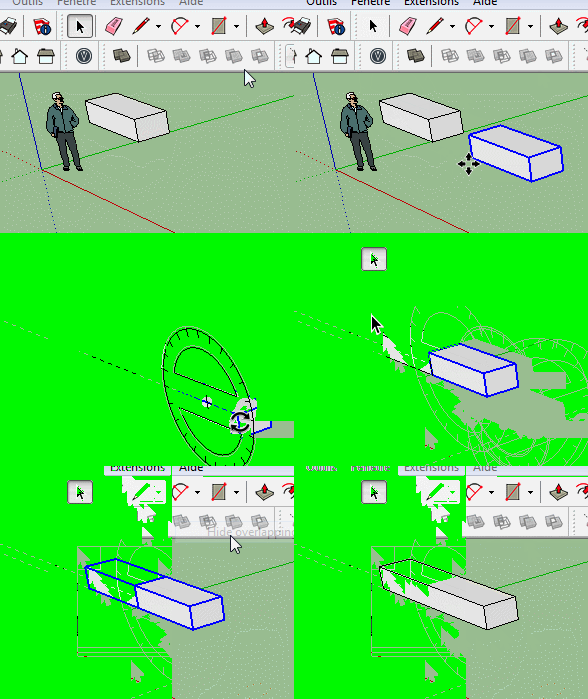
                  A simple copy box (Group)
                  overlap1.gif

                  Frenchy Pilou
                  Is beautiful that please without concept!
                  My Little site :)

                  1 條回覆 最後回覆 回覆 引用 0
                  • pilouP 離線
                    pilou
                    最後由 編輯

                    AAAAAAAAAAaaaaaaaaaaahhhhh! 😄
                    But this is curious!
                    Better if that work in any positions! 😄

                    Now seems that is a glitch inside the "gifcam" ! 😒
                    Seems it don't like the rotations! 💚

                    overlap2.gif

                    Frenchy Pilou
                    Is beautiful that please without concept!
                    My Little site :)

                    1 條回覆 最後回覆 回覆 引用 0
                    • Dave RD 離線
                      Dave R
                      最後由 編輯

                      Why don't you use Flip Along instead, Pilou? 😒

                      Etaoin Shrdlu

                      %

                      (THERE'S NO PLACE LIKE)

                      G28 X0.0 Y0.0 Z0.0

                      M30

                      %

                      1 條回覆 最後回覆 回覆 引用 0
                      • JQLJ 離線
                        JQL
                        最後由 編輯

                        @pilou said:

                        Ok! But seems there is a little glitch! 😉
                        A simple copy box (Group)
                        [attachment=0:1tsgra7o]<!-- ia0 -->overlap1.gif<!-- ia0 -->[/attachment:1tsgra7o]

                        I bet if you double click edit any of the two groups, prior to running the script, you will get the result you expect.

                        www.casca.pt
                        Visit us on facebook!

                        1 條回覆 最後回覆 回覆 引用 0
                        • pilouP 離線
                          pilou
                          最後由 編輯

                          @unknownuser said:

                          I bet if you double click edit any of the two groups, prior to running the script, you will get the result you expect.

                          YEP! Excellent! 👍
                          What make exactly this double click ?

                          @unknownuser said:

                          don't you use Flip Along instead

                          I take always the bad color anytime the first time! 😄
                          I prefer mirror 😄

                          Frenchy Pilou
                          Is beautiful that please without concept!
                          My Little site :)

                          1 條回覆 最後回覆 回覆 引用 0
                          • Dave RD 離線
                            Dave R
                            最後由 編輯

                            Mirror is nice but Flip Along can be done in a single key stroke.

                            Etaoin Shrdlu

                            %

                            (THERE'S NO PLACE LIKE)

                            G28 X0.0 Y0.0 Z0.0

                            M30

                            %

                            1 條回覆 最後回覆 回覆 引用 0
                            • JQLJ 離線
                              JQL
                              最後由 編輯

                              @pilou said:

                              YEP! Excellent! 👍
                              What make exactly this double click ?

                              When you create a group and copy it, it is just like any component, and you get duplicate instances of the same definition (duplicate groups behaving like duplicate components).

                              However, if you double-click it, you edit it, and even if you do nothing on it, it is made into a different definition, therefor "unique".

                              What happened is that the plugin hide the face of a group behaving as a component and in doing so it hid the face of both components. If you'd flipped it like Dave suggested, you wouldn't see the problem.

                              www.casca.pt
                              Visit us on facebook!

                              1 條回覆 最後回覆 回覆 引用 0
                              • pilouP 離線
                                pilou
                                最後由 編輯

                                @unknownuser said:

                                if you double-click it, you edit it, and even if you do nothing on it, it is made into a different definition, therefor "unique".

                                I don't believe that many people knows that! 😮
                                (maybe in the manual but don't have the luck to see it! 😄
                                It's the Dohdoh Duh of the day! 👍

                                Frenchy Pilou
                                Is beautiful that please without concept!
                                My Little site :)

                                1 條回覆 最後回覆 回覆 引用 0
                                • tt_suT 離線
                                  tt_su
                                  最後由 編輯

                                  @jql said:

                                  @pilou said:

                                  YEP! Excellent! 👍
                                  What make exactly this double click ?

                                  When you create a group and copy it, it is just like any component, and you get duplicate instances of the same definition (duplicate groups behaving like duplicate components).

                                  However, if you double-click it, you edit it, and even if you do nothing on it, it is made into a different definition, therefor "unique".

                                  What happened is that the plugin hide the face of a group behaving as a component and in doing so it hid the face of both components. If you'd flipped it like Dave suggested, you wouldn't see the problem.

                                  This isn't documented well in the API either. Something we need to improve. Developers need to call group.make_unique to ensure groups are unique before modifying them.

                                  1 條回覆 最後回覆 回覆 引用 0
                                  • JClementsJ 離線
                                    JClements
                                    最後由 編輯

                                    I noticed that if the normals of the two overlapping faces are the same (both are "pointing" in the same direction), then the script fails.


                                    Overlapping Fail.skp

                                    John | Illustrator | Beaverton, Oregon

                                    1 條回覆 最後回覆 回覆 引用 0
                                    • C 離線
                                      CAUL
                                      最後由 編輯

                                      @jclements said:

                                      I noticed that if the normals of the two overlapping faces are the same (both are "pointing" in the same direction), then the script fails.

                                      This is not really a bug (nor a feature). It's mentioned in the initial post. The reason for this behaviour is that it's a very convenient simplification from a developers point of view. The extension is centered around solids with consistently oriented faces so it's a reasonable simplification.

                                      1 條回覆 最後回覆 回覆 引用 0
                                      • PixeroP 離線
                                        Pixero
                                        最後由 編輯

                                        Thanks for version 2. That seems to work well now. 👍
                                        Would you please also add a "Show overlapping edges"?
                                        When for example designing a multi floor facade it would be great to hide the edges to see how the whole facade looks and then it could be useful to turn the edges back on for viewing the different floors.

                                        1 條回覆 最後回覆 回覆 引用 0
                                        • C 離線
                                          CAUL
                                          最後由 編輯

                                          @pixero said:

                                          Thanks for version 2. That seems to work well now. 👍
                                          Would you please also add a "Show overlapping edges"?
                                          When for example designing a multi floor facade it would be great to hide the edges to see how the whole facade looks and then it could be useful to turn the edges back on for viewing the different floors.

                                          Maybe the possibility to move the geometry to a specific layer is enough? Then you can turn the visibility of the layer on and off.

                                          1 條回覆 最後回覆 回覆 引用 0
                                          • PixeroP 離線
                                            Pixero
                                            最後由 編輯

                                            Yes that would do. 😄

                                            1 條回覆 最後回覆 回覆 引用 0
                                            • 1
                                            • 2
                                            • 1 / 2
                                            • 第一個貼文
                                              最後的貼文
                                            Buy SketchPlus
                                            Buy SUbD
                                            Buy WrapR
                                            Buy eBook
                                            Buy Modelur
                                            Buy Vertex Tools
                                            Buy SketchCuisine
                                            Buy FormFonts

                                            Advertisement