[Plugin] Hide Overlapping Geometry (Updated 20150511)
-
AAAAAAAAAAaaaaaaaaaaahhhhh!

But this is curious!
Better if that work in any positions!Now seems that is a glitch inside the "gifcam" !

Seems it don't like the rotations!
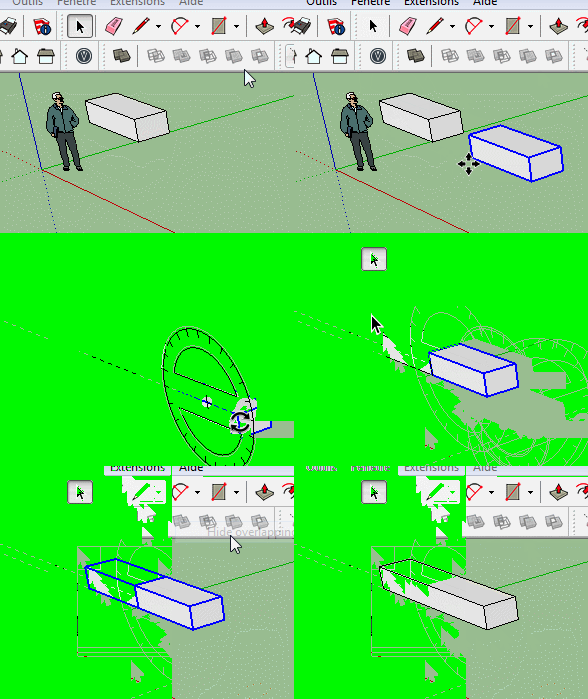
-
Why don't you use Flip Along instead, Pilou?
-
@pilou said:
Ok! But seems there is a little glitch!

A simple copy box (Group)
[attachment=0:1tsgra7o]<!-- ia0 -->overlap1.gif<!-- ia0 -->[/attachment:1tsgra7o]I bet if you double click edit any of the two groups, prior to running the script, you will get the result you expect.
-
@unknownuser said:
I bet if you double click edit any of the two groups, prior to running the script, you will get the result you expect.
YEP! Excellent!

What make exactly this double click ?@unknownuser said:
don't you use Flip Along instead
I take always the bad color anytime the first time!
I prefer mirror -
Mirror is nice but Flip Along can be done in a single key stroke.
-
@pilou said:
YEP! Excellent!
What make exactly this double click ?When you create a group and copy it, it is just like any component, and you get duplicate instances of the same definition (duplicate groups behaving like duplicate components).
However, if you double-click it, you edit it, and even if you do nothing on it, it is made into a different definition, therefor "unique".
What happened is that the plugin hide the face of a group behaving as a component and in doing so it hid the face of both components. If you'd flipped it like Dave suggested, you wouldn't see the problem.
-
@unknownuser said:
if you double-click it, you edit it, and even if you do nothing on it, it is made into a different definition, therefor "unique".
I don't believe that many people knows that!

(maybe in the manual but don't have the luck to see it!
It's the Dohdoh Duh of the day! -
@jql said:
@pilou said:
YEP! Excellent!
What make exactly this double click ?When you create a group and copy it, it is just like any component, and you get duplicate instances of the same definition (duplicate groups behaving like duplicate components).
However, if you double-click it, you edit it, and even if you do nothing on it, it is made into a different definition, therefor "unique".
What happened is that the plugin hide the face of a group behaving as a component and in doing so it hid the face of both components. If you'd flipped it like Dave suggested, you wouldn't see the problem.
This isn't documented well in the API either. Something we need to improve. Developers need to call group.make_unique to ensure groups are unique before modifying them.
-
I noticed that if the normals of the two overlapping faces are the same (both are "pointing" in the same direction), then the script fails.
-
@jclements said:
I noticed that if the normals of the two overlapping faces are the same (both are "pointing" in the same direction), then the script fails.
This is not really a bug (nor a feature). It's mentioned in the initial post. The reason for this behaviour is that it's a very convenient simplification from a developers point of view. The extension is centered around solids with consistently oriented faces so it's a reasonable simplification.
-
Thanks for version 2. That seems to work well now.
Would you please also add a "Show overlapping edges"?
When for example designing a multi floor facade it would be great to hide the edges to see how the whole facade looks and then it could be useful to turn the edges back on for viewing the different floors. -
@pixero said:
Thanks for version 2. That seems to work well now.
Would you please also add a "Show overlapping edges"?
When for example designing a multi floor facade it would be great to hide the edges to see how the whole facade looks and then it could be useful to turn the edges back on for viewing the different floors.Maybe the possibility to move the geometry to a specific layer is enough? Then you can turn the visibility of the layer on and off.
-
Yes that would do.
-
If you're developing that, could we define the layer's name by tinkering with rb?
-
Feeling really dumb. I created a box and then duplicated it and drug the corner of one box to the corners of the other box. I tried double clicking one of the boxes and then used the selection box to select both boxes. When I clicked on the Hide Overlapping Geometry, the overlapping geometry was not hidden.
I tried Dave's approach of flipping one of the boxes (that was the only change), clicked the Hide Overlapping Geometry and it worked as it should.
Not sure what I did wrong with the first approach.
-
@jql said:
If you're developing that, could we define the layer's name by tinkering with rb?
The current version lets you select an existing layer.
@ntxdave said:
Feeling really dumb. I created a box and then duplicated it and drug the corner of one box to the corners of the other box. I tried double clicking one of the boxes and then used the selection box to select both boxes. When I clicked on the Hide Overlapping Geometry, the overlapping geometry was not hidden.
I'm not sure what you're doing wrong (if anything). Do you have a sample model?
-
@caul said:
@ntxdave said:
Feeling really dumb. I created a box and then duplicated it and drug the corner of one box to the corners of the other box. I tried double clicking one of the boxes and then used the selection box to select both boxes. When I clicked on the Hide Overlapping Geometry, the overlapping geometry was not hidden.
I'm not sure what you're doing wrong (if anything). Do you have a sample model?
I have attached a VERY simple model that just has two boxes. Flipping one of them works fine. Where I am messing us is with the double click method. When I double click on one, how do I then select the other one so that I can then apply your plugin to the 2 of them. This is making me feel really dumb........
-
@ntxdave said:
I have attached a VERY simple model that just has two boxes. Flipping one of them works fine. Where I am messing us is with the double click method. When I double click on one, how do I then select the other one so that I can then apply your plugin to the 2 of them. This is making me feel really dumb........
You should not enter (double click) any of the components, just select the two components and run the script.
-
@caul said:
@ntxdave said:
I have attached a VERY simple model that just has two boxes. Flipping one of them works fine. Where I am messing us is with the double click method. When I double click on one, how do I then select the other one so that I can then apply your plugin to the 2 of them. This is making me feel really dumb........
You should not enter (double click) any of the components, just select the two components and run the script.
The problem I am having is exactly as Pilou described in this post:
@pilou said:
Ok! But seems there is a little glitch!
A simple copy box (Group)
[attachment=0:1y0rgddy]<!-- ia0 -->overlap1.gif<!-- ia0 -->[/attachment:1y0rgddy]In another post, @JQL summarized the situation very well:
@jql said:
@pilou said:
YEP! Excellent!
What make exactly this double click ?When you create a group and copy it, it is just like any component, and you get duplicate instances of the same definition (duplicate groups behaving like duplicate components).
However, if you double-click it, you edit it, and even if you do nothing on it, it is made into a different definition, therefor "unique".
What happened is that the plugin hide the face of a group behaving as a component and in doing so it hid the face of both components. If you'd flipped it like Dave suggested, you wouldn't see the problem.
However, I am doing something that should be very basic, very wrong. When I double-click one of the boxes it seems to not be becoming unique so I am not sure what I am doing wrong.
Good news is that I do get it to work fine if I slect one of the boxes and then right-click and select make unique, it does work for me. So I guess my real question (based on these posts is why does the box not become unique when I double-click it or am I not understanding the instructions correctly?
-
@ntxdave said:
Good news is that I do get it to work fine if I slect one of the boxes and then right-click and select make unique, it does work for me. So I guess my real question (based on these posts is why does the box not become unique when I double-click it or am I not understanding the instructions correctly?
The answer is in your question.
Your box is a component, not a group. If it were a group, you wouldn't see the Make Unique option in the Context menu. And just opening a component for editing won't make it unique. (That would be counterproductive.)









Advertisement